@MtcChennai@prabhusean7 sir ac bus, only one door they are opening.. They say ac will go.. Difficult for passengers.. Also front name board of bus stopped working in mid trip.. Songs are also. Played.. . Pls do something..
@MtcChennai Also only one door is opened with boarding and getting down from bus.. Conductor says ac will go, like that.. It is difficult for passengers
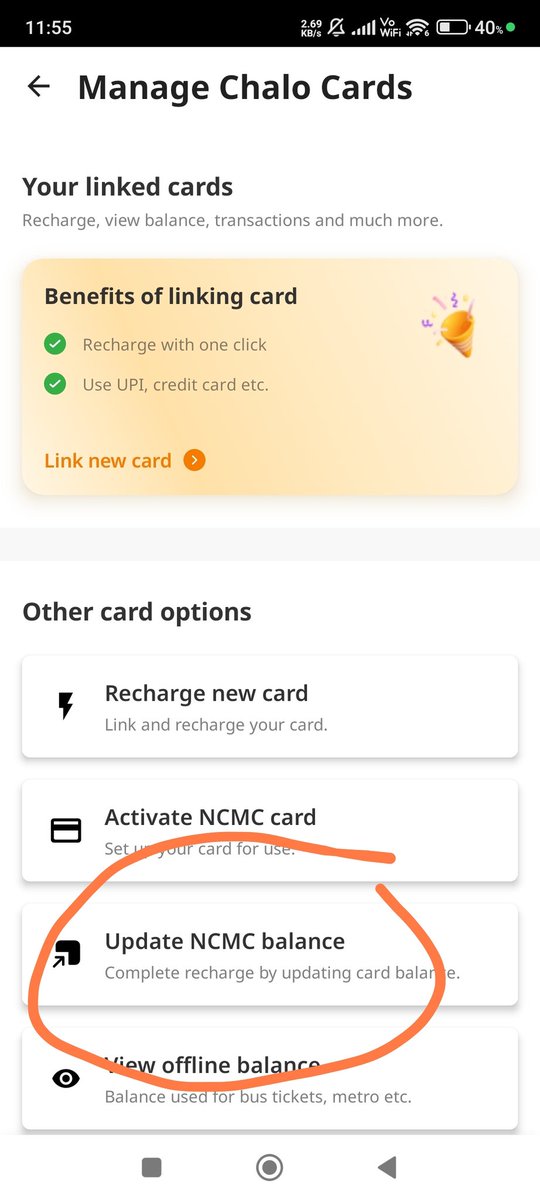
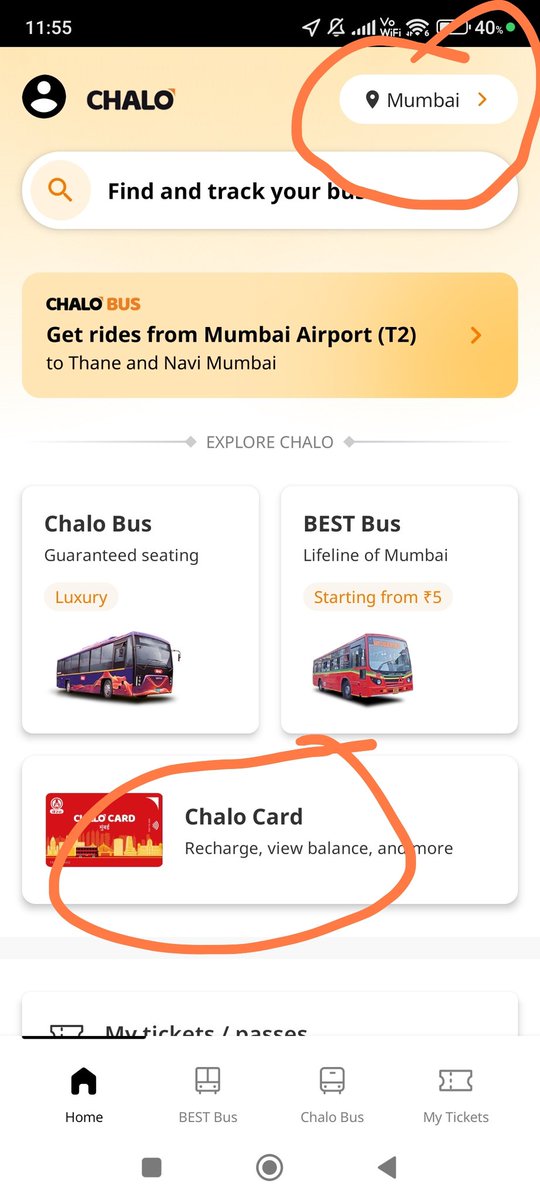
Process to update balance after phonepe recharge in Singara chennai Card.
Check if your phone has NFC enabled; otherwise, it won’t work.
1. Open the Chalo app.
2. Change location to Mumbai.
3. Tap Refresh Balance.
4. Hold your card near/on phone.
balance gets updated
Process to update balance after phonepe recharge in Singara chennai Card.
Check if your phone has NFC enabled; otherwise, it won’t work.
1. Open the Chalo app.
2. Change location to Mumbai.
3. Tap Refresh Balance.
4. Hold your card near/on phone.
balance gets updated
Process to update balance after phonepe recharge in Singara chennai Card.
Check if your phone has NFC enabled; otherwise, it won’t work.
1. Open the Chalo app.
2. Change location to Mumbai.
3. Tap Refresh Balance.
4. Hold your card near/on phone.
balance gets updated
Process to update balance after phonepe recharge in Singara chennai Card.
Check if your phone has NFC enabled; otherwise, it won’t work.
1. Open the Chalo app.
2. Change location to Mumbai.
3. Tap Refresh Balance.
4. Hold your card near/on phone.
balance gets updated
Process to update balance after phonepe recharge in Singara chennai Card.
Check if your phone has NFC enabled; otherwise, it won’t work.
1. Open the Chalo app.
2. Change location to Mumbai.
3. Tap Refresh Balance.
4. Hold your card near/on phone.
balance gets updated
Process to update balance after phonepe recharge in Singara chennai Card.
Check if your phone has NFC enabled; otherwise, it won’t work.
1. Open the Chalo app.
2. Change location to Mumbai.
3. Tap Refresh Balance.
4. Hold your card near/on phone.
balance gets updated
Process to update balance after phonepe recharge in Singara chennai Card.
Check if your phone has NFC enabled; otherwise, it won’t work.
1. Open the Chalo app.
2. Change location to Mumbai.
3. Tap Refresh Balance.
4. Hold your card near/on phone.
balance gets updated
Process to update balance after phonepe recharge in Singara chennai Card.
Check if your phone has NFC enabled; otherwise, it won’t work.
1. Open the Chalo app.
2. Change location to Mumbai.
3. Tap Refresh Balance.
4. Hold your card near/on phone.
balance gets updated
Process to update balance after phonepe recharge in Singara chennai Card.
Check if your phone has NFC enabled; otherwise, it won’t work.
1. Open the Chalo app.
2. Change location to Mumbai.
3. Tap Refresh Balance.
4. Hold your card near/on phone.
balance gets updated
Process to update balance after phonepe recharge in Singara chennai Card.
Check if your phone has NFC enabled; otherwise, it won’t work.
1. Open the Chalo app.
2. Change location to Mumbai.
3. Tap Refresh Balance.
4. Hold your card near/on phone.
balance gets updated