Claude’u daha verimli kullanmak isteyenler için güzel bir kaynak.
Anthropic ekibi, etkili prompt yazımını doğrudan örneklerle anlatıyor. Yapay zekadan tutarlı, bağlama uygun ve kullanışlı yanıtlar almak isteyenler için izlemeye değer.
Türkçe altyazı ile izleyebilirsiniz.
🚨 𝗕𝗥𝗘𝗔𝗞𝗜𝗡𝗚: Claude can now build your entire mobile app from a screenshot like a $350K senior developer at Apple. (for free)
Here are 8 insane Claude prompts replacing your entire mobile development team before they finish estimating the project cost:👇
(Save this 🔖 thread before it blows up.)
Reinforced gabion mesh is produced by twisting high-tensile steel wires around a forming drum, creating a flexible, double-twisted diamond mesh structure designed for strong fencing, rockfall protection, erosion control, and long-lasting performance in harsh environments.
🎥 _ahan_borhani_ / IG
SSO (Single Sign-On) Explained.
SSO can be thought of as a master key to open all different locks. It allows a user to log in to different systems using a single set of credentials.
In a time where we are accessing more applications than ever before, this is a big help to mitigate password fatigue and streamlines user experience.
To fully understand the SSO process, 𝗹𝗲𝘁’𝘀 𝘁𝗮𝗸𝗲 𝗮 𝗹𝗼𝗼𝗸 𝗮𝘁 𝗵𝗼𝘄 𝗮 𝘂𝘀𝗲𝗿 𝘄𝗼𝘂𝗹𝗱 𝗹𝗼�� 𝗶𝗻𝘁𝗼 𝗟𝗶𝗻𝗸𝗲𝗱𝗜𝗻 𝘂𝘀𝗶𝗻𝗴 𝗚𝗼𝗼𝗴𝗹𝗲 𝗮𝘀 𝘁𝗵𝗲 𝗶𝗱𝗲𝗻𝘁𝗶𝘁𝘆 𝗽𝗿𝗼𝘃𝗶𝗱𝗲𝗿:
𝟭) 𝗨𝘀𝗲𝗿 𝗿𝗲𝗾𝘂𝗲𝘀𝘁𝘀 𝗮𝗰𝗰𝗲𝘀𝘀
First, the user would attempt to access the Service Provider (LinkedIn). At this point, a user would be presented with login options, and in this example, they would select "Sign in with Google".
𝟮) 𝗔𝘂𝘁𝗵𝗲𝗻𝘁𝗶𝗰𝗮𝘁𝗶𝗼𝗻 𝗿𝗲𝗾𝘂𝗲𝘀𝘁
From here, the Service Provider (LinkedIn) will redirect the user to the Identity Provider (Google) with an authentication request.
𝟯) 𝗜𝗱𝗣 𝗰𝗵𝗲𝗰𝗸𝘀 𝗳𝗼𝗿 𝗮𝗰𝘁𝗶𝘃𝗲 𝘀𝗲𝘀𝘀𝗶𝗼𝗻
Once the Identity Provider (Google) has received the request, it will check for an active session. If it doesn't find one, authentication will be requested.
𝟰) 𝗨𝘀𝗲𝗿 𝘀𝘂𝗯𝗺𝗶𝘁𝘀 𝗰𝗿𝗲𝗱𝗲𝗻𝘁𝗶𝗮𝗹𝘀
At this stage, the user will submit their login credentials (username and password) to the Identity Provider (IdP).
𝟱) 𝗜𝗱𝗣 𝘃𝗲𝗿𝗶𝗳𝗶𝗲𝘀 𝗰𝗿𝗲𝗱𝗲𝗻𝘁𝗶𝗮𝗹𝘀
The Identity Provider will then verify the submitted credentials against its User Directory (database). If the credentials are correct, the IdP will create an authentication token or assertion.
𝟲) 𝗜𝗱𝗣 𝘀𝗲𝗻𝗱𝘀 𝘁𝗼𝗸𝗲𝗻 𝘁𝗼 𝗦𝗲𝗿𝘃𝗶𝗰𝗲 𝗣𝗿𝗼𝘃𝗶𝗱𝗲𝗿
Once the token or assertion has been created, the IdP sends it back to the Service Provider confirming the user's identity. The user is now authenticated and can access the Service Provier (LinkedIn).
𝟳) 𝗔𝗰𝗰𝗲𝘀𝘀 𝗴𝗿𝗮𝗻𝘁𝗲𝗱 𝘂𝘀𝗶𝗻𝗴 𝗲𝘅𝗶𝘀𝘁𝗶𝗻𝗴 𝘀𝗲𝘀𝘀𝗶𝗼𝗻
Since the Identity Provider has established a session, when the user goes to access a different Service Provider (eg; GitHub), they won't need to re-enter their credentials. Future service providers will request authentication from the Identity Provider, recognize the existing session, and grant access to the user based on the previously authenticated session.
SSO workflows like the above operate on SSO protocols, which are a set of rules that govern how the IdP and SP communicate and trust each other. Common protocols include Security Assertion Markup Language (SAML), OpenID Connect, and OAuth.
Session, cookie, JWT, token, SSO, and OAuth 2.0 - what are they?
These terms are all related to user identity management. When you log into a website, you declare who you are (identification). Your identity is verified (authentication), and you are granted the necessary permissions (authorization). Many solutions have been proposed in the past, and the list keeps growing.
From simple to complex, here is my understanding of user identity management:
🔹WWW-Authenticate is the most basic method. You are asked for the username and password by the browser. As a result of the inability to control the login life cycle, it is seldom used today.
🔹A finer control over the login life cycle is session-cookie. The server maintains session storage, and the browser keeps the ID of the session. A cookie usually only works with browsers and is not mobile app friendly.
🔹To address the compatibility issue, the token can be used. The client sends the token to the server, and the server validates the token. The downside is that the token needs to be encrypted and decrypted, which may be time-consuming.
🔹JWT is a standard way of representing tokens. This information can be verified and trusted because it is digitally signed. Since JWT contains the signature, there is no need to save session information on the server side.
🔹By using SSO (single sign-on), you can sign on only once and log in to multiple websites. It uses CAS (central authentication service) to maintain cross-site information
🔹By using OAuth 2.0, you can authorize one website to access your information on another website
Over to you: nowadays, some website allows you to log in by scanning the QR code using your phone. Do you know how it works?
–
Subscribe to our weekly newsletter to get a Free System Design PDF (158 pages): https://t.co/FIzCeaWsZV
Visualizing a SQL query.
SQL statements are executed by the database system in several steps, including:
- Parsing the SQL statement and checking its validity
- Transforming the SQL into an internal representation, such as relational algebra
- Optimizing the internal representation and creating an execution plan that utilizes index information
- Executing the plan and returning the results
The execution of SQL is highly complex and involves many considerations, such as:
- The use of indexes and caches
- The order of table joins
- Concurrency control
- Transaction management
Over to you: What is your favorite SQL statement?
—
Subscribe to our weekly newsletter to get a Free System Design PDF (158 pages): https://t.co/FIzCeaWsZV
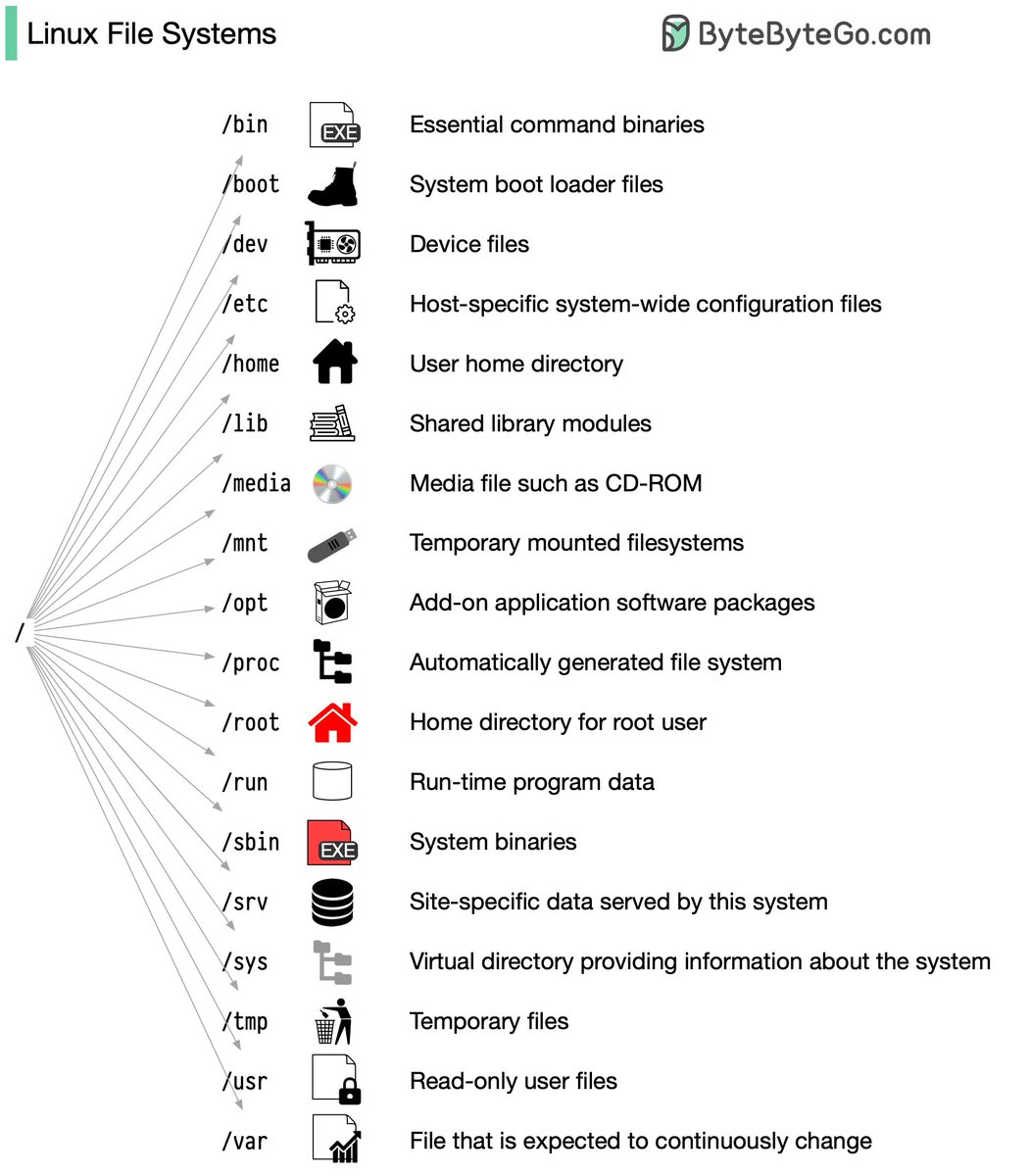
Linux file system explained.
The Linux file system used to resemble an unorganized town where individuals constructed their houses wherever they pleased. However, in 1994, the Filesystem Hierarchy Standard (FHS) was introduced to bring order to the Linux file system.
By implementing a standard like the FHS, software can ensure a consistent layout across various Linux distributions. Nonetheless, not all Linux distributions strictly adhere to this standard. They often incorporate their own unique elements or cater to specific requirements.
To become proficient in this standard, you can begin by exploring. Utilize commands such as "cd" for navigation and "ls" for listing directory contents. Imagine the file system as a tree, starting from the root (/). With time, it will become second nature to you, transforming you into a skilled Linux administrator.
Have fun exploring!
Over to you: What Linux commands are useful for navigating and examining files?
--
Subscribe to our weekly newsletter to get a Free System Design PDF (158 pages): https://t.co/RibM5u7UxP