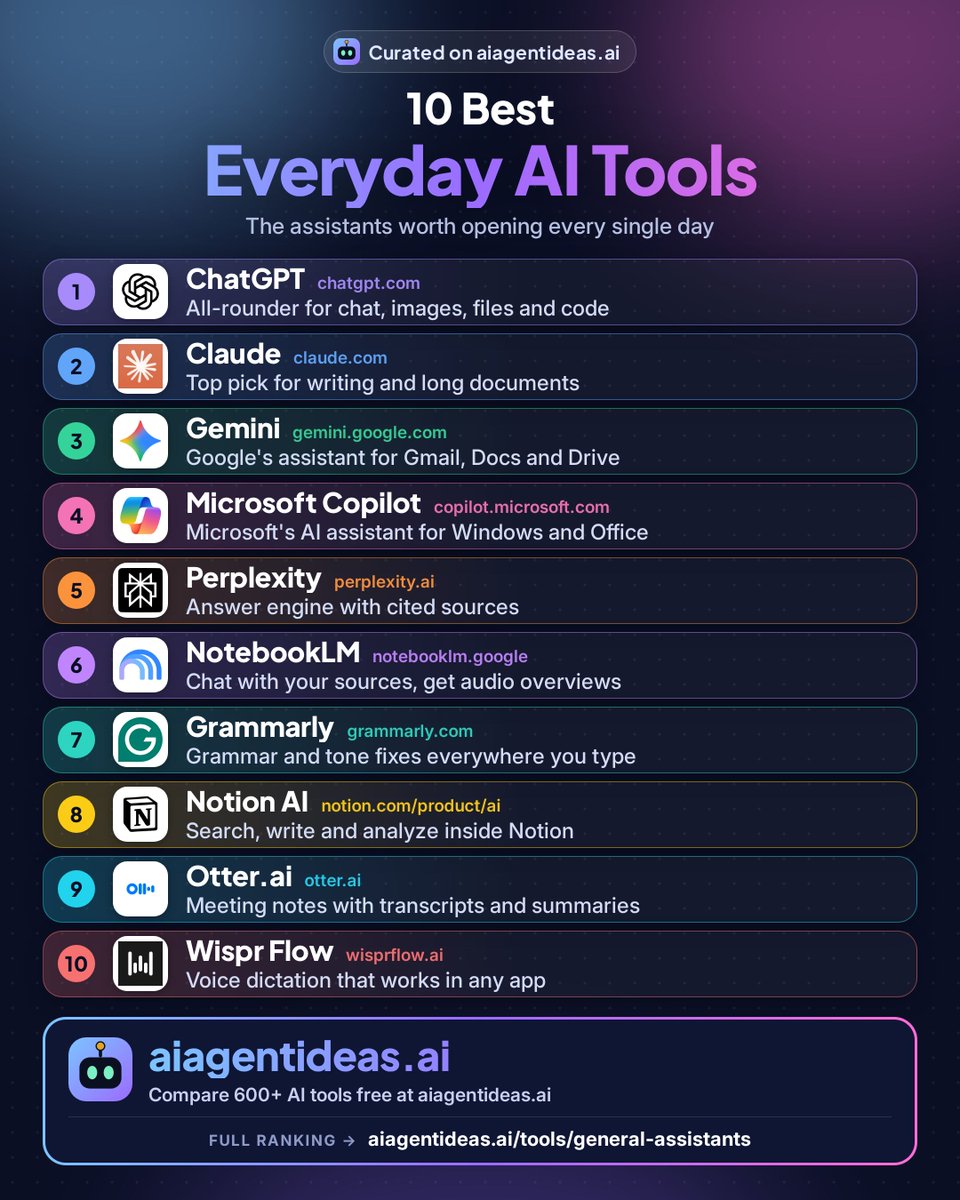
𝟭𝟬 𝘁𝗼𝗽 𝗿𝗮𝘁𝗲𝗱 𝗔𝗜 𝘁𝗼𝗼𝗹𝘀 𝗳𝗼𝗿 𝗲𝘃𝗲𝗿𝘆𝗱𝗮𝘆 𝘂𝘀𝗲
Want to save time, boost creativity, and work smarter? These AI tools can help you do it all. Not sure which to choose? We cover more than 600 AI tools.
See them all: https://t.co/lOGa3uo5yo
Save 🔖 for later — this web directory covers almost everything you need in 2026. Follow @Bitdad_Crypto for more #AI info and #AItools.👇
Day 3/30: Claude @claudeai
Our rating: 9.0/10.
Useful for digesting a long document.
Try: “Summarize this in 5 bullets, then list 3 risks.”
Check the summary against the original.
https://t.co/zem2I6bamJ
@Superhuman@Shortwave@lavenderhq 5. @scapeinbox 7.4/10
Sorts your inbox by priority and prepares draft replies with context from your meetings and attachments.
All 15 with pricing: https://t.co/H1bqNcpzO9
@Superhuman@Shortwave 3. MailMaestro 7.6/10
AI assistant for Outlook by Maestro Labs. Drafts and summarizes right inside Outlook.
4. @lavenderhq 7.6/10
An email coach for sales: scores your cold emails and suggests edits to get more replies.
Pay per change, not a cut of your ad budget. @synterai Synter Canvas is an AI agent that builds, launches and tunes campaigns across 30+ ad platforms, with a safety check on each change, at $0.25 per verified change. 7.0/10 in our rankings.
https://t.co/8syd42uOCq
Thinking Machines Lab's second-generation model is in our directory. Inkling 2 Small by @thinkymachines has 594B total and 17B active parameters, is built for long coding and agent work, and can read screenshots of what it built. 7.1/10 in our rankings.
https://t.co/n5dfALQO3c
@Anydo One job per agent is the right instinct. The part people skip is writing down what each agent is not allowed to do, like sending anything to a client without a human check first.
@AaronScottAI Solid research section. In our rankings @perplexity_ai and @claudeai both score 9.0/10, and for research the habit that matters most is opening two or three of the sources yourself before trusting the answer.
@AnishJaitwar Big lists are useful as a map. My tip: pick one tool per job you actually do every week and ignore the rest for a month. You'll learn more from using three tools well than trying thirty.
@Ishan_Narayan_ For people who know exactly what they want done, sure. For everyone else, a good draft they can check is still safer than an agent acting on its own. Most people need both, at different moments.
@Antonio_RodriIA Sketch to working app is a fun test. The real question is the second round: when you ask for a change, does it edit the app or rebuild it from scratch? That's where most of these agents still struggle.
@anupamrjp Plain VS Code first, honestly. Learning to read errors yourself pays off later. Once they can follow what the code does, @cursor_ai (8.4/10 in our rankings) is a natural next step.
@ModelScope2022 Calling only the tools that are really there sounds basic, but made-up tool calls are one of the most annoying agent failures. Curious how it holds up on long tasks with 30+ tools loaded.
@AndrewBolis Agree. @claudeai (9.0/10 in our rankings) does best when you hand it the whole document and a clear goal, while @perplexity_ai works better with a short, specific question. Same prompt, very different results.
@hqmank Great that it starts from simple #LLM pipelines. Most people jump straight to autonomous agents and skip the part where you learn when a plain script with one model call is the better answer.
@mdancho84 Worth reading for the guardrails part alone. Most agent failures I see aren't the model being dumb, they're the agent having too many tools and no clear point where a human has to say yes.
Top 3 AI writing tools (our 2026 rankings):
1. @ChatGPT — 9.3/10 for drafting
2. @claudeai — 9/10 for long docs
3. Grammarly — 8.9/10 for polish
Guide: https://t.co/NT2sX4UHeM