Cyber Security expert | ☁️ DevOps & Cloud Enthusiast | Protecting data in the cloud and securing the digital realm. 🛡️ #CyberSecurity#DevOps#Cloudsecurity
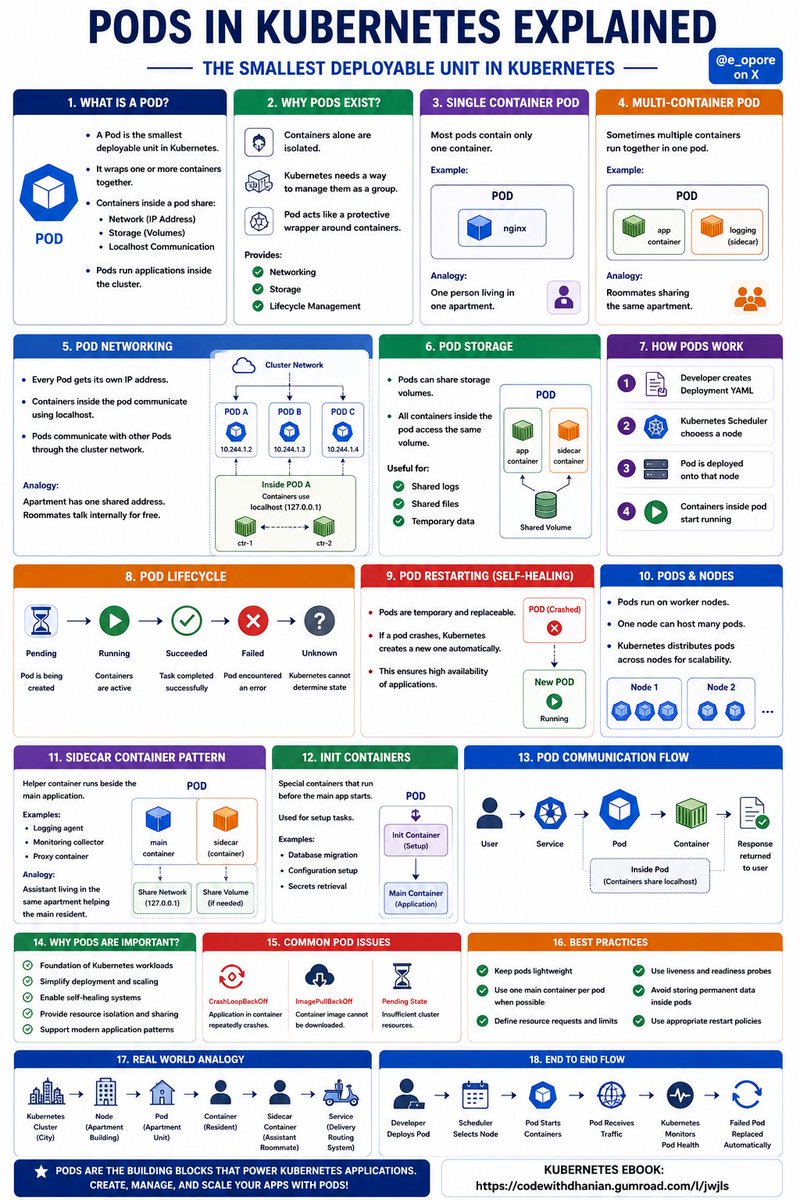
PODS IN KUBERNETES EXPLAINED
Think of a Pod like a small apartment unit inside a huge Kubernetes city.
Inside the apartment, containers live together, share resources, and work as a team.
WHAT IS A POD
→ a Pod is the smallest deployable unit in Kubernetes
→ it wraps one or more containers together
→ containers inside a pod share:
→ network
→ storage
→ localhost communication
→ Pods run applications inside the cluster
WHY PODS EXIST
→ containers alone are isolated
→ Kubernetes needs a way to manage them as a group
→ Pod acts like a protective wrapper around containers
→ provides:
→ networking
→ storage
→ lifecycle management
SINGLE CONTAINER POD
→ most pods contain only one container
→ example
→ nginx web server inside one pod
→ analogy
→ one person living in one apartment
MULTI-CONTAINER POD
→ sometimes multiple containers run together in one pod
→ containers cooperate closely
→ example
→ main app container
→ logging sidecar container
→ analogy
→ roommates sharing the same apartment
POD NETWORKING
→ every Pod gets its own IP address
→ containers inside the pod communicate using localhost
→ Pods communicate with other Pods through the cluster network
→ analogy
→ apartment has one shared address
→ roommates talk internally for free
POD STORAGE
→ Pods can share storage volumes
→ all containers inside the pod access the same volume
→ useful for:
→ shared logs
→ shared files
→ temporary data
HOW PODS WORK
→ developer creates deployment YAML
→ Kubernetes scheduler chooses a node
→ Pod is deployed onto that node
→ containers inside pod start running
POD LIFECYCLE
→ Pending
→ pod is being created
→ Running
→ containers are active
→ Succeeded
→ task completed successfully
→ Failed
→ pod encountered an error
→ Unknown
→ Kubernetes cannot determine state
POD RESTARTING
→ Pods are temporary and replaceable
→ if a pod crashes
→ Kubernetes creates a new one automatically
→ this ensures high availability
PODS & NODES
→ Pods run on worker nodes
→ one node can host many pods
→ Kubernetes distributes pods across nodes for scalability
SIDECAR CONTAINER PATTERN
→ helper container runs beside the main application
→ examples
→ logging agent
→ monitoring collector
→ proxy container
→ analogy
→ assistant living in the same apartment helping the main resident
INIT CONTAINERS
→ special containers that run before the main app starts
→ used for setup tasks
→ examples
→ database migration
→ configuration setup
POD COMMUNICATION FLOW
→ user sends request
→ service routes traffic
→ pod receives request
→ container processes request
→ response returned to user
WHY PODS ARE IMPORTANT
→ foundation of Kubernetes workloads
→ simplify deployment and scaling
→ enable self-healing systems
→ provide resource isolation and sharing
COMMON POD ISSUES
→ CrashLoopBackOff
→ app repeatedly crashes
→ ImagePullBackOff
→ container image cannot be downloaded
→ Pending state
→ insufficient cluster resources
BEST PRACTICES
→ keep pods lightweight
→ use one main container per pod when possible
→ define resource limits
→ use health probes
→ avoid storing permanent data inside pods
REAL WORLD ANALOGY
→ Kubernetes cluster = city
→ node = apartment building
→ pod = apartment unit
→ container = resident inside apartment
→ sidecar container = assistant roommate
→ service = delivery routing system
END TO END FLOW
→ developer deploys pod
→ scheduler selects node
→ pod starts containers
→ pod receives traffic
→ Kubernetes monitors pod health
→ failed pod replaced automatically
Grab the KUBERNETES EBOOK:
https://t.co/1JQaCCc17i
20 Protocols Every Cloud, DevOps & AI Engineer Should Know ⚡
If you understand these protocols, you understand how systems actually talk.
1.HTTP — web communication
2.HTTPS — encrypted web traffic
3.TCP — reliable packet delivery
4.UDP — fast, lightweight transport
5.IP — device addressing and routing
6.DNS — translates names to IPs
7.SSH — secure remote access
8.FTP/SFTP — file transfers
9.SMTP — sending emails
10.IMAP — retrieving emails
Now the cloud/devops stack 👇
11.TLS — encryption and certificate trust
12.BGP — internet and cloud route exchange
13.ARP — maps IP to MAC addresses
14.ICMP — ping, diagnostics, reachability
15.DHCP — automatic IP assignment
16.NFS — shared network storage
17.SMB — network file sharing
18.LDAP — identity and directory auth
19.gRPC — high-performance service-to-service communication
20.MQTT — lightweight messaging for IoT/AI edge systems
Bonus if you work with Kubernetes:
21.VXLAN — overlay networking
22.BGP (yes again) — used by MetalLB and CNI designs
23.eBPF — modern packet processing magic
24.Raft — powers distributed consensus (think etcd)
If you want to become a Cloud Engineer,
master these 10 skills ☁️
① Linux → live in the terminal
② Networking → VPC, subnets, routing
③ Compute → EC2, scaling, load balancing
④ Storage → S3, EBS, EFS
⑤ IAM → roles, policies, security
⑥ Databases → RDS, DynamoDB basics
⑦ Serverless → Lambda + APIs
⑧ Monitoring → CloudWatch, logs, alerts
⑨ Automation → CLI, Terraform, scripting
⑩ Projects → real cloud architectures
That’s it.
Not 200 services. Not everything.
📌 Cloud Engineers don’t memorize.
They build and connect systems.
Databases vs Servers most beginners mix these up.
Here is a thread to fix that.
1)
A server and a database are NOT the same thing.
They solve different problems but work together in every real app.
2)
If you understand this difference,
backend concepts like APIs, auth, and scaling start making sense.
3)
What is a server?
A server is a computer (or software on a computer) that receives requests and sends responses.
4)
When your frontend sends a request like:
“Get user profile”
That request hits a server first not the database.
5)
The server’s job:
Handle requests
Run business logic
Validate data
Decide what should happen next
Think of it as the brain of the application.
6)
What is a database?
A database is a system designed to store, organize, and retrieve data efficiently.
7)
Databases do NOT:
Talk directly to the frontend
Apply business rules
Decide who is allowed to access data
They just store and return data when asked.
8)
Simple flow in a real app:
User clicks button
→ Frontend sends request
→ Server processes logic
→ Server queries database
→ Database returns data
→ Server sends response
→ Frontend updates UI
9)
Important rule:
Frontend should NEVER talk directly to the database.
That’s a security and architecture disaster.
10)
Why the server sits in the middle:
Security (auth, permissions)
Validation (clean data)
Control (what data is exposed)
11)
Analogy time:
Server = waiter
Database = kitchen storage
Customers don’t enter the kitchen.
They talk to the waiter.
12)
Common beginner mistake:
“I sent a request, so my database is my backend.”
No.
Your server code is the backend.
The database is just one part of it.
13)
Examples:
Server: Node.js, Spring Boot, Django
Database: MySQL, PostgreSQL, MongoDB
Different roles. Different responsibilities.
14)
Mental model to remember:
Servers decide.
Databases store.
15)
Once this clicks,
APIs, authentication, and full-stack architecture become much easier.
Follow for more beginner-friendly full-stack breakdowns.
🗃 40 Commonly Targeted Ports by Hackers:👨🏿💻
🔒 Port 21 (FTP)
🚪 Port 22 (SSH)
💻 Port 23 (Telnet)
📧 Port 25 (SMTP)
🌐 Port 53 (DNS)
🌐 Port 80 (HTTP)
🔒 Port 443 (HTTPS)
🎮 Port 3074 (Xbox Live)
📲 Port 5060 (SIP)
🎲 Port 8080 (Proxy)
📁 Port 135 (RPC)
🖥️ Port 139 (NetBIOS)
🔓 Port 1433 (MSSQL)
🎲 Port 1521 (Oracle)
🔓 Port 1723 (PPTP)
📤 Port 1900 (UPnP)
🎮 Port 2302 (DayZ)
🖨️ Port 3389 (RDP)
🔒 Port 3306 (MySQL)
🕸️ Port 4000 (Elasticsearch)
📂 Port 4444 (Metasploit)
📤 Port 5000 (Python Flask)
🎮 Port 5555 (Android Debug Bridge)
📤 Port 5900 (VNC)
🖥️ Port 6667 (IRC)
📧 Port 6697 (IRC SSL)
📂 Port 8000 (HTTP Alt)
🖥️ Port 8081 (HTTP Proxy)
🔓 Port 9100 (Printer)
📂 Port 27017 (MongoDB)
🌐 Port 28017 (MongoDB HTTP Interface)
📂 Port 9090 (Web Debugging)
📁 Port 445 (SMB)
💻 Ports 5985/5986 (WinRM)
🔄 Port 6379 (Redis)
📂 Port 6666 (IRC)
📧 Port 993 (IMAP SSL)
🔒 Port 995 (POP3 SSL)
🎲 Port 1434 (Microsoft SQL Monitor)
This is the only article you’ll need to build your own MCP server. It covers:
> need of MCP
> how MCP works
> core concepts along with visualization
> build your own mcp server
> theory + coding
What is Terraform?
-> Terraform is an infrastructure-as-code tool that lets you build, change, and version cloud and on-prem resources safely and effectively.
Use of Terraform:
-> Terraform is an infrastructure as code tool that lets you define infrastructure resources in human-readable configuration files that you can version, reuse, and share.
-> You can then use a consistent workflow to safely and efficiently provision and manage your infrastructure throughout its lifecycle.