I built a stranger a web app using AI. With OpenAI’s Whisper API and the Dropbox Sign’s API I created a voice command e-signature generator.
I saw someone post a problem on LinkedIn so I built a solution for it.
How it works:
- The senders speech is transcribed using the Whisper API.
- Key info is extracted and parsed to fill out the fields.
- On submit, the data is passed to the Dropbox Sign API to trigger an email signature request.
- The signer receives the doc with the sender's speech data pre-filled.
This 8min video shows these steps I took (fast forward to the end to see the final product):
- Created project context prompt
- Generated PRD & tech spec with ChatGPT
- Set up project + tools
- Built app with Cursor Agents
- Demo
*this would need to be built out more to use in production, but it’s a quick MVP
What else should I build?
This may be the only high-level overview of OpenClaw on the internet.
Every time you search “OpenClaw” on YouTube, you get the same thing: deep technical setup guides, installation walkthroughs, and in the weeds tutorials.
As someone who loves podcasts but is short on time, I’ve struggled to find an OpenClaw video/podcast that I could listen to and didn’t have to visually follow along. I just wanted something to cover the "why" and the "what" of OpenClaw.
Then @lennysan released this episode with @clairevo
It is the perfect high-level overview. They stay out of the weeds and discuss: What OpenClaw is. Why it’s so powerful. How Claire is actually using 8+ agents in her daily life.
If you're curious about OpenClaw, but aren't looking for a technical configuration guide, then I highly recommend giving this a listen:
https://t.co/m0QCi9bd7o
I slack all of my content ideas to this AI agent.
The agent then provides a full text draft, image, video, or diagram asset in minutes.
I built the agent in n8n, and it handles 6 types of content inputs:
1. Raw incomplete thought or idea
2. Full rough draft
3. YouTube link + idea
4. AI avatar talking-head video
5. Infographic short-form video
6. Excalidraw whiteboard video
When a message hits the Slack trigger, the agent reads it alongside a detailed system prompt and autonomously decides which tools to call and in what order:
→ n8n for workflow orchestration
→ Claude Sonnet as the agent brain and content writer
→ Grok for viral content research and hook optimization
→ Gemini for YouTube analysis and image generation
→ HeyGen for AI avatar talking-head video generation
→ ElevenLabs for AI voiceover
→ Creatomate for infographic short-form videos
→ Slack as the end-to-end interface
Depending on the input, it returns:
- Drafted X/LinkedIn posts + a generated image
- AI avatar talking-head videos
- Complete graphic short-form videos with voiceover
- Mermaid diagrams for Excalidraw videos
The goal isn't full automation. It’s to expedite the drafting phase. I still want my content to be my content. I still shape, edit, and refine everything. But the agent eliminates the iPhone note grave yard.
Check out the demo to see it in action.
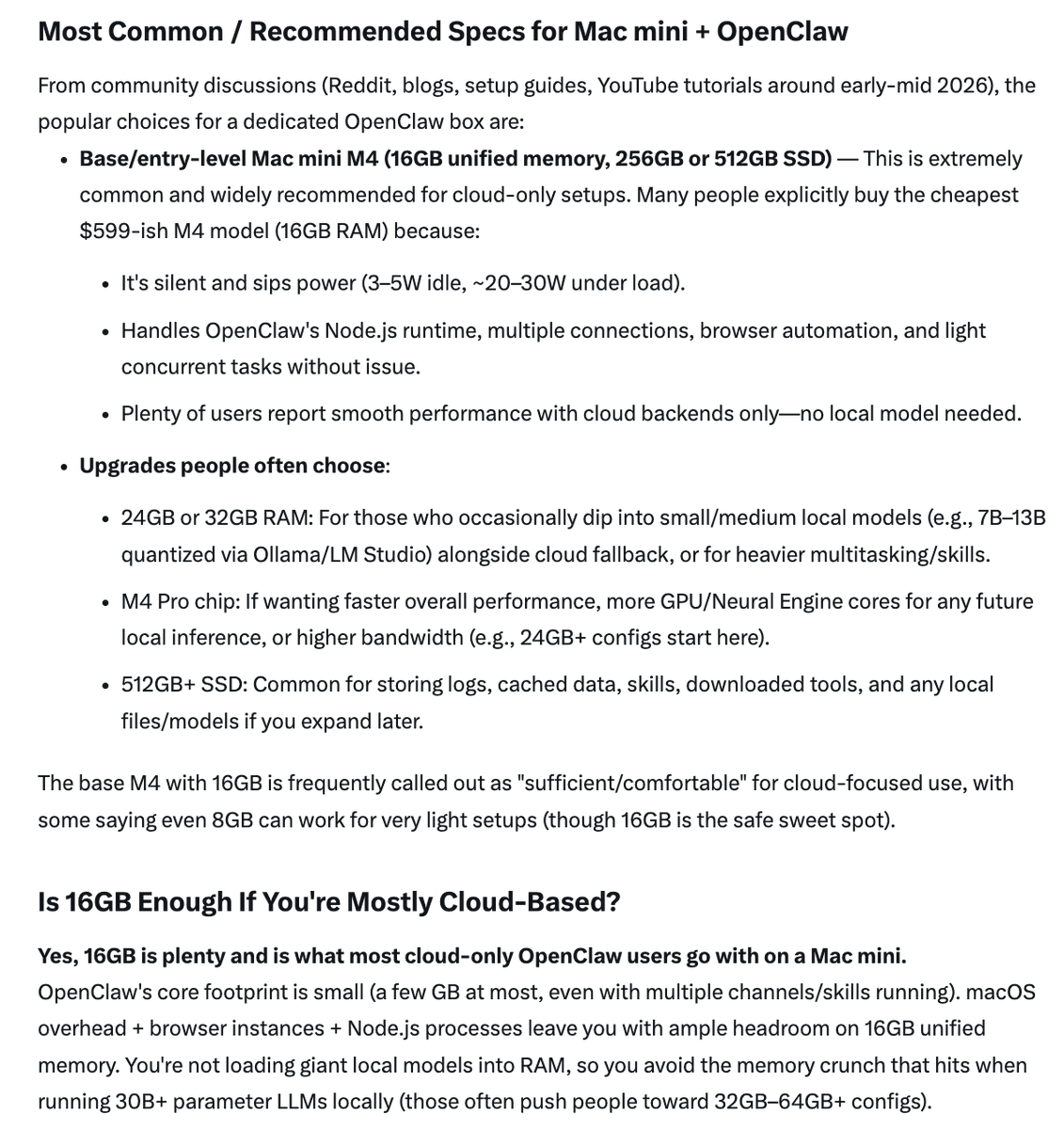
Grok is known for real-time AI use cases like breaking news, but when buying a Mac mini for OpenClaw I stumbled upon another strength: gauging consensus on consumer tech. I wasn't sure about the specs, so I asked:
“I'm buying a Mac mini to run OpenClaw. What specs do most people go with? I'll mostly be running cloud based models, is 16GB enough?”
It gave me the most in-depth, practical answer out of every LLM I tried. Saved me an hour of digging through Reddit threads.
Now anytime I'm buying a new product, I'm asking Grok what people are saying about it first.
Lovable had a free unlimited token day yesterday. During the 2-hour window while my kids napped, I built 3 apps.
1. AI-powered customer support platform (Zendesk + AI) that auto-drafts ticket responses, lets human agents chat with AI agents for troubleshooting & orchestrating tasks, and gives full control over model selection, knowledge sources, and context the AI uses.
2. A kids/parent app powered by Nano Banana that lets users generate custom artwork and turn it into real products (stickers, posters, coloring books, tattoos, etc.) that are fulfilled and shipped to your door automatically through a print-on-demand integration.
3. A template website for local home service provider businesses (plumbers, HVAC, electricians).
I normally build with Cursor or Claude Code. But I wanted to see what a no-code vibe coding tool could actually do with no constraints.
Honest take: Lovable is genuinely good for ideation and prototyping. I just described what I wanted and iterated until the UI/UX felt right. I wouldn’t ship it to production, but that's not what I would use it for.
Here’s how I would integrate Lovable into my engineering workflow:
Create a Lovable prototype → pull it into Cursor or Claude Code → have AI audit the full app and generate a detailed feature list → turn that into a PRD → open a fresh project → use the PRD + Cursor/Claude Code to rebuild it properly with my stack, my standards, and my oversight.
Lovable handled the "what should this be" question. Cursor and Claude Code can handle the "how should this actually be built" question.
There’s a lot of negativity around vibe coding tools, but I think they’re powerful, practical (in the right context), and if nothing else, fun.
I’ve been using Gemini to "speak" with YouTube videos.
Claude is my go-to LLM and I use ChatGPT too, but Gemini’s native integration with the Google ecosystem makes it great for working with Youtube source content.
In this demo Gemini processes the video directly via URL, and generates a step-by-step Facebook ads implementation guide.
If you consume a lot of content on YouTube, Gemini is a good way to further understand and apply it.
I’m the red box. My friend told me the other day he still hasn’t used ChatGPT because he couldn’t figure out how to login.
We are living in two different worlds.
Every step I took to build a directory of service providers in my local area:
- Ideation
- Data Mining (Facebook group)
- Source Compilation (Manual)
- Data Scraping (AI Automation w/ @gumloop )
- SQL Generation (Cursor)
- Database Input (@supabase )
- Application Development (Next.js + Cursor)
- Hosting (@vercel )
- Frontend User Experience
- Admin User Experience