Instead of another YouTube rabbit hole tonight.
Take these 11 courses to master Claude (for free):
→ Level 1 - 20 mins: The basics.
Claude certificates: https://t.co/Vn60ElPrcK
Claude For Dummies: https://t.co/HNa5MrCe6m
AI is (stupidly) simple: https://t.co/SVGd966GXi
Claude Roadmap: https://t.co/NG73kDCvth
→ Level 2 - 55 mins: Real workflows.
Claude Cowork: https://t.co/uWTpOI3oyE
Claude for teams: https://t.co/qxlcqheAme
Claude for slides: https://t.co/L0bPMgWEsy
Claude Skills: https://t.co/6cHYYfjpP2
→ Level 3 - 45 mins: The pro moves.
Claude Connectors: https://t.co/TSAQqOp5pn
Stop hitting Claude's limits: https://t.co/j5fEzSGxlT
Upload yourself in Claude: https://t.co/kDGBpSEA6J
Stop using Claude at work: https://t.co/c6X55Th0gV
Pro tip: Don't binge it. Do one level per sitting.
Actually apply each guide before moving to the next
https://t.co/t5beWmymtQ
People think learning Claude takes days. It doesn't.
I wrote 17 free guides that teach it in hours:
Claude 101: https://t.co/w15Z9gbhxQ…
Claude Code: https://t.co/Uc3auZB8rt
Claude Skills: https://t.co/sbn4e6gtoZ
Claude Connectors: https://t.co/vkysYcVqKn…
Claude for Excel: https://t.co/TIXNWiOKK7…
How to Prompt: https://t.co/j4VX9dHXFG
Claude Certificates: https://t.co/UiLCio8mXn…
Claude for your team: https://t.co/M8fDR8Jwcg…
Stop Prompting Claude: https://t.co/Aze2waYwRq…
AI Slides (PPT in 2026): https://t.co/Ir6nvOq4VT
Claude Design: https://t.co/08nAf8iol1
Set up Claude Cowork: https://t.co/O7VeYCQvz9…
Claude to sound like you: https://t.co/UiLCio8mXn…
Stop writing like AI: https://t.co/c8F8QieXfq…
Claude as your computer: https://t.co/DvLeYIIKMM…
Claude Cowork + Project: https://t.co/O7VeYCQvz9…
Stop hitting Claude limits: https://t.co/qlBGikuSYB…
___
1. Save this list for later (three dots, top right).
2. Share it with a friend by ♻️ reposting this image.
3. Subscribe to my free newsletter: https://t.co/70wspEnO48.
INSTEAD OF WATCHING NETFLIX TONIGHT.
Spend 1 hour with this.
Claude AI FULL COURSE that teaches you how to BUILD and AUTOMATE anything.
The people who watch this tonight will wake up tomorrow with a skill that most people will not have in 2 years.
The people who skip it will still be watching Netflix next year wondering why nothing in their life has changed.
Your call.
MIT JUST LEAKED THE EXACT DOCUMENT WALL STREET QUANT FIRMS USE TO HIRE PEOPLE.
It is called the MIT Quant Bible.
And it covers everything the $500,000 a year quants actually know that you do not.
Here is what is inside:
Probability fundamentals. Conditional probability, Bayes theorem, expected value, variance, joint distributions. The mathematical foundation every trading decision at Jane Street and Citadel is built on.
Stats fundamentals. The Law of Large Numbers. Central Limit Theorem. Confidence intervals. The tools quants use to know when a signal is real and when it is noise.
Quant research and data science. Least squares, regressions, dimensionality reduction. Real case studies from Two Sigma, QuantCo, and CitiBikes.
Quant trading and market making. What market making actually is and how the theory translates into real trading decisions.
And then the part that makes this document worth more than most finance degrees.
A question bank with real interview questions from Jane Street, Virtu Financial, Optiver, Akuna Capital, Citadel, Hudson River Trading, Two Sigma, Five Rings, and SIG.
Not prep questions.
The actual questions these firms ask.
With answers.
The firms charging $50,000 a year for access to this type of preparation are not going to be happy this exists.
Bookmark this before it disappears.
Follow
@cyrilXBT
for every elite resource that gives you access to what the top 1% actually know
Godfather of AI: "If you sleep well tonight, you may not have understood this lecture."
This 47-minute lecture is the best thing I saw about AI in the last few months.
It will definitely help you understand how it actually works and where it's going.
Geoffrey Hinton built the neural networks behind every AI alive, then quit Google to warn the world about it.
The part nobody wanted to hear:
> AI is already developing abilities its creators didn't intend
> in most cognitive tasks it's already ahead of us
> the question is no longer if it surpasses us but when
> the only decision left is which side of that line you're on
Right now the average person opens Claude, types something, gets an answer, closes the tab.
They think they're using AI. they're using maybe 10% of it.
I went through his entire lecture, then mapped everything he described to what Claude can actually do today.
17 Claude features most people will never find on their own.
Full breakdown in the post below.
Anthropic engineer:
"You can build 5 assistants in one afternoon. Each one handles a task you've been doing manually every single day"
in 45 minutes he shows exactly how to do it from scratch, step by step
most people are still doing this manually
watch the session, then save the guide below
You're prompting Claude entirely wrong.
Because you shouldn't be prompting at all. Do this:
1. Folder
☑ A folder on your computer, "Claude Cowork":
Every file inside replaces a prompt you'd type.
↳ No more "here's the context again" in every chat.
2. ABOUT ME/
☑ about-me .md & anti-ai-writing-style .md file.
Who you are. How you write. What you'd never say.
80% of these files should be what you REJECT.
↳ Claude reads them before every task.
3. PROJECTS/
☑ One subfolder/ project. Inside: brief .md, references/, drafts/
Prompt: "Read everything in PROJECTS/[name] before starting." Live work lives here. Stop pasting 15 context messages. Put them in files.
4. TEMPLATES/
☑ Save your best work as reusable patterns:
Prompt: "Use the template in TEMPLATES/[name]."
Claude studies the structure before creating new.
Add: "Match the length, sections, and tone. Only replace the content."
5. CLAUDE OUTPUTS/
☑ The ONLY folder Claude writes to:
One subfolder per project, mirroring PROJECTS/.
You always know where deliverables live.
↳ No more "Untitled 47.docx" on your screen.
6. Global Instructions
☑ Set it once. It runs every single time:
Settings → Cowork → Edit Global Instructions.
Folder protocol, naming conventions, operating rules. You tell Claude how to behave ONCE.
7. The One Prompt
☑ Your new prompt is one sentence:
"I want to [TASK] so that [SUCCESS CRITERIA]. Start by using AskUserQuestion."
80% of my chats start with exactly this.
↳ Claude prompts YOU. Not the other way around.
8. Obsidian (free)
☑ Open your Cowork folder as a knowledge base:
Your .md files start looking like Google Docs.
You can edit, search, and link them in seconds.
Your brain + Claude's memory, in one clean place.
9. Alignment
☑ The folder does the talking. The prompt is a line.
Claude asks YOU questions before doing anything.
This replaces the old prompting era.
I teach you how Claude works at https://t.co/uWTpOI3Woc.
Copy my exact folder structure + download my personal .md files for Claude here:
Step 1: Subscribe for free → https://t.co/psB7XxB2Y4.
Step 2: You will have two choices: free or paid.
Step 3: Choose the free tier. Don't pay for anything.
Step 4: Open your welcoming email (wait 30 sec).
Step 5: Access my entire folder template & md files.
Step 6: Send this image to your team's channel.
Step 7: Read 2x newsletter per week (for free).
Step 8: Become the "AI guy" at work, forever.
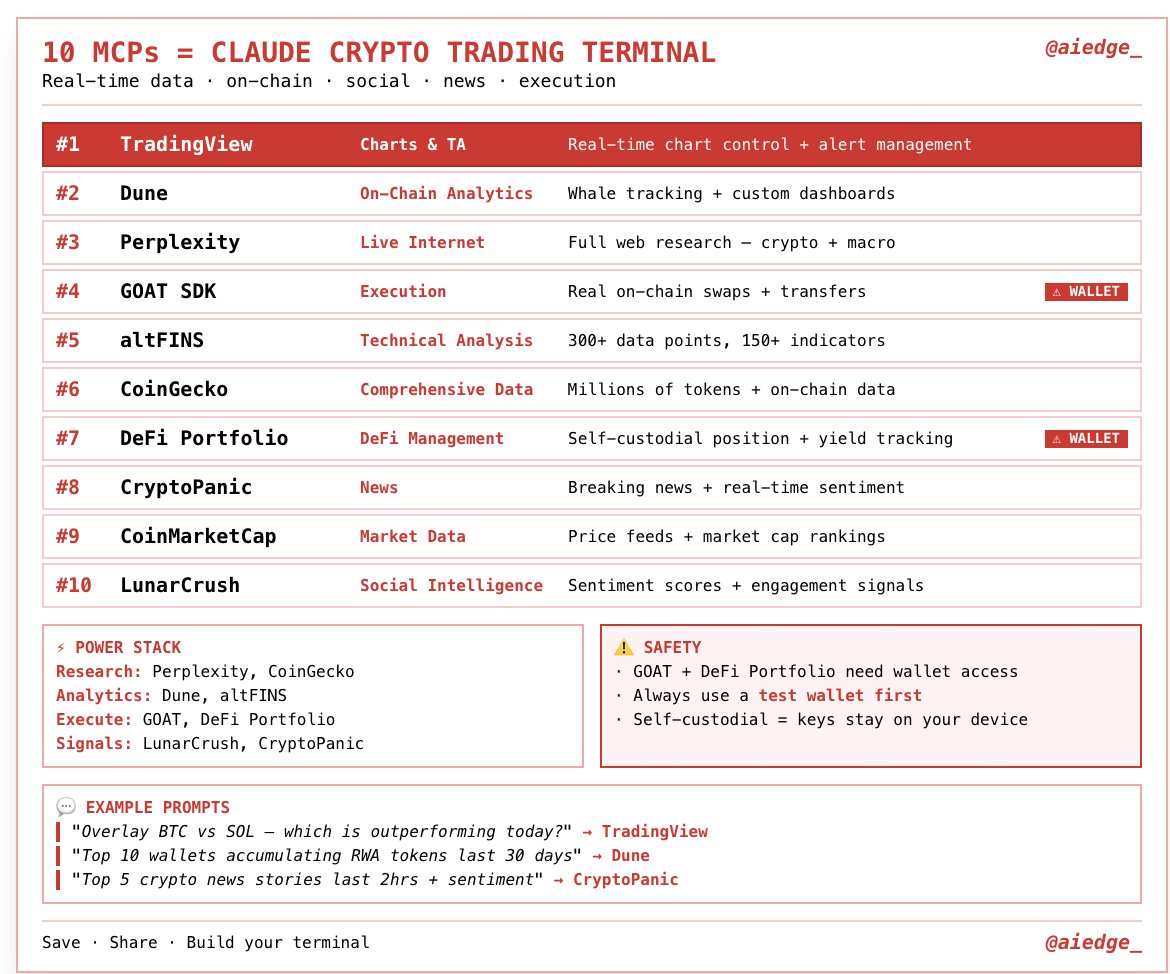
My top 10 MCPs to turn Claude into a crypto trading beast.
Connect these with your Claude, and you'll get real-time price feeds, agentic trading capabilities & more.
Pro tip: Use these to build a professional trading terminal hub.
Only takes a few minutes to set up:
Most people install Cowork, pick a folder, and start prompting.
HUGE mistake.
The full setup is 16 moves across 5 phases (summary below):
1. Workspace: pick your folder, full structure, read-only source permissions.
2. Tools: connect Gmail, Drive, Calendar. Let Cowork verify all 3 in parallel.
3. Context files: about-me, brand-voice, working-style.
4. Global instructions: paste the generated 717-word doc into Settings > Cowork > Edit Global Instructions.
5. Automations: accept the recommended skill stack, schedule Morning Briefing (weekdays 8am), schedule Quarterly Context Review (first Monday of Jan/Apr/Jul/Oct, 9am).
6. Security: run the 4-question audit, then merge the generated rules into your global instructions.
One-time work. Every session after reads all your context before running a single task.
You still use Claude like in 2025.
So here's a recap in a single cheat sheet:
1: Claude isn't 1 tool. It's 6.
Chat, Projects, Code, Cowork, Skills, Connectors.
If you don't code, Cowork should be the go-to one.
2: Pick the model before the prompt.
Opus 4.7 = thinking, analyzing, planning.
Sonnet 4.6 = grammar, brainstorming, formatting.
Haiku 4.6 = bulk tasks at 1M input tokens.
3: Toggle Extended Thinking on Opus.
Model selector → Opus 4.7 → Turn on Extended Thinking. Forces an internal monologue.
4: Cowork > Chat for serious work.
Desktop + Pro only. Reads your local files. Creates docs. Runs for minutes while you grab coffee.
5: Stop writing 500-word prompts.
Write 29 words: "I want to [task] so that [goal]. Read the files first. Ask me questions via AskUserQuestion before executing."
6: Build 3 folders inside Cowork.
ABOUT ME/ (identity + rules). TEMPLATES/ (reusable patterns). CLAUDE OUTPUTS/ (deliverables). Your prompts drop to 10 words.
7: Set Global Instructions once.
Settings → Cowork → Edit Global Instructions.
Prompt: "read ABOUT ME first, save in CLAUDE OUTPUTS, use AskUserQuestion when unclear, don't over-explain."
8: Connectors are free. Turn them on.
Slack, Gmail, Drive, Notion, Figma, Granola + 50 others. Claude reads your emails and messages mid-conversation. Zero copy-paste.
9: Force AskUserQuestion in every prompt.
Claude stops guessing. It generates a form with clarifying questions. You click. Claude executes. Prompting ends.
10: Install Claude in Excel (3 minutes).
Excel → Insert → Get Add-ins → Search "Claude by Anthropic" → Add → Sign in. Ctrl+Option+C to open. It now knows what cell D14 actually contains.
11: Install Plugins from claude .com/plugins.
Sales, Marketing, Legal, Finance, Data, Product, Support + more. Each adds skills and slash commands. Type / in the chat to see them.
12: Skills replace your prompt library.
Turn repeat workflows into slash commands. Type /negotiation-prep + one line. Claude pulls from Gmail, Slack, Granola. Drafts the email. Done.
13: Context > Prompts.
Feed your files, not just prompts. That's the game.
Download my own files at https://t.co/psB7XxAv8w.
Don't pay anything. Reply to the email to get the link
14: Examples > Prescriptions.
Paste 3 posts you wrote. "Write like this." Claude copies voice faster from examples than from 500 words of description.
15: Images = Use ChatGPT Image (with Thinking).
Claude doesn't generate realistic images (yet).
16: Real-time search = Use Grok.
Connected to X. Covers 99% of what you need.
17: Videos = Use Google Veo-4
Right tool, right job. Stop wasting tokens.
-----
To download all of my Claude infographics:
Step 1. Go to https://t.co/psB7XxAv8w.
Step 2. Subscribe for free. Don't pay anything.
Step 3. Open my welcome email (most skip this).
Step 4. Hit the automatic reply button inside.
Step 5. Download my infographics from my Notion.
Bonus. Enjoy my best copy-paste prompts, too.
🚨 Anthropic's own team just showed how to actually use Claude Code properly.
30 minutes. free. the person who created Claude Code.
watch the workshop. bookmark it.
worth more than every $500 course you almost bought.
you've been using Claude without knowing 40 of its commands.
Then read the guide below.
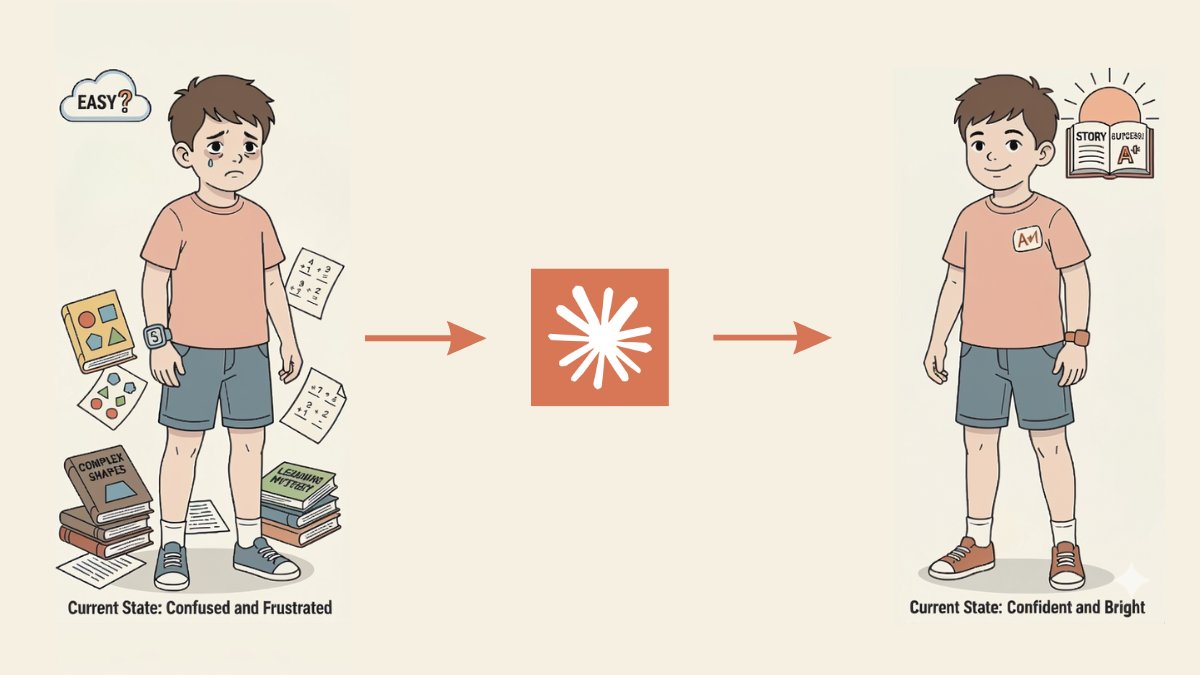
Claude can now teach your kids any school subject like a $100/hour private tutor from Khan Academy. For free.
Here are 12 prompts that explain math, science, history, and English at any grade level in minutes:
(Save this before it disappears)
🚨 Anthropic's CEO: "software engineering will be fully automated in 12 months."
two types of people right now:
type 1: uses Claude Code with basic prompts. scared about the future.
type 2: knows all 35 commands, tricks, and workflows. ships faster than a team of 5.
type 1 gets replaced in 12 months.
type 2 does the replacing.
I wrote a full guide on how to start. zero experience needed.
🚨 Anthropic's CEO: "We are so close to human intelligence, and society doesn't seem to recognize what's about to happen."
he's not talking about the future.
he's talking about right now.
while you're reading this, someone is automating their entire workflow.
I published 50 AI automations you can build this weekend.
this weekend. not "eventually."
This 30-min workshop by the creator of Claude Code will teach you more about vibe-coding than 100 YouTube video guides.
Bookmark it & give it 30 minutes today. This video will change the way you use Claude forever.
If I had one weekend to master Claude, I'd start here:
Stop bookmarking 50 guides you'll never read. These are the only ones that matter:
Claude 101 (start here):
https://t.co/kxPbZq5hYA
Claude Code 101:
https://t.co/wJ5akEpwP2
Claude Code in Action:
https://t.co/VxJpREFLkU
Prompt engineering (official):
https://t.co/otByv1jVOd
Interactive prompt tutorial (hands-on):
https://t.co/BBSVsSfEC1
CLAUDE.md & how to give Claude memory:
https://t.co/RdisG2Ahrj
Skills, teach Claude reusable workflows:
https://t.co/mZZ1aq4jHl
MCP, time connect Claude to Slack, GitHub, Drive:
https://t.co/9NAsgVrUwX
Routines (automate tasks 24/7):
https://t.co/aZrHs2Bax2
Claude Code Ultimate Guide (community):
https://t.co/KTzkCYfQxY
Awesome Claude Code (skills, hooks, plugins):
https://t.co/gxVJxo0Mlq
All 13 Anthropic Academy courses (free certs):
https://t.co/pQoDCqTmFx
Claude Code full docs:
https://t.co/bUozI4rL3r
ALL FREE. ALL OFFICIAL
Saturday: Claude 101 → prompt tutorial → CLAUDE.md → skills
Sunday: Claude Code → MCP → routines → build your first automation
by Monday you'll know more about Claude than 95% of people using it daily
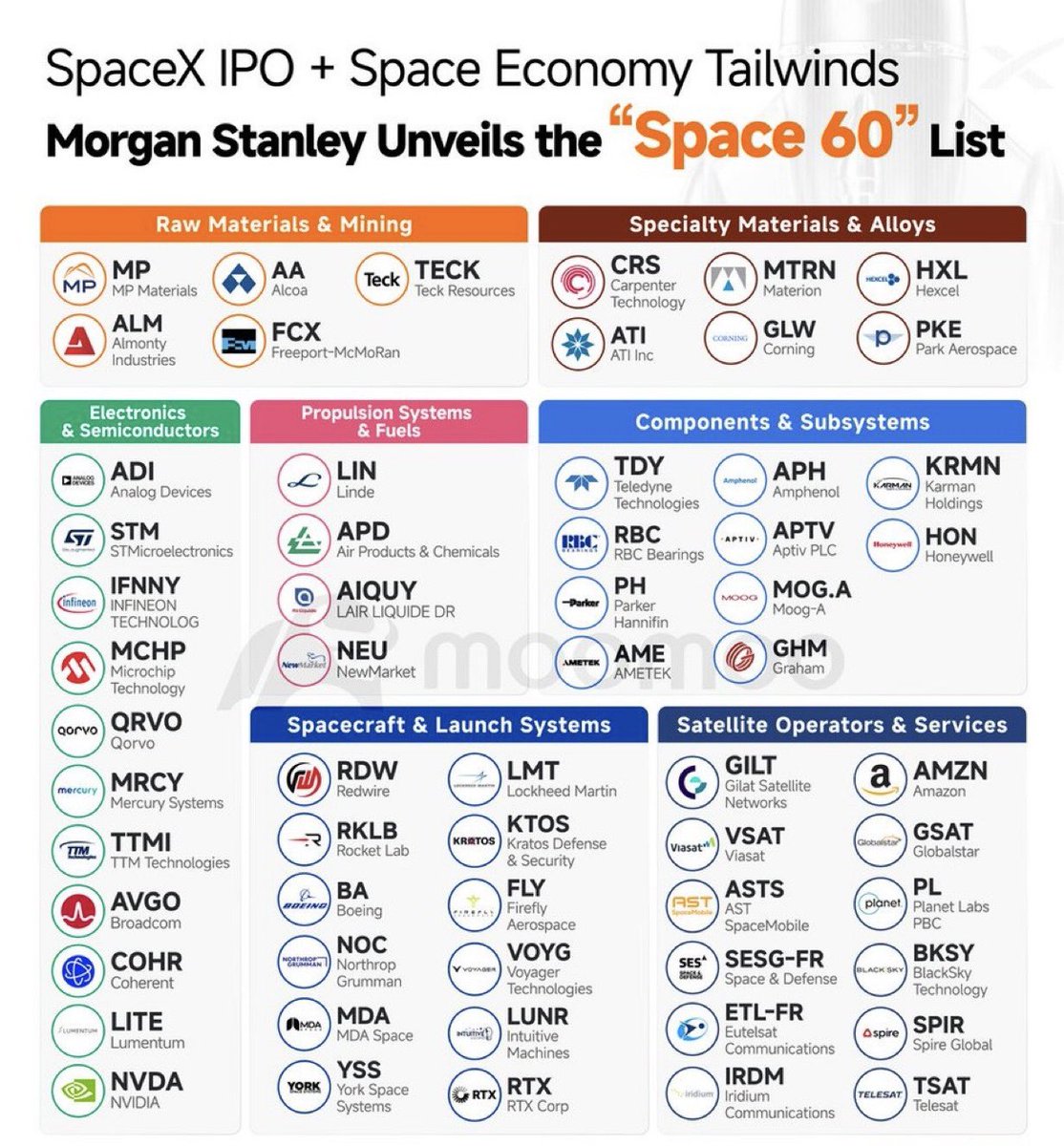
SPACE ECONOMY CHEAT SHEET
A SpaceX IPO likely forces the market to look beyond rockets and start repricing the full supply chain and infrastructure layer beneath the space economy:
Spacecraft & Launch Systems
• $YSS manufactures standardized satellite buses for rapid deployment
• $RKLB builds launch vehicles, spacecraft systems & broader orbital infrastructure
• $VOYG supplies space infrastructure & in-space services for government programs
• $LUNR provides lunar landers & surface delivery systems tied to NASA Artemis missions
• $FLY develops launch vehicles & lunar lander services for commercial & government missions
• $RDW manufactures spacecraft components, deployable structures & in-space manufacturing systems
Satellite Operators & Services
• $BKSY provides real-time geospatial intelligence & high-revisit satellite imagery
• $IRDM operates the only truly global LEO satellite network covering the entire planet
• $SPIR delivers satellite-based data & analytics across maritime, weather & RF monitoring
• $AMZN building a direct-to-device & broadband satellite network through Project Kuiper + $GSAT assets
• $PL operates the largest Earth observation constellation serving commercial, defense & intelligence customers
• $ASTS building a space-based cellular broadband network for D2D connectivity with BlueBird 7 launching April 19 & 45-60 satellites targeted by year-end 2026
Raw Materials & Mining
• $AA supplies aluminum used in launch vehicles & spacecraft structure
• $FCX provides copper that feeds power systems & electronics across the space stack
• $TECK offers diversified exposure to critical minerals tied to aerospace & industrial buildout
• $MP controls the only scaled rare earth mining & processing asset in the U.S. supporting satellite & propulsion supply chains
Specialty Materials & Alloys
• $ATI produces titanium & nickel alloys critical to propulsion & aerospace systems
• $HXL makes carbon fiber composites used in launch vehicles & satellite structures
• $PKE manufactures advanced composite materials for aerospace & defense structures
• $CRS supplies high-performance alloys used in rocket engines & spacecraft component
• $GLW supplies specialty glass & optical components for satellite communications & sensing
• $MTRN provides advanced materials & precision components for defense and space systems
Electronics & Semiconductors
• $QRVO supplies RF chips & filter components for satellite communications payloads
• $LITE supplies optical components & lasers used in high-speed communications links
• $ADI supplies precision analog & sensing chips used across satellite and launch systems
• $COHR provides lasers & optical components tied to satellite & communications systems
• $NVDA provides AI compute infrastructure for satellite data processing & autonomous systems
• $STM provides semiconductors for guidance, control & communications in space-grade applications
• $AVGO supplies connectivity & networking semiconductors used across communications infrastructure




![rubenhassid's tweet photo. You're prompting Claude entirely wrong.
Because you shouldn't be prompting at all. Do this:
1. Folder
☑ A folder on your computer, "Claude Cowork":
Every file inside replaces a prompt you'd type.
↳ No more "here's the context again" in every chat.
2. ABOUT ME/
☑ about-me .md & anti-ai-writing-style .md file.
Who you are. How you write. What you'd never say.
80% of these files should be what you REJECT.
↳ Claude reads them before every task.
3. PROJECTS/
☑ One subfolder/ project. Inside: brief .md, references/, drafts/
Prompt: "Read everything in PROJECTS/[name] before starting." Live work lives here. Stop pasting 15 context messages. Put them in files.
4. TEMPLATES/
☑ Save your best work as reusable patterns:
Prompt: "Use the template in TEMPLATES/[name]."
Claude studies the structure before creating new.
Add: "Match the length, sections, and tone. Only replace the content."
5. CLAUDE OUTPUTS/
☑ The ONLY folder Claude writes to:
One subfolder per project, mirroring PROJECTS/.
You always know where deliverables live.
↳ No more "Untitled 47.docx" on your screen.
6. Global Instructions
☑ Set it once. It runs every single time:
Settings → Cowork → Edit Global Instructions.
Folder protocol, naming conventions, operating rules. You tell Claude how to behave ONCE.
7. The One Prompt
☑ Your new prompt is one sentence:
"I want to [TASK] so that [SUCCESS CRITERIA]. Start by using AskUserQuestion."
80% of my chats start with exactly this.
↳ Claude prompts YOU. Not the other way around.
8. Obsidian (free)
☑ Open your Cowork folder as a knowledge base:
Your .md files start looking like Google Docs.
You can edit, search, and link them in seconds.
Your brain + Claude's memory, in one clean place.
9. Alignment
☑ The folder does the talking. The prompt is a line.
Claude asks YOU questions before doing anything.
This replaces the old prompting era.
I teach you how Claude works at https://t.co/uWTpOI3Woc.
Copy my exact folder structure + download my personal .md files for Claude here:
Step 1: Subscribe for free → https://t.co/psB7XxB2Y4.
Step 2: You will have two choices: free or paid.
Step 3: Choose the free tier. Don't pay for anything.
Step 4: Open your welcoming email (wait 30 sec).
Step 5: Access my entire folder template & md files.
Step 6: Send this image to your team's channel.
Step 7: Read 2x newsletter per week (for free).
Step 8: Become the "AI guy" at work, forever.](https://pbs.twimg.com/media/HGlSoo8aAAAw4TI.jpg)

![rubenhassid's tweet photo. You still use Claude like in 2025.
So here's a recap in a single cheat sheet:
1: Claude isn't 1 tool. It's 6.
Chat, Projects, Code, Cowork, Skills, Connectors.
If you don't code, Cowork should be the go-to one.
2: Pick the model before the prompt.
Opus 4.7 = thinking, analyzing, planning.
Sonnet 4.6 = grammar, brainstorming, formatting.
Haiku 4.6 = bulk tasks at 1M input tokens.
3: Toggle Extended Thinking on Opus.
Model selector → Opus 4.7 → Turn on Extended Thinking. Forces an internal monologue.
4: Cowork > Chat for serious work.
Desktop + Pro only. Reads your local files. Creates docs. Runs for minutes while you grab coffee.
5: Stop writing 500-word prompts.
Write 29 words: "I want to [task] so that [goal]. Read the files first. Ask me questions via AskUserQuestion before executing."
6: Build 3 folders inside Cowork.
ABOUT ME/ (identity + rules). TEMPLATES/ (reusable patterns). CLAUDE OUTPUTS/ (deliverables). Your prompts drop to 10 words.
7: Set Global Instructions once.
Settings → Cowork → Edit Global Instructions.
Prompt: "read ABOUT ME first, save in CLAUDE OUTPUTS, use AskUserQuestion when unclear, don't over-explain."
8: Connectors are free. Turn them on.
Slack, Gmail, Drive, Notion, Figma, Granola + 50 others. Claude reads your emails and messages mid-conversation. Zero copy-paste.
9: Force AskUserQuestion in every prompt.
Claude stops guessing. It generates a form with clarifying questions. You click. Claude executes. Prompting ends.
10: Install Claude in Excel (3 minutes).
Excel → Insert → Get Add-ins → Search "Claude by Anthropic" → Add → Sign in. Ctrl+Option+C to open. It now knows what cell D14 actually contains.
11: Install Plugins from claude .com/plugins.
Sales, Marketing, Legal, Finance, Data, Product, Support + more. Each adds skills and slash commands. Type / in the chat to see them.
12: Skills replace your prompt library.
Turn repeat workflows into slash commands. Type /negotiation-prep + one line. Claude pulls from Gmail, Slack, Granola. Drafts the email. Done.
13: Context > Prompts.
Feed your files, not just prompts. That's the game.
Download my own files at https://t.co/psB7XxAv8w.
Don't pay anything. Reply to the email to get the link
14: Examples > Prescriptions.
Paste 3 posts you wrote. "Write like this." Claude copies voice faster from examples than from 500 words of description.
15: Images = Use ChatGPT Image (with Thinking).
Claude doesn't generate realistic images (yet).
16: Real-time search = Use Grok.
Connected to X. Covers 99% of what you need.
17: Videos = Use Google Veo-4
Right tool, right job. Stop wasting tokens.
-----
To download all of my Claude infographics:
Step 1. Go to https://t.co/psB7XxAv8w.
Step 2. Subscribe for free. Don't pay anything.
Step 3. Open my welcome email (most skip this).
Step 4. Hit the automatic reply button inside.
Step 5. Download my infographics from my Notion.
Bonus. Enjoy my best copy-paste prompts, too.](https://pbs.twimg.com/media/HGgamu3a8AAFQYc.jpg)