VEO 3.1 Is Here
More Control. More of Your Vision.
Sharper realism. Smoother motion. Smarter storytelling. VEO 3.1 gives you total control of your cinematic vision.
What’s new:
◦ End Frames: Define how your story ends with precision and control.
◦ Enhanced Fidelity: More realistic motion, depth, and detail.
◦ Smarter Expression: Human gestures and emotion that feel real.
Still includes everything you love about VEO - seamless video and audio generation, text-to-video, and multi-modal creation - now faster, sharper, and more intuitive.
Brought to you first, as official Google launch partner.
VEO 3.1 Now available on https://t.co/9TJ9gzjykj.
FP jargon for masses:
1. “Pure” is “Stateless”
2. “Higher-Order Functions (HOFs)” is “First-Class Functions”
3. “Dependent Types” is “First-Class Types”
4. “Linear Types” is “RAII on the type level”
5. “Algebraic Data Types (ADTs)” is “Choice Types”
We saved the best for last.
Announcing React Email 2.0.
1. Re-imagined preview experience
2. Massive performance improvements
3. New components
4. Deployment to Vercel
5. Better support for monorepos
Let's dive into each one of those...
Problem: In TypeScript, developers often declare needless conditionals.
Why needless conditionals are a problem:
🚩 Adds noise
🚩 Hurts readability
🚩 Creates confusion
🚩 Often a sign of a misunderstanding or a logic error
Solution: typescript-eslint/no-unnecessary-condition
I just used this rule to find and automatically fix 100’s of bad conditionals in a large codebase.
Here are 4 examples of bad conditionals it found:
1. The author didn't know that map always returns an array. So the fallback to an array was needless.
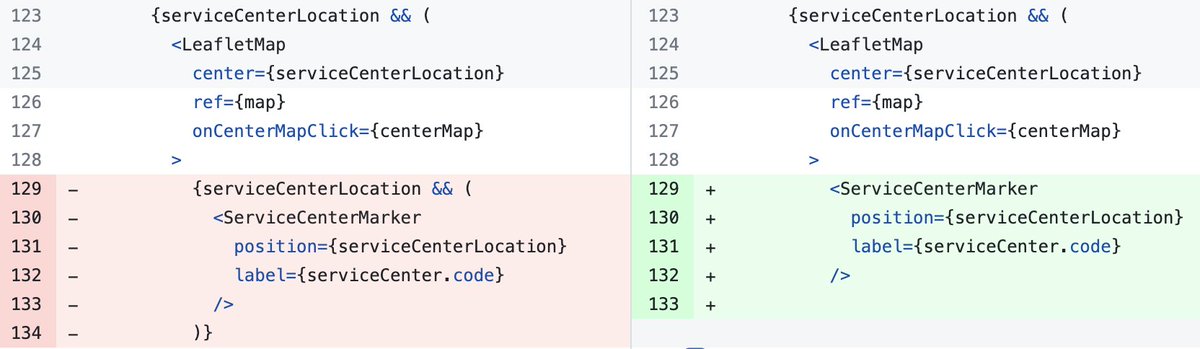
2. The condition is already checked on 123, so the check on 129 was redundant.
3. Here it caught a logic error! The "??" was reported as needless. The developer meant to check the array's length.
4. The variable is always defined because it's narrowed on line 90. So, the "?." on 92-95 were all needless.
I'm so impressed with this rule! I plan to run it on all TypeScript projects in the future.
The `gap` CSS property is a convenient way to set the spacing between not only the grid but also flex items!
And now, with the just-released Safari 14.1, you can use it in every major browser! 🥳
⚙️ Você sabe o que acontece quando manda o compilador executar?
Entender mais sobre os aspectos fundamentais da computação é importante para evoluir como desenvolvedor!
Bora explorar esse tópico nessa breve thread!
1/9