In 2018, Stanford professor Matt Abrahams gave a masterclass on why most people fail to communicate well.
He broke down:
- The structure every message needs
- Why audiences stop listening
- The psychology of attention
15 lessons that'll make your communication unforgettable:
The secret for unlimited FREE Claude 3.5 Sonnet requests! My latest newsletter reveals a game-changing tool you won't want to miss. 👇
Zed: From Coding Editor to Universal AI Assistant
Imagine having unlimited access to one of the world's most advanced AI models, right at your fingertips, completely free. This isn't a far-off dream – it's the reality offered by Zed, an open-source coding editor that for me rapidly evolved into something much more. It is my central application to work with AI.
At its core, Zed is designed as a tool for developers, offering a fast and efficient coding environment. However, the recent addition of Zed AI has transformed it into a universal assistant capable of tackling a wide range of tasks. One aspect which made me started to use Zed, is that Anthropic's Claude 3.5 Sonnet, which from my point of view is currently the best model to assist you at writing, can be used for free in Zed. It's important to note that the duration of this free access is unclear, and using Zed intensively for non-coding tasks might not be the intended use case. However, the potential benefits are simply too good to ignore.
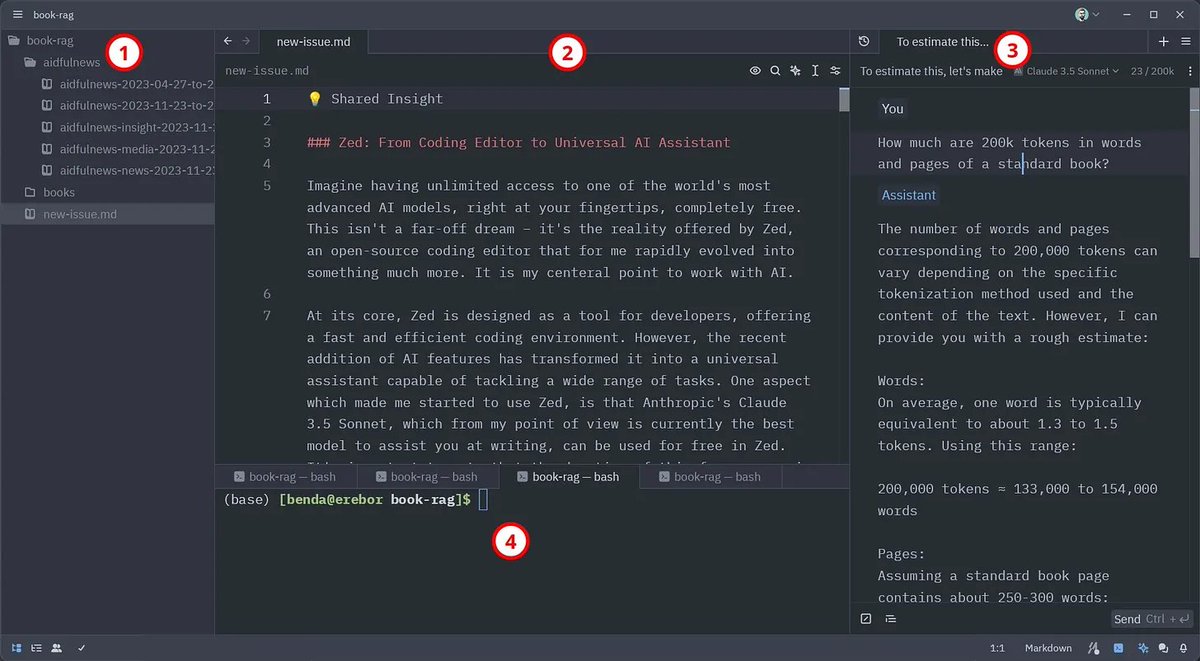
Zed has four main sections: 1) file tree of current project, 2) open files, 3) assistant panel, 4) terminal.
What truly makes Zed shine is its suite of context-building commands. The /file command allows you to seamlessly incorporate any text file from your disk into the AI conversation, while /fetch can parse and include a webpage directly in your prompts. Furthermore, you can create your own prompt library feature. You can save text snippets and recall them with the /prompt command, providing a neat way to store personal information that helps guide the AI's replies in the direction you need. For example, you could save details about your specific Linux operating system setup in a prompt, ensuring that responses to Linux-related questions are tailored precisely to your environment.
These features are not just powerful, they are also transparent. Every piece of added context remains fully visible and editable, giving you unprecedented control over your AI interactions. And by using the Claude 3.5 Sonnet model, you can make use of up to 200k tokens for your requests, which corresponds to around 150k words or 500 book pages.
As in other chatbot applications, you can organize multiple chats in tabs and access older chats via a history button, allowing you to revisit and build upon previous conversations.
Initially, I used Zed for the intended use case of programming. However, I realized its capabilities for general requests and now have the editor open and ask for assistance with a wide variety of tasks. From simple word translations to complex document analysis, creative writing, and in-depth research. The ability to easily incorporate content from popular file-based note-taking apps like @logseq and @obsdmd has made Zed a valuable asset in my knowledge management workflows as well.
While Zed's primary focus remains on coding, its AI features have opened up a world of possibilities. It's not just a coding editor – it's a gateway to a new era of AI-assisted work and creativity. The context-building commands are really helpful in tailoring the AI responses to your needs. From my perspective, especially as long as you can use Claude 3.5 Sonnet for free in Zed, it is the best way to explore the new possibilities text-based AI models bring to you.
Currently, Zed offers official builds for macOS and Linux. While Windows is not yet officially supported, it can be installed relatively easily using Msys2 instead of building it yourself. MSYS2 is a software distribution and building platform for Windows that provides a Unix-like environment, making it easier to port and run Unix-based software on Windows systems. I successfully installed Zed on a Windows 11 system, following the MSYS2 installation instructions for Windows (links in post below 👇).
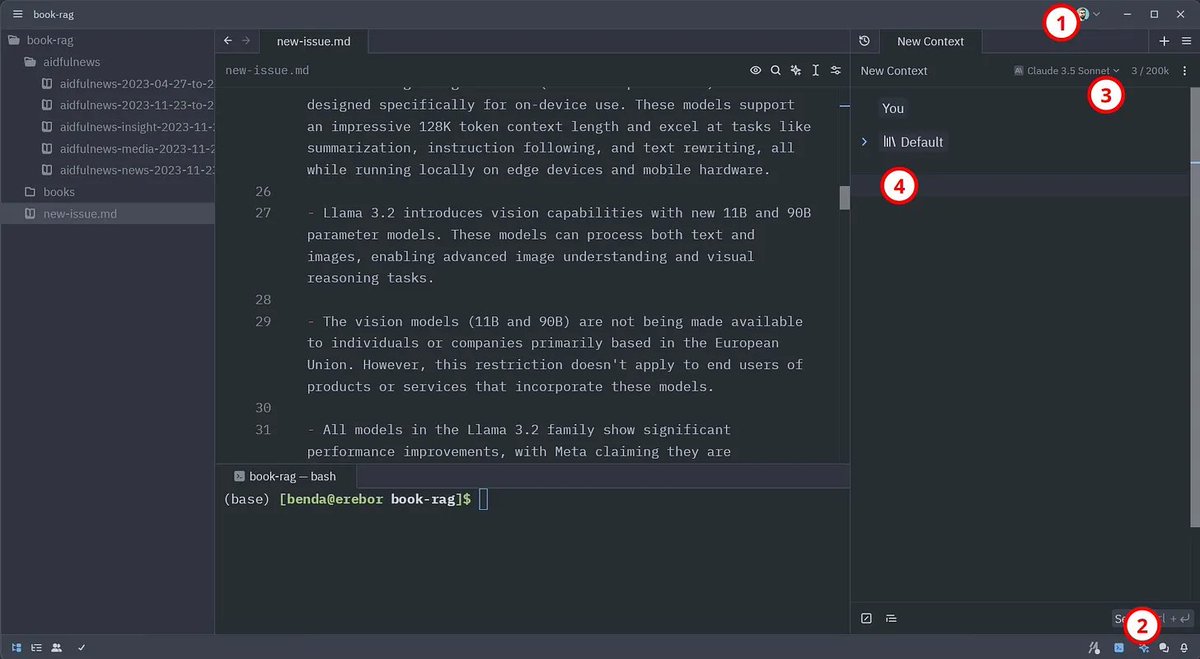
Steps to get started with Zed. 1) login, 2) assistant panel, 3) choose model, 4) chat.
If you are now eager to get started with Zed for non-coding tasks, follow these steps after installation (the enumeration corresponds to the numbers shown in the image above):
1. Open the assistant panel with a click on the ✨ button in the lower right (or CTRL/CMD + ?)
2. Choose “Claude 3.5 Sonnet Zed” in the dropdown menu
3. Start chatting in the assistant panel (send message with CTRL/CMD + ENTER)
As Zed is, from my perspective, currently one of the most powerful ways to use text-generating AI, I intend to create some video tutorials to help others unlock Zed's full potential. If you're interested in seeing tutorials on specific Zed features or use cases, please let me know! Your feedback will help shape the content and ensure it's as useful as possible. Have you tried Zed yourself? What has your experience been like? I'm eager to hear your thoughts and suggestions on how we can make the most of this powerful tool. Just hit reply and share your thoughts.
There's not a lot of info on @cursor_ai's composer beta so i wanted to share an example of building out a nextjs app without ever touching a piece of code. Highly unpolished with a few hitches but its incredible to be able to build things like this.
cmd+i, forgot to say that 😅
What can an 8-year-old build in 45 minutes with the assistance of AI?
My daughter has been learning to code with @cursor_ai and it's mind-blowing🤯
Here are highlights from her second coding session. In 45 minutes she built a chatbot powered by @CloudflareDev Workers AI ��
On this day 2 years ago, I quit my job and moved to Madrid so my wife could get her MBA.
I was 25 and terrified to go solo.
But today, the little business I started brings in 5x more than I made in that job (which was a wonderful role), I write fiction ~3 hours per day, and get to shoot hoops on Tuesday afternoons.
If I was starting over, here’s what I’d tell myself:
1. Get started, get consistent, then get good.
Your early writing or business will probably suck.
Mine did.
They’ll improve but only if you give yourself permission to suck first.
2. Nobody thinks about you more than you do.
Ask for what you want. I missed a few big opportunities because I didn’t ask.
99% of the time, the worst thing that happens is someone says no.
The best thing that can happen is your life is forever changed.
3. Start your side hustle while you’re still a full-time employee.
Set a target % of your salary you want to hit.
Then, when you hit that, go all in.
It’s less risky and gives you a specific goal.
4. Chase uncapped upside.
Read “Finite & Infinite Games.”
5. Take your mental health seriously.
I never gave it two thoughts. Then got seriously depressed for a few months.
Think sleeping in until 11, laying around, super lazy, no energy, no reading, not hitting the gym.
We moved, and overnight I became my normal, happy, creative self.
Your environment matters a lot.
6. “Quality” is subjective.
No matter what you do, some people will call your stuff trash.
But others will love it.
If you’re happy with your work, ship it.
Embrace the cringe.
Write what you’d wanna read.
7. The people you look up to are also winging it.
8. Be different.
Name and Claim your category.
Then when others follow your lead, their work bolsters you.
9. What’s obvious to you isn’t obvious to others.
10. The “starving artist” doesn’t need to be you.
Creatives have more ways than ever to make money.
– Productized agency
– Educational products
– Newsletter to drive demand
Generate revenue from Day 1.
Start an agency. Create a course. Sell something.
11. “You’re marketing to a moving parade, not a standing army.” – David Ogilvy
Say one thing 1000 different ways. Repeat the messages you believe in most. Even post the exact same thing 3-4 months later.
Put the work into building the flywheel. Then let it spin.
***
Again, this is what I’d tell myself. Some come from painful mistakes. Others come from wins.
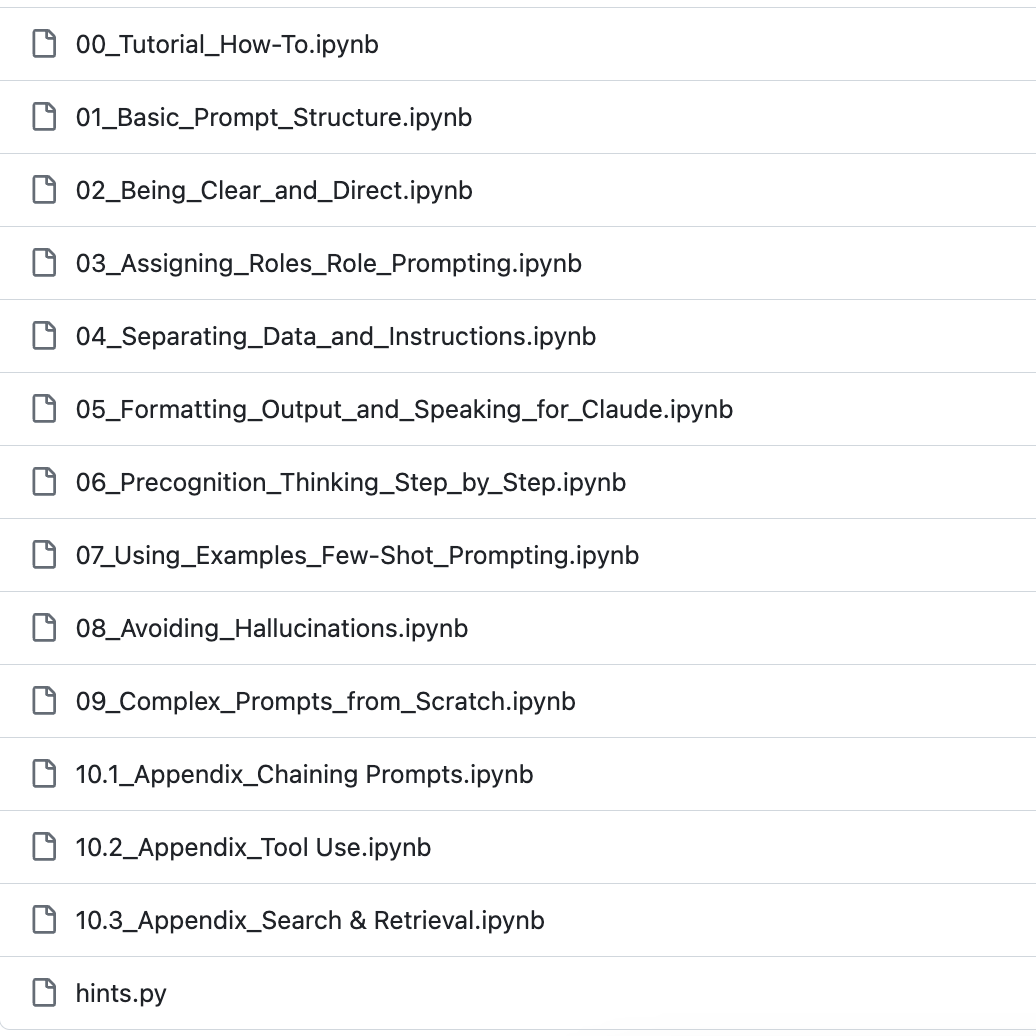
The interactive tutorial is over 9 chapters long and introduces all the prompting fundamentals—from how to structure your prompt to best practices for including examples.
If you've never heard of terms like CoT or few-shot, this is the place to start!
INTRODUCING MORPHEUS-1
The world’s first multi-modal generative ultrasonic transformer designed to induce and stabilize lucid dreams.
Available for beta users Spring 2024
@AulesYt Hier immer noch nicht, auch kein Mobilfunk. Jetzt schon 30 Stunden offline ohne jegliche Kommunikation von #smartmobil - wow @smartmobil_de warum sind da nicht wenigstens ein paar Worte auf der Website oder Twitter zur Info möglich?
@UpwardSpiralsCo@tinybuddha And: A lot of your criticisms and negative perceptions of people are often reflections of your own shortcomings that you’re unwilling to admit.
I find this fascinating. I assume part of the reason a bird can learn and use this interface is because touch devices generally simplify interaction: larger elements, direct manipulation, etc.