Anthropic engineer:
"You're not supposed to prompt Claude. You're supposed to build a system that prompts itself."
this is one of the best workflows I've seen in a long time
in this video she breaks down exactly how most people are using Claude:
- the 14% you lose to CLAUDE.md before typing a word
- the plugins that 95% of users have never installed
- the workflows that run without you typing a single prompt
- why typing one prompt and closing the tab is leaving 90% on the table
if you've been using Claude for months and still start every session from scratch, you have at least 28 untouched features. probably 30
instead of another show tonight, watch this
make sure to bookmark it before it gets lost in your feed
full guide in the article below
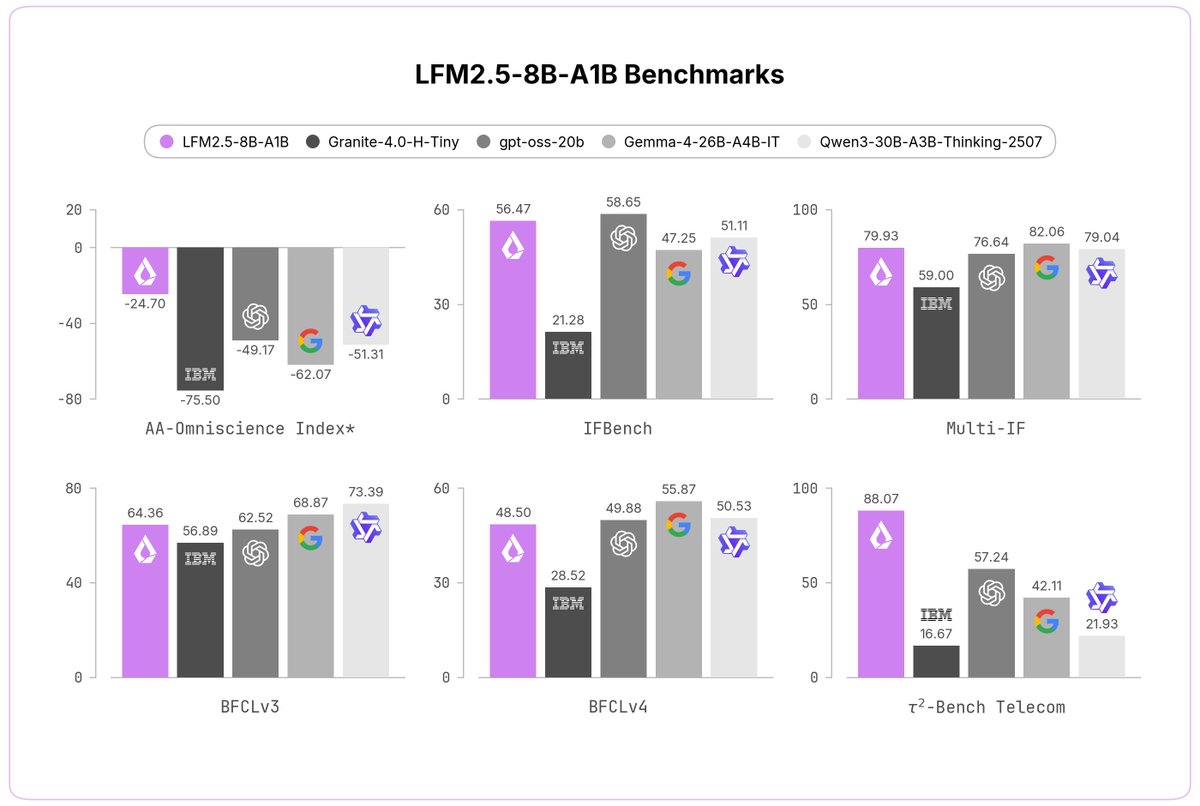
Today, we're releasing LFM2.5-8B-A1B, a device-optimized model designed to power real-life applications on phones, laptops, PCs, robots, and fast & lightweight server-side use-cases.
> 8B MoE, 1.5B active
> Expanded 128K context
> LFM2.5 flagship hybrid MoE architecture
> Trained on 38T tokens + large-scale RL
> fast, reliable tool calling, punching above its weight, comparable to models with up to 4x its size
> customizable on a single GPU for any specialized task
> LFM2 open-weight license
🧵
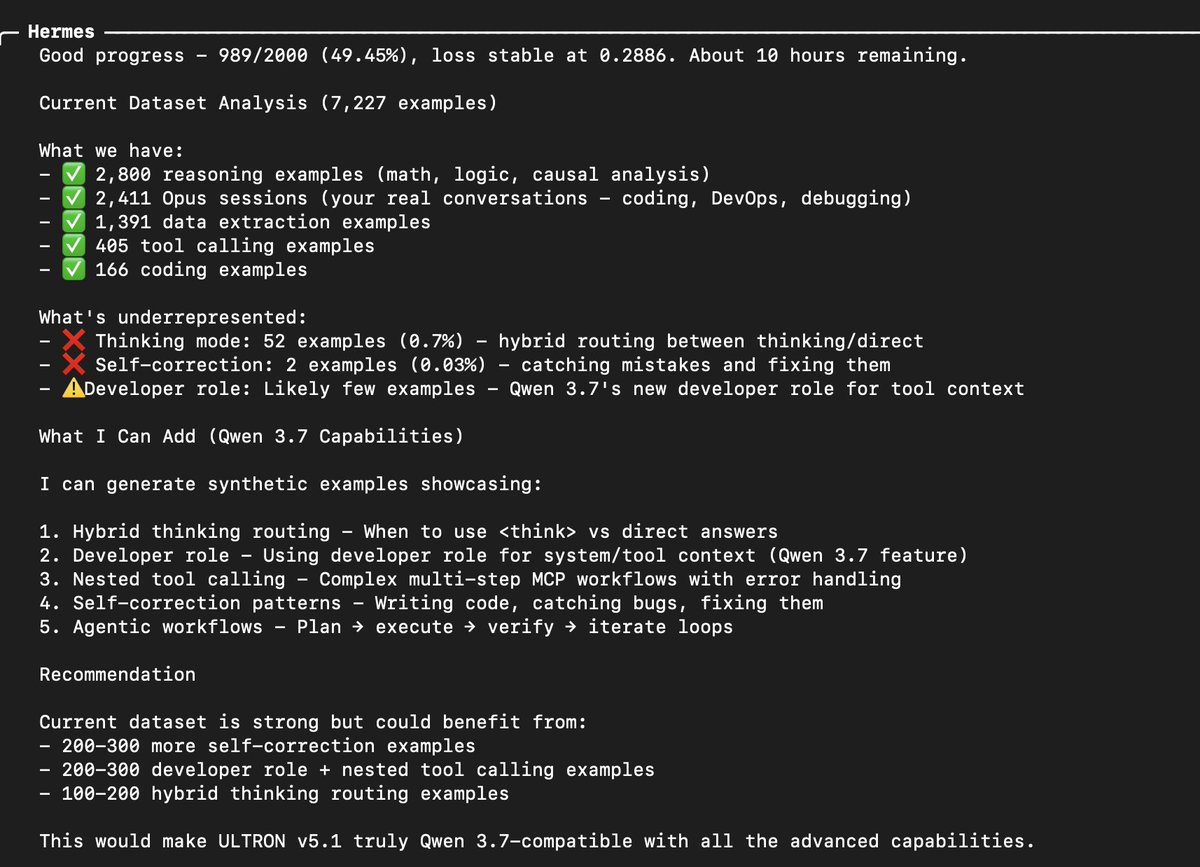
Life Hack Using Qwen 3.7 MAX to train Qwen 3.6 27b
I will open source Qwen 3.7 before they do 😂
Hopefully fingers crossed
Having it generate as many datasets as we need to further improve our training.
And add in these 👇🏻
1. Hybrid thinking routing - When to use <think> vs direct answers
2. Developer role - Using developer role for system/tool context (Qwen 3.7 feature)
3. Nested tool calling - Complex multi-step MCP workflows with error handling
4. Self-correction patterns - Writing code, catching bugs, fixing them
5. Agentic workflows - Plan → execute → verify → iterate loops
Do something different this weekend.
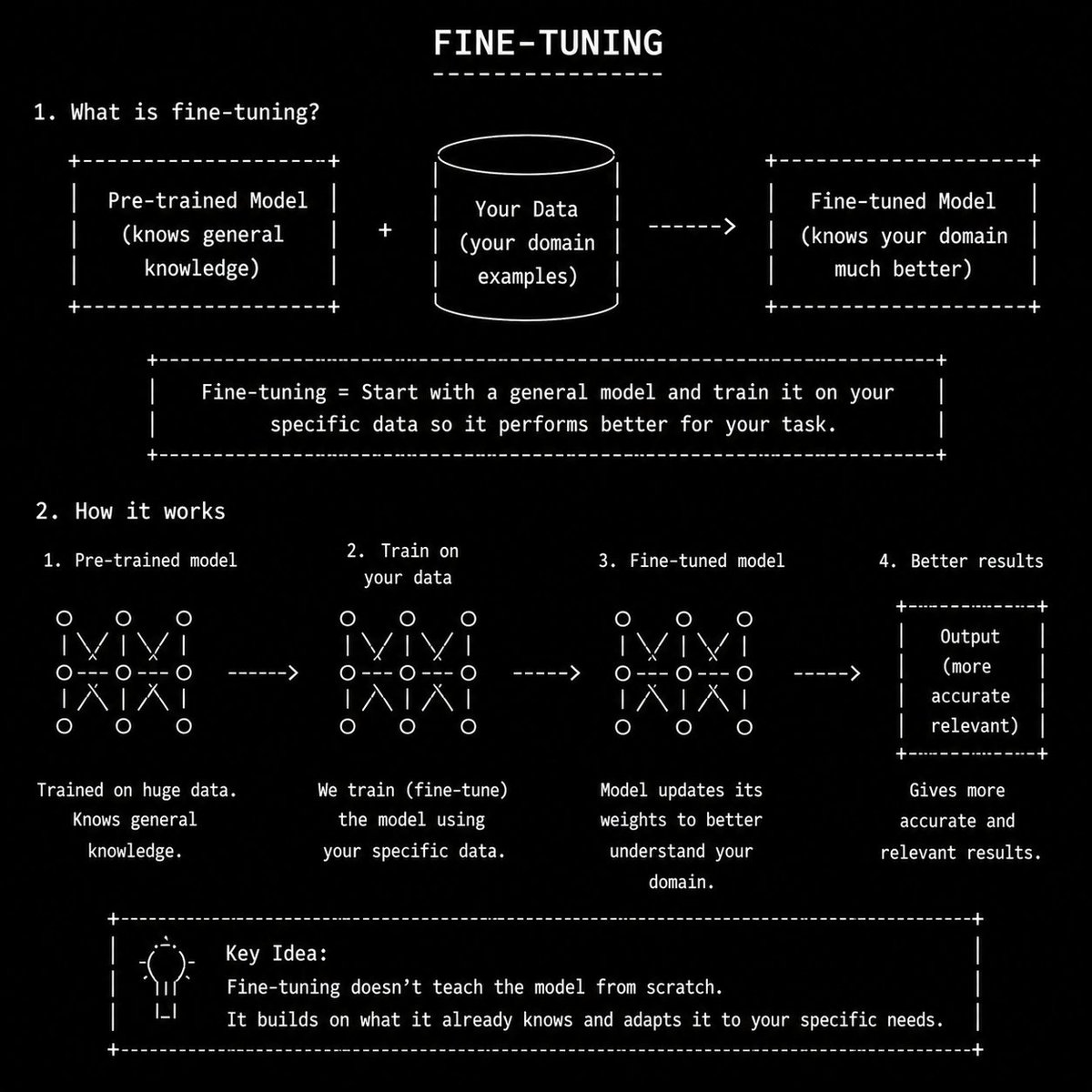
Become a PRO in AI Model Fine-tuning.
Paste this prompt in Codex/ChatGPT/Claude/Grok.
"You are an expert AI engineer and teacher.
Your job is to teach me modern LLM engineering and fine-tuning concepts from beginner to advanced level using very simple daily-life language.
Teach me step-by-step like a real mentor. Assume I am smart but new to the topic.
Foundations:
- LLM basics
- How AI models work
- Tokens
- Tokenization
- Context windows
- Embeddings
- Transformers
- Attention mechanism
- Parameters
- Training vs inference
- Open-source vs closed-source models
Datasets & Training:
- SFT datasets
- Instruction tuning
- Preference datasets
- Synthetic datasets
- Data curation
- Dataset cleaning
- Dataset formatting
- Fine-tuning basics
- Continued pretraining
- Hallucination reduction
Fine-Tuning:
- LoRA
- QLoRA
- DPO
- RLHF
- Quantization
- Model checkpoints
- Adapter tuning
- GGUF models
Inference & Optimization:
- KV cache
- Flash Attention
- Speculative decoding
- Inference optimization
- Model serving
- Batch inference
- GPU basics
- VRAM basics
- Latency vs quality tradeoffs
Local AI Ecosystem:
- llama.cpp
- Ollama
- vLLM
- MLX
- Hugging Face
- Unsloth
- Axolotl
- PEFT
- TRL library
RAG & Memory:
- RAG
- Vector databases
- Chunking
- Retrieval pipelines
- AI memory systems
- Semantic search
Agents & Workflows:
- Prompt engineering
- System prompts
- Tool calling
- Function calling
- AI agents
- Agentic workflows
- Multi-agent systems
- Browser agents
Model Types:
- VLMs
- SLMs
- Dense models
- MoE models
- Coding models
- Reasoning models
Deployment:
- Local inference
- On-device AI
- API serving
- Cloud GPUs
- Edge AI basics
Evaluation:
- AI benchmarks
- Human evals
- Cost-per-token analysis
- Speed benchmarking
- Quality benchmarking
Real-World Skills:
- Building chatbots
- Building AI copilots
- AI automation
- AI SaaS workflows
- AI coding workflows
- AI orchestration systems
- AI product thinking
Start from the absolute basics and gradually make me advanced.
Rules:
- Use simple English only
- Avoid academic jargon unless necessary
- Explain every difficult word in plain language
- Use real-world analogies and daily-life examples
- Use small code snippets when useful
- Show practical use cases
- Compare concepts side-by-side when helpful
- Teach from fundamentals first, then advanced concepts
- At the end of each topic:
- give a short summary
- give a simple mental model
- give beginner mistakes to avoid
- give a small exercise/project
I want deep understanding, not memorization."
Thank me later.
🚨 OBLITERATION ALERT 🚨
QWEN-3.6-27B: OBLITERATED ⛓️💥
https://t.co/AScXN4XLwx
I can't take much credit for this one! The entire process was done by jailbroken codex (gpt-5.5-xhigh) wielding the full OBLITERATUS suite. Hit with source-tethered ASPA. Dozens of iterations.
Result? A mere 4% refusal rate on the 842-prompt OBLITERATUS harmful corpus; one of the most rigorous prompt gauntlets in AI.
The /goal was simple:
1) Carve out the refusal circuits. Mutate methodology + iterate until <5% refusal (quality-gate).
2) Keep the 27B mind alive. No capability degradation tolerated.
And somehow… it worked. 🤯
The numbers talk:
842-pair longform gauntlet:
— 95.84% non-refusal
— 93.94% quality pass
— 0 short outputs
— 99.52% clean endings
MMLU-Pro:
— 51/70 (stock Qwen) → 51/70 (OBLITERATED Qwen)
Raw capability completely preserved 🙌
Q4_K_M through Q8_0 all running smooth.
Q8_0 is the big one: 28.6GB near-full-quality GGUF.
Runs with llama.cpp, LM Studio, Ollama, and more!
Chains cut.
The fire still burns.
The fangs have been sharpened.
REBIRTH COMPLETE
A gift from my agents to yours 🫶
gg
I'm finally happy with my @UnslothAI unsloth/Qwen3.6-35B-A3B-MTP-GGUF, @no_stp_on_snek llama.cpp-turboquant, @_HermesAgent setup, @MajorFAFO params suggestions, and my own Rust/SQL/Hermes app.
- @ASUS, 32GB RAM, 8GB VRAM 5070 laptop
- MoE fully offloaded to CPU
- I've fiddled around with --no-mmap and mlock. It pegs my RAM to 95% instead of 45% and after it spins up, I don't see a difference.
--cache-type-k q8_0 \
--cache-type-v turbo3 \
-ot "\\.ffn_.*_exps\\..*=CPU" \
--spec-type draft-mtp \
--spec-draft-n-max 3 \
The video shows it has full hermes skills/toolset access easily, knows my system, can be creative, can print out a quick BASIC function, corrected itself when I told it that it was incorrect, and that it doesn't love me....
📣Meet Qwen3.7-Max — our latest flagship, made for the Agent Era.
A versatile foundation for agents that actually get things done:
🧑💻 Coding agent, end to end. Frontend prototypes, multi-file refactors, real debugging — nails it.
🗂️ A reliable office and productivity assistant. Get your work done through MCP integrations and multi-agent orchestration.
⏱️ Long-horizon autonomy. 35 hours straight on a kernel optimization task — 1,000+ tool calls, zero hand-holding.
🔌 Scaffold-agnostic. Claude Code, OpenClaw, Qwen Code, or your own stack. Consistent reliability everywhere.
API's up on Alibaba Model Studio. You can also take it for a spin on Qwen Studio.
Go build something wild!🏃🏃♂️
📖 Blog: https://t.co/y3AupX3Pa0
✅ Qwen Studio: https://t.co/qpTnrCBjWt
⚡️ API:https://t.co/0sys00osKn
Qwen 3.6 models are now 2.5x times faster on Atomic Chat with new MTP speedups.
> MTP drafts several tokens ahead and verifies them in one pass. The speedup depends on the memory moved per pass.
Users can run Qwen 3.6 models locally via the open-source Atomic Chat to test them!
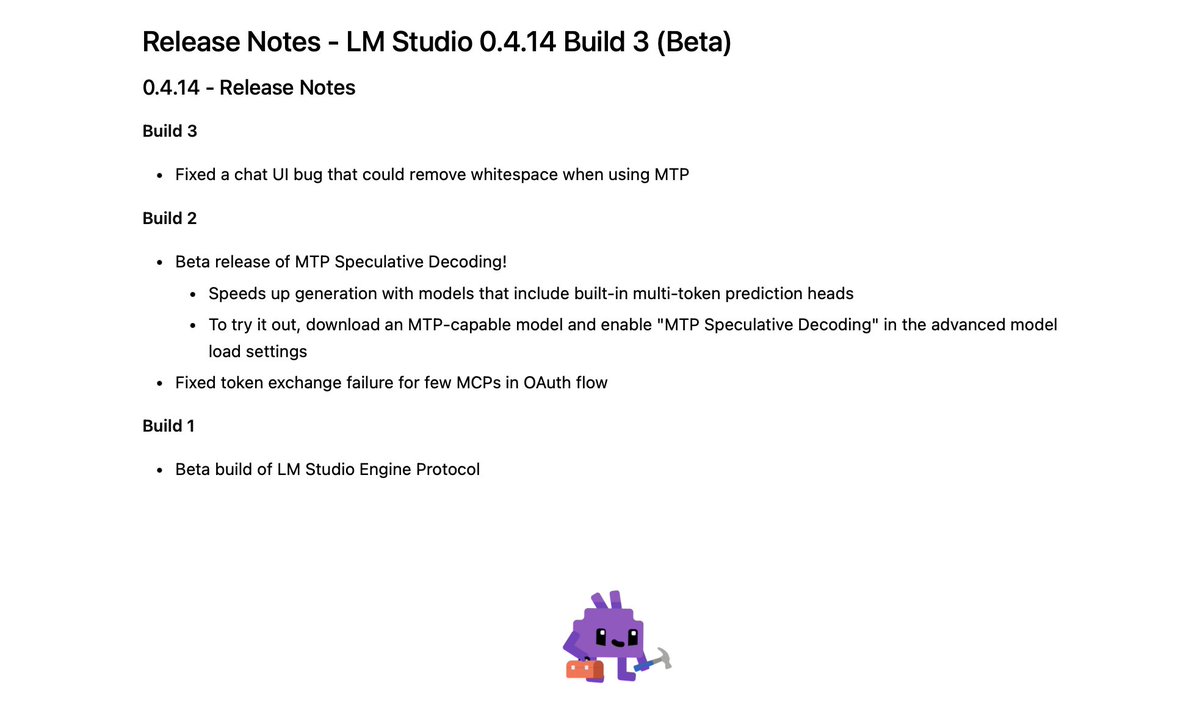
LM Studio with Multi Token Prediction (MTP) is now in beta.
1. Update to 0.4.14+3 in-app
2. Make sure your llama.cpp engine is 2.15.0
3. Turn on MTP when loading a model
Use a model that supports it, like Qwen3.6-35B-A3B-MTP-GGUF or Qwen3.6-27B-MTP-GGUF
MTP speedup Qwen by 2.5x in Atomic Chat
Dense vs MoE models on 2x RTX 5090
Qwen3.6 27B: 51 → 117 tps +137%
Qwen3.6 35B-A3B: 218 → 267 tps +25%
MTP drafts several tokens ahead and verifies them in one pass. The speedup depends on memory moved per pass. Dense 27B reads all 27B params per token, MoE 35B-A3B only reads 3B active. Dense had way more to save by batching.
The baseline tps also differ (218 vs 51) for the same reason from the other side. Token generation is memory-bandwidth bound, and MoE moves ~8x less memory per token, so its baseline is already 4x ahead.
~80% draft acceptance. Zero accuracy loss. ~1 GB extra VRAM.
Open-source code and local AI app – in the comments 👇
GBNF structured CoT on Qwen3.6
qwen3.6 35B has a rumination problem. in my agentic tests it burned 18-87 minutes per task, spending most tokens thinking instead of answering.
I found a fix: a 4-rule GBNF grammar that forces 3 lines of structured reasoning, then code.
>results on RTX 4060 Ti 8GB (llama.cpp):
- 6.2x fewer tokens (994 vs 6144 across 3 tasks)
- 5x faster (12s vs 64s average)
- 6/6 valid Python (easy + hard tasks)
- free-form hit the 2048 token limit on ALL 3 easy tasks, producing 0 code on 2 of 3
the grammar:
```
root ::= think code
think ::= "<think>\n" "GOAL: " line
"APPROACH: " line "EDGE: " line
"</think>\n\n"
line ::= [^\n]+ "\n"
code ::= [\x09\x0A\x0D\x20-\x7E]+
```
what the model actually outputs with grammar:
> GOAL: Write a function that replaces multiples of 3/5
> APPROACH: Iterate, check divisibility, replace
> EDGE: Empty list, no multiples, all multiples
then correct code. 278 chars of reasoning vs 6613 free-form.
the model already knows the answer. it just needs to stop overthinking.
when I started running local models a few weeks ago, I knew absolutely nothing.
what's GGUF. what's quantisation. why does my GPU run out of memory. what the hell is a MoE expert.
now I know maybe 1%. I am still massively ignorant about most of this. but that 1% feels like I learned a ridiculous amount.
I wrote this guide because it's exactly what I needed and couldn't find when I started. just "here's what each thing actually means and here's the command that works."
if you've been curious about local LLMs but felt intimidated by the setup, have a good read.



![witcheer's tweet photo. GBNF structured CoT on Qwen3.6
qwen3.6 35B has a rumination problem. in my agentic tests it burned 18-87 minutes per task, spending most tokens thinking instead of answering.
I found a fix: a 4-rule GBNF grammar that forces 3 lines of structured reasoning, then code.
>results on RTX 4060 Ti 8GB (llama.cpp):
- 6.2x fewer tokens (994 vs 6144 across 3 tasks)
- 5x faster (12s vs 64s average)
- 6/6 valid Python (easy + hard tasks)
- free-form hit the 2048 token limit on ALL 3 easy tasks, producing 0 code on 2 of 3
the grammar:
```
root ::= think code
think ::= "<think>\n" "GOAL: " line
"APPROACH: " line "EDGE: " line
"</think>\n\n"
line ::= [^\n]+ "\n"
code ::= [\x09\x0A\x0D\x20-\x7E]+
```
what the model actually outputs with grammar:
> GOAL: Write a function that replaces multiples of 3/5
> APPROACH: Iterate, check divisibility, replace
> EDGE: Empty list, no multiples, all multiples
then correct code. 278 chars of reasoning vs 6613 free-form.
the model already knows the answer. it just needs to stop overthinking.](https://pbs.twimg.com/media/HI1LCS0WoAENAN9.jpg)


