@karpathy Thanks for sharing, I wonder you do not use the ‘Canvas’ feature for text editing in ChatGPT. I hope a feature like that will be integrated into all text based applications like email, it’s so useful but you do not even mention it.
What’s your thoughts on this?
@AravSrinivas Working on an FP&A Analyst and would love to have some credits, I am also interested in resources to learn more about this, it is the future
I was sceptical of this so I did 2 things:
1. Ask Grok to provide an evaluation model to score disinformation spreaders
2. Provide a list based on the evaluation
I got a scoring system and results, interestingly it is not correct either, follower count is the easiest metrics to verify it is wrong as well.
How could ai judge truth from lies if it can’t even get objective facts right?
What does this mean for AI in general?
@OneManCircus87 Humans are following the same pattern. It’s our choices in food and exercise. I observe little muscle and lots of fat when looking around
We’re starting to roll out the ability to search through your chat history on ChatGPT web.
Now you can quickly & easily bring up a chat to reference, or pick up a chat where you left off.
This summarisation prompt sounds like a good approach!
However, when testing with my own documents, I’ve noticed something interesting.
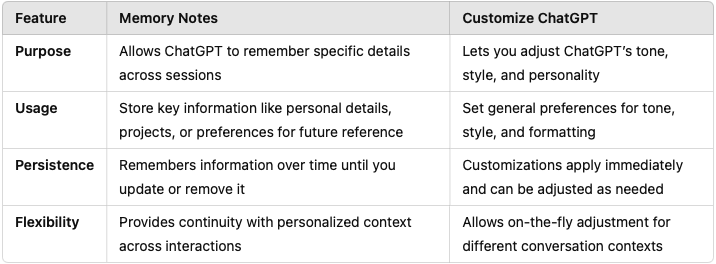
By customising ChatGPT on tone and format, I actually get a much better result by simply entering "summarise this text."
Using the below prompt does give me specific answers to key questions, which helps me quickly understand the text, but it's not quite a summary—it's something different.
What would you call this approach? It feels more like a detailed analysis rather than a concise summary.
Good summarization prompt
---
1.) Analyze the input text and generate 5 essential questions that, when answered, capture the main points and core meaning of the text.
2.) When formulating your questions:
a. Address the central theme or argument
b. Identify key supporting ideas
c. Highlight important facts or evidence
d. Reveal the author's purpose or perspective
e. Explore any significant implications or conclusions.
3.) Answer all of your generated questions one-by-one in detail.
@arianevans@emollick Love that, Arian. Happy to share tips on non-tech AI training.
I focus on practical, real-world uses that show immediate value, like automating tasks or streamlining communication.
It helps people see AI as a tool, not just tech.
Many companies are far from ready for the AI revolution. Board members often have limited understanding but are expected to lead with confidence. What does this mean in practice?
1.Develop clear AI policies
2.Invest in staff training
3.Prioritize data security
4.Stay agile—AI is evolving fast
5.Encourage experimentation with AI
Boards need to step up—AI isn’t just an IT issue; it’s a business transformation
I train non-IT staff on AI in Switzerland, and even a two-hour intro shows a remarkable productivity boost.
Many initially approach AI like Google, leading to underwhelming results. But with just a few clear instructions, they start to see where AI is heading, realize how it will change our lives, and quickly adopt it in their daily routines.
They also begin to recognize that much of the media they consume is already AI-generated.