Most developers know these terms…
But many don't know when to use each one.
🍪 Cookies → Small data sent with every HTTP
request
🗂️ Session → User state stored securely on the
server
💾 LocalStorage → Persistent client-side storage
⚡ SessionStorage → Temporary storage for a single browser tab
Rule of thumb:
🔐 Login session → Session or secure HttpOnly cookie
🎨 Theme preference → LocalStorage
📝 Multi-step form → SessionStorage
🍪 Remember user preferences → Cookies
One wrong storage choice can create unnecessary security risks.
Save this cheat sheet for your next interview or project. 👇
Hashing ≠ Encryption ≠ Decryption ≠ Encoding
I still see these terms used interchangeably, but they solve very different problems.
✅ Hashing → One-way fingerprint (password storage, integrity checks)
✅ Encryption → Locks data with a key to keep it secret
✅ Decryption → Unlocks encrypted data using the correct key
✅ Encoding → Changes data format for compatibility, not security
⚠️ Base64 is encoding, not encryption.
If you are building APIs, authentication systems, or secure applications, knowing the difference is essential.
Saved this as a quick handwritten cheat sheet for developers. 👇
🎯 Some of the best engineers at top companies were hired without a single certification.
No CS degree. No stack of badges. Just skills.
So here's the question I get all the time:
"Do I need certifications or a degree to break into tech?"
In my opinion → you don't.
Certificates can help. They give you structure, a learning path, and proof that you put in the effort.
But they are not a must-have to land the job.
📌 Here's what actually gets you hired:
→ Can you solve real problems?
→ Can you write clean, working code?
→ Can you explain your thinking clearly?
→ Do you have good soft skills?
→ Do you keep learning when nobody forces you to?
A certificate shows that you passed a test.
It does not show you can ship a feature, debug a production issue, or work well with a team.
Certifications are a nice bonus, they can open a door or fill a gap on your resume.
But the skills behind them are what keep you in the room.
👉 Do you agree that during interviews, you should not ask a candidate about a certificate?
——
♻️ Repost to help others break into tech the right way
➕ Follow me ( @AntonMartyniuk ) to improve your .NET and Architecture Skills
System Design Series - Day 30/30
Deployment Strategies That Prevent Disasters
The most dangerous moment in engineering is deploying to production.
Most junior engineers know one strategy: push it and hope.
Here are 5 deployment strategies that separate junior from senior engineers 👇
1. Strategy 1: Rolling Deployment
The most common and safest starting point.
Instead of updating all servers at once, update one server at a time.
- Server 1: Updated and healthy
- Server 2: Updated and healthy
- Server 3: Updated and healthy
If Server 2 fails health check:
Stop deployment.
Only Server 1 and 2 are affected.
Roll back Server 2.
Server 3 stays on the old version.
Zero total downtime.
Built-in safety net.
2. Strategy 2: Blue-Green Deployment
Run two identical production environments.
- Blue: Current live version (serving all traffic)
- Green: New version (deployed but receiving zero traffic)
Steps:
1. Deploy new version to Green
2. Run full test suite on Green
3. Switch traffic from Blue to Green (instant)
4. If problems: Switch back to Blue (instant rollback)
Zero downtime.
Instant rollback.
Gold standard for zero-risk deployments.
Cost: Double the infrastructure (worth it for critical systems).
3. Strategy 3: Canary Deployment
Named after canary birds in coal mines.
Instead of switching all traffic at once:
- Deploy new version
- Send 5% of traffic to new version
- Monitor for 30 minutes
- If stable: Increase to 20% → 50% → 100%
If problems at any stage: Route 100% back to old version.
Only 5% of users are ever affected.
Used by Netflix, Google, and Amazon for every major release.
4. Strategy 4: Feature Flags
Ship code without activating features.
Deploy the new checkout flow to production.
Feature flag is OFF.
- Internal team: ON for employees only
- Beta users: ON for 10% of users
- Full rollout: ON for everyone
Problems during rollout?
Turn the flag OFF.
Instant rollback without redeploying.
Tools: LaunchDarkly, Unleash (open source), or simple database boolean.
Separates deployment from release.
5. Strategy 5: Database Migration Safety
The deployment strategy nobody teaches but everyone needs.
You cannot change database schema and deploy code simultaneously.
Old code running while migration runs = broken queries.
The safe pattern (backwards compatible migrations):
- Week 1: Add new column (nullable, old code ignores it)
- Week 2: Deploy new code (uses new column if present)
- Week 3: Backfill data in new column
- Week 4: Remove old column
Never break existing queries during migration.
This is why experienced engineers fear schema changes more than new features.
Which deployment strategy does your team currently use?
Reply with the number (1-5).
This concludes the System Design Series.
Thank you for following along for 30 days.
#SystemDesign #Deployment #Backend
Aprende Clean Architecture aplicado al Frontend
✓ Usa casos de uso, servicios y repositorios
✓ Cómo se organizan las distintas capas
✓ Nada de clases, todo con funciones
✓ Implementado con TypeScript
https://t.co/AbPeGPp88y
Two-factor authentication is easy to get mostly right.
And dangerous to get slightly wrong.
The basic idea is simple:
- Generate a TOTP secret
- Show a QR code
- User scans it with an authenticator app
- User enters a 6-digit code
- Server validates the code
But the details matter.
The first mistake is enabling 2FA too early.
If you enable it before the user confirms their first code, you can lock them out of their own account.
The correct setup flow is:
1. Generate a pending secret
2. Show the QR code
3. Ask the user to enter the first code
4. Validate the code
5. Only then activate 2FA
6. Generate recovery codes
The second mistake is issuing a full access token after password login.
If the user has 2FA enabled, the password should only get them a short-lived limited token.
That token should only allow one thing:
Validate the 2FA code.
Only after the TOTP code is valid should you issue the real access token.
And then there are the security details people often skip:
- Encrypt TOTP secrets at rest
- Prevent code reuse within the verification window
- Rate limit failed attempts
- Hash recovery codes before storing them
- Show recovery codes only once
2FA is not just a QR code screen.
It’s a full authentication flow.
I wrote a detailed walkthrough for implementing 2FA in ASPNET Core with TOTP, QR codes, recovery codes, and the correct login/setup flow: https://t.co/lHkXhtQxc8
Connection pooling in Postgres.
Postgres uses a process-per-connection model
not thread-per-connection.
That means every connection is expensive :
memory, file descriptors, process overhead.
Now the connection math matters.
A default pool of 100 connections is roughly ~1GB of RAM before queries even run.
4 app servers x 100 connections = 400 connections.
Postgres defaults to max_connections = 100.
Now the database starts refusing connections.
The fix usually isn’t “add more connections.”
It’s a connection pooler.
PgBouncer in transaction mode is the standard answer.
Apps connect to PgBouncer (cheap).
PgBouncer multiplexes them onto a much smaller pool of real Postgres connections (expensive).
1,000 app connections can fan into 20 actual DB connections.
Before reaching for it, read the caveats.
Prepared statements, session-level state, advisory locks.. all behave differently.
If your scaling plan is just increasing max_connections, you probably don’t need a bigger database.
You need PgBouncer.
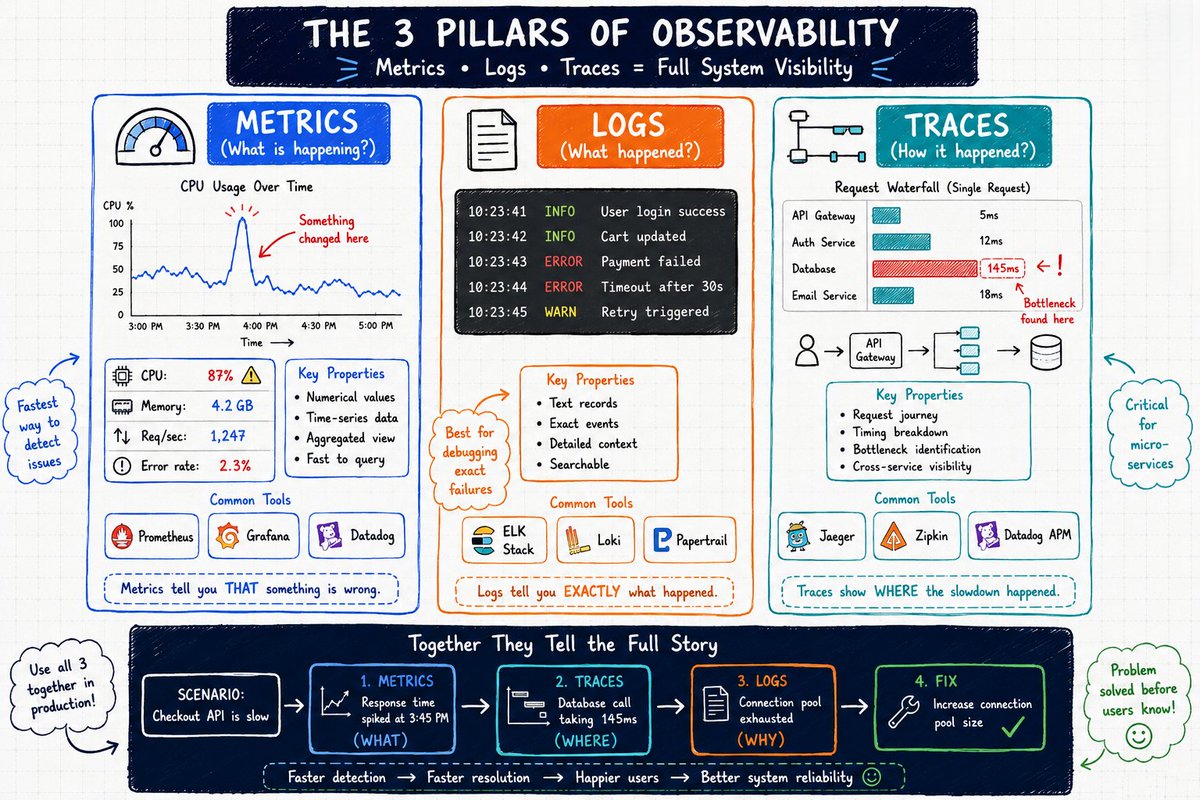
System Design Series - Day 19/30
The 3 Pillars of Observability
Most junior engineers think
monitoring = “is the server up?”
That’s like a doctor only checking if the patient is breathing.
Real observability has 3 pillars.
Mastering them will make you stand out in every senior interview.
Thread 👇
🔒 Google quiere apps Android más seguras
Google ha anunciado nuevas herramientas y mejoras para facilitar la publicación de apps más seguras en Google Play.
► Nuevos checks de seguridad
► Mejor protección contra fraude y abuso
► Más herramientas para developers
► Publicar apps seguras será más sencillo
👇🏻👇🏻👇🏻
→ https://t.co/AiTr3jEsBn ←
System Design Series - Day 18/30
Why Monitoring Matters (The Hard Truth)
Your app crashed 2 hours ago.
You found out when your friend texted:
“Bro your website is down 💀”
This is embarrassing.
This is also how 90% of early-career engineers discover problems.
The hard truth:
If your users find bugs before you do, you don’t have a product.
You have a time bomb.
What monitoring actually is:
Imagine hiring a 24/7 security guard for your house.
Without monitoring → Guard shows up after the robbery and says “Sir, your house was broken into.”
With monitoring → Guard sees suspicious activity at the door, alerts you immediately, and you prevent the robbery.
The 3 things every app must track:
1. Is it UP?
Basic health check every 30 seconds.
Alert instantly if down.
2. Is it FAST?
Track response times.
Users leave after 3 seconds of delay.
3. Is it CORRECT?
Error rate above 1%? Something is broken.
Real example:
Junior engineer ships a new feature on Friday evening and goes home happy.
Feature has a memory leak.
By Saturday morning: memory at 98%, response time 8 seconds, error rate 45%, users leaving in droves.
Without monitoring → Discovers it Monday morning from angry messages.
With monitoring → Alert fires at 2% memory spike. Fixed in 30 minutes on Saturday night.
The 3 AM difference:
- Bad monitoring = You sleep through disaster and wake up to catastrophe.
- Good monitoring = You wake up for 15 minutes, fix it, and go back to sleep.
What to monitor:
- Uptime
- Response time
- Error rate
- CPU usage
- Memory usage
- Database query performance
Free tools you can set up today (2 hours total):
- UptimeRobot → checks if your site is alive every 5 minutes
- Sentry → catches every error with full context
- Grafana + Prometheus → beautiful metrics dashboard
You cannot fix what you cannot see.
Set up monitoring before you need it.
Not after your friend texts you that your app is down.
Tomorrow: Observability deep dive.
Have you ever discovered a production issue from a user or friend instead of your own alerts?
Drop your story below 👇