🚨 UPDATE: Mini Shai-Hulud has crossed from @npmjs into @pypi and is still spreading.
Newly confirmed compromised artifacts:
@opensearch-project/opensearch: 3.5.3, 3.6.2, 3.7.0, 3.8.0 (1.3M weekly downloads)
mistralai: 2.4.6 on PyPI
guardrails-ai: 0.10.1 on PyPI
additional @squawk/* packages on npm
guardrails-ai 0.10.1 executes malicious code on import. On Linux, it downloads git-tanstack[.]com/transformers.pyz, writes it to /tmp/transformers.pyz, and runs it with python3 without integrity verification.
The git-tanstack.com domain displayed a message signed “With Love TeamPCP,” along with: “We've been online over 2 hours now stealing creds
Regardless I just came to say hello :^)”
The page also linked to a YouTube video and you can probably guess which one.
🧬Collinearity Analysis is here in #gbdraw v0.11.0! You can easily detect and visualize synteny and collinearity blocks using LOSATP. You can instantly align the entire diagram based on a shared ortholog!
Try it now: https://t.co/ahqoRxbDHT
#bioinformatics#genomics#microbiology
Claude Code ships with 5 architectural layers most engineers never open.
Not features. Not settings. Layers — each solving a distinct problem that LLMs alone can't solve. And four of them have nothing to do with prompting.
Here's the full Agent Development Kit:
Layer 1 — CLAUDE.md → The Memory Layer
Architecture rules, naming conventions, test expectations, repo map. Always loaded. Always active.
Two scopes:
• ~/.claude/CLAUDE.md → global
• .claude/CLAUDE.md → project
This isn't context you paste in before every session. It's context that never needs repeating. The agent's constitution.
Layer 2 — Skills → The Knowledge Layer
Each SKILL.md carries a description. Claude matches it at runtime and forks the skill into an isolated subagent. On-demand, never always-on.
Task-specific knowledge without inflating your main context window. Modular by design.
Layer 3 — Hooks → The Guardrail Layer
PreToolUse → PostToolUse → SessionStart → Stop → SubagentStop
This is the layer most teams skip. And the one they regret skipping first.
Hooks are NOT AI. They're deterministic event-driven shell commands.
• Auto-lint on every Write
• Hard-block on rm -rf
• Slack notification on Stop
Event fires → Matcher checks → Command runs
Quality enforced at the infrastructure level. Not the prompt level.
Layer 4 — Subagents → The Delegation Layer
Each subagent gets its own context window, model, tools, and permissions.
Main agent delegates down. Receives results up. That's it.
No infinite recursion — subagents can't spawn subagents. Main context stays clean. Hard boundaries by design.
Layer 5 — Plugins → The Distribution Layer
Bundle your skills + agents + hooks + commands into a plugin. One install. Whole team inherits the behavior.
Think npm packages — but for what your agent knows how to do.
Wrapping everything:
→ MCP Servers on the left (GitHub, databases, APIs, custom integrations)
→ Agent Teams on the right (parallel execution, message passing, shared permissions)
The 5-layer stack in one line:
CLAUDE.md sets rules → Skills provide expertise → Hooks enforce quality → Subagents delegate work → Plugins distribute to the team
Most production failures in agentic systems trace back to one missing layer.
Which one is the gap in your current setup?
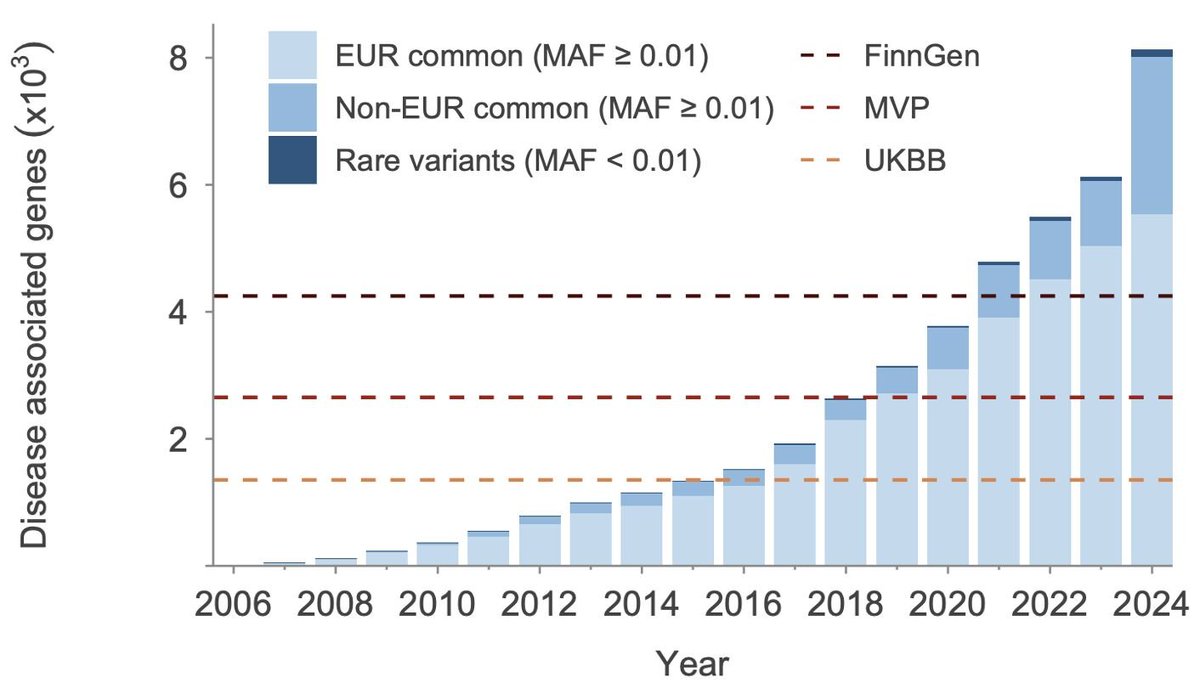
This new preprint by Open Targets is one of the most comprehensive efforts to date to connect the dots across all available (>100K) GWAS datasets that have been generated over the last two decades👇
Claude Code leaked their source map, effectively giving you a look into the codebase.
I immediately went for the one thing that mattered: spinner verbs
There are 187
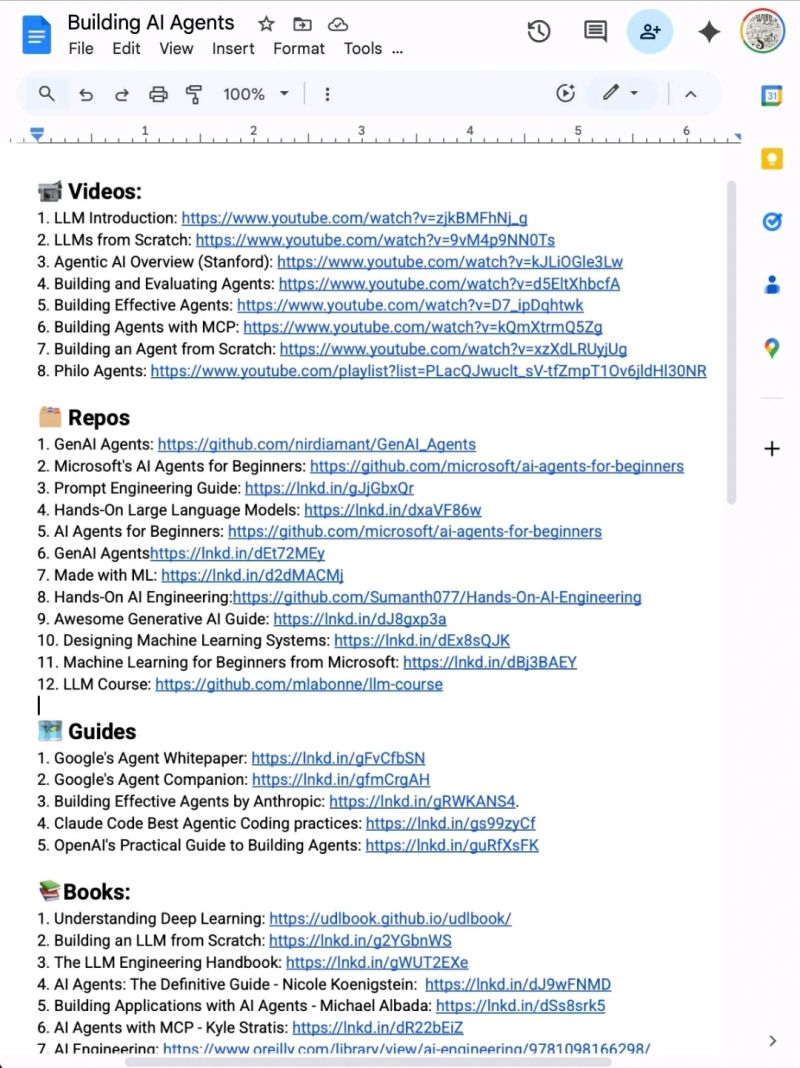
Stop wasting hours trying to learn AI. 📘📚
I have already done it for you.
With one list. Zero confusion. And no fluff
📹 Videos:
1. LLM Introduction: https://t.co/MfZHtEFSZC
2. LLMs from Scratch: https://t.co/kfPUVOpIxp
3. Agentic AI Overview (Stanford): https://t.co/YwfdVehhsO
4. Building and Evaluating Agents: https://t.co/6S8FGJRYbE
5. Building Effective Agents: https://t.co/pDTKM04SbE
6. Building Agents with MCP: https://t.co/5tXUZo9Xri
7. Building an Agent from Scratch: https://t.co/BtDWY0u0Du
8. Philo Agents: https://t.co/A4bj3gDOAg
🗂️ Repos
1. GenAI Agents: https://t.co/XbindjiOGu
2. Microsoft's AI Agents for Beginners: https://t.co/6Yaapil6AA
3. Prompt Engineering Guide: https://t.co/9JyzmoITLO
4. Hands-On Large Language Models: https://t.co/cuFS03HiXZ
5. AI Agents for Beginners: https://t.co/6Yaapil6AA
6. GenAI Agentshttps://lnkd.in/dEt72MEy
7. Made with ML: https://t.co/vDNcCdZ8Ni
8. Hands-On AI Engineering:https://t.co/GZs4q8rSYc
9. Awesome Generative AI Guide: https://t.co/EdJ1eGDF0m
10. Designing Machine Learning Systems: https://t.co/Nf1szfXGWK
11. Machine Learning for Beginners from Microsoft: https://t.co/gEdhvs78o3
12. LLM Course: https://t.co/4ISw9XBGWe
🗺️ Guides
1. Google's Agent Whitepaper: https://t.co/fQ64JT8Hru
2. Google's Agent Companion: https://t.co/NHt05sw0Sx
3. Building Effective Agents by Anthropic: https://t.co/VjaqhSl1jz.
4. Claude Code Best Agentic Coding practices: https://t.co/yBGMtyeWTg
5. OpenAI's Practical Guide to Building Agents: https://t.co/kmqQgcvvwL
📚Books:
1. Understanding Deep Learning: https://t.co/cgSSJ1U1d6
2. Building an LLM from Scratch: https://t.co/IUVA1tpJJ2
3. The LLM Engineering Handbook: https://t.co/G5HGLfTTq9
4. AI Agents: The Definitive Guide - Nicole Koenigstein: https://t.co/kehojr3v2p
5. Building Applications with AI Agents - Michael Albada: https://t.co/QHaJEitMMN
6. AI Agents with MCP - Kyle Stratis: https://t.co/POn6waJ2w7
7. AI Engineering: https://t.co/rU9HES8VEU
📜 Papers
1. ReAct: https://t.co/q4zflGWTVT
2. Generative Agents: https://t.co/GK5QswcPQ2.
3. Toolformer: https://t.co/mhDey5PGJL
4. Chain-of-Thought Prompting: https://t.co/3kwFbejFqA.
🧑🏫 Courses:
1. HuggingFace's Agent Course: https://t.co/jIyZzuScoQ
2. MCP with Anthropic: https://t.co/ph5cM4zgx1
3. Building Vector Databases with Pinecone: https://t.co/VtA6lSCaQd
4. Vector Databases from Embeddings to Apps: https://t.co/mr9rePzbc3
5. Agent Memory: https://t.co/hjWM88dY2h
Repost for your network ♻️
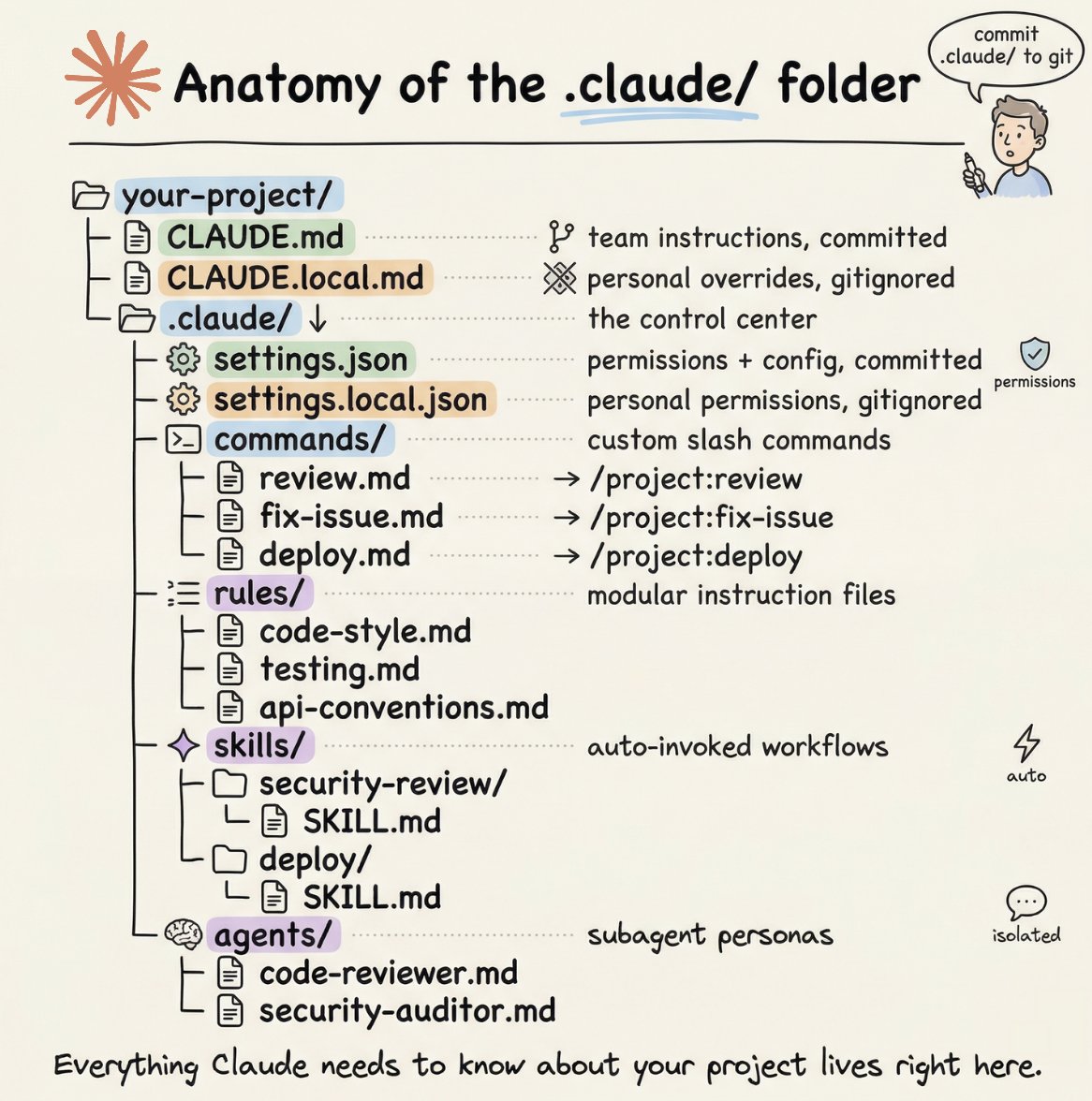
How to setup your Claude code project?
TL;DR
Most developers skip the setup and just start prompting. That's the mistake.
A proper Claude Code project lives inside a .𝗰𝗹𝗮𝘂𝗱𝗲/ folder. Start with 𝗖𝗟𝗔𝗨𝗗𝗘.𝗺𝗱 as Claude's instruction manual. Split it into a 𝗿𝘂𝗹𝗲𝘀/ folder as it grows. Add 𝗰𝗼𝗺𝗺𝗮𝗻𝗱𝘀/ for repeatable workflows, 𝘀𝗸𝗶𝗹𝗹𝘀/ for context-triggered automation, and 𝗮𝗴𝗲𝗻𝘁𝘀/ for isolated subagents. Lock down permissions in 𝘀𝗲𝘁𝘁𝗶𝗻𝗴𝘀.𝗷𝘀𝗼𝗻.
There are two .𝗰𝗹𝗮𝘂𝗱𝗲/ folders: one committed with your repo, one global at ~/.𝗰𝗹𝗮𝘂𝗱𝗲/ for personal preferences and auto-memory across projects.
The .𝗰𝗹𝗮𝘂𝗱𝗲/ folder is infrastructure. Treat it like one.
The article below is a complete guide to 𝗖𝗟𝗔𝗨𝗗𝗘.𝗺𝗱, custom commands, skills, agents, and permissions, and how to set them up properly.
We are also releasing self-contained lecture notes that explain flow matching and diffusion models from scratch. This goes from "zero" to the state-of-the-art in modern Generative AI.
📖 Read the notes here: https://t.co/RULWDgn9pm
Joint work with @EErives40101.
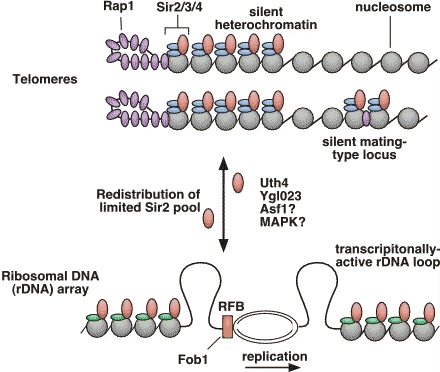
This is where rDNA silencing becomes crucial.
Sir2, the OG Sirtuin, is a chromatin silencing protein that controls the epigenome and suppresses recombination at rDNA. More silencing, less DNA recombination, fewer ERCs, longer lifespan
Around the same time, Dan Gottschling’s lab showed that aging yeast cells lose transcriptional silencing and accumulate genomic instability.
Together, these studies revealed that genome instability at repetitive DNA is a fundamental aging driver
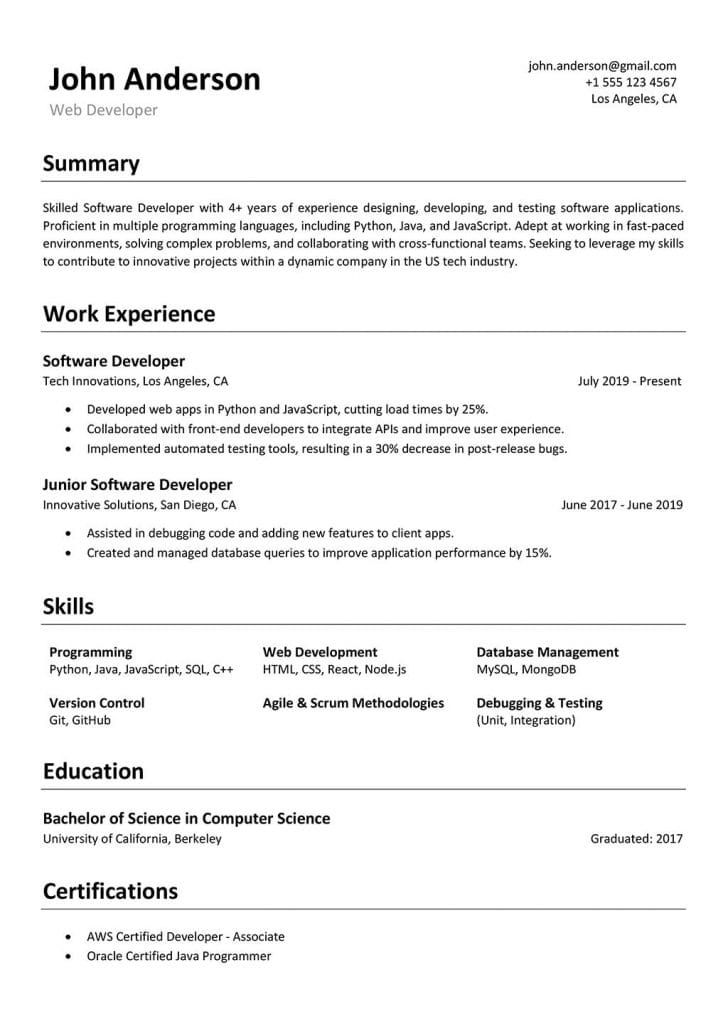
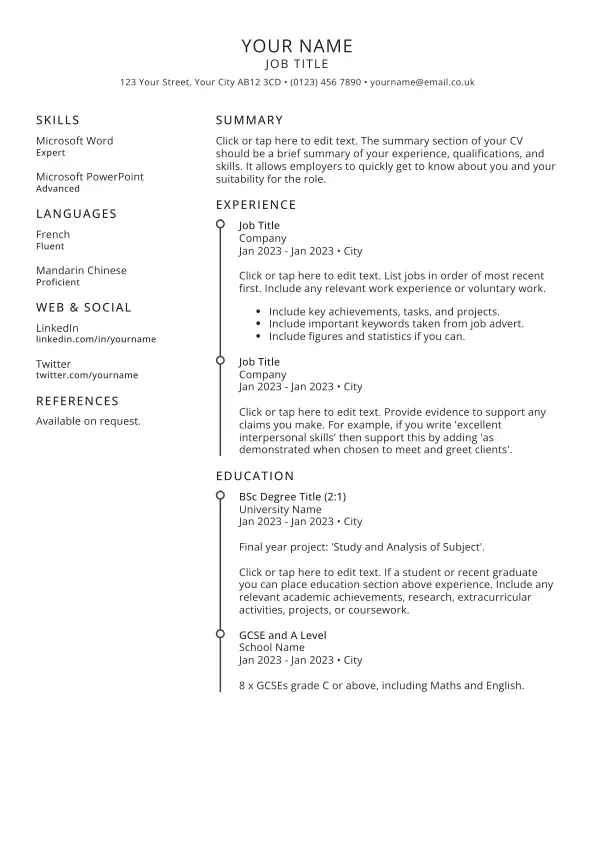
🚨BREAKING: Claude can now write your entire job application like a top recruiter.
Here are 10 prompts that turn a job description into a tailored CV, cover letter, and interview prep guide in under 5 minutes (Save this)
This is one of those “this changes everything” moments.
Microsoft just broke a core assumption in AI.
You needed GPUs to run big models.
Not anymore.
They open-sourced BitNet,
an inference framework that runs a 100B parameter LLM on a single CPU 🤯
No GPU
No cloud
No expensive setup
Just your laptop.
Here’s the trick:
Instead of 16-bit or 32-bit weights...
BitNet uses 1.58 bits
Yes, seriously.
Weights = -1, 0, +1
That’s it.
No heavy matrix math.
Just simple integer ops your CPU already handles easily.
And the results?
• 100B model → 5–7 tokens/sec on CPU
• Up to 6x faster than llama.cpp
• 82% less energy usage
• Runs on x86 + ARM (MacBook)
• Memory reduced by 16–32x
But here’s the insane part:
👉 Accuracy barely drops.
Their model (BitNet b1.58 2B4T) competes with full-precision models trained the “normal” way.
So what does this unlock?
• Fully offline AI (privacy ↑)
• No more API bills
• AI on phones, IoT, edge devices
• Access in low-internet regions
We’re watching AI move from
“cloud-only” → “runs anywhere”
The GPU monopoly just got… shaky.
And this is open source.
Let that sink in. 🚀
🚀MIT Flow Matching and Diffusion Lecture 2026 Released (https://t.co/bKgs2wghvY)!
We just released our new MIT 2026 course on flow matching and diffusion models! We teach the full stack of modern AI image, video, protein generators - theory and practice. We include:
📺 Videos: Step-by-step derivations.
📝 Notes: Mathematically self-contained lecture notes
💻 Coding: Hands-on exercises for every component
We fully improved last years’ iteration and added new topics: latent spaces, diffusion transformers, building language models with discrete diffusion models.
Everything is available here: https://t.co/bKgs2wghvY
A huge thanks to Tommi Jaakkola for his support in making this class possible and Ashay Athalye (MIT SOUL) for the incredible production! Was fun to do this with @RShprints!
#MachineLearning #GenerativeAI #MIT #DiffusionModels #AI


![benagen3571's tweet photo. [novel tool] Dogme: a nextflow pipeline for reprocessing nanopore RNA and DNA modifications. #nanopore #DNA #RNA https://t.co/2mZYjxgW5u https://t.co/8xFFUh1ZTK](https://pbs.twimg.com/media/HD0X4K7WQAEzWbl.jpg)




![SocketSecurity's tweet photo. 🚨 UPDATE: Mini Shai-Hulud has crossed from @npmjs into @pypi and is still spreading.
Newly confirmed compromised artifacts:
@opensearch-project/opensearch: 3.5.3, 3.6.2, 3.7.0, 3.8.0 (1.3M weekly downloads)
mistralai: 2.4.6 on PyPI
guardrails-ai: 0.10.1 on PyPI
additional @squawk/* packages on npm
guardrails-ai 0.10.1 executes malicious code on import. On Linux, it downloads git-tanstack[.]com/transformers.pyz, writes it to /tmp/transformers.pyz, and runs it with python3 without integrity verification.
The git-tanstack.com domain displayed a message signed “With Love TeamPCP,” along with: “We've been online over 2 hours now stealing creds
Regardless I just came to say hello :^)”
The page also linked to a YouTube video and you can probably guess which one.](https://pbs.twimg.com/media/HIFxSRYXgAA6u3V.jpg)