Google just dropped a 1-hour course on Graph Engineering: from agents to full automation
00:00 – Build your first AI agent
08:24 – Build agent memory
28:34 – Agentic loops
40:04 – How to build MCP
1:00:22 – Graph engineering
This 1-hour watch replaces any $500 course you could pay for.
Watch it, then try your first graph with the step-by-step guide below
Boris Cherny recorded this internally for his team. It was never meant to go public.
He built Claude Code and shows how to go from idea to production-ready product in just 30 minutes.
No script. No cuts. He just talks and types.
This is the most practical video on Claude Code I’ve seen.
Watch the video, then read about loops below.
- Drafted a blog post
- Used an LLM to meticulously improve the argument over 4 hours.
- Wow, feeling great, it’s so convincing!
- Fun idea let’s ask it to argue the opposite.
- LLM demolishes the entire argument and convinces me that the opposite is in fact true.
- lol
The LLMs may elicit an opinion when asked but are extremely competent in arguing almost any direction. This is actually super useful as a tool for forming your own opinions, just make sure to ask different directions and be careful with the sycophancy.
Google announces MCP for Android.
AppFunctions lets Android apps expose capabilities directly to AI agents.
Agents can discover and execute them via natural language. No app navigation needed ❤️🔥
Most developers think Claude Code = terminal + prompt.
That barely scratches the surface.
The real power of Claude Code isn’t the prompt.
It’s the system around the prompt.
Once you understand this, everything changes.
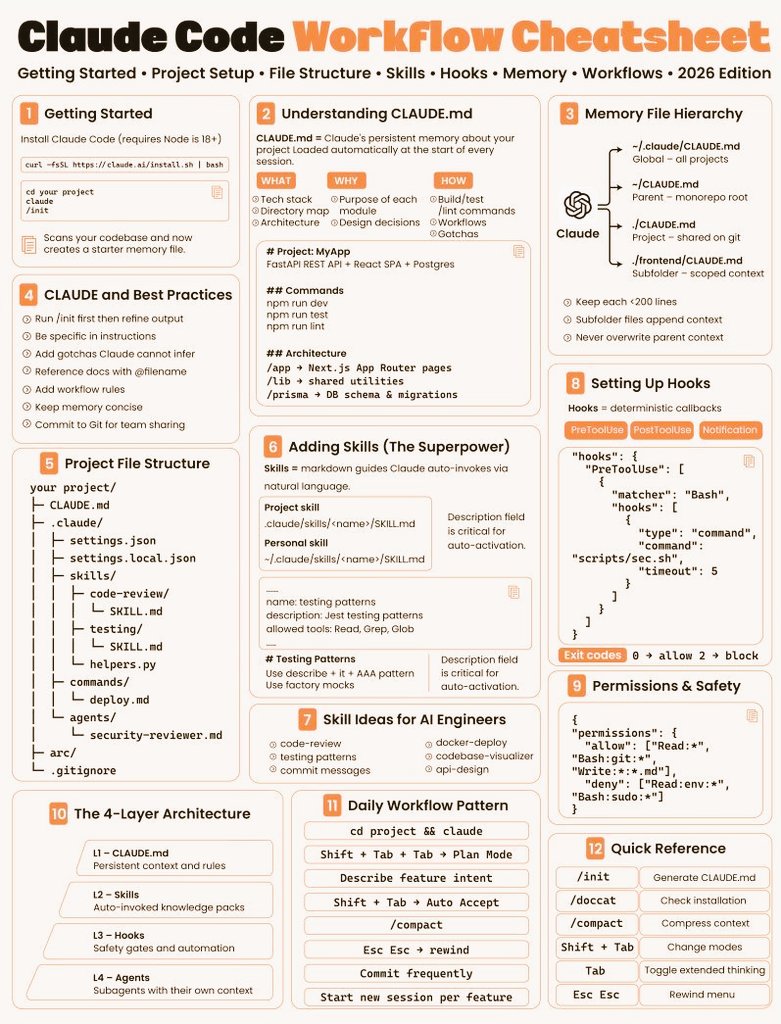
Claude Code actually works like a 4-layer AI engineering system:
1️⃣ CLAUDE.md → Project memory
Persistent context for your project.
Stores rules, conventions, and architecture decisions.
2️⃣ Skills → Reusable knowledge packs
Claude automatically invokes them when relevant.
Think: reusable workflows and expertise.
3️⃣ Hooks → Deterministic guardrails
Safety gates that run automatically.
Unlike prompts, hooks are 100% enforced.
4️⃣ Agents → Specialized sub-agents
Each with their own context window.
Great for complex, multi-step tasks.
Most engineers install Claude Code and immediately start prompting.
But the difference between average output and production-level results usually comes down to setup.
Practices that make a huge difference:
→ Run /init on day one to generate CLAUDE.md
→ Organize the .claude/ directory (skills, hooks, permissions)
→ Write clear skill descriptions so Claude knows when to trigger them
→ Use the memory hierarchy (global → project → folder)
→ Add hooks for critical rules (hooks = enforced, memory = advisory)
When structured properly, Claude Code stops feeling like a chatbot.
It starts behaving like a real AI development system.
If you want to learn it properly, Anthropic released several free courses:
Claude 101
https://t.co/2rcC5bJtO5
AI Fluency: Framework & Foundations
https://t.co/4flvjjgodh
AI Fluency for Students
https://t.co/Rlw4EimtVR
AI Fluency for Educators
https://t.co/oOfArjADYI
Teaching AI Fluency
https://t.co/4xNM2pDVYw
Also includes developer topics like:
• Claude Code in Action
• Building with the Claude API
• Prompt Engineering tutorials
• Model Context Protocol (MCP) fundamentals
Bookmark this if you're building with Claude.
The future of AI development isn't just prompts.
It's systems around prompts.
#AI #Claude #AIAgents #LLM #GenAI #AIEngineering