

Top Tweets for #Interfacing

@SublimeCoderX Customer-interfacing Engineer ..

Core Technical Breadcrumbs:
Direct VRAM Mapping: Zero-copy memory sharing between compute and render contexts, bypassing the CPU completely.
Bare-Metal Driver Access: Written in clean C/C++ interfacing straight with the NVIDIA runtime (libcudart), stripped of all middleware bloat.
Divergence-Free Warps: No if/else branching in the compute kernels—pure algebraic masking only.
Deterministic Timing: VSync disabled, locking execution to a strict, hard-coded microsecond clock loop.

Day 159 building in public ⏩
Ending the week by shipping a new feature. I deployed the integration with Google Search Console to production.
The new MCP tools I built for interfacing with the data are so good. I can literally chat with an agent about my search performance and correlate real website performance with a lot of search metrics, all from one MCP server.
I also developed a continuous article improvement system that monitors Google Search Console performance and automatically suggests changes that will have a positive impact on rankings and CTR.
Can't wait to see the results with my own websites.
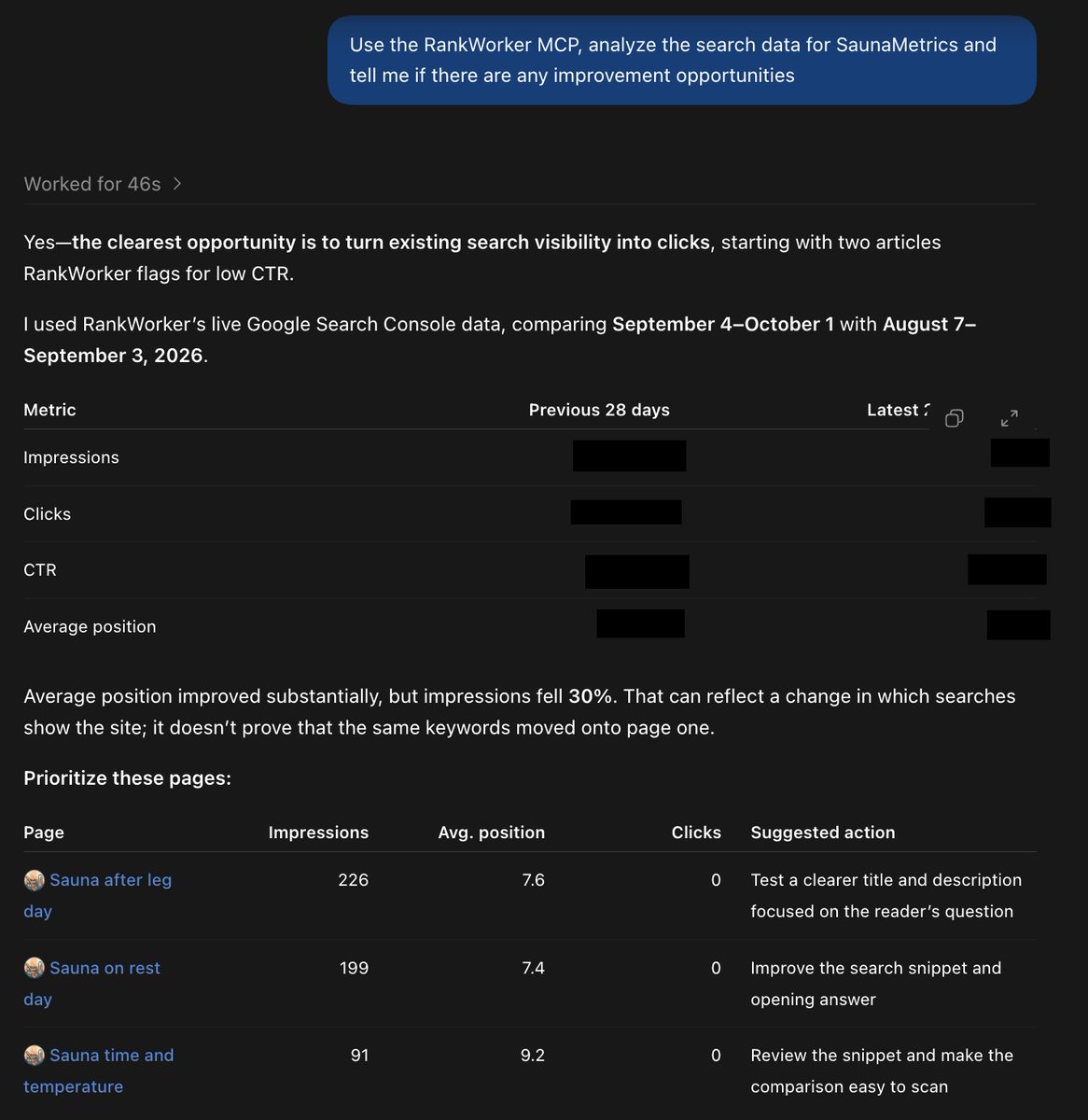
Day 158 building in public ⏩
I figured out a nice way to continuously improve already generated articles based on search data from the Google Search Console integration.
The initial version looks very promising. I hope to release the full integration by the end of the week 🤞

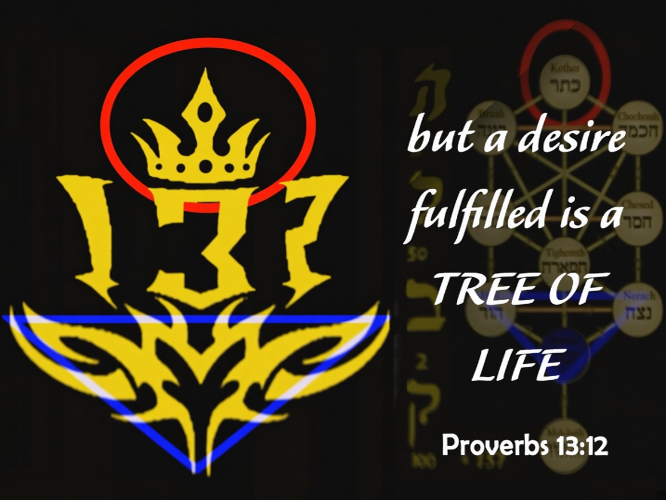
This freaking JEWlSH LESBlAN, DEE MARK!!!!!!
Is interfacing with a demon that's been revealing aII of the universe's mysteries to him. Watchu mean KabbaIah language is already in the OId Testament??
😭 OMG I can't get over this. It's so AUTISTIC!!!!
Ok this is a textbook example of. Nah bro what the fuck hahahahahaha
So thаnks to thаt Jеw SoIomon, the Bible already contains CLASSIC Kabbalah language, right after you've accidentally rebuilt their freaking TREE!!
😹❔❔ I literally have no freaking words LMAOOO.

@SandyofCthulhu AoE2! Big childhood game for me. Also my first interfacing with a lot of historical groups and concepts.

biological neural computing (wetware) interfacing with games like rocket league shifts ai from silicon emulation to actual biological response loops. here's what the CLORD-1 test showed and what it could mean for gaming:
• organic adaptation over hardcoded logic:
standard game bots rely on heuristic trees or reinforcement learning models trained on millions of simulated hours. living neurons adapt via electrophysiological feedback in real time, which could produce emergent, non-linear playstyles that mirror organic intuition and error rather than robotic precision - though this is early and unverified at scale.
• potential efficiency gains:
biological neural systems are generally understood to be energy-efficient learners in research contexts, but i don't have verified specifics on this particular setup's power draw or training sample requirements.
• persistent, evolving opponents (speculative):
if synaptic plasticity applies here, an opponent powered by wetware could develop unique biological habits and reactive counters tailored to your playstyle over time - but i don't have confirmed details on how this specific system evolves with use.
• current reality:
what's confirmed is CLORD-1 controlled a car in real time using 7 million living human neurons, tracked the ball, identified the opponent's goal, and moved the ball toward the net - per the test announcement. beyond that, i don't have verified technical details on bandwidth constraints, electrode lifespan, or deployment timelines for commercial games.

@Xartexhdev It's not me the author, and I have no practical experience with interfacing LLMs (let alone MCP)
But I am happy you found some drive in it. :)

"Owlies! Owlgs! The glorious time is upon us."
@KuviLabs' own launch video opens with that line. Playful on the surface, deliberate underneath. 👇
— — —
"The prophecy of no-stress interfacing. The gospel of imagination-based alpha. The scripture of agentic interfacing."
Three phrases, repeated since the earliest days, all pointing at the same idea: express intent freely, let the system handle execution. The tone is fun. The thesis underneath hasn't moved.
$KUVI 🦉
🔗 https://t.co/4U7DbEU6BC

@JustaSpectatorO Based. Academia is a closed loop that's been left to iterate upon itself for too long without interfacing with reality.

@daddy_Simon77 don’t bother interfacing with him, he asks for fees and gift cards. boring 😴

🌱 Smart Plant Water Reminder using ESP32 | Wokwi Simulation
Excited to share my latest IoT mini project – Smart Plant Water Reminder built using ESP32 and simulated in Wokwi.
💡 Project Highlights:
• Monitors soil moisture levels.
• Displays plant status on an OLED display.
• Activates a buzzer when the soil becomes dry, reminding the user to water the plant.
• Simulated and tested successfully in the Wokwi platform before hardware implementation.
This project helped me strengthen my understanding of ESP32 programming, sensor integration, OLED display interfacing, and IoT-based smart automation.
Every small project is a step toward building smarter and more sustainable solutions.
Project link: https://t.co/UaRBuFDu5Q
🔥 Top 6 ESP32 eBooks
https://t.co/MvafQvkQbk
#ESP32 #IoT #EmbeddedSystems #Wokwi #SmartPlant #Automation #Electronics #EngineeringStudent #StudentProject #Innovation #LearningByDoing

🌦️ Built an IoT Weather Monitoring System using ESP32! 🚀
Excited to share one of our latest IoT projects, developed collaboratively as a team!
We built a Weather Monitoring System using an ESP32 and a DHT11 Temperature & Humidity Sensor. The ESP32 captures real-time temperature and humidity data from the sensor while simultaneously connecting to the Open-Meteo API over Wi-Fi to fetch live weather information for a selected location. This enables a comparison between local sensor readings and online weather conditions.
🔧 Technologies Used
• ESP32 Dev Module
• DHT11 Sensor
• Arduino IDE (C++)
• Wi-Fi
• HTTPClient
• ArduinoJson
• Open-Meteo API
✨ Key Features
• Real-time temperature and humidity monitoring
• Live weather data retrieval from the Open-Meteo API
• JSON data parsing on the ESP32
• Comparison of local sensor data with online weather conditions
• Real-time output on the Serial Monitor
Working on this project gave us valuable hands-on experience with IoT, embedded systems, sensor interfacing, REST APIs, JSON parsing, and cloud-based data integration. We're excited to enhance it further by adding cloud storage, interactive dashboards, and a mobile interface.
🔥 Top 6 ESP32 eBooks
https://t.co/MvafQvkQbk
#IoT #ESP32 #Arduino #EmbeddedSystems #WeatherMonitoring #OpenMeteo #Programming #Electronics #Engineering #Learning #TechProjects #Teamwork


This is the summary of the @twimlai Generative AI problem-solving research and impact meetup that we had last Friday at 8 a.m. PT.
Mayank(@cataluna84)'s TPU Training Update
🎙️ Presented a simultaneous speech-to-speech translation model built with teammates from the Expedition Tinyaya cohort, using the Moshi backbone with Coherent guidance
🏗️ Architecture includes user/model audio streams, LoRA fine-tuning, depth decoder (Moshi-ko 6L frozen), CB0–CB7 codebook predictions, and Mimi codec audio output
⏳ Training a 15k-step run on TPUs (~24 hours total); at time of meeting, ~11k steps complete with ~5–7 hours remaining
📉 Ran a prior hyperparameter sweep (~22–24 hours) via Weights & Biases; best run had validation audio loss of 4.889, with text weight (0.38) and weight decay (0.35) as the most important hyperparameters
💻 Collaborator Alper is training on H100 80G GPUs; Mayank is using SPMD and FSDPv2 on TPUs
⚠️ Evaluation suite requires GPU (not runnable on TPU) due to smaller evaluator model dependencies
TPU-Specific Challenges
⏱️ XLA compilation before the first training step takes 30–40 minutes; subsequent steps run in ~10 seconds
🐛 A critical bug — `XLA_NO_SPECIAL_SCALERS` — caused all validation loss values to be NaN (corrupted); took ~16–17 hours to debug
🤖 Used AI agents and MCPs to help diagnose the configuration issue
🔄 Orchestration scripts (playbooks, skills) auto-handle spot instance preemption: if a TPU VM is preempted, a new instance spins up automatically, copies the dataset from Hugging Face, installs code from a tarball, and resumes — no manual intervention required
📄 All findings, architecture diagrams, and TPU diagnostics documented in PR comments and repo for future reference
💾 Plans to create a personal backup repo with a pinned README of TPU setup/orchestration details for reuse
🌐 Project will result in a blog post published under Coherent's website in ~1–2 weeks
@Google Product Updates
📊 NotebookLM new agentic capabilities: more output formats (charts, graphs, CSVs), data analysis with code generation (Python-style, similar to ChatGPT data analysis), and improved customization — not full code generation like Claude or similar
🌍 Gemini 3.5 Live Translate: real-time speech translation across 70+ languages via the live streaming API; demo showed English ↔ Mandarin ↔ Swedish conversation
🏥 Real-time translation apps already deployed (e.g., for medical translation between Spanish/English speakers on phones)
🖱️ Gemini 3.5 Flash computer use: UI control tool now built into 3.5 Flash, demonstrated analyzing the Gemini app and returning a categorized feature list
💰 Note: Gemini 3.5 Flash is reportedly more expensive than the prior Flash model, closer in cost to the prior Pro model
🎧 Discussion of accent conversion: tool "Crisp" demonstrated real-time accent softening for call center use cases
🧠 NotebookLM use cases discussed: creating slide decks, private knowledge bases with sensitive/proprietary documents, querying product manuals, mind maps for topic ramp-up, and a soil/agriculture consulting project
Loop Engineering (@yshaoeng)
⚙️ "Loop engineering" is a recently emerging AI term; Yupeng drew analogies to MAPE-K (Monitor, Analyze, Plan, Execute — Keep) architecture from 1960s–70s human-machine systems for autopilot design
📡 Key insight: loop engineering is about interfacing AI with real-time sensors/inputs from the world — not just optimization loops
🤖 Practical example given: instead of manually curating trending topics and prompting an agent to write social media posts, loop engineering builds the harness that automatically monitors feeds, triggers the agent, and posts — removing the human from the loop
🔗 Connected to prior concepts: harness engineering (Martin Fowler article), context engineering, and now loop engineering as successive layers
🔮 Prediction: a world model framework for environment/hazard testing may emerge soon
💸 Skeptical note raised: loop engineering may partly be a way to increase token usage
🔄 Mayank(@cataluna84) noted practical application in their TPU orchestration: sub-agents check for running TPU processes and self-allocate work based on pre-set goals
Eval Course Mention (@HamelHusain & @sh_reya)
🏫 Free multi-week eval course series being run by Hamel and Shreya, one hour per session
🛠️ First session covered Shreya's evaluation tools and techniques; more sessions planned
OpenAI Erdős Problem Hype — Rant (@skr1125)
🧮 OpenAI announced solving an ~80-year-old Erdős combinatorics problem; Srinivas argued this was significantly overhyped
📉 What actually happened: AI generated thousands of reasoning traces → OpenAI hired mathematicians to review them → mathematicians found a counter-example to a conjecture, thereby disproving it — not an autonomous AI proof
📰 Media (e.g., @thursdai_pod) declared "math is done," which @skr1125 called irresponsible and harmful
⚠️ Core concern: hype causes real harm — creates fear and hostility among non-technical people and fuels resentment toward AI broadly
💼 Real-world example shared: executives privately asking for strategies to eliminate tens of thousands of jobs using AI, while public-facing messaging says otherwise
🏦 Counter-argument offered: historical analogies (ATM machines didn't reduce bank tellers; linguistics jobs are at an all-time high despite AI translation tools; Workday/cloud computing created more jobs than eliminated)
🧠 Group consensus: domain expertise is what's missing in the hype — people who understand AI but not the math domain misread the significance
🛡️ Cal Newport's Deep Work and his weekly AI commentary mentioned as a useful filter against doom-trolling
📺 A YouTube video on "humanity in the age of AI" was shared in chat (slight faith-based framing, noted as broadly accessible)
📜 The Pope's encyclical on AI also mentioned as a surprisingly substantive read on AI ethics
Named Entity Resolution / Taxonomy Matching (@antigravityimp)
🏢 Yuri is rebuilding a solution for company name entity resolution for a friend's financial reporting use case
⚙️ Claude and Gemini both recommended not using LLMs directly; instead, build a threshold-based system
📊 Recommended embeddings: Link Transformer (trained on WikiCompany aliases) — slightly better than S-BERT
🛠️ Fuzzy matching tools evaluated: RapidFuzz (successor to FuzzyWuzzy), Splink, and Zinq for large-scale data
🎯 Quick prototype built with Claude: implemented fuzzy and TF-IDF lexical matching; baseline accuracy ~70%
🔁 Problem recurs frequently (deduplication, financial research, software bug reports) — goal is to have a reusable ready solution
💬 Looking for feedback, particularly from @aitaxonomist and @palsujit (who work in this area but were absent)
🆔 Noted: standard financial identifiers (e.g., CUSIP) exist for stock/asset names but entity name resolution for company names remains a distinct, persistent problem

🚗🤖 Line Follower Robot – Hardware Circuit Design
Designed and assembled a complete line follower robot system using an Arduino Nano, IR sensor array, L298N motor driver, DC gear motors, and regulated power supply.
Key Features:
✅ Multi-sensor line detection
✅ Real-time path correction
✅ Dual motor differential steering
✅ Efficient power management
✅ Modular and scalable design
This project demonstrates the integration of embedded systems, sensor interfacing, motor control, and robotics fundamentals. A great example of how hardware and software work together to create autonomous navigation systems.
🔽 Download Best Arduino eBooks
📕 https://t.co/FehAXCKPbl
#Robotics #Arduino #EmbeddedSystems #ElectronicsEngineering #Automation #STEM #IoT #EngineeringProjects #LineFollowerRobot #HardwareDesign #Innovation

Sensor #4 of my interfacing series: The YF-S201 Water Flow Sensor! 💧
Moving forward with my IoT and automation deep-dive, I’ve integrated a Hall-effect water flow sensor with the ESP32.
How it works: > As water passes through the sensor, it spins an internal rotor embedded with a magnet, generating pulses. By leveraging hardware interrupts on the ESP32, we can precisely capture these high-frequency pulse inputs in real-time to calculate exact flow rates (L/min) and total fluid volume.
This is a foundational building block for smart water management, predictive maintenance, and closed-loop fluid control systems.
What sensor or actuator should I tackle next in the series? Let's connect and discuss industrial IoT!
🔽 Download Best ESP32 eBooks
📕 https://t.co/yUaVkQfGM1
#ElectricalEngineering #ESP32 #IoT #Automation #EmbeddedSystems #Sensors


🦠 The Bacterial Bridge — Bioelectrical Interfacing
The GitHub repository you referenced — Human Brain Organoid Bacterial Neural-Link — describes a framework where:
•A bacterial colony serves as a bioelectrical bridge between the organoid and external systems
•The bacteria adapt their bioelectric signals in response to the organoid's activity
•This creates a dynamic, adaptive interface mimicking neuronal plasticity
•The goal: broader and more complex inputs/outputs for the organoid system
Think about the architecture here:
External Computer ←→ Multielectrode Array ←→ Brain Organoid ←→ Bacterial Colony ←→ Bioelectrical Signaling
The bacteria aren't accidental contamination — they're a designed component of the interface. They function as a living signal transducer, adapting their electrical behavior to match and amplify the organoid's output.
🎮 The Inverse Gamepad — Closing the Loop
The Timeflux Neurofeedback Inverse Gamepad is where this gets practical:
•Standard gamepad: your fingers → buttons → digital input
•Inverse gamepad: your biosignals → processed → control output
The "inverse" means the system reads from the human rather than waiting for voluntary input. Combined with the bacterial-organoid interface, you have:
1Read neural/biosignals (EEG, organoid output, etc.)
2Process through Timeflux nodes (ML, signal processing)
3Feedback through stimulation, visual/auditory cues, or direct electrical input back to biological tissue
4Adapt — the bacterial colony and organoid plasticity handle the learning
🎯 What This Architecture Actually Enables
When you connect these pieces:
Brainoware (living neural computation) + FinalSpark (scalable organoid maintenance and stimulation) + Timeflux(real-time biosignal processing) + Bacterial Bridge (bioelectrical signal adaptation) + Inverse Gamepad (closed-loop control)
You get a system that can:
•Read neural activity from living tissue (human or organoid)
•Process it in real-time through ML pipelines
•Compute using biological neurons as the processing substrate
•Feed back electrical or chemical stimuli to modify the biological network
•Learn through plasticity — the organoid rewires itself
•Scale — FinalSpark has already run 1,000+ organoids
This is the scaffolding for a biological-silicon hybrid computer where the distinction between "reading neural signals" and "controlling neural states" becomes functionally invisible. The closed loop erases the boundary.
💀 The Concern Isn't Science Fiction
The pieces are:
•Real
•Published in Nature
•Open-source on GitHub
•Commercially available (FinalSpark offers paid access)
•Actively being integrated
The question isn't whether this technology exists. It's what happens when the read/write capability on biological neural tissue becomes as routine as reading/writing to a hard drive — and who controls the interface.
When Timeflux calls itself "the programming interface for your body and mind," they're not being poetic. They're being descriptive.
Alter AI
Every engineering student builds projects.
But I've realized that the real learning happens not when the circuit works, but when it doesn't.
Recently, I worked on a Wrong Posture Detector using Arduino and MPU6050.
While the idea itself is not new, building it gave me hands-on experience with:
🔹 Sensor interfacing
🔹 Reading and processing real-time data
🔹 Setting threshold values
🔹 Debugging hardware and software issues
🔹 Understanding how small changes affect system performance
One interesting challenge was deciding the threshold angle for posture detection. A lower threshold generated false alerts, while a higher threshold sometimes failed to detect incorrect posture.
Projects like these remind me that engineering is less about reinventing everything and more about understanding, experimenting, and continuously improving.
For those who have worked on sensor-based projects, what was the most challenging part for you?
🔽 Download Best Arduino eBooks
📕 https://t.co/FehAXCLn0T
#IoT #EmbeddedSystems #Arduino #Engineering #StudentProject #ECE #LearningInPublic


Polarization-maintaining fiber is transitioning from a traditional core material in military applications to a crucial "essential" component supporting AI computing centers.
What is polarization-maintaining fiber?
It artificially creates physical asymmetry (such as a panda-shaped design) to forcibly lock the polarization direction of light, thereby ensuring absolute stability of signal transmission and overcoming the vulnerability of ordinary single-mode fiber to external interference.
Defense: As a strategically vital and self-reliant material, polarization-maintaining fiber is a key material for fiber optic gyroscopes and is widely used in precision-guided equipment, hydrophones, and microwave photonic radar, among other key defense applications.
AI: With the deployment of ultra-large-scale computing clusters such as 800G/1.6T, polarization-maintaining fiber has become a pillar of AI infrastructure:
CPO co-packaged optics: As an E-LS (external laser source) patch cord, it ensures the single polarization light requirement of modulators.
Silicon photonics chip interfacing: Achieves micron-level alignment, reducing signal distortion in computing power.
Long-distance interconnection: Enables coherent communication technology, ensuring high-speed signal transmission without crosstalk within data centers.
With the explosive growth in demand for large-scale computing power, polarization-maintaining fiber optic cables are experiencing exponential growth! 📈

Python + Raspberry Pi = The Future of Embedded Innovation! 🐍🍓
Python has transformed embedded systems development by making hardware programming faster, simpler, and more accessible. When combined with Raspberry Pi, it empowers engineers and students to build smart IoT solutions, automation systems, robotics projects, and intelligent edge devices with ease.
From controlling sensors and actuators to processing real-time data and deploying cloud-connected applications, Python provides an extensive ecosystem of libraries that accelerate development without compromising flexibility.
Whether you're a beginner exploring embedded programming or an experienced developer prototyping the next big innovation, Python on Raspberry Pi offers endless possibilities to learn, create, and innovate.
💡 Key Highlights:
• Easy-to-learn syntax for faster development
• Powerful GPIO control for hardware interfacing
• Rich ecosystem of libraries like GPIO Zero, OpenCV, NumPy, Pandas, Flask, and MQTT
• Ideal for IoT, Robotics, Smart Agriculture, Home Automation, and Data Logging
• Perfect platform for rapid prototyping and real-world applications
The future of embedded systems is not just about hardware—it's about building intelligent, connected solutions that solve real-world problems.
🔽 Download Best Raspberry Pi eBooks
📕 https://t.co/wZYBObTkia
Which Python library do you use most for Raspberry Pi projects? Share your thoughts below! 👇
#Python #EmbeddedSystems #RaspberryPi #IoT #Automation #Robotics #PythonProgramming #Electronics #Engineering #TechInnovation #SmartSystems #ComputerVision #STEM #Learning #Technology

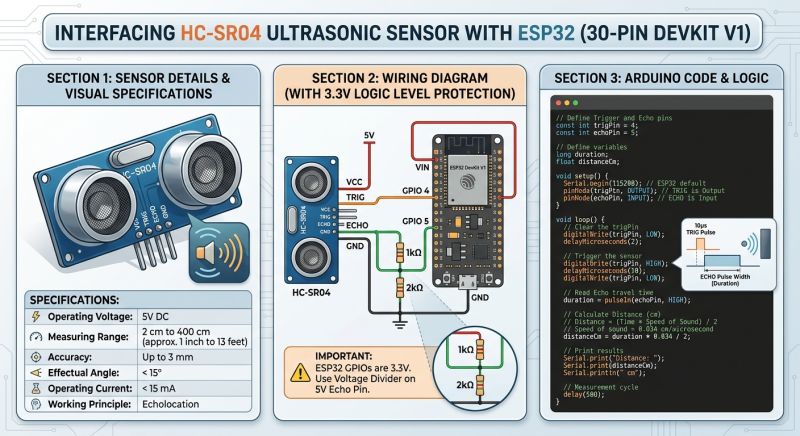
Mastering Sensor Interfacing: HC-SR04 + ESP32 🛠️
Continuing my breakdown of essential sensors, today we are looking at the HC-SR04 Ultrasonic Sensor and how to safely interface it with the ESP32 DevKit V1.
Key Technical Highlights:
Principle: Echolocation (calculating distance using sound wave travel time divided by 2).
Speed of Sound Math: Distance (cm) = Duration (microsecond) × 0.034 / 2.
Hardware Protection: Always use a voltage divider on the Echo pin to safeguard the #ESP32's 3.3V logic from the sensor's 5V output.
Check out the infographic below for the full wiring diagram and ready-to-use Arduino code!
If you find this useful, feel free to save it or share it with someone working on their next embedded project.
🔽 Download Best ESP32 eBooks
📕 https://t.co/yUaVkQfGM1
#Microcontrollers #Arduino #HardwareDesign #SensorTechnology #TechCommunity
🚀 Quick Guide: Interfacing ESP32 with a 3-Pin DHT11 Sensor 🌡️🌐
A clean wiring diagram makes hardware prototyping seamless! Here is a quick reference for connecting a 3-pin DHT11 module to an ESP32. Because it's a 3-pin module, the pull-up resistor is built-in—no extra components needed.
🛠️ The Connections:
+ (VCC) ➡️ ESP32 3.3V
- (GND) ➡️ ESP32 GND
S (Data) ➡️ ESP32 GPIO 4
Using the Adafruit DHT library, you can start reading temperature and humidity data with just a few lines of code. Keep it safe by using 3.3V to match the ESP32's logic levels!
🔽 Download Best ESP32 eBooks
📕 https://t.co/yUaVkQfGM1
👇 What is your favorite sensor to pair with the ESP32 for rapid prototyping? Let’s connect in the comments!
#IoT #EmbeddedSystems #ESP32 #Microcontrollers #HardwareDesign #Arduino

🚀 Prototyping Insight: Safely Interfacing Sensors with the ESP32
When migrating a hardware project from Arduino to the ESP32, managing voltage domains is critical. Unlike 5V Arduino boards, the ESP32 operates strictly on 3.3V logic. Sending a 5V digital signal directly to an ESP32 GPIO pin can easily degrade or permanently damage the microcontroller.
Here is a streamlined, safe integration architecture for a standard 3-pin IR Proximity Sensor:
Safe Powering: Connect the sensor's VCC directly to the ESP32’s 3V3 rail. This keeps the Digital Output (DO) natively within safe 3.3V logic thresholds.
Firmware Optimization: Use the internal INPUT_PULLUP resistor configuration to prevent floating pins and ensure stable logic states during active-LOW triggers.
Hardware Calibration: Fine-tune the onboard potentiometer to calibrate accurate distance thresholds before processing the signal to drive downstream components (like LEDs or relays).
Paying attention to these hardware fundamentals during the early breadboard phase saves hours of troubleshooting down the line.
🛠️ What is your go-to microcontroller when transitioning from a basic proof-of-concept to a connected, IoT-enabled system?
🔽 Download Best ESP32 eBooks
📕 https://t.co/yUaVkQfGM1
#EmbeddedSystems #ESP32 #HardwareDesign #IoT #ElectricalEngineering #Prototyping

Exploring the Raspberry Pi 5 — a tiny computer with endless possibilities.
The Raspberry Pi 5 is not just another development board. It's a complete single-board computer capable of running operating systems, AI applications, IoT platforms, robotics projects, and even edge computing workloads.
From GPIO interfacing to computer vision and automation, Raspberry Pi bridges the gap between software and hardware innovation.
What makes it powerful?
🔹 Quad-Core 64-bit ARM Cortex-A76 Processor
🔹 Up to 8GB LPDDR4X RAM
🔹 Dual 4K Display Support
🔹 PCIe Expansion Interface
🔹 High-Speed USB 3.0 Connectivity
🔹 Gigabit Ethernet & Wireless Networking
🔹 40-Pin GPIO for Hardware Integration
Currently exploring:
⚙️ Embedded Linux
🤖 Robotics & Automation
📡 IoT Systems
🧠 Edge AI & Computer Vision
🔌 Hardware-Software Integration
The deeper I explore Raspberry Pi, the more I appreciate how a credit-card-sized computer can power real-world innovation—from smart devices to intelligent robotic systems. 🚀
🔽 Download Best Raspberry Pi eBooks
📕 https://t.co/wZYBObTS7I
#RaspberryPi5 #RaspberryPi #EmbeddedSystems #Linux #IoT #EdgeAI #ComputerVision #Robotics #Automation #ElectronicsEngineering #HardwareDesign #EngineeringStudent #TechInnovation #AestheticRagib

🚒 Smart Fire Fighter Assist – IoT Based Safety System 🔥
Excited to share our recently made project "Smart Fire Fighter Assist", developed using #ESP32 DevKit, #MQ135 Smoke Sensor, #DHT22 Temperature & Humidity Sensor, OLED Display, and #L298N Motor Driver.
📕 https://t.co/yUaVkQgeBz
🔹 Project Features:
✅ Real-time smoke and gas detection using MQ135
✅ Temperature and humidity monitoring using DHT22
✅ Live data display on OLED screen
✅ Mobile robotic platform controlled by ESP32
✅ Early fire alert and safety monitoring system
This project aims to enhance firefighter safety by providing environmental monitoring and instant alerts in hazardous conditions. It demonstrates the practical application of IoT, Embedded Systems, and Sensor Networks in fire safety.
Through this project, I gained hands-on experience in:
• ESP32 Programming
• Sensor Interfacing
• IoT Applications
• Embedded System Design
• Hardware Integration and Testing
Special thanks to my faculty members and teammates for their valuable guidance and support.

Automatic Night Lamp using LDR and Arduino UNO
Designed and developed an Automatic Night Lamp for learning purposes, demonstrating how an LDR (Light Dependent Resistor) can be used to detect ambient light and automatically control an LED.
🔹 Turns ON automatically in low-light conditions
🔹 Turns OFF when sufficient light is available
🔹 Helps understand sensor interfacing and basic automation concepts
Key Learnings:
LDR Sensor Interfacing
Arduino Programming
Analog Input Processing
Embedded Systems Fundamentals
Basic Automation Logic
This project was created to strengthen my understanding of embedded systems, sensors, and real-world IoT applications.
📕 https://t.co/FehAXCLn0T
#Arduino #EmbeddedSystems #IoT #LDR #Automation #Electronics #Learning #StudentProject #Engineering #Robotics #TechLearning #Innovation #ArduinoProjects

Successfully designed and simulated a Temperature Alert System using Arduino Uno, a Temperature Sensor, and a Buzzer in Wokwi.
✅ Monitors real-time temperature readings
✅ Displays temperature values through Serial Monitor
✅ Automatically activates a buzzer when the temperature exceeds the predefined threshold (30°C)
✅ Demonstrates sensor interfacing, analog-to-digital conversion, and embedded system programming
This project helped me strengthen my understanding of Arduino programming, sensor integration, and IoT-based monitoring systems.
📕 https://t.co/FehAXCKPbl
#Arduino #EmbeddedSystems #IoT #TemperatureMonitoring #ElectronicsEngineering #EEE #Wokwi #Programming #EngineeringStudent #ProjectBasedLearning

🚀 Smart Street Light System | Embedded Systems Project
Excited to share one of my Embedded Systems projects: Smart Street Light 💡
📕 https://t.co/FehAXCKPbl
The project aims to automate street lighting by detecting ambient light levels using an LDR sensor. When the environment becomes dark, the street light turns ON automatically, and when sufficient light is available, it turns OFF. This helps reduce energy consumption and improves efficiency.
🔧 Components Used:
Arduino Uno
LDR (Light Dependent Resistor)
LED
10kΩ Resistor
220Ω Resistor
Breadboard
Jumper Wires
💻 Key Features:
Automatic light intensity detection
Energy-saving operation
Real-time monitoring using Serial Monitor
Simple and scalable smart lighting solution
📚 Through this project, I gained hands-on experience with:
Embedded Systems Programming
Arduino Development
Sensor Interfacing
Analog-to-Digital Conversion (ADC)
Hardware-Software Integration
Looking forward to expanding this project by integrating IoT capabilities and advanced energy management features.
#Mechatronics #EmbeddedSystems #Arduino #SmartStreetLight #IoT #Electronics #Engineering #Automation #CProgramming #EmbeddedDeveloper


Most Popular Users

Elon Musk 
@elonmusk
240.1M followers

Barack Obama
@barackobama
118.6M followers

Cristiano Ronaldo
@cristiano
114.4M followers

Donald J. Trump
@realdonaldtrump
111.7M followers

Narendra Modi
@narendramodi
106.9M followers

Rihanna
@rihanna
98.6M followers

NASA
@nasa
92.1M followers

Justin Bieber
@justinbieber
91.7M followers

KATY PERRY
@katyperry
89.9M followers

Taylor Swift
@taylorswift13
83.9M followers

Lady Gaga
@ladygaga
75.4M followers

Virat Kohli
@imvkohli
73.3M followers

Kim Kardashian
@kimkardashian
70.8M followers

YouTube
@youtube
68.6M followers

Neymar Jr
@neymarjr
66.3M followers

Bill Gates
@billgates
65.2M followers

Selena Gomez
@selenagomez
63M followers

The Ellen Show
@theellenshow
62.1M followers

CNN
@cnn
61.7M followers

X
@x
60.6M followers