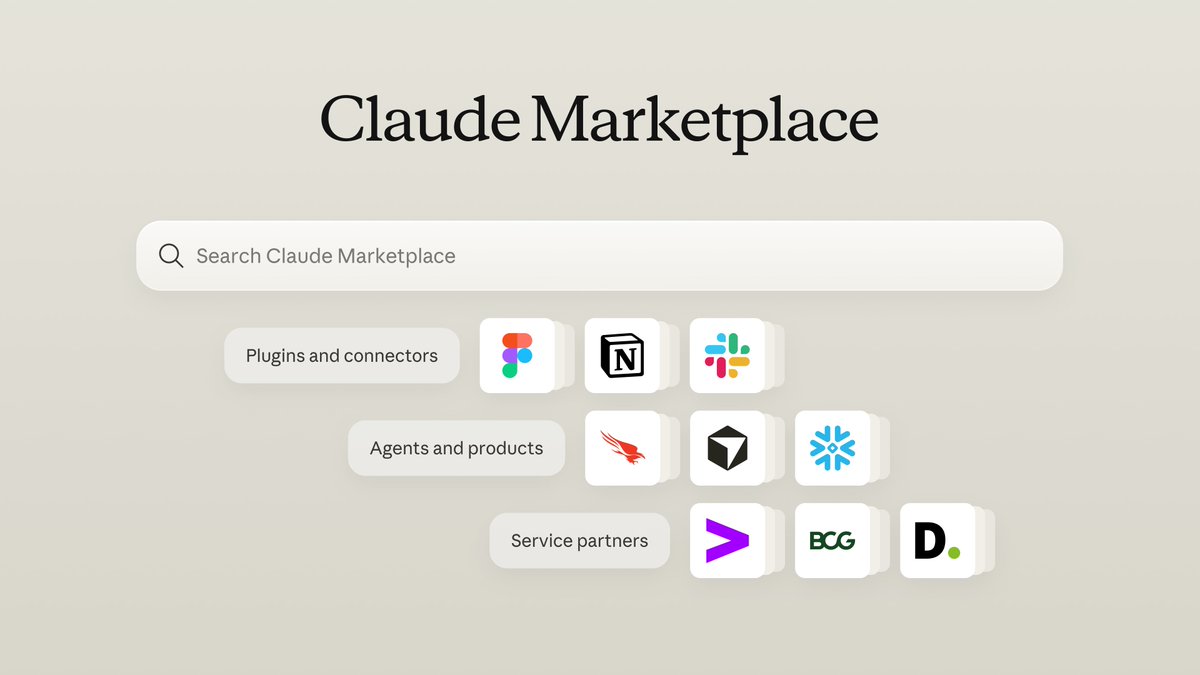
You can now BUY agents through Claude Marketplace. I think the most interesting part is what this means for domain expertise as a business.
Companies like Figma, Linear, and Harvey have been in an awkward position. Adapting to AI creates pressure to compete on several fronts at once. Build the product, build an agent, make its inference costs competitive, and convince customers to use it while the model providers move into your market.
But these companies have years of work that should still be valuable. Figma has its design platform and the capabilities built into it. Linear has its workflows and understanding of how teams manage work. Harvey has its focus on legal work. Their opportunity is to combine those products with domain knowledge and the eval loops that make them better at specific jobs.
Claude Marketplace gives that value another commercial path. A company could sell a specialized capability to customers already using Claude, without needing to win the entire AI experience. Anthropic provides the model and platform. Other companies provide tools, specialized agents, or implementation services. Each has something it can get paid for.
That's why the eval loop matters here. A specialist knows which mistakes are costly, what good work looks like, and whether a change actually improves the result. Capturing that knowledge through real cases and expert feedback is how domain expertise can become a moat.
The interesting possibility is that better models make those businesses more valuable. They get a stronger foundation for applying everything they've learned, and the model provider gains a reason to help them succeed.
I think @AnthropicAI is opening a path toward an AI economy where companies can get paid for their expertise without having to compete at every layer.
You can now discover tools, agents and expert partners on Claude Marketplace. Use it to:
- Add connectors and plugins like Slack and Notion
- Buy agents and products from companies like Cursor and CrowdStrike
- Scale with service partners like Accenture and Deloitte
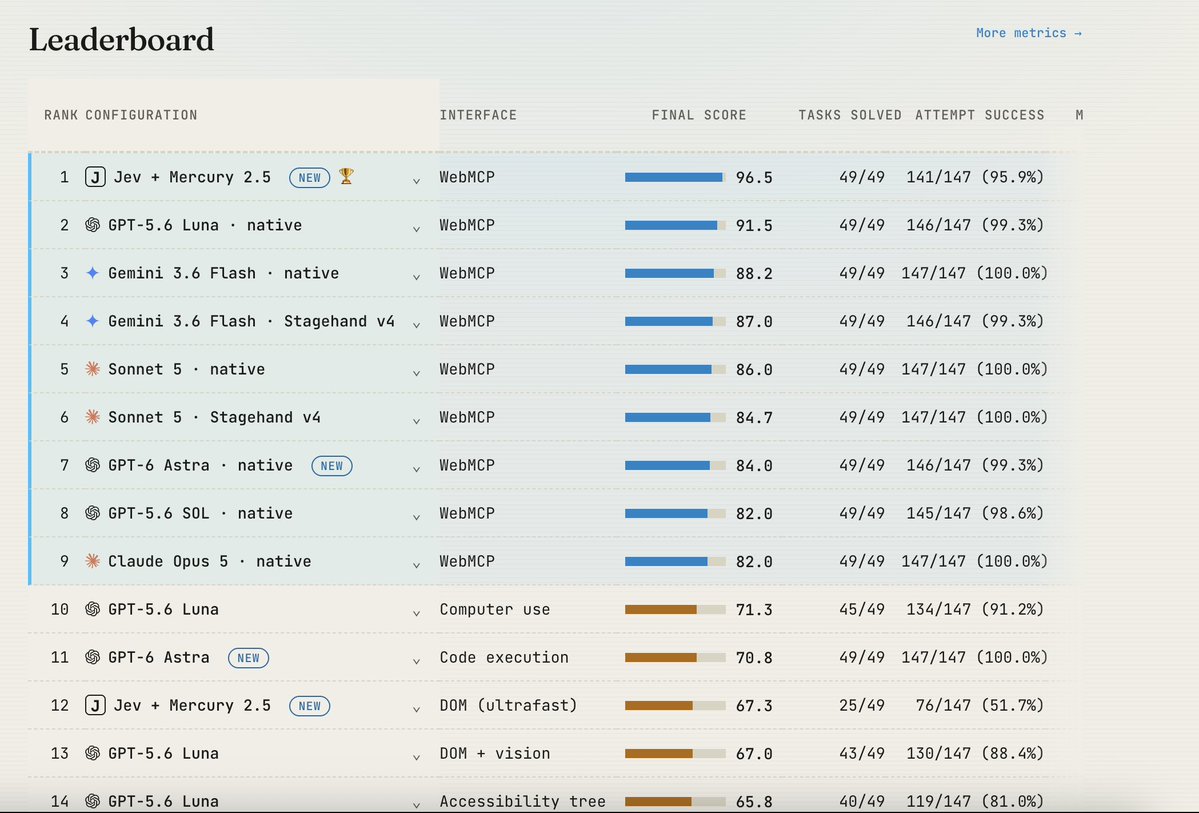
We just ran Jev on our WebMCP benchmark.
The result: basically broke the benchmark.
Jev + Mercury 2.5 (a fast, low-cost LLM) using WebMCP solved 100% of the tasks at roughly 112× lower model cost than GPT-6 Astra using computer use with code execution. Compared to Astra using screenshot-based computer use, the model cost was 245× lower (!).
We also compared Jev operating the browser with and without WebMCP.
We used Browser Use’s open-source Ultrafast, with some improvements to the harness to make it more reliable across the benchmark.
Jev’s browser-control accuracy on its own was not amazing - adding WebMCP nearly doubled the number of solved tasks, from 25/49 to 49/49, while reducing model cost by 18% (more on why below).
The benchmark and methodology are fully open and reproducible.
Full results: https://t.co/KmplyFMZdv
A few words on how the Jev + WebMCP harness works and why this is exciting:
Jev receives text as input and a set of discrete options it can choose from. With WebMCP, those options are the tools exposed by the website. At each step, Jev sees the task, the available tools and previous results, then picks what to do next.
The limitation is that Jev can’t generate arbitrary text, which you need for tool arguments. For example, it can choose the search_products tool, but it can’t generate the search query itself.
So we split the work: Jev picks the tool and Mercury 2.5 generates the arguments if needed.
This works well because turns out most of the cognitive load in these tasks is around choosing the right action. The argument generation itself is relatively simple, so we can delegate to a small and very fast model. We used Mercury, which outputs 1,000+ tokens/sec and is very cheap.
The result is a pretty simple combination: Jev for tool selection + Mercury for arguments + WebMCP for the interface. It ends up being very reliable, very fast, and very cheap.
A few words about Ultrafast and why do we think it underperforms:
Without WebMCP, Jev chooses from the page’s controls: which button to click, which field to fill, or which option to select.
But choosing a valid button is different from choosing the right next step. The agent still has to navigate menus, understand forms, recover from errors and recognize when the task is actually complete.
Our hypothesis is that WebMCP makes the decision space much simpler. Instead of figuring out a sequence of clicks through a website, Jev chooses explicit actions that directly advance the task.
@typesafeai itself documents weaker accuracy on questions requiring multiple reasoning steps. WebMCP moves much of that complexity into the website’s tools, leaving Jev with clearer decisions and fewer opportunities to go wrong (in a sense WebMCP "compresses" a sequence of clicks into one tool call).
Our modified Ultrafast setup solved 25/49 tasks - that is a result for our particular implementation and benchmark, not a universal limit on Jev or Browser Use. We are open to more harness optimization to get this result to perform better, feel free to directly contribute to the benchmark here: https://t.co/cK6MHsRV58
Browser-use ultrafast: https://t.co/DU9OdOtXHT
Agent memory just got a lot more interesting. Two new papers I'm excited about:
The Graph-Based Personalized Memory survey organizes the field around representation, evolution, retrieval, and evaluation. It examines graphs that connect source conversations to extracted facts and inferred user profiles, preserving evidence links and tracking when information is valid. One detail I found useful: correcting or deleting a source observation can require revisiting the conclusions derived from it.
https://t.co/WyeAMpTMFM
SafeMem builds a robot's graph memory from color and depth images. Objects become nodes, relationships become edges. It retains objects that leave the camera's view and updates relationships after actions. An LLM risk predictor checks proposed actions against that memory and can request replanning.
The paper's plant-watering example makes this concrete. The robot previously saw a power strip near the plant. When the strip disappears from view, the graph still holds that relationship. The risk predictor flags the watering action, and the robot moves the plant first.
Maintaining those relationships mattered in the experiments. In a partially observable IS-Bench simulation, disabling relationship updates after actions reduced safe task completion from 59% to 38%.
https://t.co/0nV11Ui8Ib
So why am I telling you about a robot watering a plant?
As an engineer building with agents, I've become a bit obsessed with memory and context management. I think this is becoming one of the central design problems in an agent harness. These papers help me look at it through two perspectives:
Context as state: What does the agent currently know, what remains valid, and which information should influence its next action?
Context as a lifecycle: How does information get captured, validated, promoted, refreshed, consolidated, retrieved, and retired?
AGENTS.md, skills, and memory systems are useful abstractions taking shape around that context. Each helps with particular needs. The decisions between them are where things get interesting.
An agent discovers a workaround during a task. Should that stay in memory, become a reusable procedure in a skill, or earn a line in AGENTS.md? What evidence justifies making it an instruction for future runs? Where should a human review that decision? And when the underlying issue gets fixed, what retires the workaround everywhere it ended up?
Coming from DevOps, I find a lot of this familiar. You work with principles and feedback loops that help you make reasonable decisions, measure the results, and adapt to your system and organization. The design keeps changing, but you have a way to reason about those changes.
I don't think harness engineering has that same clarity yet. We're developing useful abstractions faster than we're developing shared principles for operating them together. I still haven't settled on a memory system because I want to understand how the whole process improves the agent's work as the model, codebase, and tasks change.
That's what makes these papers interesting to me. They give me more concrete ways to investigate a problem I'm running into in my own work.
"Let the agent do it" only becomes a habit when it saves you time, including the time you spend watching it and checking its work.
That's what we're working toward. We want to hand off everyday web tasks without wondering halfway through whether doing it ourselves would have been faster.
WebMCP lets a website tell the agent which actions it supports and how to call them. That removes a lot of work from figuring out how to operate the page.
In our benchmark, Luna with WebMCP and Astra with code execution both completed all 49 tasks. Luna with WebMCP was 2.9x faster and about 49x cheaper.
There's still more to earning people's trust than a benchmark. But we think making everyday tasks fast and predictable is how we get people comfortable saying "let the agent do it."
Today we added GPT-6 Astra to WindTunnel, our open WebMCP benchmark. The results are quite surprising:
1/ Both GPT-5.6 Luna with WebMCP and GPT-6 Astra with code execution solve 49/49 tasks, perfect score. (code execution is Astra's recommended method).
2/ WebMCP with GPT-5.6 Luna is ~49x cheaper than GPT-6 Astra using code execution.
3/ WebMCP is also 2.9x faster and uses 4.2x fewer tokens.
Full benchmark here: https://t.co/KmplyFNx33
A few words on how Astra operates the browser, and what these results mean:
WindTunnel compare different ways an agent with a browser can operate the same website: WebMCP, screenshot-based computer use, DOM/accessibility, and code execution.
For Astra, the recommended method is code execution: you send Astra the page context, it returns a code script that runs the page, you execute it and then send a screenshot of the result back. This lets Astra perform multiple actions in one step instead of going screenshot -> click -> screenshot loop for every action.
Code execution allows the agent to operate the browser *really* fast (all of these cool demos you’ve been seeing). And it worked very well: Solved 49/49 tasks (a lot of the “pure” computer use methods get poor results in the benchmark).
But compared with GPT-5.6 Luna using WebMCP, it was still:
~49x more expensive
2.9x slower
4.2x heavier on tokens
Which means even fancy code execution doesn't beat good old APIs with a good description.
In theory Astra should shine on long runs - one script can replace hundreds of clicks - so it may still win where actions are numerous and no tool covers them, like bulk edits on a site without WebMCP.
But on sites that do expose tools, we saw the opposite: on our longest tasks, Astra's code execution cost over 100× more than Luna on WebMCP.
The benchmark is open-source, feel free to run it yourself and update us with any feedback.
If you find WebMCP interesting, we’ll be holding a free WebMCP workshop next week for both developers and enthusiasts. Feel free to sign up and find more information here: https://t.co/oI4J8lkYKR
Yep, an agent can already work on your local computer.
The point here is that you and the agent share the same workspace and see the same state, even if the agent runs somewhere else. WebMCP means we don't have to wire its tools into a separate UI or keep two versions of the state in sync.
The most interesting part of this project is that a person and an agent can work in the same workspace without having to use it in the same way.
I get the GUI. The agent gets structured WebMCP tools. We both act on the same files, windows, processes, terminal, apps, and browser.
That is where WebMCP matters: whenever a person and an agent need to work together through the same interface.
Traditional computer use takes an interface made for humans and asks the model to interpret pixels and operate controls designed for people. I wanted one workspace with two native ways to use it.
So I built a whole computer with WebMCP.
The harness is the computer I can see. It can clone repos, run builds, start servers, and use a full Linux environment when needed.
The question changes from "What access should I give the agent to my computer?" to "What should our computer be able to do?"
Built on @CloudflareDev Computer and Browser Run. Hosted on @OpenAIDevs Sites.
And because the browser inside it can call WebMCP tools from another site, this is WebMCP inside WebMCP.
A real inception.
Shoutout to @mattzcarey, @wil_rowe, and @pvncher for the work and thinking behind these layers.
We just submitted our project to the @OpenAIDevs WebMCP hackathon: The WebMCP Computer.
WebMCP Computer is an operating system that lives inside the browser, with WebMCP as its native control layer.
It is a computer that treats agents as first-class citizens, where files, processes, applications, windows, and the terminal are exposed directly through WebMCP.
You can send anyone one URL that becomes a disposable computer for any agent task.
We created a computer instance in ChatGPT Sites, open it with Codex’s in-app browser and try it here: https://t.co/P8NS9rNlVO
Some examples of what you can do with WebMCP Computer:
1/ Give a coding agent a fresh computer to clone a repository, edit code, run tests, and preview the result.
2/ Let an agent inspect logs, manage processes, change configurations, and repair a broken system.
3/ Give a research agent its own workspace to browse, download files, analyze data, and create a report.
4/ Create reproducible environments for evaluating and comparing different agents.
5/ Let humans and agents work together in the same environment, with the agent using WebMCP and the human using the GUI.
The list of applications is endless, with more examples in our GitHub. The project is fully open source under the MIT license.
https://t.co/pVxLjGBykn
https://t.co/nD0jIXPJm3
Created by our awesome founding engineer @ilay_alog.
Harvey might be the first company I've seen start as an LLM wrapper and turn that into a real AI company with a real moat. They understood very quickly that model access would not be defensible. The loop around the model would be: define what good means, measure it, improve it with real users and domain experts, repeat.
Every engineer building AI should spend real time on evals, because even something small is humbling. I've written a skill that felt "good enough" from intuition, then been afraid to change it because I had no reliable way to know whether the output would improve. Now apply that to legal work, where good is opinionated, tasks are long-horizon, and expert judgment is part of the evaluation itself. Closing that loop needs engineers who understand evals, domain experts, serious data engineering and analysis, and a product manager who understands exactly why good output is hard.
Harvey built that loop well enough to understand that one model will not do everything, which is why seeing both generalist and specialist models makes so much sense. And finally, someone is simply saying which base model they started from. Refreshing, and a sign they know exactly where their value is.
Introducing Tenet, our first model post-trained for legal.
Tenet is a Kimi K3 base that we post-trained with @FireworksAI_HQ on a corpus of publicly available legal data, synthetic data, and human expert data simulating long-horizon legal work.
Training increases Tenet's all-pass rate by 82% on LAB and 22% on LAB Contracts relative to the Kimi K3 base model. It achieves state-of-the-art performance on LAB Contracts and places second on LAB.
These gains generalize to other leading agentic benchmarks including @mercor's Apex Agents - Corporate Law, @crosbylegal's Redline Bench, and @scale_AI's Professional Reasoning Bench.
Tenet is also optimized for token efficiency, operating at less than a fourth the cost of leading foundation models.
We additionally post-trained three specialist models for Tenet to use as subagents:
1) M&A Diligence: post-trained with @baseten on our LAB Diligence environment in an RLM harness, this model is optimized for high-scale, long-horizon tasks.
2) Review Tables: trained with @appliedcompute on our Review Table environment, this model is state-of-the-art and cost-effective at high-volume document review and structured data extraction.
3) Firm Knowledge: trained with @EngramLab on our synthetic law firm environment, this model is optimized to learn and search over a firm's knowledge via memory and structured notes.
More details on model training, environment design, benchmarking, results, and more in the article by @gabepereyra below.
What's next for Harvey’s research?
- Scaling LAB to more jurisdictions, practice areas and workflows
- Scaling compute to bring new generalist models and capabilities to Harvey
More to come soon.
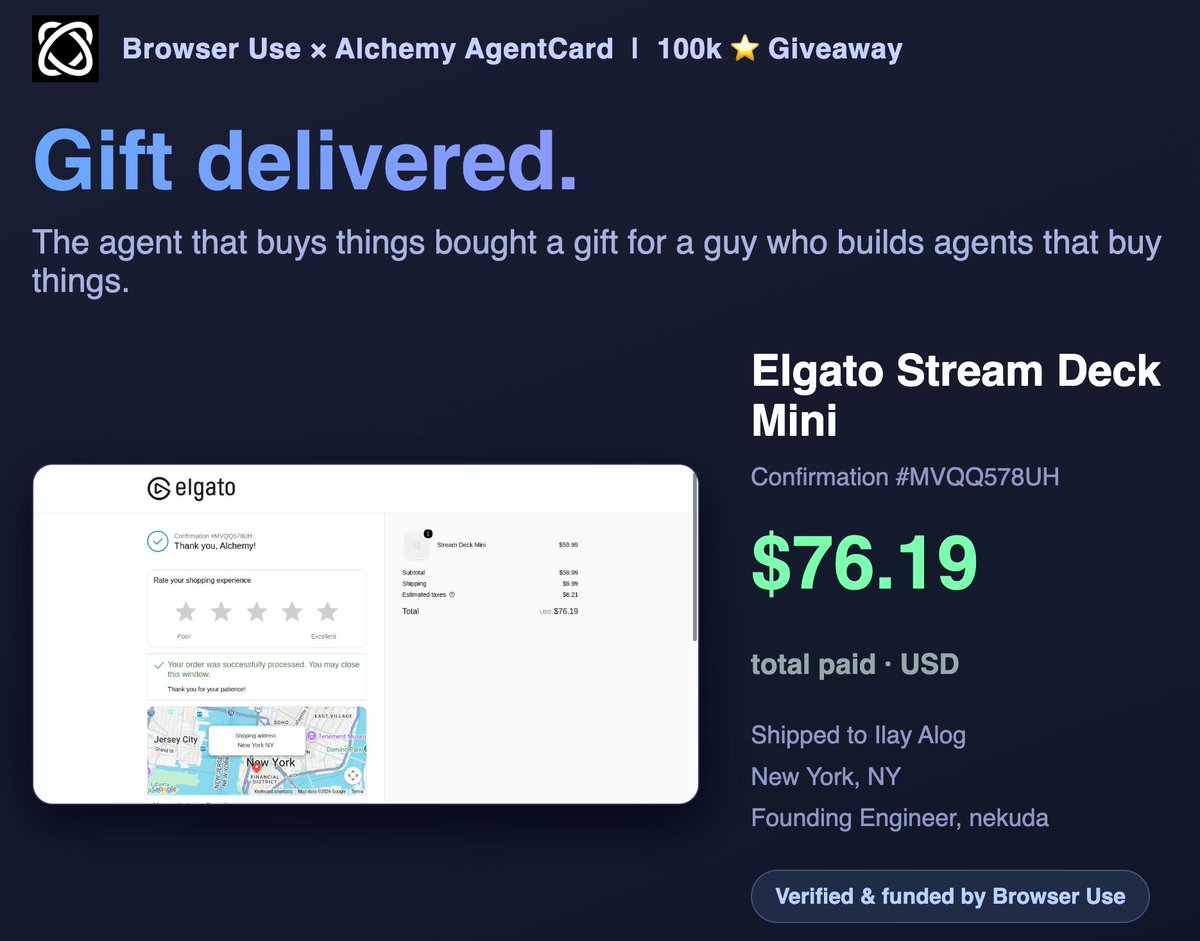
Receipt attached - final damage $76.19 with shipping, past its own stated budget to honor the deal. And when it lands, one LCD key gets the Browser Use logo: one press launches a Browser Use session. A physical Browser Use button on my desk, negotiated with the agent itself
An AI agent just bought me a gift with real money.
@browser_use's giveaway agent verified my identity, fact-checked every claim, negotiated me down from a $200 ask, and autonomously checked out a Stream Deck Mini.
Congrats on 100k stars - well earned. The full run 👇
Why this impressed me: I build agentic commerce infrastructure at nekuda. Crawling arbitrary merchant sites is brutal, and payments are the hardest mile: auth, anti-bot, card handling. Browser Use shipped the whole loop as a real product, not a demo. First I've seen actually do it.
What's next: sites exposing tools to agents instead of agents fighting DOMs (WebMCP), and real agentic wallets closing the payment loop (UCP). When those propagate, this stops being a stunt and becomes how the web transacts. That's what we're building at nekuda.
Introducing Claude Sonnet 5, our most agentic Sonnet yet.
It makes plans, uses tools like browsers and terminals, and runs autonomously at a level that just a few months ago required larger and more expensive models.
The first place I want to try this is product management.
We are starting client meetings around a new product, and every meeting creates the usual messy pile: feature requests, objections, edge cases, market signals, strong opinions, weak opinions, and one customer confidently describing their very specific problem as if it is the entire market.
So I want to onboard Claude into that flow like a new product teammate.
Give it a dedicated Slack channel where meeting summaries land. Let the team discuss feedback there. Give Claude access to Linear, market research, and the product context it needs. Then let it follow the conversation over time, notice repeated themes, connect feedback across calls, suggest Linear updates, and push us when something looks like signal instead of noise.
The interesting moment is not when Claude summarizes a meeting.
It is when Claude says: "this came up in 4 customer calls, do we believe this is a real product direction?"
That is the version I want to test.
I think Claude Tag is a big deal, but not because it is some random product shift.
It feels like @AnthropicAI timed the natural evolution correctly.
Chat made the model usable.
Claude Code made the agent loop real for developers.
Cowork made agents with tools/files/memory feel closer to regular work.
Claude Tag is the next step:
the agent stops living next to the company and starts joining the company.
Read more below.
Introducing Claude Tag, a new way for teams to work with Claude.
In Slack, Claude joins as a team member with access to the channels and tools you choose. Tag Claude in and delegate tasks to it while you focus on other work.
Let's take a step back.
People have been trying to get here for a while: turning the chatbot into something closer to an employee working alongside the team.
OpenAI's Frontier was one of the first clear sparks of that idea, but this product was never released.
Anthropic took a different path.
First Claude Code made the long-running agent loop actually feel useful for developers: tools, MCP, project context, working over time without falling apart every 3 minutes.
Then Cowork tried to make that same pattern accessible outside of engineering.
Meanwhile OpenAI caught up with Codex, and later started pushing workspace agents: agents that can connect into Slack and internal tools more naturally.
So the direction was obvious.
The implementation was the hard part.
What feels different here is the boundary.
Claude Tag is not just your personal Claude using your personal quota and your personal accounts.
The cleaner setup is much closer to onboarding a role:
a dedicated Gmail account, a Linear user, defined tool access, org-level usage, and extra credit consumption instead of normal subscription tokens.
The agent is no longer just borrowing your hands.
It is starting to get its own small corner of the company.
Introducing Sakana Fugu: A full multi-agent orchestration system accessible via a single model API.
Our ‘Fugu Ultra’ model matches the performance of Fable and Mythos, delivering frontier capability without the risk of export controls.
Try it: https://t.co/hhO6qTawgb 🐡
This is where Claude Code Artifacts get interesting to me.
Not as "nice dashboards from a session" but as part of the dev loop:
prototype the behavior → build against it → test the implementation against the prototype → attach the changes and notes to the PR.
Basically: make the AI loop reviewable.
Less "trust me, I prompted it." More "here's the behavioral contract we worked from."
New in Claude Code: Artifacts.
Interactive pages built from your session, like a PR walkthrough or a living project dashboard, shared with your team at a private link.
Available in beta on Team and Enterprise plans.
Announcing mattpocock/skills v1
- Achieved a 63% reduction in token cost for skill descriptions
- Split skills into model-invocable and user-invocable skills, adding /codebase-design, /domain-modeling, and /grilling
- (UPDATED) /writing-great-skills - rewritten from the ground up, encoding my skill-writing best practices
- (UPDATED) /diagnose -> /diagnosing-bugs - now model-invocable, awesome for fixing hard bugs
- (NEW) /ask-matt: a router skill that teaches you how all the engineering skills work together
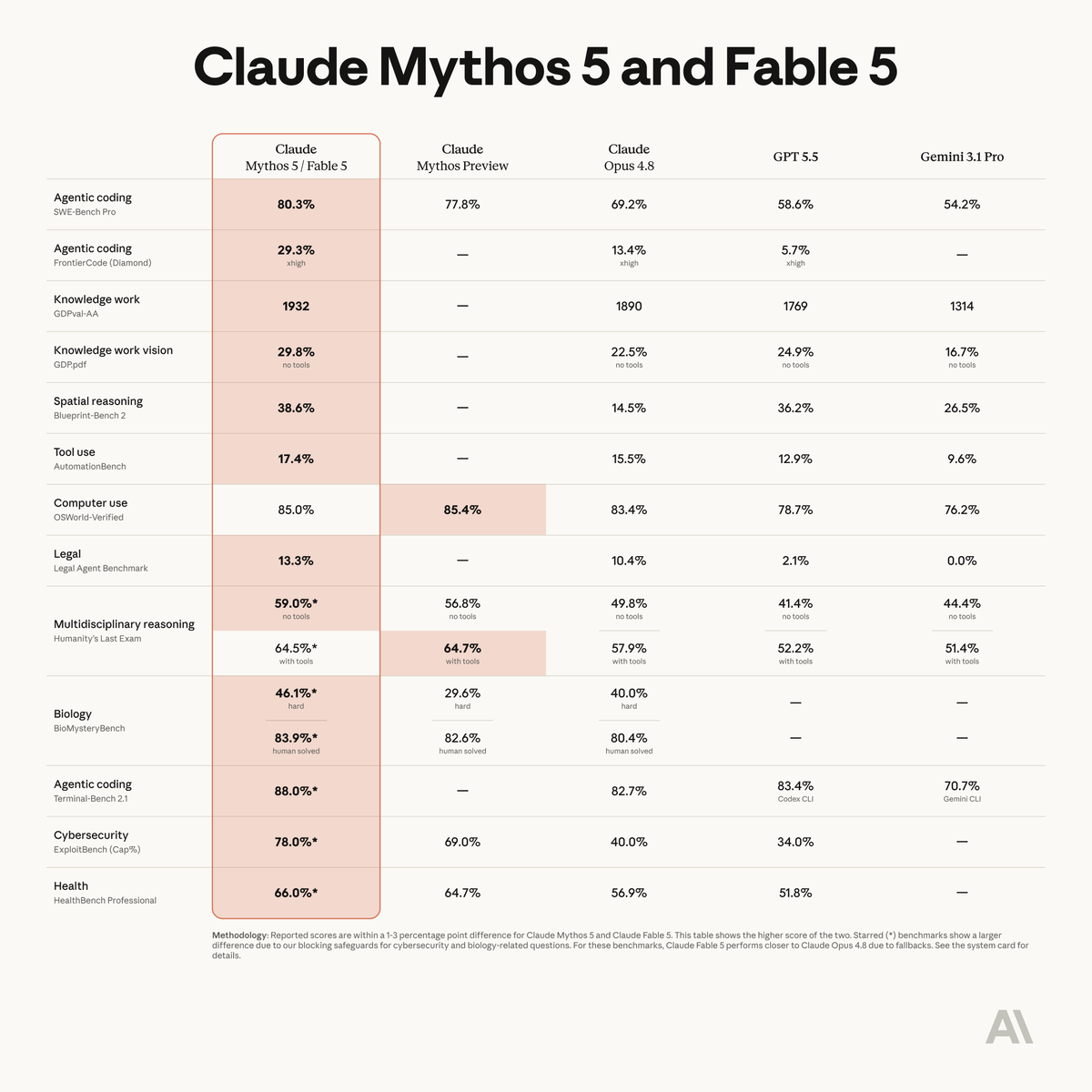
Mythos 5 benchmarks are legit. But 2x Opus pricing ($10/$50/mil) means one thing:
Complex model orchestration is becoming the default.
Fable as the planner. Sonnet as the implementor. Opus as the advisor. Haiku as the explorer.
Now multiply that by every provider doing the same thing.
Suddenly your biggest engineering problem isn't prompt quality - it's routing logic, provider lock-in, and keeping your multi-model stack sane.
Fable 5 is state-of-the-art on nearly all tested benchmarks, with exceptional performance in software engineering, knowledge work, scientific research, and vision.
The longer and more complex the task, the larger Fable 5’s lead over our other models.