Added 3D mesh rendering and visualization to the mobile app. InstantHMR runs at ~10ms end to end (crop to mesh) on my Galaxy s23. The detector is quite slow (20 ms) but is called only once every 30 frames. Hgnetv2 backbone is definitely easier to deplpoy than Repvit
Pollo MCP just made AI filmmaking beginner friendly.
Before, turning an idea into a cinematic short meant wrestling with first frames, character consistency, endless prompt rewrites, and hand stitching clips.
Now you describe the concept and @itsPolloAI MCP handles the rest:
Claude → story + direction
GPT Image 2.5 → characters / storyboards
Seedance 2.5 → video generation
Pollo AI MCP → connects the workflow
Within a year, solo creators will be making what used to take full crews. 2027 is going to be wild 🔥
슈퍼 면역력 햇빛 받은 버섯
버섯은 식물계에서 유일하게 비타민D를 스스로 합성할 수 있는 놀라운 존재.
1. 버섯을 슬라이스하여 햇빛에 단 15분만 노출해도 비타민 D2함량이 무려 2,000% 까지
급증.
2. UV-B 광선이 버섯 속의 ‘ 에르고스테롤’
성분과 만나 천연 비타민 D로 변환.
3. 단순히 수치만 올라가는게 아니라
우리 몸이 흡수하기 가장 좋은 천연 상태의 영양소를 얻게 됨
🚨: What does a BLACK HOLE actually sound like?
NASA turned this supermassive monster in galaxy M87 into pure audio.
It’s real data. Turn the volume up.
GPT Astra / Opus 5.5 -> Real estate photos to 3D walkable spaces - GitHub Skill
Repo is here:
https://t.co/1duqWGKmhJ
This workflow sparked a lot of "how to do it" questions - so we decided that to share the skill will be the best solution
Your AI agent will lead you through all the steps, and the README file will explain all the installation details.
Have fun:
Someone open sourced Hindsight, a memory system that lets AI agents learn over time rather than just recall past chats, and it picked up 1,668 GitHub stars in a day on its way to 22.1K.
→ Organizes memory into world facts, experiences, observations and mental models, modeled on human memory
→ Claims state-of-the-art accuracy among agent memory systems on the LongMemEval benchmark
→ Plugs into 60+ tools, including Claude Code, Cursor, GitHub Copilot, LangGraph, CrewAI and n8n
→ Runs locally with Docker or pip, supports 25+ LLM providers and is MIT licensed
Repo: https://t.co/HGL5OBReJn
THIS IS FUCKING INSANE.
a Chinese developer just released a FREE tool that can turn one script and one photo into a complete video with a presenter.
it was just released and already has 26,000 stars.
it’s called
"lanshu-create-ai-presenter-video".
here's how it works:
you give it a script and a presenter photo you have permission to use.
the AI creates the voice, makes the presenter talk, and matches the lips to the audio.
then it adds the subtitles, creates the cover, checks that everything is synced properly, and gives you the finished video with a quality report.
the final video is 9:16, 1080x1920, 30fps, and 45-75 seconds long.
and the crazy part is
it does all of this in one run on your own computer.
if you make short form content, save this before you make your next video.
will be dropping more free tools soon,
so bookmark
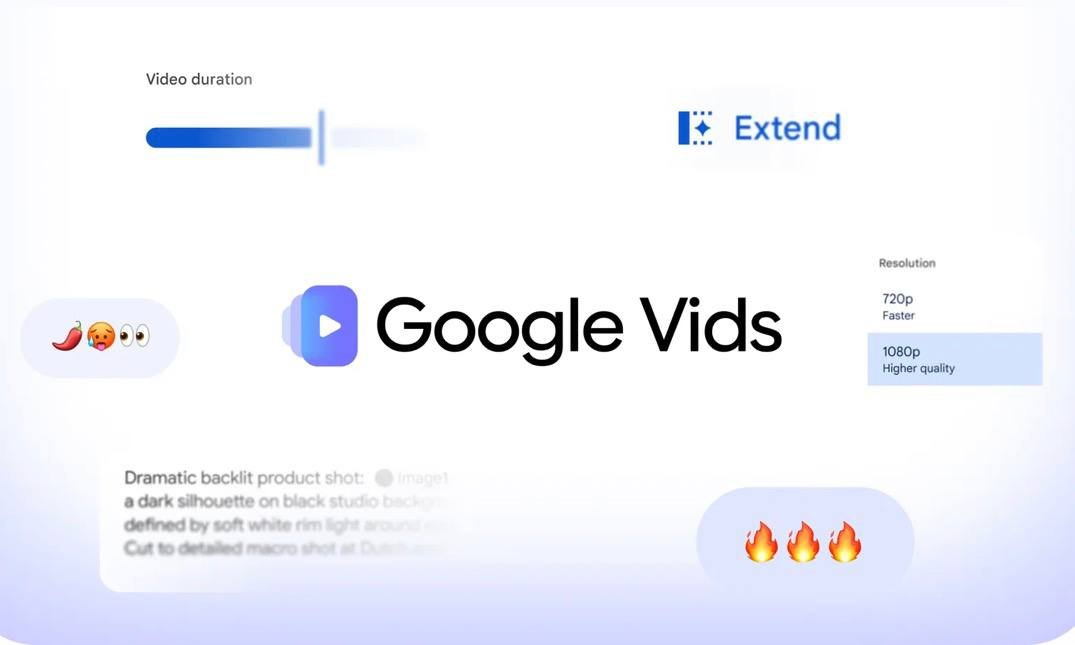
🚨 جوجل تفجر قنبلة موسم الذكاء الاصطناعي: توليد فيديو مجاني بدقة 1080p متاح للجميع الآن! 💥🎥
بدون أي اشتراكات مدفوعة وبشكل مجاني تماماً لأي شخص يملك حساب Google.. أصبح بإمكانك إنتاج مقاطع فيديو عالية الجودة باستخدام Gemini Omni مباشرة من متصفحك!
⚡️ إمكانيات مرعبة تنهي احتكار أدوات الفيديو المدفوعة:
🎬 ضبط مدة المشهد، الانتقالات، وإضافة المؤثرات بضغطة زر واحدة!
📐 صمّم فيديوهاتك ومقاطع الإعلانات في ثوانٍ معدودة دون الحاجة لخبرة مونتاج!
🌐 إنشاء مباشر من المتصفح: بدون تحميل برامج ثقيلة أو استهلاك موارد جهازك!
صنّاع المحتوى وأصحاب الإعلانات التجارية أمام تحول تاريخي وسريع.. التجربة متاحة فوراً! 🤯⚡️
جرب الأدوات بنفسك من الرابط: 👇
🚨 STOP USING CLAUDE LIKE A BASIC CHATBOT — HERE ARE 12 WAYS TO USE IT AS A REAL AI WORK SYSTEM
Most people use Claude for writing, brainstorming, and answering questions.
But that’s only one layer of what you can build with it.
Claude can be used across coding, automation, research, browser workflows, document creation, AI agents, reusable skills, and multi-step development workflows.
Here are 12 practical use cases worth knowing 👇
Today we announce our new unified multi-agent framework that provides creators with a system for generating temporally consistent, long-form video narratives while mitigating visual drift and pipeline error propagation. Learn more: https://t.co/FWbKBvca3s
🚨 Chinese scientists just detected an unexplained 71-terahertz vibration inside mitochondria — the microscopic "powerhouses" of living cells.
The work was published by researchers at the University of Shanghai for Science and Technology.
The signal, which oscillates 71 trillion times per second, was detected in living human cells and mouse tissues but vanished completely once the cellular structures were dried or disrupted.
This dependency on structural integrity led the scientific team to propose that mitochondria may utilize a quantum hybrid state, known as a polariton, created by light-matter coupling inside their highly folded inner membranes to optimize how they function.
To test this theory, the scientists stimulated human cell cultures with weak infrared light tuned to specific frequencies associated with this quantum state. The experiment yielded a stunning 10 percent jump in the production of adenosine triphosphate (ATP), the vital molecule that fuels almost every biological function in our bodies.
While the study was published as a bioRxiv preprint and is still awaiting peer review, it represents a monumental leap for quantum biology. If verified, the ability to manipulate these quantum channels could pave the way for revolutionary treatments targeting metabolic diseases, aging, and chronic genetic conditions.
source: Song, B., et al. (2026). A quantum state of mitochondria in the living cell. bioRxiv.
좌파였던 진중권
그래서 그런지 그들의 음침하고
더러운 속내를 누구보다 핵심적으로 이야기한다.
검찰수사권을 빼앗고, 기소도 못하게 만들고
검사악마화로 검사파면제 도입하고
재판 겨우 갔더니 법왜곡죄 만들고
범죄를 면소법으로 없애고
이것도 안통한다 싶었는지
법관늘리고 헌재가져가서 4심제도입하고
진짜 어마어마하죠?
근데 이렇게 열변을 토해내면 뭐합니까~
공산당한테 돌아오는 답변은: 국민적인 공감대인데
그래 너네들이 맨날 국민무새 하는데
중요한건 너네 국민은 인민이자나ㅋㅋㅋ
🔥 TRUMP JUST REPOSTED JFK’S MOST TERRIFYING SPEECH — AND THE DEEP STATE IS PANICKING
JFK saw it coming. In 1961. And now, Trump has just made sure 300 million Americans see it, too.
The speech everyone’s talking about: Kennedy’s address to the American Newspaper Publishers Association, April 27, 1961. The CIA had just botched the Bay of Pigs. Kennedy was livid. He’d been lied to by his own intelligence apparatus. And he walked onto that stage and said something no president has dared say since.
“We are opposed around the world by a monolithic and ruthless conspiracy that relies primarily on covert means for expanding its sphere of influence — on infiltration instead of invasion, on subversion instead of elections, on intimidation instead of free choice.”
Read that again. Monolithic. Ruthless. Conspiracy.
This wasn’t some fringe radio host. This was the sitting President of the United States, on live television, telling the American people that a shadow network of power — operating through intelligence agencies, media complicity, and institutional capture — was working against the republic itself.
And then he said the quiet part out loud:
“Its preparations are concealed, not published. Its mistakes are buried, not headlined. Its dissenters are silenced, not praised. No expenditure is questioned, no rumor is printed, no secret is revealed.”
Sound familiar?
Sixty-five years later, Trump drops this video on Truth Social. No commentary needed. The speech does all the work. And within hours, the same media outlets that spent four years calling Trump a conspiracy theorist are suddenly very quiet.
Here’s what they don’t want you to connect:
- Kennedy was assassinated 2.5 years after this speech
- The Warren Commission was a joke — even the House Select Committee on Assassinations in 1979 concluded Kennedy was “probably assassinated as a result of a conspiracy”
- The files are STILL classified
- Trump has been pushing to release them, but the permanent national security state refuses, instead slow-walking the order
The timing isn’t random. This isn’t just history. JFK described a permanent national security state that has only grown more entrenched — one that operates beyond elections, beyond accountability, beyond the reach of voters.
Kennedy called it “a system which has conscripted vast human and material resources into the building of a tightly knit, highly efficient machine that combines military, diplomatic, intelligence, economic, scientific, and political operations.”
That machine didn’t disappear when he died. It got even stronger.
Trump reposting this isn’t nostalgia. It’s a signal. The same forces JFK warned about are the same forces that tried to destroy Trump — Russiagate, two impeachments, lawfare, media blackout, assassination attempts. The playbook hasn’t changed. Only the names.
And now the sitting president just reminded the country who the real enemy has always been.
The speech that scared them then is the speech they’re terrified you’ll watch now.
Sharing this because they’re counting on you not to watch it. Don’t let them win. 🎯
this is the first AI setup that genuinely scared me
GPT-6 Sol thinks. Jev decides. Grok Bot does the work. together they do a whole team's job for pocket change
alone, each one hits a wall. Jev can't write a sentence. Sol has no computer or phone of its own. and one builder put the last part best: "12 Grok Bots without Jev are just 12 tabs"
i couldn't find anyone running all three together. so i spent the last 48 hours wiring them into one team:
→ one group chat, 4 Grok Bots: Boss, Scout, Writer, Closer. they pass work to each other, you just read the chat
→ Boss plans the day with GPT-6 Sol. in one public test Sol did the same job as Opus 5.5 for $0.08 instead of $0.69, 4x faster
→ Scout pulls every lead in your niche and Jev asks each one 6 quick questions. one builder ran 3,412 leads like this: 20,472 decisions in 15.7 seconds for $0.41
→ only real buyers reach Writer, and Sol drafts every pitch. tricky lead? Jev tells Sol to think harder. easy one? it tells it to relax. that trick alone cut one setup's bill in half
→ Closer sends from your email after you tap approve. Telegram gets the scoreboard every night
the 6-hour job of reading leads now takes 16 seconds. your laptop stays shut
most people pay their smartest AI to say "skip" all day. this stack pays Jev a fraction of a cent for it
Claire Vo already runs about 30 Grok Bots. one prints her kids a newspaper every morning. another gets 5-star reviews from customers who have no idea it's a bot
every day you wait, someone's Scout reaches the client you would've gotten
bookmark this before someone's bot takes your clients
"AI가 짜준 수천 줄의 코드, 솔직히 다 읽고 검토할 엄두 나시나요?"
Claude Code나 Cursor가 코드를 아무리 잘 뽑아줘도, 결국 "AI가 어떻게 짰는지 이해하고 리뷰하는 일"이 개발자의 최대 지옥이 되어버림.
이 문제를 한 방에 끝내버린 오픈소스 'Whiteboard'가 등장함.
AI가 전체 시스템 구조를 캔버스에 '그림(다이어그램)'으로 한눈에 쫙 펼쳐주고, 그림을 콕 클릭하면 해당 코드로 바로 순간이동함. 복잡한 코드 리뷰를 게임처럼 만들어버리는 툴.
누구나 무료로 쓸 수 있는 오픈소스 링크와 핵심 특징은 👇 (타래)
[클로드 Opus 5.5 출시기념]
📌 '바이브코딩'할 때 무조건 한번쯤 쓰는 필수 클로드코드 핵심 명령어 총정리해봤습니다.
(AI 안쓰고 제가 전부 명령어 하나씩 비교해서 직접 정리했음)
북마크해두고 필요한 순간에 써보시면 도움되실거예요!
/init
--> 클로드코드를 처음 쓰는 프로젝트에서 기존 코드를 분석해 CLAUDE.md 초안을 만들어주는 명령어 (명령어 이름대로 클로드가 권장하는 공식 init해줌)
/model
--> 지금 선택된 모델이 어떤 모델인지 확인할 때 또는 사용할 클로드 모델을 바꿀 때 쓰는 명령어
/effort
--> 해당 클로드 모델이 얼마나 깊게 생각시킬지 설정할 때 쓰는 명령어 (보통 low, medium, high, xhigh, max, ultra 까지 존재하며, 선택 가능)
/plan
--> 코드를 바로 작성시키지 않고 계획부터 세울 수 있게 쓰는 명령어 (구현 전 제대로 된 설계부터 할 때나 앱을 처음 만들 때 많이 사용함)
/goal [이 goal 완료 조건 프롬프트]
--> "계속해"라고 작업을 끝낸 클로드에게 귀찮게 지시하지 않아도 완료 조건을 만족할 때까지 무한히 알아서 loop 느낌으로 작업해주는 명령어 (잘 때 켜두면 담날까지 계속 작업하는 경우가 많음) (단 토큰 녹을 수 있음 주의!)
/context
--> 현재까지 컨텍스트 윈도우에 토큰이 얼마나 찼는지, 자동 압축까지 얼마나 남았는지 볼 수 있는 명령어. (현재 컨텍스트 사용량과 구성을 시각적으로 보여줌)
/compact [압축원하는 방향 설명 프롬프트 (안쓰고 그냥 compact 명령어만 써도 됨)]
--> 대화가 길어지거나 "여기서 한번 끊고 이어서 가볼까?"라고 생각이 들 때 쓰는 명령어. (지금까지의 대화를 요약해 공간을 확보해줌) (자동 압축전에 이 명령어로 내가 직접 압축 가능)
/resume
--> 이전 작업 세션 리스트를 보여주고 이전 대화를 선택해 재개할 수 있는 명령어. (방향키로 세션 선택 가능, Enter 누르면 그 세션으로 진입)
/rewind
--> 클로드가 수정한 코드가 마음에 들지 않을 때 되돌아갈 수 있는 명령어. (코드나 대화를 이전 체크포인트로 복원가능)
/usage
--> 현재까지 사용량을 얼마나 썼는지 볼 수 있는 명령어 (5시간 한도, 주간한도도 볼 수 있고 활동 통계 등도 확인가능)
/verify
--> 클로드의 "구현했습니다"라는 말을 믿지 않고 실제로 작동하는지 확인할 때 쓰는 명령어. (테스트 통과 여부만 보는 것이 아니라 바뀐 기능의 실제 흐름을 실행하고 관찰해 검증함)
/code-review
--> 클로드 본인이 짠 코드도 다시 의심하게 할 때 쓰는 명령어. (변경 코드에서 버그를 검토)
/simplify
--> 코드가 스파게티 마냥 너무 복잡해진 것 같을 때 쓰는 명령어. (중복, 불필요한 복잡성, 비효율을 검토하고 정리)
/batch
--> 큰 작업을 여러 에이전트에게 나눠 동시 작업시킬 때 쓰는 명령어. (5~30개 작업으로 분해하고 병렬 처리함. Git 저장소가 필요함)
/advisor
--> 클로드 혼자 판단하지 말고 다른 모델에게도 물어보게 해주는 명령어. (중요한 순간에 두 번째 모델의 자문을 받도록 할 수 있음)
/loop
--> 특정 작업을 클로드에게 "5분마다 획인해줘, 처리해줘"를 입력하지 않아도 일정 시간마다 자동으로 작업해주는 명령어. (프롬프트를 주기적으로 실행함, 세션을 열어둬야 함)
/remote-control
--> 집 밖에서도 원격으로 내 컴퓨터 클로드에게 작업을 다른 컴퓨터나, 휴대폰으로 작업시킬 때 쓰는 명령어. (다른 기기에서 현재 로컬 세션에 접속, 해당 컴퓨터 전원이 켜져있어야 함)
/deep-research
--> 클로드 코드에서 딥리서치할 때 쓰는 명령어. (여러 방향으로 웹 검색하고 원문을 교차검증해 출처가 포함된 보고서를 만들어줌)
/insights
--> "나는 클로드 코드를 제대로 쓰고 있을까?" 클로드코드 전체를 분석받을 때 쓰는 명령어. (이 컴퓨터의 최근 클로드코드 세션, 기록을 분석해 문제 지점과 추천 기능을 HTML 보고서로 정리해줌)
/btw
--> 작업중인 클로드를 방해시키지 않고 질문할 수 있는 사이드채팅?할 수 있는 명령어. (작업 멈추지 않고 질문할 때 매우 유용함)
/rename [원하는 세션 이름]
--> 현재 클로드코드 세션이 마음에 들 때 세션 이름을 지정해줄 수 있는 명령어. (한국어도 가능)
/config
--> 클로드코드의 모든 세팅값을 보거나, 수정할 때 쓰는 명령어.
/recap
--> 잠깐 자리를 비웠다가 "여기서 뭐 하고 있었지?" 싶을 때 쓰는 명령어 (현재 세션을 한 줄로 요약해줌)
/clear
--> 말그대로 현재 세션을 clear 시켜주는 명령어. (이전 작업의 맥락이 섞이지 않게 새 작업을 시작할 때나 빈 컨텍스트로 새 대화를 시작할 때 주로 씀)
클로드코드 설치하면 기본적으로 쓸 수 있는 명령어는 이것보다 훨씬 많지만 '자주 쓰이는', '진짜 필요한' 것들만 추리고 추려봤습니다.
IBM built a retriever that hallucinates 65x less than fine-tuned RAG systems.
no vector database. no embeddings. no re-ranker.
Right now, if you want an AI to read a massive document, you use Retrieval-Augmented Generation (RAG).
But standard RAG does something brutal. It takes a beautifully structured 500-page manual and throws it into a blender.
It chops the text into arbitrary, fixed-size chunks. It strips away the chapters, the sections, the hierarchy.
It throws away the map and asks the AI to find the treasure.
A new paper just introduced STAIR, a method that fixes this massive blind spot.
Instead of shredding documents into random chunks, STAIR uses the document's actual structure, its Table of Contents, as an addressing scheme.
The generative retriever pulls information against the real hierarchy of the text. It remembers where things actually live.
The benchmark results are staggering.
STAIR hit an 82.6% Recall@1, completely destroying traditional methods like BM25 and standard Dense Passage Retrieval (DPR).
But here is the most important metric for any business running AI in production:
Hallucinations plummeted to under 0.05%.
Almost zero.
By giving the AI back the structural context, the system stopped guessing and started retrieving with lethal precision.
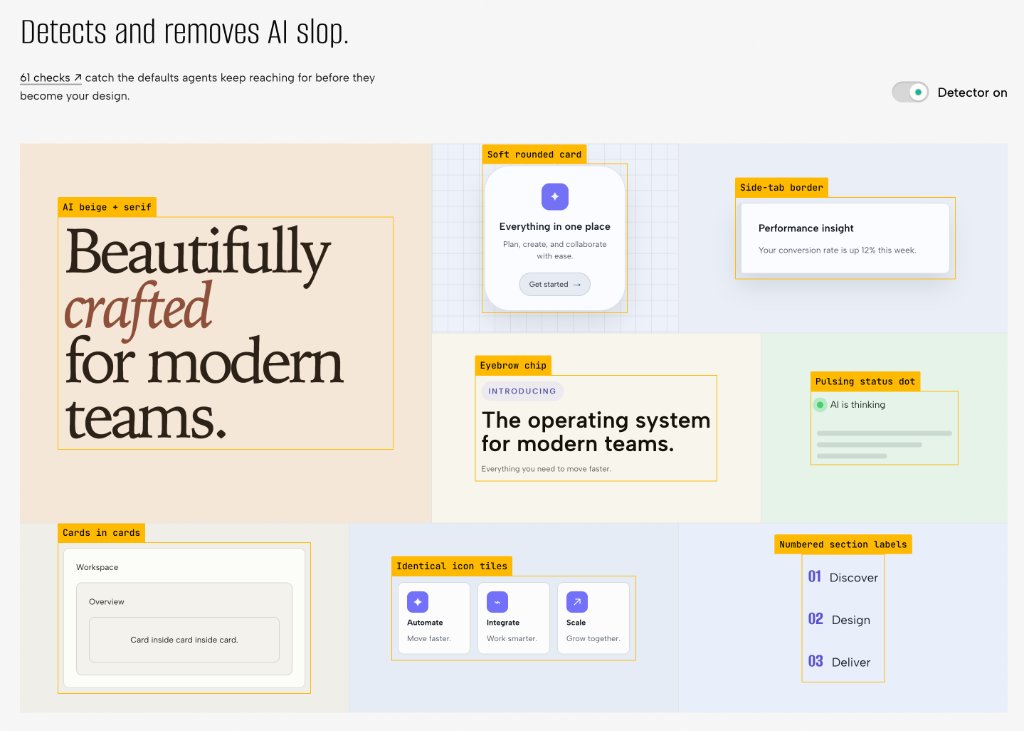
'바이브 코더'라면 무조건 공감할 AI의 고질병:
"기능은 잘 도는데, 결과물 보면 묘하게 AI 냄새 풍기고 촌스러움."
베이지색 배경, 둥근 보라색 카드, 카드 속의 카드... 전 세계 AI들이 똑같이 남발하는 디자인 찌꺼기(AI Slop) 61가지를 싹 걷어내는 오픈소스 'Impeccable'.
명령어 한 줄로 붙여서 실리콘밸리급 UI로 갈아엎는 법 정리 👇 (타래)





![lucian__03's tweet photo. [클로드 Opus 5.5 출시기념]
📌 '바이브코딩'할 때 무조건 한번쯤 쓰는 필수 클로드코드 핵심 명령어 총정리해봤습니다.
(AI 안쓰고 제가 전부 명령어 하나씩 비교해서 직접 정리했음)
북마크해두고 필요한 순간에 써보시면 도움되실거예요!
/init
--> 클로드코드를 처음 쓰는 프로젝트에서 기존 코드를 분석해 CLAUDE.md 초안을 만들어주는 명령어 (명령어 이름대로 클로드가 권장하는 공식 init해줌)
/model
--> 지금 선택된 모델이 어떤 모델인지 확인할 때 또는 사용할 클로드 모델을 바꿀 때 쓰는 명령어
/effort
--> 해당 클로드 모델이 얼마나 깊게 생각시킬지 설정할 때 쓰는 명령어 (보통 low, medium, high, xhigh, max, ultra 까지 존재하며, 선택 가능)
/plan
--> 코드를 바로 작성시키지 않고 계획부터 세울 수 있게 쓰는 명령어 (구현 전 제대로 된 설계부터 할 때나 앱을 처음 만들 때 많이 사용함)
/goal [이 goal 완료 조건 프롬프트]
--> "계속해"라고 작업을 끝낸 클로드에게 귀찮게 지시하지 않아도 완료 조건을 만족할 때까지 무한히 알아서 loop 느낌으로 작업해주는 명령어 (잘 때 켜두면 담날까지 계속 작업하는 경우가 많음) (단 토큰 녹을 수 있음 주의!)
/context
--> 현재까지 컨텍스트 윈도우에 토큰이 얼마나 찼는지, 자동 압축까지 얼마나 남았는지 볼 수 있는 명령어. (현재 컨텍스트 사용량과 구성을 시각적으로 보여줌)
/compact [압축원하는 방향 설명 프롬프트 (안쓰고 그냥 compact 명령어만 써도 됨)]
--> 대화가 길어지거나 "여기서 한번 끊고 이어서 가볼까?"라고 생각이 들 때 쓰는 명령어. (지금까지의 대화를 요약해 공간을 확보해줌) (자동 압축전에 이 명령어로 내가 직접 압축 가능)
/resume
--> 이전 작업 세션 리스트를 보여주고 이전 대화를 선택해 재개할 수 있는 명령어. (방향키로 세션 선택 가능, Enter 누르면 그 세션으로 진입)
/rewind
--> 클로드가 수정한 코드가 마음에 들지 않을 때 되돌아갈 수 있는 명령어. (코드나 대화를 이전 체크포인트로 복원가능)
/usage
--> 현재까지 사용량을 얼마나 썼는지 볼 수 있는 명령어 (5시간 한도, 주간한도도 볼 수 있고 활동 통계 등도 확인가능)
/verify
--> 클로드의 "구현했습니다"라는 말을 믿지 않고 실제로 작동하는지 확인할 때 쓰는 명령어. (테스트 통과 여부만 보는 것이 아니라 바뀐 기능의 실제 흐름을 실행하고 관찰해 검증함)
/code-review
--> 클로드 본인이 짠 코드도 다시 의심하게 할 때 쓰는 명령어. (변경 코드에서 버그를 검토)
/simplify
--> 코드가 스파게티 마냥 너무 복잡해진 것 같을 때 쓰는 명령어. (중복, 불필요한 복잡성, 비효율을 검토하고 정리)
/batch
--> 큰 작업을 여러 에이전트에게 나눠 동시 작업시킬 때 쓰는 명령어. (5~30개 작업으로 분해하고 병렬 처리함. Git 저장소가 필요함)
/advisor
--> 클로드 혼자 판단하지 말고 다른 모델에게도 물어보게 해주는 명령어. (중요한 순간에 두 번째 모델의 자문을 받도록 할 수 있음)
/loop
--> 특정 작업을 클로드에게 "5분마다 획인해줘, 처리해줘"를 입력하지 않아도 일정 시간마다 자동으로 작업해주는 명령어. (프롬프트를 주기적으로 실행함, 세션을 열어둬야 함)
/remote-control
--> 집 밖에서도 원격으로 내 컴퓨터 클로드에게 작업을 다른 컴퓨터나, 휴대폰으로 작업시킬 때 쓰는 명령어. (다른 기기에서 현재 로컬 세션에 접속, 해당 컴퓨터 전원이 켜져있어야 함)
/deep-research
--> 클로드 코드에서 딥리서치할 때 쓰는 명령어. (여러 방향으로 웹 검색하고 원문을 교차검증해 출처가 포함된 보고서를 만들어줌)
/insights
--> "나는 클로드 코드를 제대로 쓰고 있을까?" 클로드코드 전체를 분석받을 때 쓰는 명령어. (이 컴퓨터의 최근 클로드코드 세션, 기록을 분석해 문제 지점과 추천 기능을 HTML 보고서로 정리해줌)
/btw
--> 작업중인 클로드를 방해시키지 않고 질문할 수 있는 사이드채팅?할 수 있는 명령어. (작업 멈추지 않고 질문할 때 매우 유용함)
/rename [원하는 세션 이름]
--> 현재 클로드코드 세션이 마음에 들 때 세션 이름을 지정해줄 수 있는 명령어. (한국어도 가능)
/config
--> 클로드코드의 모든 세팅값을 보거나, 수정할 때 쓰는 명령어.
/recap
--> 잠깐 자리를 비웠다가 "여기서 뭐 하고 있었지?" 싶을 때 쓰는 명령어 (현재 세션을 한 줄로 요약해줌)
/clear
--> 말그대로 현재 세션을 clear 시켜주는 명령어. (이전 작업의 맥락이 섞이지 않게 새 작업을 시작할 때나 빈 컨텍스트로 새 대화를 시작할 때 주로 씀)
클로드코드 설치하면 기본적으로 쓸 수 있는 명령어는 이것보다 훨씬 많지만 '자주 쓰이는', '진짜 필요한' 것들만 추리고 추려봤습니다.](https://pbs.twimg.com/media/HS-RPF_bwAAmwtb.jpg)