Bonito recurso para aprender Algoritmos de Programación.
Son 86 lecciones y está totalmente en Español.
Estructuras de datos, algoritmos, grafos, retos...
→ https://t.co/yPlVOKfXm0
¡AWS ha sacado un emulador oficial 100% local!
No tiene coste y todo se queda en tu máquina.
Perfecto para pruebas en local, crear prototipos, ejecutar tests de integración y más.
Para Windows, macOS y Linux. De código abierto:
https://t.co/IL6MRkYa14
Microsoft quietly published 99 ready-made .NET skills for AI Agents.
Most .NET developers have no idea they exist 👇
These skills are official and open source.
They work in Claude Code, Codex, GitHub Copilot and Cursor.
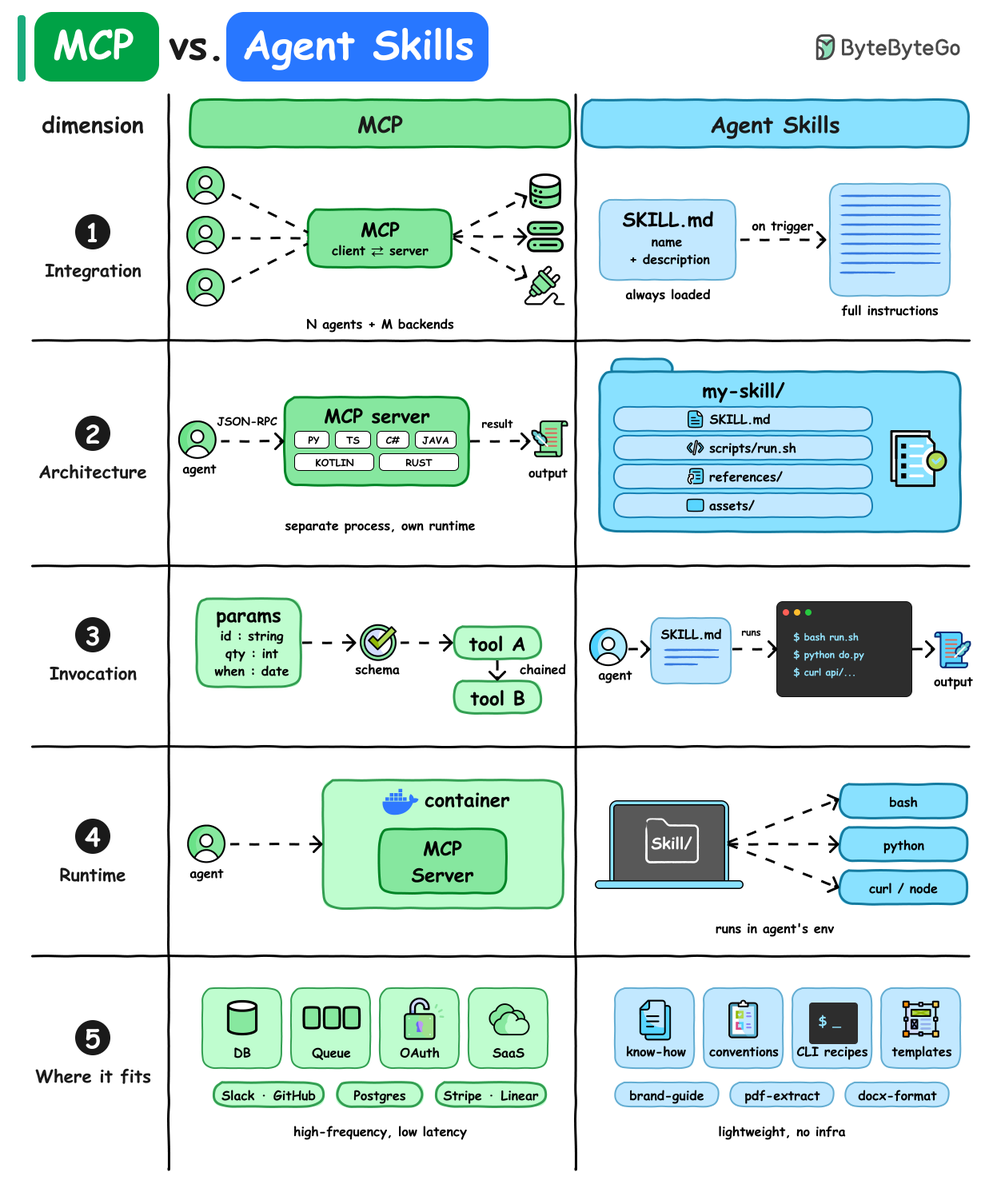
A skill is a folder with instructions.
Your AI agent loads it only when a task needs it.
You write the steps once, and the agent follows them every time.
Microsoft keeps them in the dotnet/skills repo: 14 plugins, 99 skills.
A plugin is a group of related skills. You install a plugin and get all its skills at once.
Here are 5 I'd install first, in this order:
𝟭. 𝗱𝗼𝘁𝗻𝗲𝘁-𝘂𝗽𝗴𝗿𝗮𝗱𝗲
Moves a project from .NET 8 to 10 and turns on nullable reference types.
𝟮. 𝗱𝗼𝘁𝗻𝗲𝘁-𝗱𝗮𝘁𝗮
The optimizing-ef-core-queries skill catches N+1 queries, picks the right tracking mode and removes common EF Core performance traps.
𝟯. 𝗱𝗼𝘁𝗻𝗲𝘁-𝗮𝘀𝗽𝗻𝗲𝘁
Builds Web API endpoints and file-upload endpoints in Minimal APIs the right way.
𝟰. 𝗱𝗼𝘁𝗻𝗲𝘁-𝘁𝗲𝘀𝘁
The biggest plugin: 22 skills to run tests, filter them and move between test frameworks.
𝟱. 𝗱𝗼𝘁𝗻𝗲𝘁-𝗮𝗶
Builds, debugs and tests MCP servers with the C# SDK.
These skills know .NET.
They don't know YOUR project.
They can't tell where you keep your entities, that you don't use repositories, or that your handlers return Result<T>.
Your own skills fill this gap:
→ Microsoft's skills handle general .NET tasks
→ Your skills handle your house rules and conventions
Use both, and your AI agent knows the framework and your style.
2 tips before you install:
→ Don't install all 99. Every skill adds its description to the agent's context, so pick the plugins that match your stack
→ Name the skill in your prompt instead of letting the agent guess which one to use
In my article, I explain the full setup:
→ What a skill is and what's inside one
→ How to write a description so the skill triggers at the right time
→ How to turn your conventions into skills: rich entities, no repositories, full features
→ How to use the Skill Creator to bundle your real code files
→ How to install Microsoft's dotnet/skills in 4 steps
👉 Read the full step-by-step guide here:
↳ https://t.co/UASPgYrc4X
Subnetting explained simply
Think of a network like a big apartment building.
IP Address = apartment number
Network = the whole building
Subnetting means:
“Splitting one big network into smaller organized sections.”
Why?
• Better speed
• Better security
• Easier management
Example:
192.168.1.0/24 = one big network
Subnetting it into /26 creates 4 smaller networks:
192.168.1.0
192.168.1.64
192.168.1.128
192.168.1.192
Easy trick:
/25 jumps by 128
/26 jumps by 64
/27 jumps by 32
/28 jumps by 16
The more bits you “borrow,” the smaller the subnet becomes.
Subnetting looks hard at first…
until you understand the pattern.
15 SYSTEM DESIGN PRINCIPLES
1. SCALABILITY
→ Design systems to handle growth in users and traffic
→ Use horizontal scaling (adding more servers)
→ Avoid single-machine limitations
A good system should grow without breaking.
2. AVAILABILITY
→ Ensure your system is always accessible
→ Use redundancy and failover strategies
→ Minimize downtime
High availability = better user trust.
3. RELIABILITY
→ Systems should perform consistently over time
→ Handle failures gracefully
→ Ensure data correctness
Users should depend on your system without surprises.
4. PERFORMANCE
→ Reduce latency and response time
→ Optimize database queries
→ Use caching strategies
Fast systems improve user experience.
5. FAULT TOLERANCE
→ Design systems to continue working even when parts fail
→ Use backups and replication
→ Implement retry mechanisms
Failures are inevitable — plan for them.
6. LOAD BALANCING
→ Distribute traffic across multiple servers
→ Prevent server overload
→ Improve system responsiveness
No single server should carry all the load.
7. CACHING
→ Store frequently accessed data temporarily
→ Reduce database load
→ Improve speed
Examples: Redis, in-memory caching
8. DATABASE DESIGN
→ Choose the right database (SQL vs NoSQL)
→ Normalize or denormalize based on use case
→ Index for faster queries
Data design is the backbone of your system.
9. CONSISTENCY VS AVAILABILITY (CAP THEOREM)
→ You can’t have full consistency, availability, and partition tolerance at once
→ Choose trade-offs based on system needs
Understanding trade-offs is key in distributed systems.
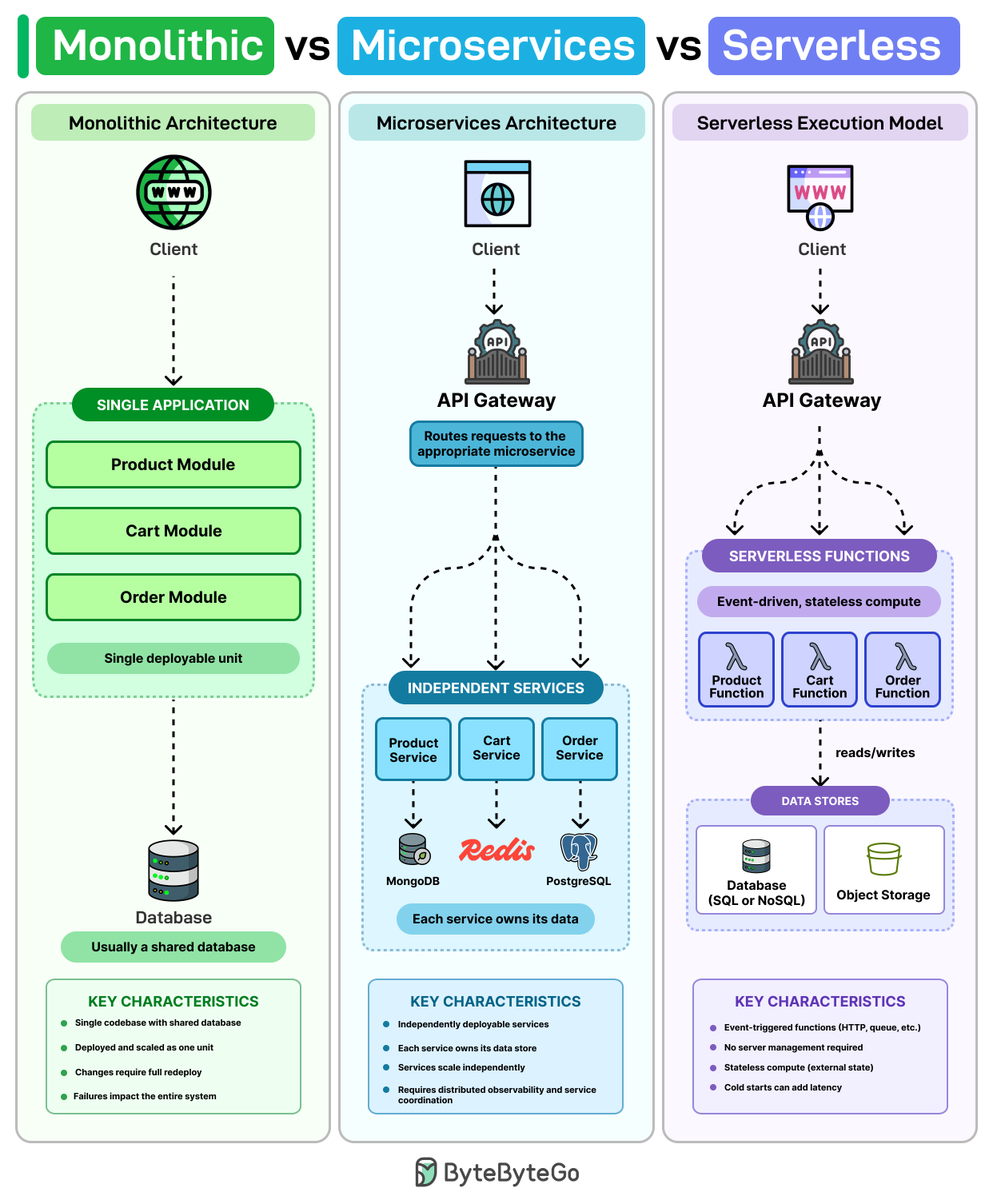
10. MICROSERVICES ARCHITECTURE
→ Break systems into smaller independent services
→ Each service handles a specific responsibility
→ Enables scalability and flexibility
Avoid tightly coupled monoliths when scaling.
11. API DESIGN
→ Use REST or GraphQL
→ Keep APIs consistent and predictable
→ Version your APIs
APIs are the communication bridge between systems.
12. MESSAGE QUEUES
→ Handle asynchronous tasks
→ Improve system resilience
→ Decouple services
Examples: RabbitMQ, Kafka
13. SECURITY
→ Encrypt data (HTTPS, TLS)
→ Implement authentication & authorization
→ Protect against attacks (SQL injection, XSS)
Security must be built from day one.
14. MONITORING & LOGGING
→ Track system performance
→ Log errors and events
→ Use tools like Prometheus, ELK
You can’t fix what you can’t see.
15. DEPLOYMENT & CI/CD
→ Automate builds and deployments
→ Use pipelines for testing and release
→ Ensure smooth updates
Faster delivery with fewer errors.
System design is about making the right trade-offs while building systems that are scalable, reliable, and efficient.
If you want to master system design in depth:
Grab the System Design Handbook:
https://t.co/WIMretRdFc
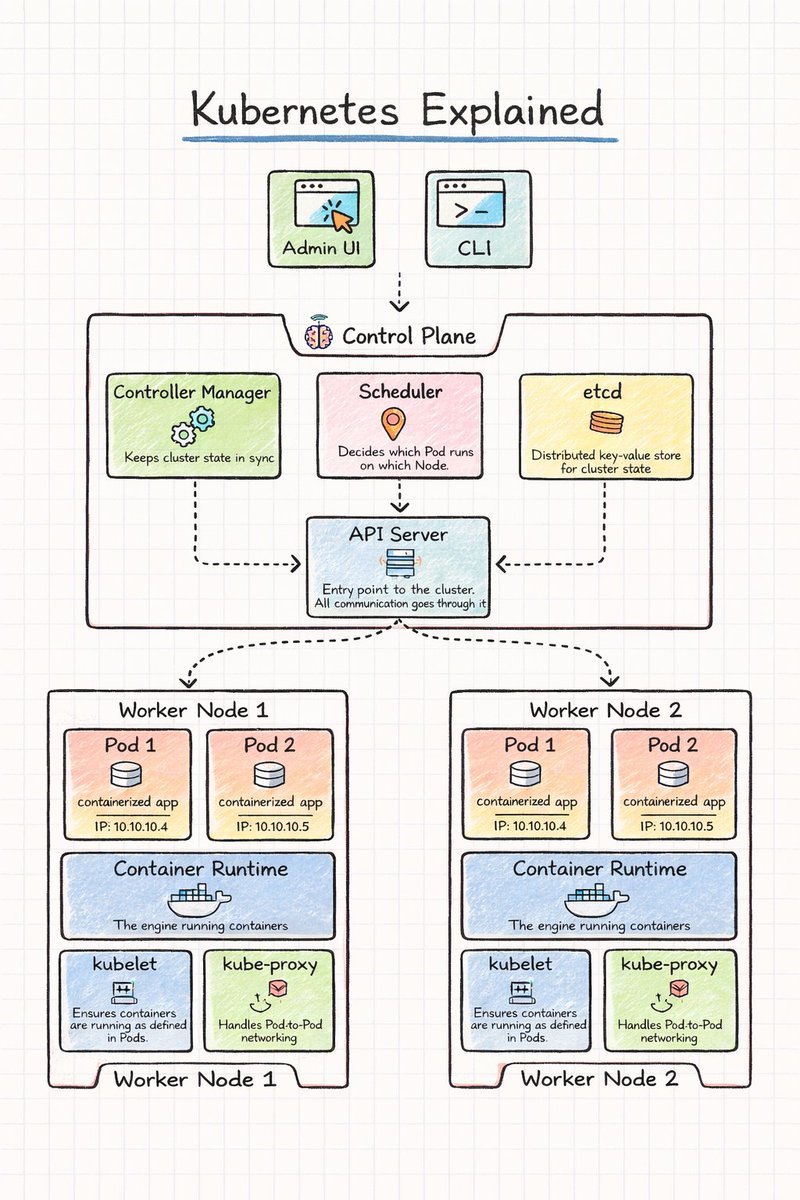
Kubernetes Simplified..! ☸️
A Kubernetes cluster has two main parts:
🧠 Control Plane
• API Server
• Scheduler
• Controller Manager
• etcd
🖥 Worker Nodes
• Pods
• Container Runtime
• kubelet
• kube-proxy
InShort Simplified 👇
🧠 Control Plane
API Server
• Entry point of the Kubernetes cluster
• All commands and requests go through it
• Communicates with all components
Scheduler
• Watches for new Pods
• Chooses the best worker node
• Assigns Pods to nodes
Controller Manager
• Keeps cluster in the desired state
• Detects failures
• Recreates Pods if needed
etcd
• Distributed key-value database
• Stores cluster configuration
• Stores cluster state
🖥 Worker Nodes
Pods
• Smallest deployable unit
• Runs one or more containers
• Each Pod gets its own IP
Container Runtime
• Runs containers on the node
• Pulls container images
• Manages container lifecycle
kubelet
• Agent running on each node
• Communicates with the API Server
• Ensures containers run as expected
kube-proxy
• Handles network routing
• Enables Pod-to-Pod communication
• Manages service traffic
RabbitMQ is a message broker.
Think of it like a reliable postal service for your software.
Whether you're building microservices or just want to offload work from your main app, RabbitMQ is one of the best tools to help you get there.
Instead of one system directly calling another (which creates tight coupling), RabbitMQ acts as the middleman:
• One part of your app sends a message.
• Another part receives and processes it when it's ready.
This is called asynchronous communication, and it’s great for performance, reliability, and scalability.
Key Components:
• Producer: The one who sends the messages.
• Consumer: The one who receives the messages.
• Queue: Where the messages wait until they are processed.
• Exchange: The "dispatcher" that directs the messages to the appropriate queues.
• Binding: The rules that connect exchanges with queues.
You can easily set it up using Docker.
Read full implementation: https://t.co/jsPPStWKM4
__
EF Core too slow? Insert data 14x faster and cut saving time by 94%.
Boost performance with Bulk Insert: https://t.co/XL8wIniIEn
#Dotnet
Kubernetes Deployment Strategies need not be that complex to understand.
Here, We’ve made this to simplify the understanding.
47K+ read our TechOps Examples newsletter: https://t.co/wwkI6UOSo4
What do we cover:
DevOps, Cloud, Kubernetes, IaC, GitOps, MLOps
🔁 Consider a Repost if this is helpful
Tuning Postgres queries is no fun.
Missing indexes, slow joins, unreadable EXPLAIN plans… It’s a time sink.
What if your database could help you out?
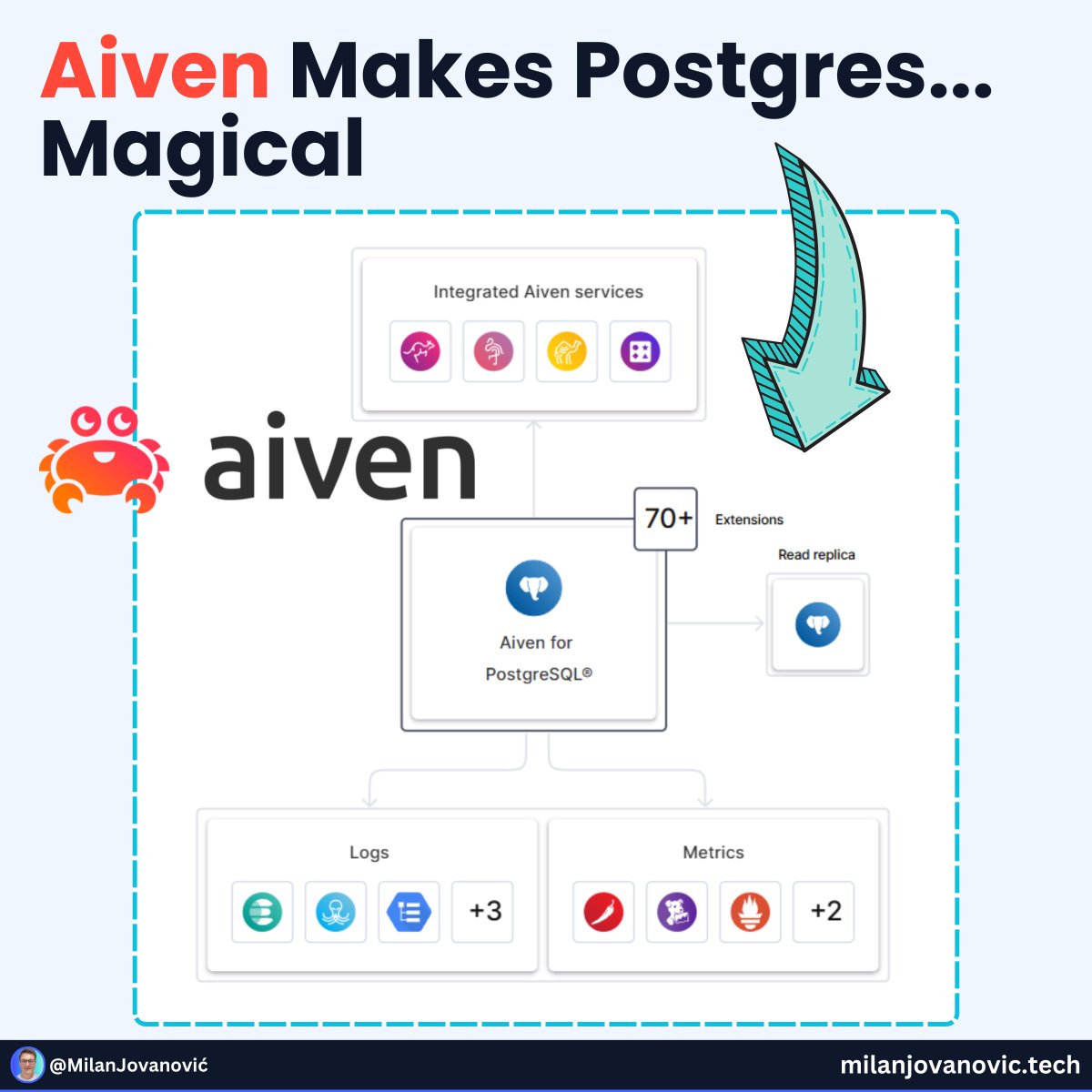
Aiven for PostgreSQL has an AI optimizer that reviews your queries and tells you how to fix them.
→ Add this index, rewrite that SQL, make this faster.
It’s like having a performance expert built into your DB.
You also get:
✅ Fully-managed Postgres in under 10 minutes
✅ 99.99% uptime & self-healing failover
✅ Built-in backups, scaling, monitoring, and 70+ extensions
✅ One flat price, no hidden networking fees
And you can try it for free.
Sign up and you’ll get an extra $100 in credit to explore: https://t.co/vBpZIhxJI3
Big thanks to @aiven_io for supporting the dev community and sponsoring this post!
Your software architecture needs testing.
Yes, you read that right.
Architecture tests help you enforce your software design rules.
Here are some design rules that you can enforce:
- Services must be internal
- Entities and Value objects must be sealed
- Controllers can't depend on repositories directly
- Command (or query) handlers must follow a naming convention
You can learn more about Architecture Testing here: https://t.co/j4aCROE763
Many Cloud Engineers think load balancers are just for traffic distribution.
There are plenty of use cases in modern cloud architectures proving otherwise.
Here, We’ve made this to help you better understand.
45K+ read our TechOps examples newsletter: https://t.co/wwkI6UOSo4
What do we cover:
DevSecOps, Cloud, Kubernetes, IaC, GitOps, MLOps
🔁 Consider a Repost if this is helpful.
Why aren't you using Central Package Management in .NET?
I remember the days when managing NuGet packages across multiple projects was a pain!
You know what I mean.
You open a large solution and find out every project uses a different version of the same package.
Not fun!
Think of CPM as a control center for all your package versions.
Instead of setting versions in each project, you set them once in one place.
Then, you just reference a package you want to use without specifying the version.
It's that simple.
Click here to learn more about CPM: https://t.co/kR09lNNdhK