🔥For better AI videos, talk like you’re directing a movie.
3 must-see video prompts below you can use! ⬇️
You can use these prompts for your own work, just substitute the industry, roles etc. for your own situation.
The best AI video prompts aren’t about hoping for cinematic magic — they’re about giving the AI a clear creative brief.
When you treat AI like your video director, you start shaping scenes, pacing, mood, and visuals with intention.
You’re not chasing a finished video — you’re building raw footage ideas, shot concepts, and story directions you can refine or build on.
This approach helps you explore cinematic options you wouldn’t think of solo while keeping everything tied to your audience and goals.
Core Strategy: Guide the AI like a collaborator, not a transaction.
In this phase, we’re not chasing final video edits—we’re generating raw shot lists, scenes, and visual approaches.
Assign clear roles and scenarios: “Act as a Gen Z video director shooting Instagram Reels for an eco-friendly outdoor gear brand.”
Layer in full context: Include your message, target audience, platform, video length, and style references.
Refine through iterative conversation: Adjust shot angles, pacing, lighting, camera moves, or emotional tone. Explore alternatives and variations.
Push the AI to think wider: Use "give me 3 alternate scene directions" or "what’s a more cinematic take" to expand the creative possibilities.
🔥 Example Prompts
You can use these prompts for your own work, just substitute the industry, roles etc. for your own situation.
💥 Corporate Communications (Internal Culture Campaign): “You’re a corporate comms lead at a national healthcare company. You’re producing a short internal video campaign to promote cross-department collaboration. Generate 5 creative video concepts (interviews, motion graphics, mini-doc formats) that feel authentic, modern, and resonate with both clinical staff and executive leadership.”
💥 Retail Clothing Brand (Eco-Conscious Line): “Imagine you’re a Millennial video director launching a sustainable basics collection called ‘Field Form.’ Generate 5 short-form video concepts (Reels, TikToks, YouTube Shorts) that visually highlight the natural materials, sustainability values, and real-life use — while keeping the tone fresh and not overly promotional.”
💥 SaaS Business (CRM Tool): “Act as a content strategist at a SaaS company that builds CRM tools for small businesses. I’m creating a video campaign to promote our new Shopify integration. Generate 5 video ideas (explainer animations, customer testimonial formats, or product walkthroughs) that communicate ease of integration and business growth.”
💥 Follow me on Substack at https://t.co/1qdwBfXZbz
💥 Follow me on LinkedIn at https://t.co/vVsXFOKBRa
💥 Follow me on Medium at https://t.co/EoFzztjnRD
💥 Promethean Blog https://t.co/VfuHCl9dBw
💥 Follow me on X at https://t.co/MXqCnNyI9h
After spending time breaking down 20+ viral SaaS launch videos with claude, I found one structure that keeps showing up over and over again:
Hook → Solution → Demo → Features → CTA
That's it.
Just a simple flow that helps people understand your product fast and keeps them watching until the end.
If you're creating your first product video, start with this structure.
Simple. Proven. Effective.
For everyone asking how I did this, it's actually simple.
I built my entire SaaS inside @Lovable so it already had full context. I just switched to plan mode and prompted:
"Create a 15-30 second animated launch video. Show key features, happy users, end with 'Sign up at [link]'"
Approved the plan and BOOM. Done in 2 minutes.
Remember, your feature section doesn't need to be a wall of text with icons.
Bento grids with micro-animations we designed for Lightdash last year @designme
Small details like this make a SaaS site feel alive and more premium.
Skills alone won’t make your AI generated frontend look good. If the model hasn’t actually studied great design, it won’t invent great design just by reading a small file of instructions.
That’s why Refero MCP matters. It lets agents search and study real product design and user flows
https://t.co/1mrQsCAXD1
The only web design inspiration sites you need:
https://t.co/ZWHuJfxuQf → My personal fav
https://t.co/0iDg051tam → Large selection
https://t.co/Eb3u3iUbsy → All niches
https://t.co/UAyVWJUgrY → SaaS
https://t.co/Va5E1qUP9t → Unique
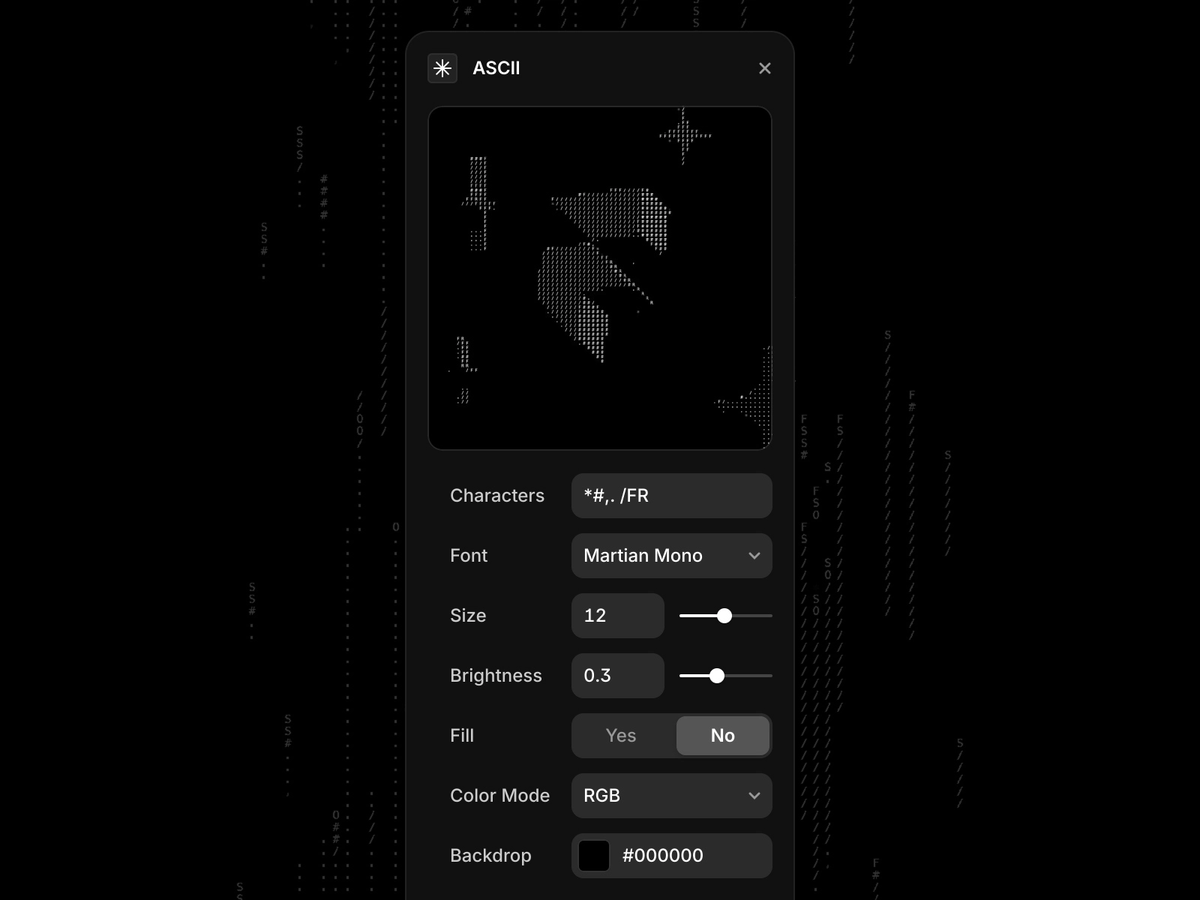
Want to add a unique visual flair to your website? There’s a plugin for that!
🎨 Transform images and text into stunning ASCII art
🖱️ Convert visuals with just a few clicks for that distinctive style
🔧 Full control over typography, from fonts to spacing
✨ Add eye-catching, creative elements that make your website stand out
🔥 Perfect for turning simple visuals into artistic masterpieces
Excellent Resource with FREE eBooks for Designers to Massively Boost Your Knowledge! 💥🚀
Save to Bookmarks for reference 🔖
FREE Book Collections for:
- Design systems
- User Experience (UX)
- Visual design
- Usability
- Typography
- Front-End Development
- Startup
- Career
Link below 👇
#ux #ui #uxdesign #uidesign #productdesign #research #design #usability #userexperience #usabilitytesting #usertesting #typography #fonts #visualdesign #webdevelopment #webdesign #business #startup