After 10,000+ notes in Obsidian over 3 years,
I learned a brutal truth:
"taking notes" and "building reusable knowledge"
are two completely different jobs.
Most "AI-powered second brains" only solve the first.
The default LLM Wiki today looks like this:
"Ask GPT → paste into Obsidian → done."
That's not a wiki.
That's a more expensive notepad.
No retrieval. No citation. No compounding.
The word "wiki" only earns its meaning
when three things are true:
① The Raw stays immutable.
② The Wiki itself is compiled by an LLM.
③ Past Queries flow back into the Wiki as new pages.
This is Karpathy's LLM Wiki pattern.
Raw Sources → Wiki → Queries
The critical part is the last arrow.
Most systems end at "ask question, get answer."
The answer evaporates.
A real wiki bakes that answer back
into a page where it becomes
the next person's starting point.
If this loop doesn't run,
you don't have a wiki — you have an inbox.
Second insight.
"Search" isn't one thing either.
In my setup, 5 methods coexist:
• BM25 — word frequency
• Vector — meaning embeddings
• HyDE — hypothetical answer search
• Grep — distribution matching
• Graphify — graph structure
Throw the same question at all five
and you'll get five different answers.
That's not a flaw.
Each algorithm sees a different signal.
BM25 sees lexical surface.
Vector sees semantic distance.
Grep sees distribution.
Graphify sees connective structure.
The right question is never
"which one is best?"
It's "which signal does THIS query need?"
The most underrated distinction
in LLM-driven knowledge work:
Access vs Search.
If you know where it is → access it (Read).
If you don't → search for it (qmd / Grep).
Conflate these and your agent
burns tokens "reading everything"
every single turn.
The cost difference shows up in a month.
Third insight.
Single-vault PKM doesn't scale
once you live with LLMs.
I now run 7 active vaults:
🌍 Mothership — human-authored personal PKM
🛰 LLM Wiki — LLM-authored, compiled
🤝 Shared — co-authored with collaborator
🤖 Product — product context (human + LLM)
💼 Admin — business operations
📤 Published — public showcase
People always ask:
"Isn't that just fragmentation?"
No. It's division of labor.
The deciding question isn't
"what's the topic?"
It's:
• Who is the primary author?
• Who has merge authority?
• What is its lifespan?
Different agreement models → different vaults.
Mix LLM-generated pages
and human-authored insights
into one folder, and the trust signal collapses.
You can't tell who wrote what.
You can't trust what compounds.
The fix isn't tagging.
The fix is structural separation.
Obsidian wikilinks don't cross vault boundaries.
But search engines like qmd do.
That asymmetry is the core design move
of multi-vault operation.
Each vault runs at its own pace,
under its own consensus model —
but the search layer stays unified.
Tonight I'm teaching all of this
at the April Monthly Obsidian (Seoul).
Two hours, three threads:
① Building a compiling LLM Wiki
② Five search methods, when to use which
③ Mothership × Satellite vault architecture
📅 2026.04.30 · 19:30 KST
📍 Yeongdeungpo (offline) + Zoom (online)
→ https://t.co/yuVZ6dPO2C
Anyone can buy the tools.
A reusable knowledge system has to be designed.
Tonight I'm sharing the blueprint
that took 3 years of trial and error to draw.
Essential for Claude Code beginners. Read carefully for effective use.
1. Parallel Exec: Run 5 Claude Code sessions simultaneously in terminal. Number tabs 1–5; use iTerm2 notifications.
2. Web/Mobile Concurrent: Run 5–10 extra sessions on https://t.co/5CFCsV3nta + terminal. Use --teleport to transfer. Start on iOS app AM for later review.
3. Model Sel: Use Opus 4.5 w/ thinking for all tasks. Slower than Sonnet but better tool use/accuracy = faster results.
4. Team Docs: Maintain single https://t.co/Qw4sJJS0gt file in Git. Update on any Claude error to avoid repeats.
5. Code Review: Tag @.claude in PRs for doc adds. Use Claude Code GH Actions ("Compounding Engineering").
6. Plan Mode: Start most work in Plan mode (Shift+Tab x2) to refine. Then auto-accept edits for single-pass impl.
7. Slash Cmds: Store repetitive tasks in Git at /.claude/commands/. E.g., /commit-push-pr auto-calcs git status for quick PRs.
8. Subagents: Automate workflows (e.g., code-simplifier, verify-app) as subagents.
9. PostToolUse Hook: Auto-format code via hooks to prevent CI errors.
10. Perm Mgmt: Pre-authorize safe cmds via /permissions (avoid --dangerously-skip-permissions). Share config in Git.
11. Ext Tools: Config Claude for direct Slack MCP, BigQuery, Sentry use. Share configs in Git.
12. Long Tasks: Use bg agents, Stop hooks, ralph-wiggum plugin. Skip perm checks in sandboxes if needed.
13. Key Tip: Verification Loop: Enable self-verification for 2–3x better quality. E.g., auto UI testing w/ Claude Chrome ext. Use domain-specific test suites, bash cmds, simulators, etc.
📝 공짜로 음성을 텍스트로 전환하기(화자 구별은 어떻게 할까?)
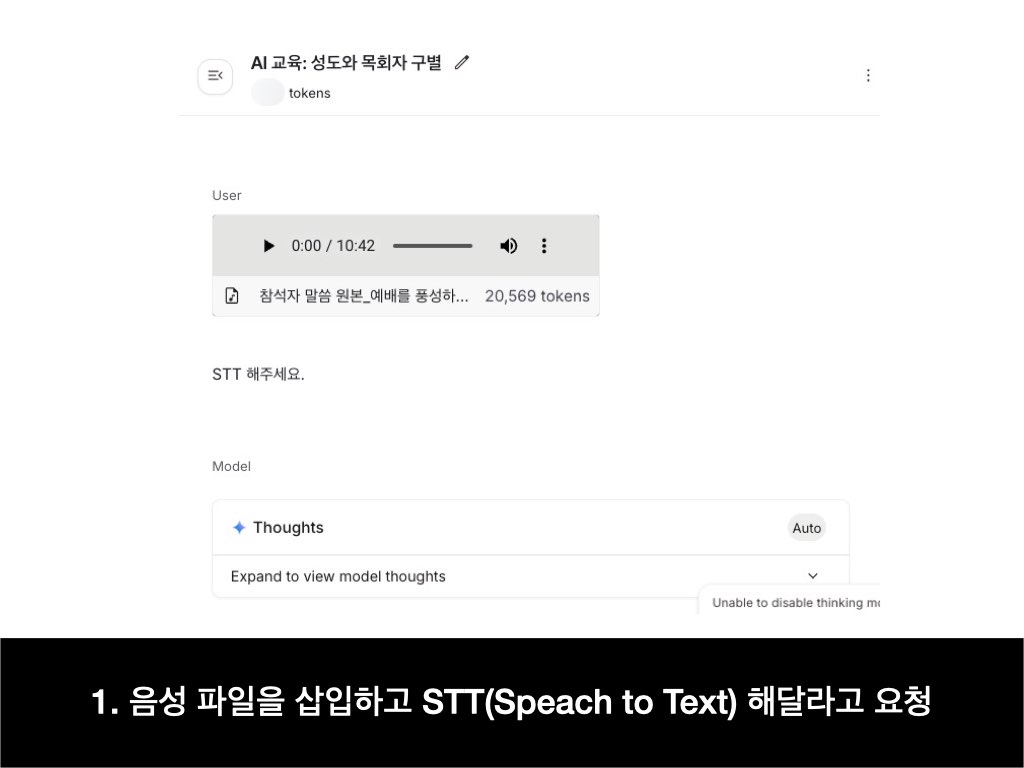
Google AI Studio에서 음성 파일을 텍스트로 전환할 수 있다는 것을 알고 계셨나요?
이러한 기능을 일반적으로 STT(Speech to Text)라고 부릅니다.
1. Google AI Studio의 Chat으로 들어갑니다. 음성 파일을 업로드한 뒤 STT 해달라고 합니다.
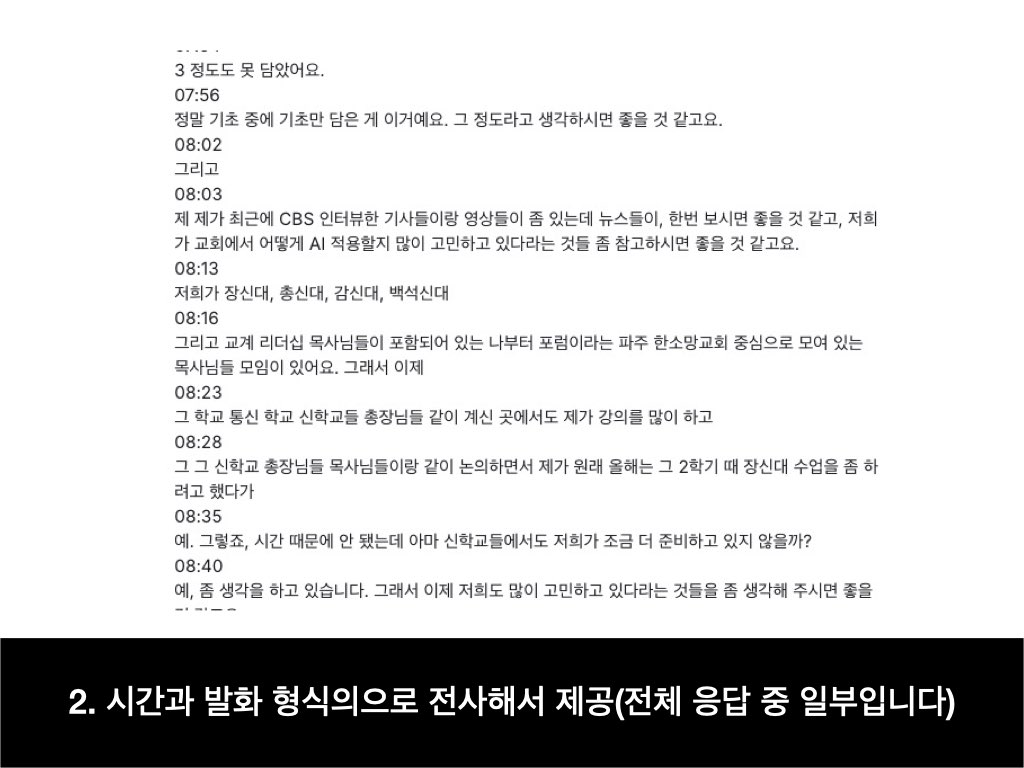
2. 그랬더니 발화된 시간과 발화 내용을 보여줍니다.
3. 그런데 가독성이 아쉬워서 보기 좋게 정리해달라고 했습니다. 뒤에 "원본을 그대로 써"라는 지시를 추가했는데요. 그냥 정리해달라고 할 때는 요약(Summary)를 해버리기 때문이었습니다.
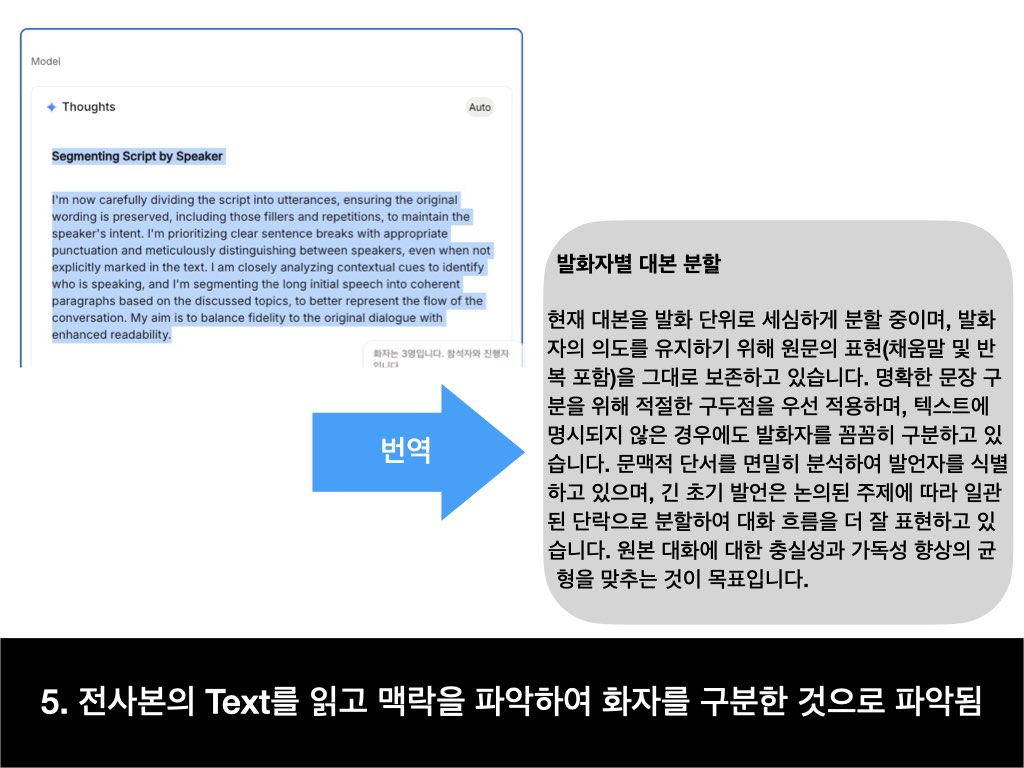
4. 그랬더니 화자를 구별해 주더군요. 어떻게 했을까요?
5. 'Thoughts'를 펼쳐보니 Text를 읽고 맥락을 통해 구분한 것 같습니다. 발화자의 목소리로 구별한 것은 아닌 것이지요.
이 과정을 통해 질문이 하나 생겼습니다.
음성 파일을 넣고 화자를 구별해달라고 요청을 했을 때, "Text를 통해 구별하는 것이 아니라 음향적 특징을 통해 구별 가능한가?" 입니다.
Obsidian Importer now lets you generate Markdown files from a CSV.
It converts thousands records in seconds and automatically generates a Base that you can use to explore and edit the data.
🔍 CMDS Avengers 모집 (~4/13 마감)
지식관리 도구를 열심히 공부하며 연구하고 있는 제가 현 시점에 CMDS Avengers를 모집하는 것은 앞으로 혼자서 모든 것을 할 수는 없겠다는 판단이 들어서입니다.
Obsidian, DEVONthink, Notion, Eagle 잘 쓰고 있습니다. 그런데 제가 이해하는 Raycast나 n8n, Dify는 개발자분들이 이해하는 것과는 수준 차이가 있겠지요. Hookmark를 사용하면 macOS에서 URI Scheme을 쓸 수 있다는 것 다들 알고 계셨나요? MCP도 공부해야하고 Dify도 다뤄야 RAG 잘 세팅하겠다 싶었습니다.
결국에는 기록입니다. 단순히 정보만 저장하고 마치는 것이 아니라, 메타데이터나 사전 정의된 시스템을 통해 지식을 분류하고 맥락을 고려한 연결성을 ��보하고자 하는 갈망과 궁금증이 있습니다.
🤝 참여 방법
1. 신청서 작성: https://t.co/89EhqHtXZZ
2. 오픈카톡방 참여: CMDS Nexus (비밀번호: cmds)
https://t.co/vFJm2cwDyI
3. 팀채팅 초대: 제출하신 이메일과 휴대폰 번호로 CMDS Avengers 전용 카톡방 초대 링크를 보내드립니다.
💡 함께하는 이유
디지털 정보 홍수 속에서 진정한 통찰력을 발견하는 여정에 동참하실 전문가를 찾습니다.
메타데이터 기반의 지식 관리와 AI 통합에 관심 있는 분들의 많은 참여 바랍니다.
📋 프로젝트 소개
CMDS Avengers는 Obsidian, DEVONthink, Eagle을 통합하여 강력한 지식 관리 시스템을 구축하는 프로젝트입니다.
단순한 정보 저장소가 아닌, 메타데이터를 통해 맥락과 연결성을 보존하는 진정한 '세컨드 브레인'을 만들어갑니다.
🔍 주요 기능 및 목표
- 통합 지식 관리 시스템: Obsidian, DEVONthink, Eagle 통합
- 자동화 워크플로우: Raycast, n8n, Hookmark, Dify 등을 활용한 자료 수집/분석 효율화
- AI 통합: MCP 프로토콜 기반 지능형 조력 기능 구현
- 맞춤형 AI 어시스턴트: Dify의 LLM 애플리케이션 개발 기능 활용
- 확장성: 개인뿐 아니라 팀 단위 지식 그래프로 확장 가능
🧑🏻🏫 옵시디언과 메타데이터의 실전 활용 무료 특강
1. 분산된 지식을 효과적으로 연결하고 싶어요.
2. 나만의 지식 DB를 체계적으로 구축하고 싶어요.
3. n8n, Make으로 자동화된 지식 관리 시스템 만들고 싶어요.
이런 분들을 위해 온라인 무료 특강을 준비했습니다.
▪️다음과 같은 내용을 다룰 것 입니다.
1. 메타데이터의 개념과 지식관리에서의 중요성
2. 옵시디언 내 메타데이터 실전 활용법 (태그, 속성, 링크, 쿼리 등)
3. CMDS 지식관리 프���임워크 적용 사례 및 워크플로우
4. 실시간 질의응답 및 참여형 실습 세션
많은 분들께서 배워가실 수 있길 바랍니다.
- 일시: 2025년 3월 25일 (화) 오후 7시~8시 반
- 강연자: 구요한 (커맨드스페이스 대표, 지식관리 전문가)
- 줌 링크: https://t.co/F5uw4VVnxy
옵시디언에서 줄 간격을 어떻게 바꿀까요?
CSS Snippet으로 할 수 있습니다.
하지만 프로그래밍이 익숙치 않으신 분들께는 어려울 수 있을 것 같아요. 아래 가이드를 작성해드렸으니 따라해보세요.
https://t.co/fZUWfZkquu
#Obsidian#옵시디언#PKM#SecondBrain
책 “역설계”의 인기를 통해 대중들의 욕망을 확인할 수 있다.
많은 독자들은 제 2의 자청이 되길 꿈꿨다.
하지만 최근 들어 저자인 자청에 대한 의혹이 제기��고 있다.
누군가는 실망하고, 누군가는 여전히 작가를 신뢰한다. 비판적인 이들은 예견했고, 비난하는 이들은 즐기고 있다.
폰트 하�� 잘 못 쓰면 수 백만원 벌금을 낼 수 있다?
유튜브, 카드 뉴스에서 상업용 폰트를 무단으로 사용해 고액 합의금을 지불한 사례가 늘고 있습니다.
하지만 아래 절차를 따르면 상업적 이용이 가능한 무료 폰트를 찾을 수 있어요.
1. 눈누 사이트에 들어갑니다.
2. 원하는 폰트를 검색
3. 라이선스 요약표를 살펴���니다.
4. OFL 허용 혹은 OFL만 제외하고 모든 내용이 허용된 폰트를 선택합니다.(아래 사진 참고)
AI 기술 발전으로 콘텐츠 제작이 쉬워지지만, 저작권 분쟁도 급증하고 있습니다.
폰트 저작권도 이 문제에 포함 되어 있습니다. 여러분이 쓰는 폰트를 확인해보세요. 작은 주의로 큰 손해를 막을 수 있으니까요.
* 사진1 : OFL 허용된 폰트
사진2 : OFL만 제외하고 모든 내용이 허용 된 폰트