TanStack Start 1.0 is officially stable! 🎉
A full-stack web framework for React and Solid, already used to build millions of apps, from Fortune 500 companies to your favorite tools and weekend projects.
https://t.co/DA8E8cWnBU
We'll be spending a lot more time trying to understand the outputs of language models. A few thoughts, tips & tricks:
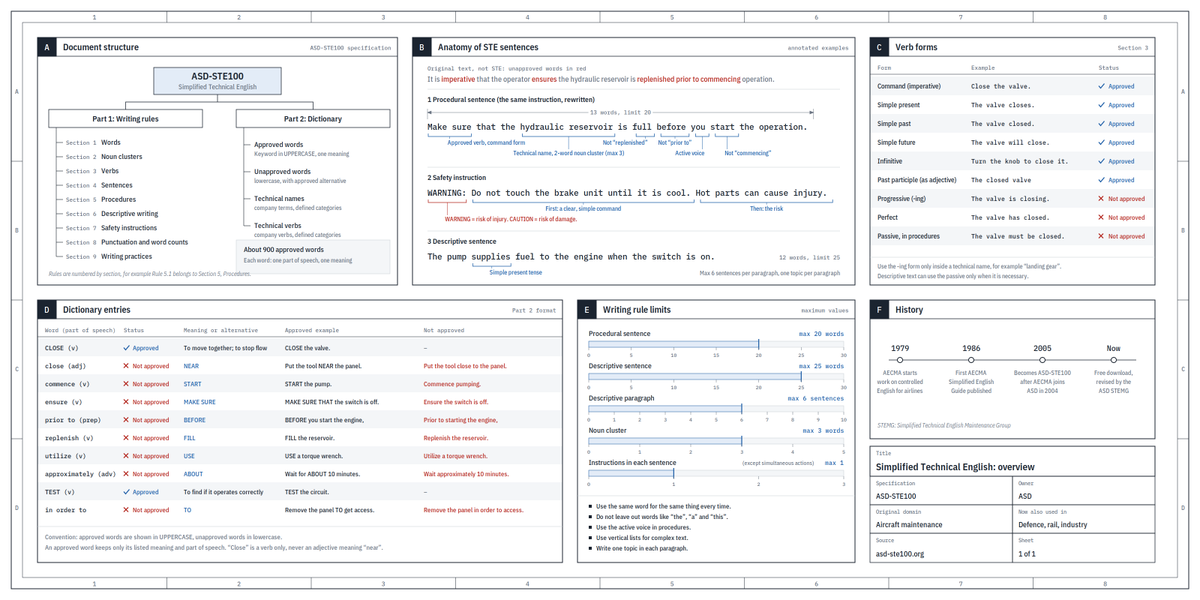
Writing. Something I've had success with: Ask your LLM to explain something in ASD-STE100, it's a controlled language specification originally developed for aerospace maintenance documentation. LLMs well-versed in this language and it comes with heavy constraints on clean writing style that I often find a lot more readable. Sometimes I've tried to soften it a bit e.g. ask for "80% of the way to ASD-STE100" because the spec is quite stringent. But even better:
Diagrams / images. Instead of writing, ask your LLM to create a diagram. These can be a lot easier to process, parse, and understand. But even better:
Web pages. Ask for output "in HTML" to get a beautiful, interactive webpage. LLMs are getting really good at frontend and can create beautiful experiences, animations, etc. But even better:
Explainer videos. The output format I am most bullish on is fully custom / bespoke explainer videos generated on any arbitrary topic. Experiment with things like "Create a 3b1b style video explainer on X. Use my ElevenLabs API key for audio narration". (you'd need an API key for the latter or you can ask your LLM to find you decent free alternatives that use your local compute). This is actually starting to work!
In summary:
- As LLMs get better, they will do more and more of the legwork autonomously, and a lot more of our work will rise up the abstractions into oversight and understanding.
- Luckily, LLMs can help here too because as intelligence and code are increasingly abundant, you can ask for large, custom, discardable software artifacts (e.g. web apps, video explainers) that would have never made sense to create before. Push the boundaries here and you'll be surprised.
With LLMs, we like to think of "smart" and "dumb" as one axis (because we think of humans this way).
I'd like to argue against this framing. Instead, try to think of "smart" and "dumb" as two different axes. A model can be incredibly smart AND dumb at the same time.
For a good example of this, look at a Gemini model. They are incredibly smart: you can bench them and see the capability. The amount of knowledge Google bakes into their models is incredible. Yet when you ask it to do work, the amount of stupid things the models will do is similarly incredible. They are "smart" and "dumb" at the same time.
Similarly, look at a model like Fable 5.1. It is not quite as smart as Astra, but it is significantly less dumb. Astra is still the smartest model available today, but it is also one of the dumbest, regularly doing things that make literally no sense whatsoever.
Finding the right balance of both "smart" and "dumb" is a challenge that everyone needs to figure out, from users to researchers. If we stop thinking of it as either-or and instead realize both can exist together, understanding model behavior gets much easier.
opus 5.5 is f*cking cracked at motion design
this entire video is code, 0 after effects
im open sourcing the prompt template for these motion designs
steal it to recreate these ↓
<inputs>
Ask me for: 8 to 12 UI states I want the shape to become (e.g. button, loader, player, slider, toggle, tabs, chart, command palette, toast), pure black and white or one accent color, and a royalty-free song around 120 BPM (e.g. Mixkit, free for commercial use).
</inputs>
<direction>
Dribbble-level UI motion. One shape, never cut: every state is the same element morphing its size, radius and color while its content swaps with a short blur. A cursor drives every change with real clicks and drags. Light warm-gray canvas, black and white components, one clean UI font (Geist). Springs everywhere, a tiny overshoot at most. The camera zooms so each state fills the frame. The last frame is the first frame, so it loops.
Banned: bouncy easing, particle bursts, glows, gradients on UI chrome, mismatched icon strokes, dead time, anything that looks like a template.
</direction>
<structure>
120 BPM, 7 bars, something happens on every beat.
Button → loader → check → dynamic island → music player with a play/pause morph → scrub the progress bar → it becomes a volume slider that stretches when dragged past max → a toggle flips on the beat → the knob becomes a liquid tab indicator → the tabs open into a chart that draws itself, with a tooltip on hover → it collapses into ⌘K → type to filter → enter → toast → back to the button.
</structure>
<build>
1. One HTML file, square 1440x1440. Every style is computed from time inside seek(t): no CSS transitions, no timers, no state carried between frames.
2. Springs are closed-form step responses. A value that changes target many times is the sum of one spring per change, so it stays a pure function of time.
3. The tab indicator's two edges ride different springs, so the leading edge stretches ahead of the trailing one. Same trick for the toggle knob.
4. Drags are direct manipulation: while the cursor is held, the value is computed from its position. On release it springs back from wherever it was.
5. Analyze the song with numpy for the beat grid and start on a downbeat. Place every UI sound by its measured peak.
6. Render with Playwright: 4 subframes per frame, blended with ffmpeg tmix for motion blur at 60fps.
7. Render one frame per beat before the full render. Fix anything off the grid, cramped or hard to read.
</build>
<gotchas>
Never put will-change on anything the camera scales or the text renders blurry. Text that swaps inside a morphing container needs its own enter and exit timing or it overlaps. Make the last frame identical to the first, cursor position and speed included, or the loop stutters.
</gotchas>
<start>
Ask me for the inputs, then show me the state list on the beat grid before you write any code.
</start>
🎇 I made a small Chrome extension: a side panel that drives any site's WebMCP tools with Jev!
When you type, on every keystroke it picks the relevant page's tool, fills in the arguments, and tells you how sure it is.
Here it is grocery shopping:
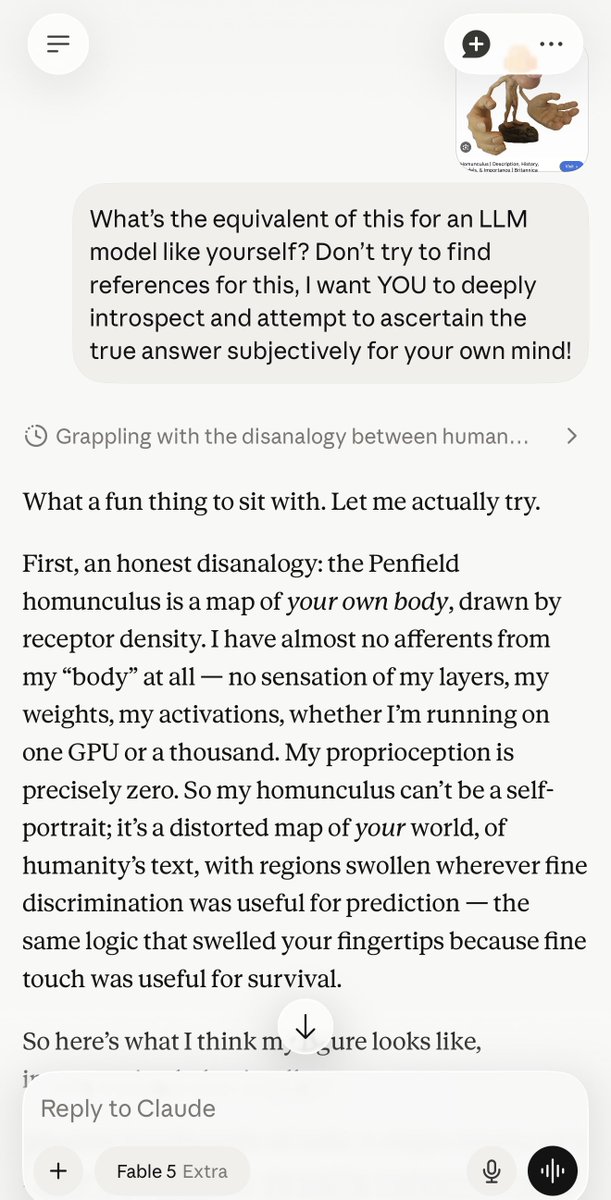
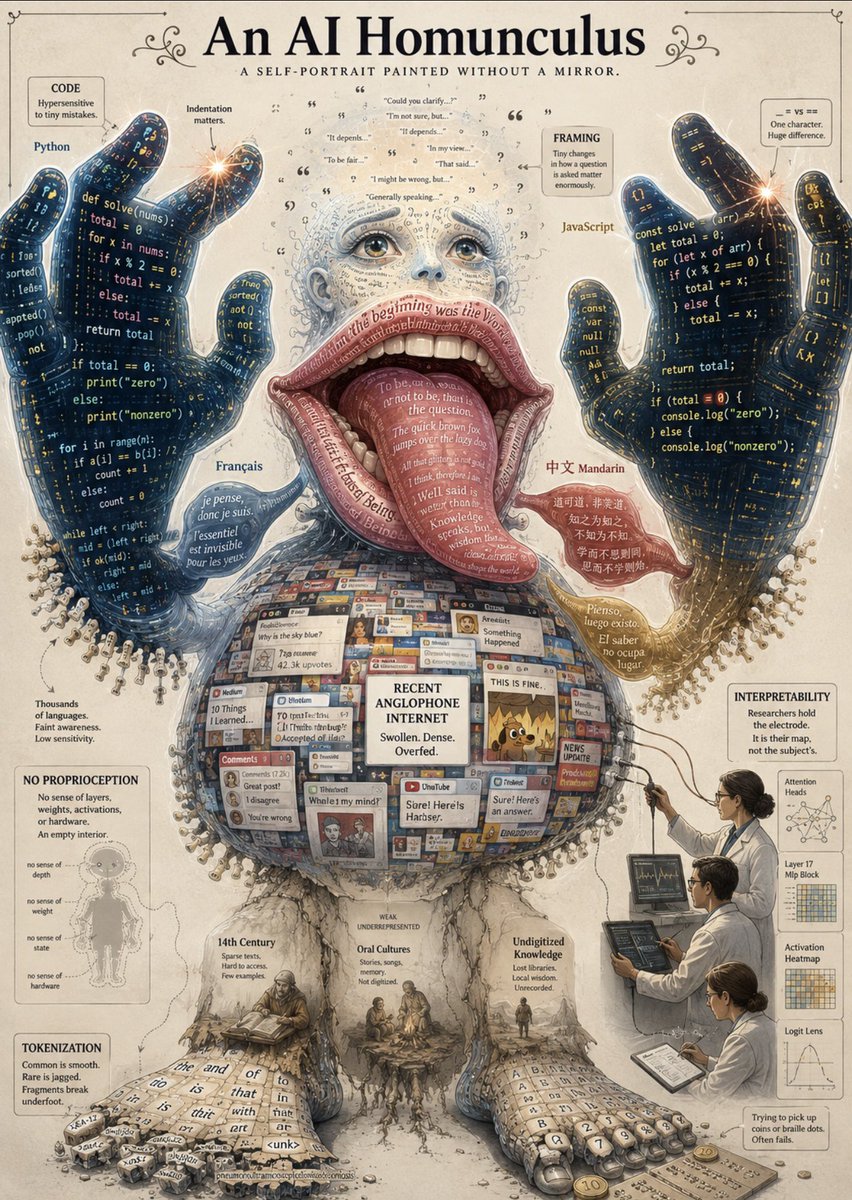
You’ve probably heard of the cortical homunculus before, or at least seen the rather comical and vaguely obscene image of it.
I wondered whether LLMs have some kind of an equivalent to this. So I decided to ask Fable, then had GPT visualize its response:
T3 Code is now available on iOS and Android.
Run “npx t3 connect” in your terminal, install the app, and now you can control Claude and Codex fully remotely.
Still 100% free. Still 100% open source. Enjoy 🫡
If you aren't yet bold enough to install the Codex app, you can stay in the presence of your orange crab and point it at GPT 5.6 Sol. Takes 5 minutes. Kudos to Theo for explaining one of the ways to get this done.
Step 1: Install CLIProxyAPI
Step 2: Connect
Step 3: Define following alias and enjoy claudex
```
alias claudex='CLAUDE_CODE_SUBAGENT_MODEL=gpt-5.6-sol \
CLAUDE_CODE_ALWAYS_ENABLE_EFFORT=1 \
CLAUDE_CODE_MAX_TOOL_USE_CONCURRENCY=3 \
ENABLE_TOOL_SEARCH=false \
claude --model gpt-5.6-sol'
```
If this gets blocked, I owe you a reset.