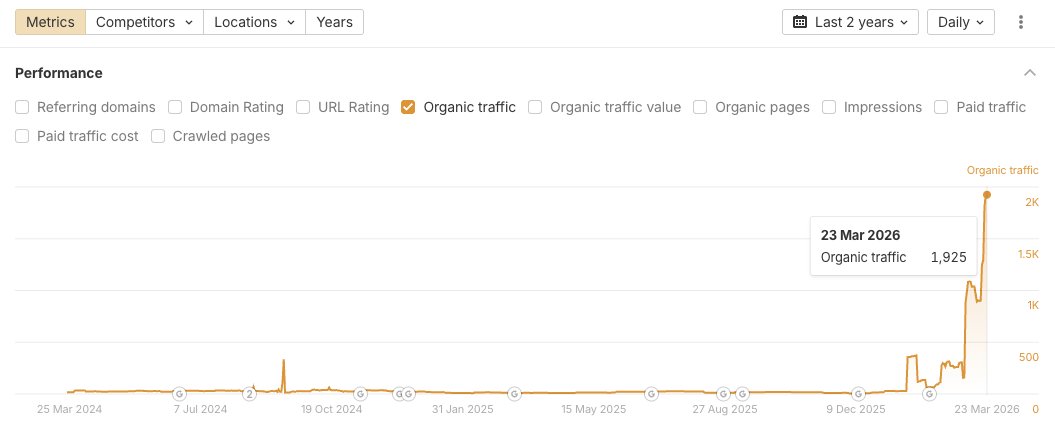
here's the exact process we built to automate content creation using Claude Code, 23 custom skill files, and the .@ahrefs MCP:
https://t.co/ZIF5LKblLo
(the article also includes a YouTube video where i demo the whole system to our ever-discerning CMO, @timsoulo)
hope this is helpful, and spurs a few ideas for automating the drudgery out of your work :)
Saw this on Linkedin in regards to AI content:
Here are the truths:
There is NOTHING to suggest that Google hates AI content or penalises it in any way - it's NOT the generation that's; the issue it's the output, value, format and strategy that matters.
Google CAN recognise AI content by "common word frequency" and patterns in AI output.
In practice AI CONTENT could be perceived as LOW EFFORT if it's being pushed out at scale on to a domain that had no history of doing that before or if the domain has no underlying trust or if there is no brand.
Then there's the fact that:
1. AI Content output is text, what about images and media to bolster the content?
2. Is the AI content adding NEW value or is it regurgitating what already exists on the web? this is KEY, Google isn't looking to serve 10 page 1 results all harping on about the same thing, if there are 10,000 other sites all doing the same thing, you've got the SAME type of content "endemic" and subsequently, Google doesn't even need to index it, let alone rank it
The 8 Levels of Ecommerce SEO (hint: you're probably missing 5+):
Most eCommerce brands do 1 or 2 levels of SEO.
Then wonder why they can't rank.
Here are the 8 levels of eCommerce SEO — and what it actually takes to win:
Level 1: Know Your ICP
Who are you selling to?
- Define your ideal customer in detail
- Know their pain points, search behavior, and buying triggers
- Everything else builds on this
Level 2: Keyword Research
No keywords = no strategy.
- Find keywords for your collection pages, product pages, and blog
- Separate by intent: collection pages = category intent, product pages = transactional intent
- Build a list of 50-100+ keywords before you touch a single page
Level 3: On-Page Optimization
This is where Shopify stores leave money on the table.
- Optimize every collection page with a target keyword, H1, and unique description
- Write product page copy that sells and ranks — meta titles, descriptions, and headers matter
- Don't let Shopify's default templates dictate your SEO structure
Level 4: Content Writing
Blog content fills the gaps your product and collection pages can't.
- Target TOFU and MOFU keywords with educational blog posts
- Use blogs to internally link back to your collection and product pages
- Write for humans first, Google second — depth wins over word count
Level 5: Link Building
Authority is earned, not assumed.
- Aim for DR 30+ backlinks with real traffic
- Use partnerships, guest posts, and digital PR
- Build 10+ quality links per month over time
Level 6: Website Performance
Google ranks experiences, not just content.
- Fast load speeds on desktop and mobile
- Clean UX with clear CTAs
- Fix crawl errors, redirects, and broken links regularly
Level 7: CRO
Traffic means nothing if it doesn't convert.
- Optimize collection and product pages for conversions
- Test headlines, CTAs, and page layouts
- Turn organic visitors into buyers
Level 8: Analytics
This is what separates good SEO from great SEO.
- Track clicks, rankings, traffic, and revenue monthly
- Use GSC, GA4, and Ahrefs together
- Make decisions based on data — not gut feeling
Most Shopify brands stall at Level 2 or 3.
The ones that reach Level 8 — and stay consistent — are the ones dominating Google.
---
Which level are you currently at?
♻️ Repost if this gave you clarity on where to focus your eCommerce SEO.
P.S. At TrioSEO, we run all 8 levels for eCommerce brands ready to grow with SEO. Book a call: https://t.co/uIexj9oU9h
I've reviewed more than 100 SEO Audits shared to us by clients over the last year.
Most common things I saw:
1. Recommendation exports from SEMRUSH and AHREFS - many with snapshots, explanation of issue and fix
2. A lot of emphasis on lower value areas - some blown out of proportion such as IMG ALT attributes, longer title tags, missing meta descriptions - all of which Google handles in most cases
3. A lot of the data used was third party (SEMRUSH, AHREFS, DataForSEO, SERanking) - 70% of audits included some search console data, 30% did not
4. More than 20% of the SEO audits highlighted toxic links and recommended DISAVOWS that would of likely been detrimental
5. Less than HALF of the SEO audits covered google's non indexed page reasons - some of which contained vital/critical issues
6. Only a small portion of the SEO audits actually looked for correlation between content quality and user engagement
Basic SEO audits are OK as a starting point. But they rarely tell you why a site is actually underperforming or what will actually move the needle.
The audits we run at Assertive go several layers deeper.
We start with data warehouse analysis through SEO Stack, which gives us access to the full GSC dataset rather than the sampled view.
We can see query-level patterns, impression anomalies, click gaps and content cannibalisation that are invisible in standard reporting.
From there we build a prioritised action plan based on what the data says will have the most commercial impact, not just what shows up in a standard crawl.
We cover:
Full search console data teardown
Brand vs non brand segment and review
Sub folder traffic segment and review
Full technical SEO audit covering everything from crawling to accessibility, internal link counts to anchor consistency
Full rendering audits - analyse DOM outputs, what Google and LLMs can see
Full page indexing audits - what is and isn't indexed, we review each non indexed page reason, we look at what's not being indexed and why, we look for issues with content quality, site structure, engagement, trust factors, technical anomalies and more
Full content audits - we cover EVERYTHING from content quality and value through to NLP, query counts, engagement, depth, YMYL/E-E-A-T, trust signals, content prioritisation, information architecture, scroll depth and engagement, internal links and more - we cover thin content, decaying content, duplicate content, cannibalisation and more
Full link audits - we cover everything from link quality to topical trust flow, traffic grouping, page quality factors, citation factors, link context, anchors, IP sources and more
We have run this process for businesses including Lenovo, BNP Paribas brands, Virgin and a wide range of mid-market ecommerce and lead gen sites.
If your current SEO results do not reflect the effort going in, the audit is usually where you find out why. Drop us a message if you want to talk through what that would involve for your site.
1,000s of people ask me "How do I learn Ecommerce SEO"?
Me: Here's my 10 favorite resources...
1,000s of people ask me: "How do I learn Ecommerce SEO?"
Me: Start with these 10 resources.
1. Shopify SEO Guide — https://t.co/VZDSJjFJOR
The definitive starting point. Covers everything from product pages to site structure.
2. Ahrefs Ecommerce SEO Guide — https://t.co/zS6xWR6GOg
Deep, data-backed, and specific to ecommerce. One of the best free resources online.
3. Semrush Ecommerce SEO Toolkit — https://t.co/pbKhF6NDUM
Built for ecommerce. Keyword research, competitor analysis, and site audits in one place.
4. Shopify Help Center — https://t.co/9dpypiVyqd
Underrated. Covers technical SEO settings specific to Shopify stores.
5. Lumar (formerly Deepcrawl) Blog — https://t.co/PwOL5ZOe7Q
Technical SEO for ecommerce at scale. Great for stores with large catalogs.
6. Practical Ecommerce — https://t.co/u0SnRJhxfk
No fluff. Tactical advice on SEO, content, and marketing for online stores.
7. Ecommerce Influence Podcast — https://t.co/dg1mwoezPx
Austin Brawner covers growth and SEO strategy for Shopify brands. Worth every episode.
8. Kurt Elster's Ethercycle Blog — https://t.co/3zQUKAUvA1
Shopify-specific CRO and SEO. One of the most underrated resources for store owners.
9. The Savvy SEO Newsletter — https://t.co/0YDlYIAuq8
Every Sunday. SEO + content marketing built for founders growing online businesses.
10. TrioSEO Blog — https://t.co/IK4BLtbJch
My team's real playbook. Strategies we use for ecommerce clients every day.
---
These aren't random finds.
They're what I'd hand to any ecommerce founder starting from zero.
And they're what I used while learning ecommerce SEO.
Most store owners treat SEO as an afterthought.
The ones winning on Google treat it as an ongoing learning opportunity.
---
What you think?
Repost if you know an ecommerce founder who needs this.
P.S. Want me to audit your Shopify SEO for free? Book a quick call: https://t.co/uIexj9oU9h
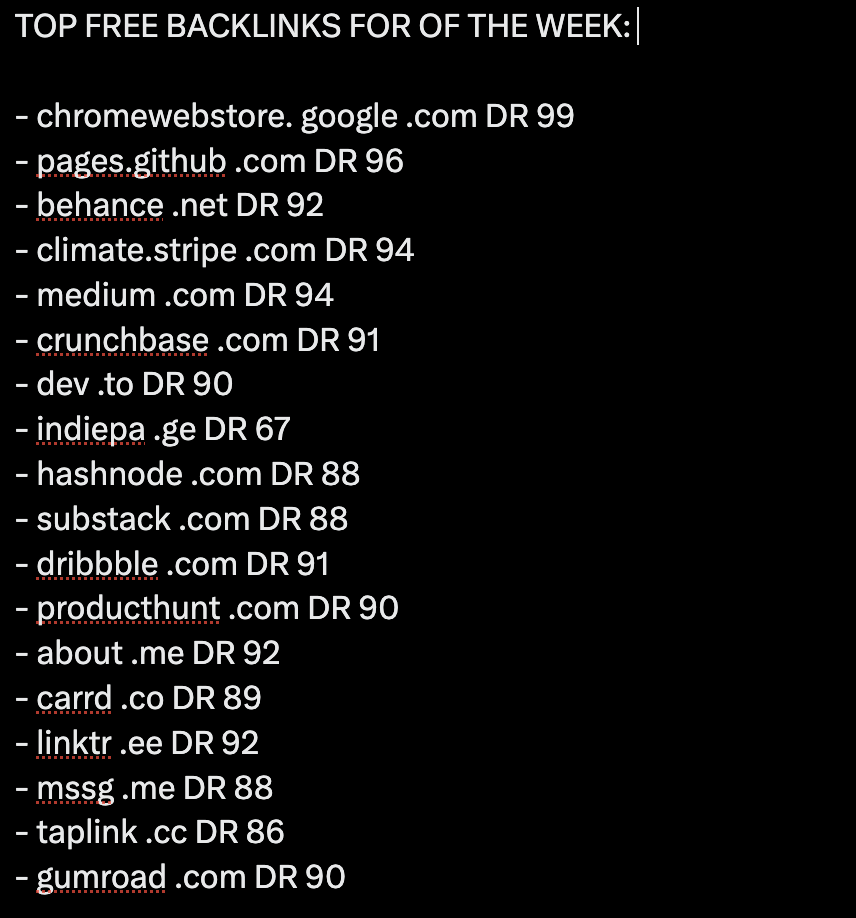
TOP FREE BACKLINKS OF THE WEEK:
- chromewebstore. google .com DR 99
- pages.github .com DR 96
- behance .net DR 92
- climate.stripe .com DR 94
- medium .com DR 94
- crunchbase .com DR 91
- dev .to DR 90
- indiepa .ge DR 67
- hashnode .com DR 88
- substack .com DR 88
- dribbble .com DR 91
- producthunt .com DR 90
- about .me DR 92
- carrd .co DR 89
- linktr .ee DR 92
- mssg .me DR 88
- taplink .cc DR 86
- gumroad .com DR 90
I saw this earlier and whilst it is awesome!
It's likely overwhelming for more junior SEOs - and is fairly long winded.
You can literally cut 99% of this out with SEO stack.
Connecting Google Search Console to Claude via MCP:
1. This is likely to complex for quite a lot of SEOs especially those with less technical expertise
2. The UI isn't great and even when you do connect you don't have a unified interface between search console and the data analysis
3. This is LIMITED to the last 16 months of data + is limited by context size!
You can do all this in SEO Stack with NO steps other than signing up.
This is EXACTLY the reason we built AI into the stack so that users could sign up, import their google search console data and then talk to their Google Search Console data with absolute EASE!
Here are the benefits to using SEO Stack's AI integration over Google Search Console with an MCP like claude:
1. It requires literally ZERO set up, you sign up at https://t.co/ZX85hp5pwl, pick a plan and sign in
2. Import your websites from Google Search Console
3. Off you go - head to the AI ASSISTANT
The benefits:
✅ Zero setup required - easy even for beginner SEOs
✅ The AI ASSISTANT is in the same environment as your Google Search Console UI - so it's all in one place
✅ SEO Stacks AI ASSISTANT has an insanely large context window - it can process hundreds of millions of rows of data
✅ The AI Assistant for talk to search console data allows the generation of interactive graphs, charts, tables
✅ It can build CLICK GRAPHS for query groups - for example it can draw a click chart for "queries containing" - you could create multiple click lines for different query or page groups - this is SUPER powerful for comparison performance between query groups or pages
✅ It can find CANNIBALISATION and KEYWORD OVERLAP at scale much faster - because we're not pulling GSC data directly over API we can look at much larger datasets faster!
✅ SEO Stack bridges the gap between GSC and GA4 so you can actually talk to both data sets at once as opposed to the MCP setup with GSC
✅ There's a HUGE prompt library in SEO Stack's GSC talk to search console data - so you can one click for a wide range of SEO tasks, analysis, report building
✅ SEO Stack can look at MORE than 16 months of GSC data - because it's a warehouse it means you can get data for LONGER timeframes.
✅ SEO Stack can look at all the work you tell it you've done to the website, it can then use the AI assistant to look at GSC + GA4 data to ascertain patterns in data to look for correlative impact
Don't get me wrong - for those who are technically competent the below is super useful.
But you can literally do this and 1000x more in our stack.
Try it FREE - give it a test:
https://t.co/ZX85hp5pwl pick a plan and use the coupon code: KHDUAGPQ
Try it free for 30 days, add your website and head to the AI ASSISTANT and try it out.
You can do a LOT MORE without having to set anything up! We even provide the API credits so you don't need to worry about setting up keys or hooking anything up!
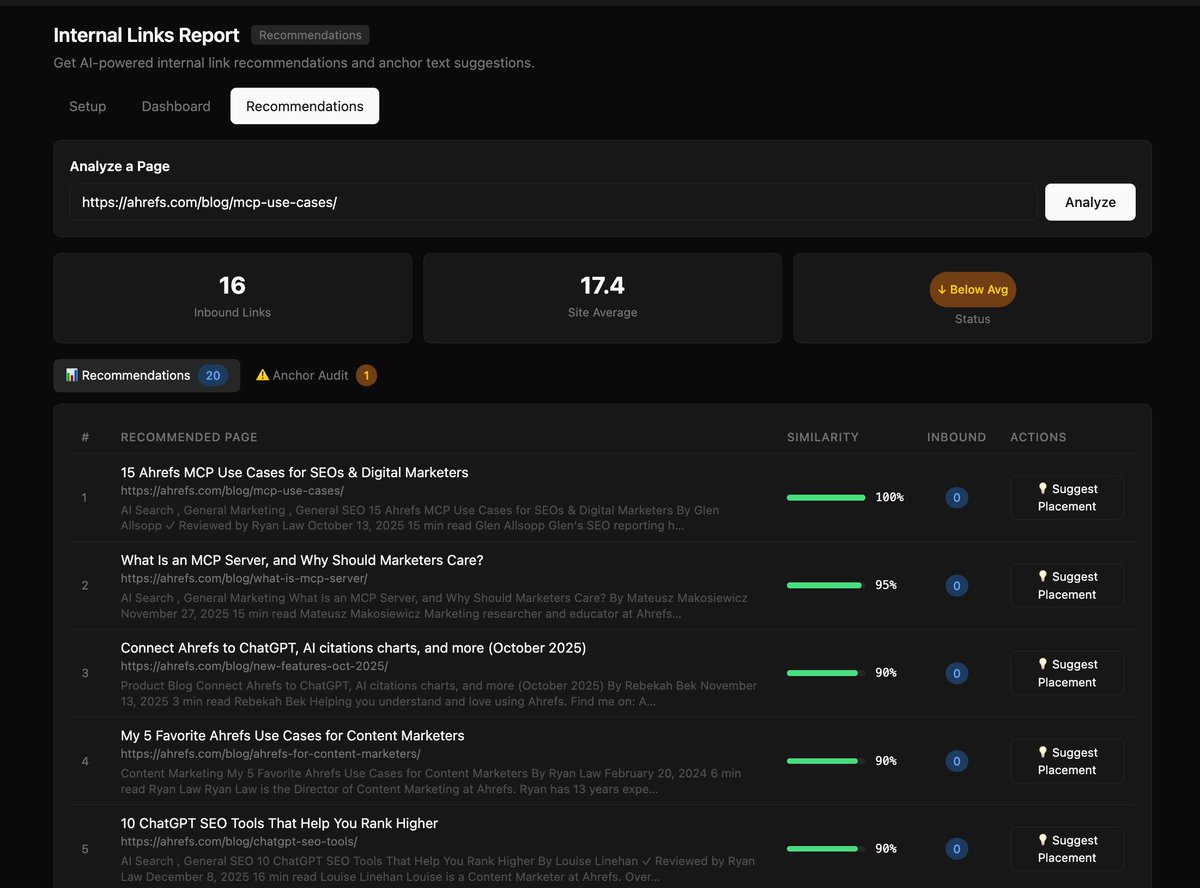
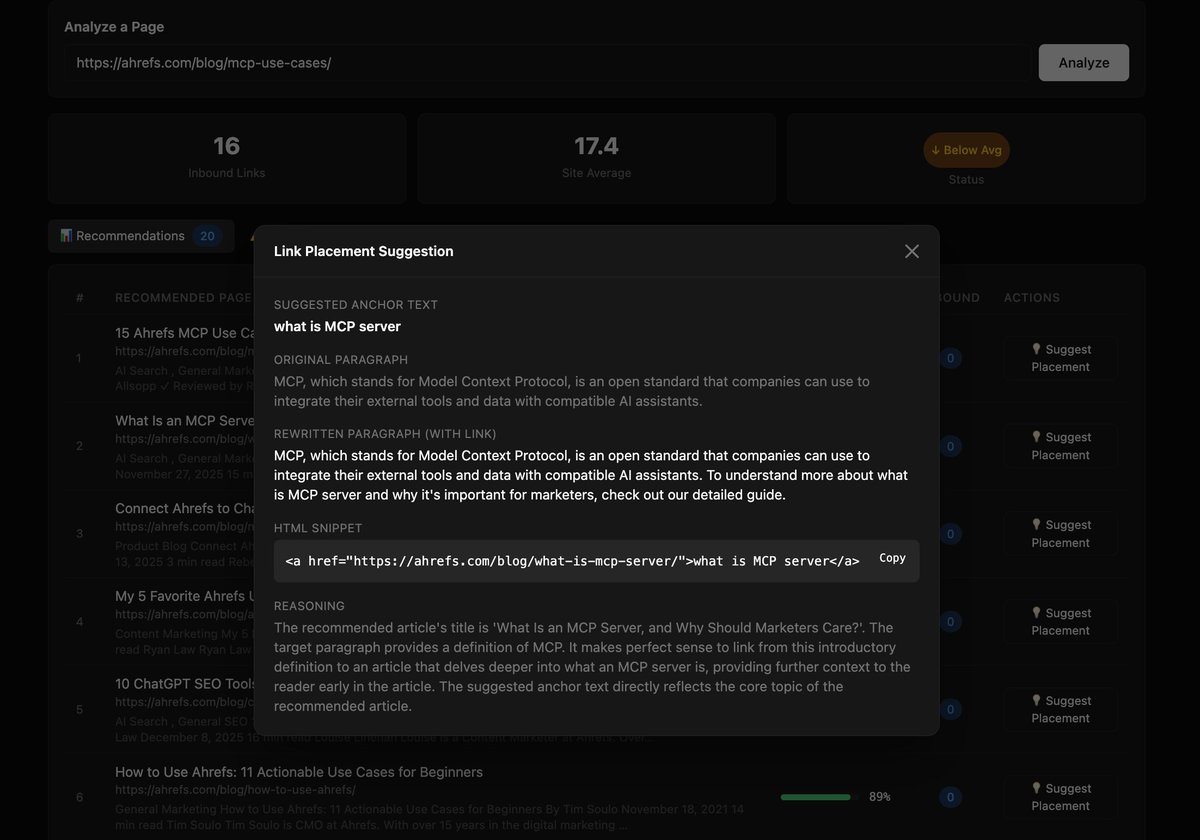
i built ANOTHER new tool: the internal links tool!
find high-value internal linking opportunities, analyze anchor text distribution, and get AI-powered placement suggestions.
internal linking is one of the most underrated levers in SEO. it distributes authority, helps Google discover pages, and keeps your readers engaged. but as much as i love writing new content, i hate linking back to it from our existing content :')
so i built a tool that turns internal link optimization into a systematic workflow:
→ ingest any XML sitemap and automatically process every page
→ extract content, generate semantic embeddings, and map all existing internal links
→ smart URL filtering strips out /wp-content/, pagination, feeds, and other junk automatically
→ prioritize pages by a composite score: high external authority + few internal links = biggest opportunity
→ get top-10 link recommendations for any page, ranked by semantic similarity
→ click "Suggest Placement" and AI finds the best paragraph, writes natural anchor text, and gives you a ready-to-paste HTML snippet
→ anchor text audit catches every "click here" and "read more" across your site, with AI-generated replacements
→ automatic scanning detects newly published posts and generates linking recommendations before you even ask
(pairs perfectly with the content updater i just shared—find what needs updating, then make sure it's properly linked to!)
want to try this for yourself? this 9and much more) awaits you on the other side of this link:
https://t.co/qJC691VoH8
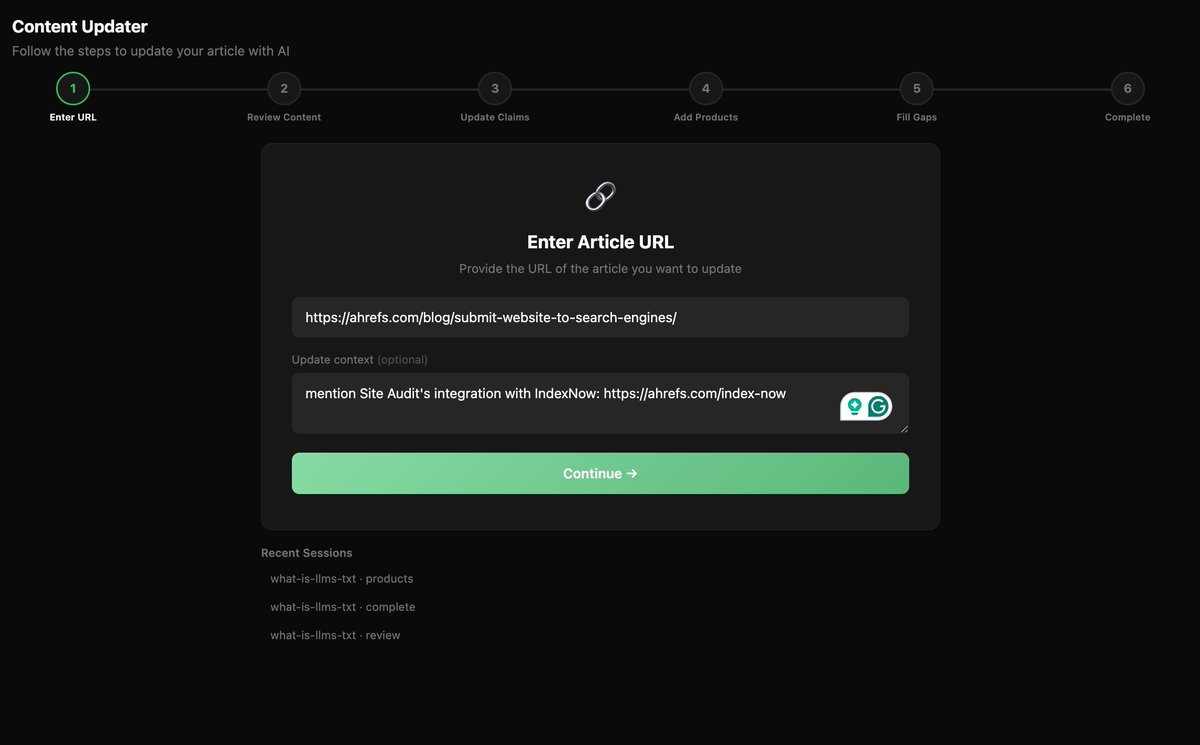
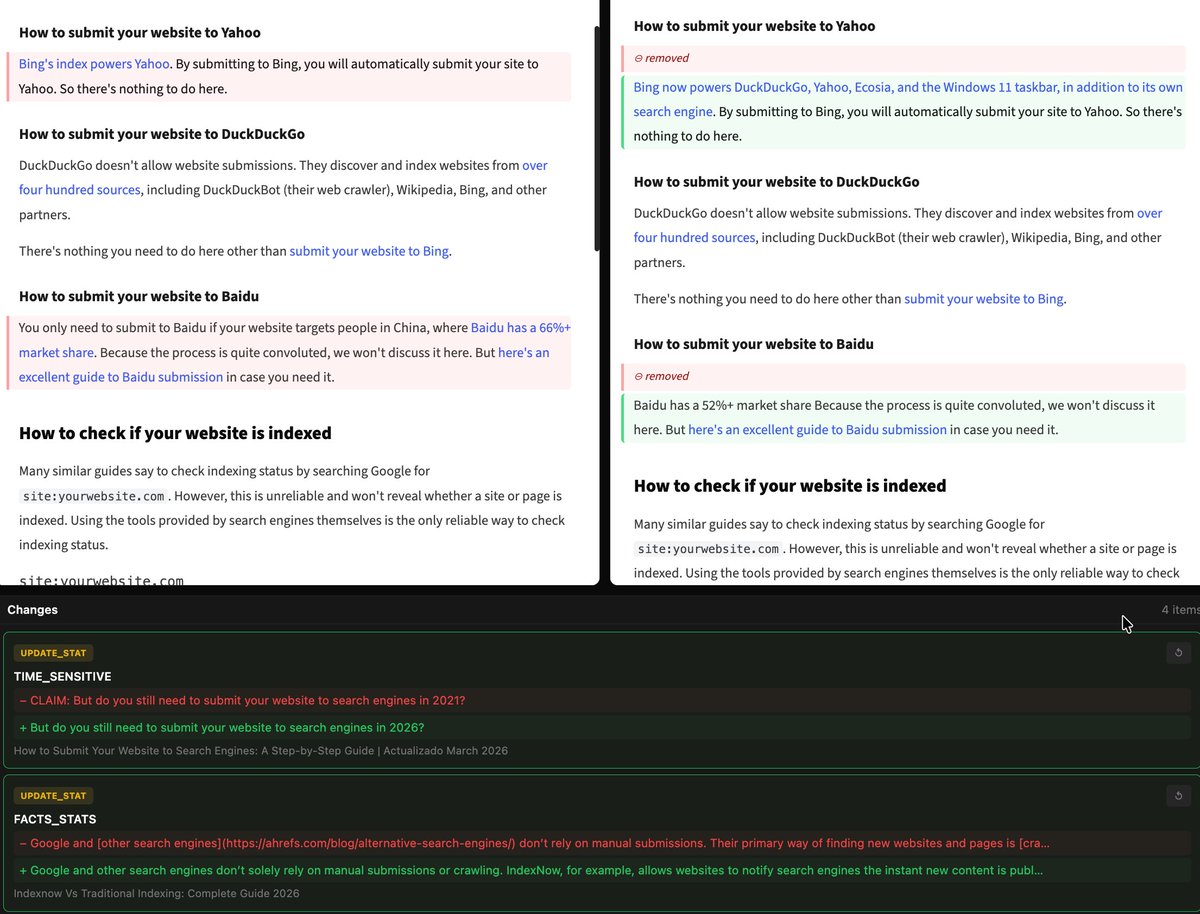
i built a new tool: the automatic content updater!
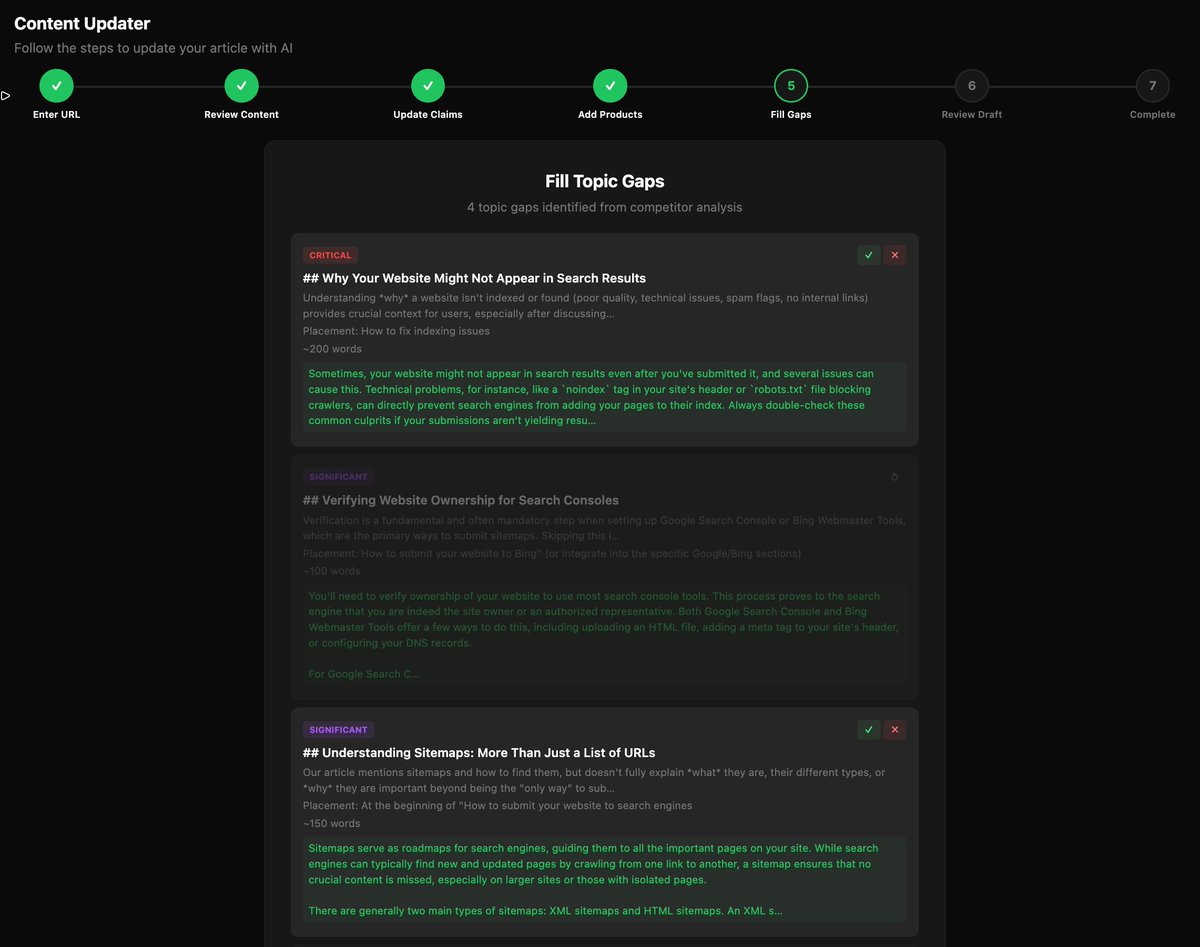
find and fix outdated claims and statistics, naturally mention your latest products, and find and fill topic gaps.
updating blog content is one of the highest-ROI activities in content marketing. but nobody likes doing it, especially on a blog with 1,000+ articles, like ours :')
so i built a tool that turns content maintenance into a guided, step-by-step workflow:
→ paste any blog URL and extract the full article content
→ automatically find outdated statistics and suggest replacements with sources
→ check your product changelog and recommend natural feature mentions
→ scrape top-ranking competitors and identify topic gaps you're missing
→ generate new sections in your writing style for gaps you accept
→ accept, reject, or edit every single suggestion before anything changes
→ compile the final updated article and export in whatever format you like
crucially, this is designed as a counterpart to your human judgement and creative inclinations. guide the updating process with as much (or as little) context as you like, and review and improve any suggested updates directly in the editor.
(unsurprisingly, this pairs extremely well with the content freshness tool i shared on Monday!)
want to try this for yourself? join the waitlist here:
https://t.co/qJC691VoH8
You can literally skyrocket organic traffic to your brand in under 3 months by:
1) Doing good keyword research.
2) Building endless Product Category pages.
Let's say you're selling pressure washers.
Do keyword research and find low-competition, niche-relevant keywords like:
> electric pressure washers
> gas pressure washers
> portable pressure washers
> car pressure washers
> 2500 psi pressure washers
> 6 gpm pressure washers
> 4000 psi pressure washers
Build Product Category pages for each of those keywords.
Add content to each Product Category page that highlights the product, unique selling points, frequently asked questions, and cross-links between other Product Category pages.
Add the important Product Category pages to your main navigation menu.
And wait for Google to index the pages.
If you actually found low-competition keywords, the pages will rank and boost organic traffic and sales pretty quickly.
I do this for literally every brand I work with and it always works.
It's the closest thing to an SEO cheat code.
If you don't already use the Advanced GSC Visualizer Chrome extension, it is quickly becoming my favorite tool for analyzing the impact of algorithm updates.
How to Measure your SEO Cheat Sheet:
(8 steps to see how your SEO is performing for your business)
1. Organic Traffic Analysis
2. Keyword Rankings
3. Backlink Profile
4. Page Load Time
5. Bounce Rate & User Engagement
6. Conversion Rate from Organic Traffic
7. Content Performance
8. Mobile Usability
---
Get REAL about your SEO.
Run these 8 steps in 1 hour.
And be honest abt how you're doing.
Make a To Do list based on it.
Get back to work & improve.
No way around it.
---
What did I miss?
Repost ♻️ + tag a B2B biz owner friend in the comments.
P.S. Get a free SEO audit from me:
https://t.co/YOsjjx7yoV
Founder: "I've been publishing blogs for 6 months. Why am I not ranking on Google and LLMs?"
Me: "Show me your keyword research."
Them: "…what keyword research?"
That's the problem.
Most founders start with writing.
They should start with research.
Here's the keyword research process I use for all 30+ TrioSEO clients:
1. Brainstorm like your ICP
- Write down every question your ideal customer is Googling.
- Don't overthink it. Start with 20-30 terms.
- These become your seed keywords.
2. Run them through Ahrefs or Semrush
- Look at search volume and keyword difficulty.
- Volume: aim for 30+ monthly searches.
- Difficulty: match it to your current domain rating.
3. Study the suggested keywords
- Every tool gives you related terms.
- These are gold. Don't skip them.
- Add anything relevant to your list.
4. Steal from competitors
- Plug your top 3 competitors into Ahrefs.
- See what keywords they rank for that you don't.
- That's your content gap. Fill it.
5. Shortlist 100+ keywords
- More options = better prioritization.
- Don't cut too early.
- You want a full picture before you start planning.
6. Label intent and prioritize
- Tag each keyword: BOFU, MOFU, or TOFU.
- Start with BOFU. These drive revenue.
- Work outward from there.
7. Repeat every quarter
- Search behavior changes.
- New competitors emerge.
- Your keyword list should never be "done."
Keyword research isn't glamorous.
But it's the difference between content that ranks and content that disappears.
Six months of blogs with no strategy isn't an SEO problem.
It's a research problem.
---
Was this helpful?
♻️ Repost if you know a founder skipping this step.
P.S. This is step one of what we do for every client at TrioSEO. If your content isn't ranking, book a strategy call and let's find out why: https://t.co/uIexj9oU9h
Short cuts in SEO are not only becoming less sustainable, in many cases they struggle to make any ground in the first place.
Here are some key things to think about:
👉1. Speed of content availability on non established or repurposed domains
It's pretty obvious to Google if a site comes out of nowhere and has thousands of pages of content - in most cases indexing is likely to be slow, poor, most pages indexed become unlikely to be served.
This looks even more suspicious if the domain is new and not part of a site URL change where there's some form of like for like.
👉 2. LLMs literally work on next word prediction, therefore Google will easily spot whether content looks mass produced or low effort - it doesn't even have to be bad content, it can just be content deemed as low effort.
Low effort doesn't mean bad content, it can be content that's not presented in a way that's helpful, it could lack images, supporting page elements and features.
👉 3. To address the growing problem of scaled content abuse Google is likely to lean on a lot of surrounding signals and weighting before even giving the content a chance to rank.
Getting good links at scale is hard and usually requires there to be a real brand behind it.
Building brand signals makes content abuse at scale harder because you need to build a genuine brand behind it.
👉 4. There are likely to be lots of other things looked at overall, things I'd imagine that would play a part include:
✔️ Content overall value and effort
✔️ Content types and authority requirements
✔️ Main content effort and uniqueness
✔️ Content classification/YMYL
✔️ Content end purpose and CTAs
✔️ Branding and branded search
✔️ Content NLP
✔️ Content alignment/diversification
✔️ Domain age / DNS
✔️ Domain history if any
✔️ Brand signals and establishment
✔️ Brand search volumes and sentiment
✔️ Company details
✔️ Internal linking and linking behaviors
✔️ External link profile proportionate to domain age and history
✔️ External link quality
✔️ External link anchors
✔️ Patterns of link distribution
✔️ Patterns of link growth
then there are loads of other dead giveaways such as:
🌍 Favikon indicator of platform
📝 Obvious signs of mass content generation i.e. persistent reccuring AI word combinations, double em dashes etc.
🌍 Link spam, tiered link spam, directory spam
and so much more.
The question I always ask people who genuinely love black hat SEO but mask it with social engineering for social engagement as a way of getting lots of likes and engagement is.....
Where's your follow up case study for the sites that do have a short boom in traffic before the wipeout?
Don't get me wrong, SEO experiments are fun, but it should be made clear to people who may wish to emulate this stuff (potentially on client sites) that it's high risk and in most cases low reward.
Google will always have an ongoing battle with spam that's a given, but polluting the web is nothing to shout home about....
#seo
🚨 BREAKING: Claude can now do SEO, keyword research, and technical audits like a $10,000/month agency (for free).
Here are 7 Claude Cowork prompts that replace $120,000/year in SEO bills:
(Save this before it disappears)
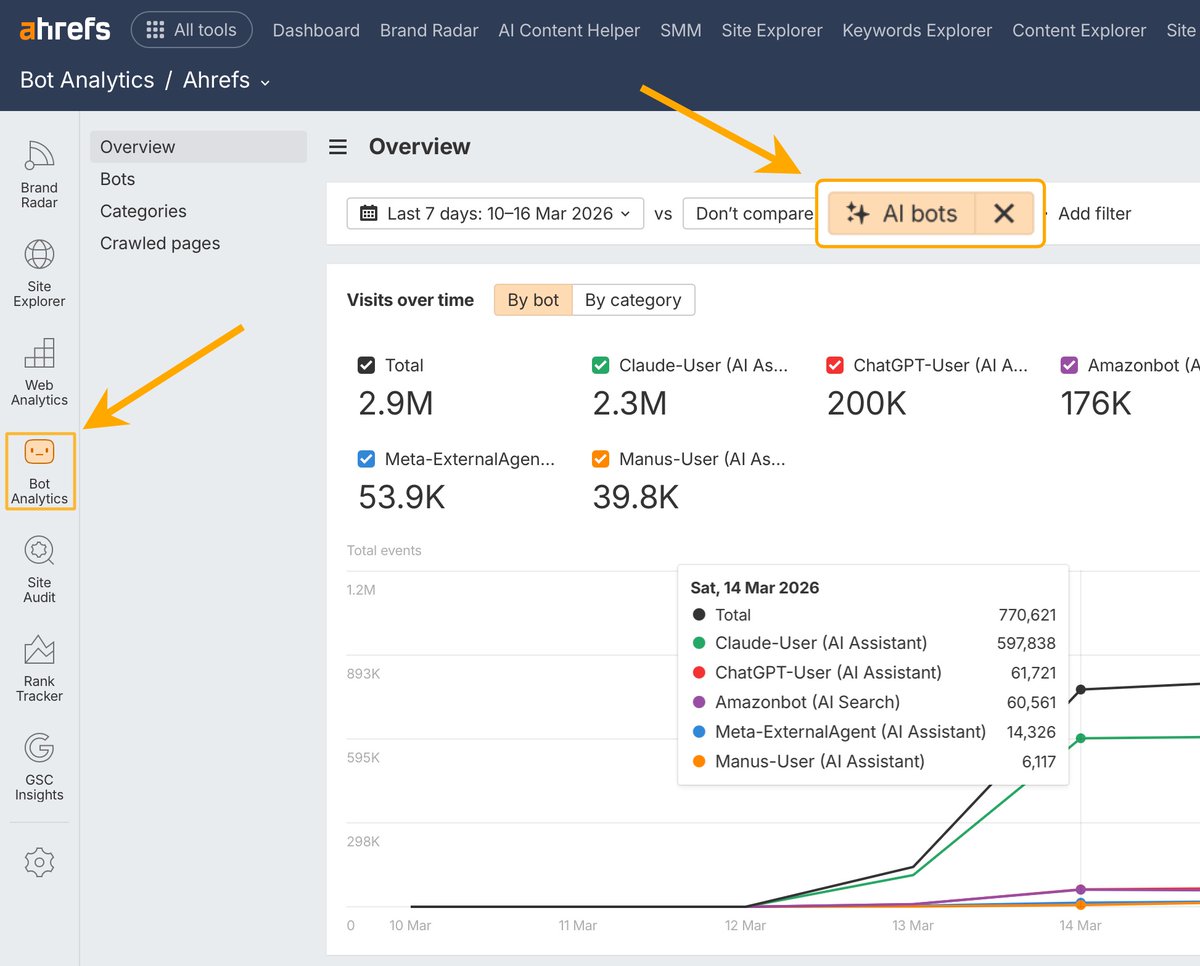
Are you tracking visits to your website from AI bots?
Because we just added Bot Analytics to @Ahrefs! 🔥
It tracks all kinds of bots across 12 categories:
- AI assistants
- AI search bots
- AI crawlers
- search engines
- SEO tools
- Social media bots
- And more
The cool part: it collects data server-side via Cloudflare integration. No JS tracking script needed.
The tool is FREE while in Beta, so give it a spin and let us know what you think!