AMD Users - Update your chipset drivers to the newest one (8.08.12.551). Driver provides meaningful FPS improvements across the board. Graph taken from @Dety0 & @rudolphfn_
Select Chipset & Board -> Download -> Install & Reboot
https://t.co/Bl0dslI93H
The Best Nvidia App + Nvidia Control Panel Settings in 1 Minute for MAX Performance while Gaming
(Decreased Input Delay/Latency + Increased FPS + Reduced Nvidia/Windows Telemetry)
Essential Info Below!
🚨 Windows is secretly hurting your mouse feel in 2026
Even on high-end PCs, background tasks can make your aim feel heavy and movements laggy in Warzone, BlackOps7, Valorant, and CS2.
This 45-second registry tweak gives your game more foreground priority for snappier responsiveness.
✅ Best for:
Competitive players who run Discord + Chrome in the background
❌ Skip if:
You're a heavy multitasker or on an unstable/low-end system
🛠️ THE FIX:
1. Win + R → type `regedit` → Run as Administrator
2. Go to: `HKEY_LOCAL_MACHINE\SYSTEM\CurrentControlSet\Control\PriorityControl`
3. Double-click **Win32PrioritySeparation**
4. Set to **Hexadecimal** → Change value to **26** → OK
5. Restart your PC
⚠️ Create a System Restore Point first (search “Create a restore point”).
Some players use **2A** instead for a more aggressive effect.
Won’t add FPS, but a lot of competitive players report it feels noticeably smoother and more responsive.
Test it and drop your before/after results below 👇
#PCGaming #FPSBoost #WindowsTweaks #RegistryTweak #Win11
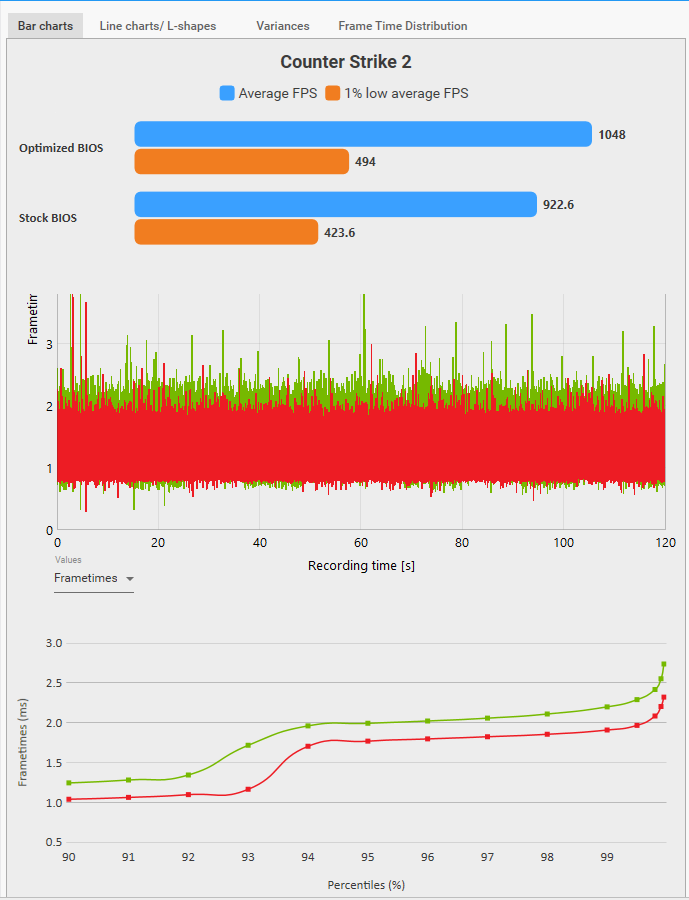
9800X3D in CS2 - Stock vs Optimized BIOS Benchmark
📊 Average FPS:
Stock: 922.6 FPS
Optimized: 1048 (🔼13.6%)
📈 1% Lows:
Stock: 423.6 FPS
Optimized: 494 (🔼16.6%)
🛠️ Test Method & Settings:
- Offline with Bots (Mirage)
- 3 Runs per Test
- 1280x960 Stretched
- Reflex Enabled, MSAA 4x, AO Medium
✨ BIOS Tweaks:
Expo Profile: EXPO1
UCLK DIV1 Mode: UCLK=MEMCLK
SVM Enable: Disabled
Precision Boost Overdrive: Advanced
PBO Limits: Motherboard
CPU Boost Clock Override: Enabled (Positive)
Max CPU Boost Clock Override: 200
Curve Optimizer: All Cores
All Core Curve Optimizer Sign: Negative
All Core Curve Optimizer Magnitude: 15-25 (I use 25)
Integrated Graphics: Disabled
Re-Size BAR Support: Enabled
Above 4G Decoding: Enabled
💻 PC Specs:
- 9800X3D + RTX 5070
- Windows 11 Pro
- 32GB DDR5 CL30
- Game Mode: Enabled
- HAGS: Enabled
- NVIDIA Driver: 591.86
✅ Note: This is a basic BIOS optimization, I am not PRO tweaker or optimizer, and the results may vary from system to system. Try what works best for you and use that.
Still running stock RAM timings on your 9800X3D / AM5 CPU?
You're leaving performance on the table
Applying EXPO / DOCP & changing these timings will :
🚀 Boost FPS
⚡ Lower Delay
🎯 Reduce stutter
Have a 9800X3D or any other AM5 CPU?
If your PBO settings don't look like this, you're leaving free FPS on the table. 📉
Most people just run stock or copy/paste random settings they found online.
Here is what actually maximizes your Ryzen performance. 👇
On AMD x3d CPUs using idle disabled powerplan cuts your FPS dramatically. Was testing it out recently wondering why my lows got way worse for no reason.
Idle enabled is the only way to go for highest FPS
🚨AM5 BIOS GUIDE🚨
Instantly boost performance on any AM5 setup.
Enhance stability, increase FPS, and reduce input delay.
Join my Discord for optimization link below or in my bio.
My CS2 feels crisp. How?
Accident.
I was asked to install CSGO for the stream, so I did.
CSGO legacy beta is what's working (not the other CSGO option).
Then I copied my CFG and autoexec for CSGO (of course I have it in my PC) into user data folder.
Then I put these launch options:
-tickrate 128 -freq 360 -noaafonts -novid +exec autoexec.cfg -
(360 is my monitor refresh rate)
(I know that these should not work in CS2, I know whole story. I did a hundreds of tests)
Then I went in CSGO, put my resolution 1280x1024 and it didn't want to stretch.
I have AMD 9070xt, I had full panel on, I made custom resolution. I did everything and it didn't want to stretch.
So I googled, no answer.
I asked ChatGPT and I found out that source 1 engine doesn't use AMD GPU scaling.
I turned off AMD GPU scaling and integer scaling and boom CSGO was stretched.
I played CSGO it was fun, got banned on community server cause they thought I was cheating, I didn't want to go on some telegram for them to check me for cheats.
I go back to CS2 and my game is crisp.
It's smooth. My mouse is free, no input lag, no "melting" of the game, no laggy feeling.
4th day now it's smooth, it's not a placebo.
I went back to CSGO to compare (still better game)
I go back to CS2 and it's still smooth.
Extra:
Windows 11 pro debloated with Chris Titus tool.
Dynamic tick - disabled.
I didn't mess with the HPET cause I stream.
Win32PrioritySeparation - set to 22 decimal
No damage prediction.
My CS2 resolution is 1280x1088 cause the stretch feeling in CS2 and CSGO is not the same.
By my tests CSGO 1280x1024 stretch = CS2 1280x1100
But it's to fast for CS2 peeker's advantage.
So I did some calculations and I am now on 1280x1088
I don't know what else to tell you, I don't know what did the trick, the game just works 2 times better than before.
It will not improve all the bad things in CS2 but at least it's smooth.
Plus I am streaming on one PC and that always adds an input lag, every streamer knows that.
Here is one moment how it works now:
https://t.co/M3aHNz2fTP
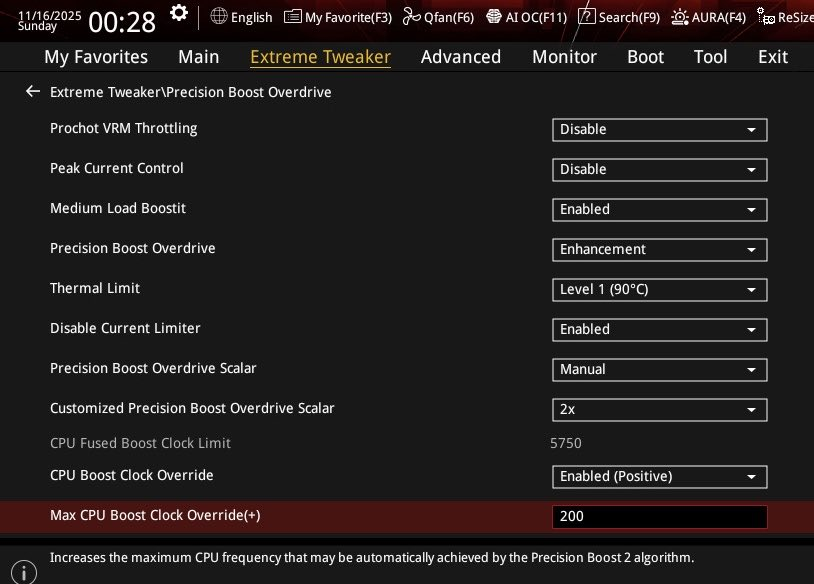
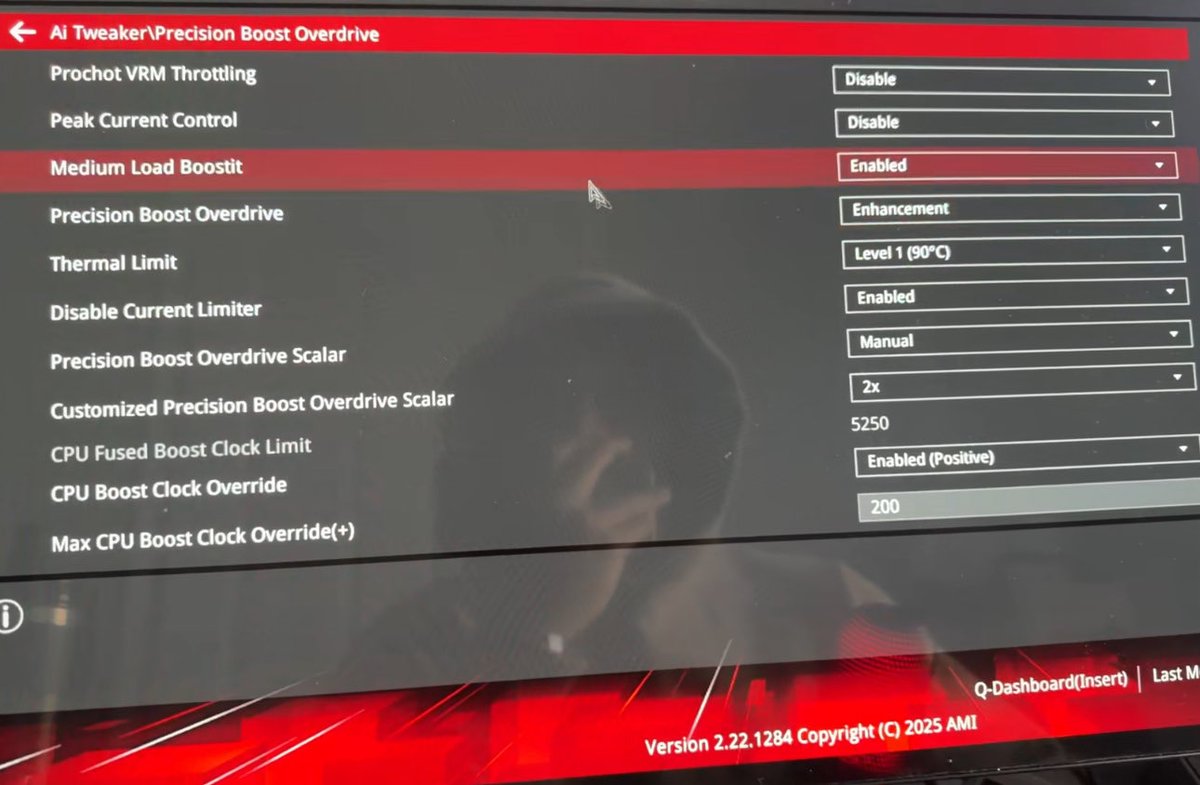
Best Ryzen PBO Settings for MAX FPS in any game
Medium Boost it: Enabled
PBO: Enhancement or Advanced
Thermal Limit: 90C
Disable Current Limiter: Enabled
PBO Scalar: Manual -> 2X
CPU Boost Clock Override: Enabled -> 200
Make sure to ♻️ for gamers in need
TL;DR: You should probably change ONE specific Power Plan setting if you're using an AMD X3D CPU and PBO: switch "Heterogeneous short running thread scheduling policy" to "All Processors" and see if it does something for you. I also made a small C Win32 app to switch it in-game with no overlay so you can test for yourself: https://t.co/wCITr0Hh8w
---
I think I figured out why the "assign affinity of game process to logical cores other than 0/1" works, and why it seems to only work if you use PBO!
I realized that there is only ONE power plan setting that seems to affect anything consistently, called "Heterogeneous short running thread scheduling policy". I think based on what I have found that the following happens:
- Game threads are always classified as short running - even when I played with other settings that are supposed to change the threshold between the short/long classification. It makes sense though as game threads tend to yield often as they deal with I/O and wait (e.g. GPU draw calls)
- I am pretty sure that anything to do with handling DPC's from peripherals (the actual part of the interrupt pipeline that then leads to it surfacing to the game via RawInput's API) is also classified as a short running thread (as it should)
- Even though a lot of people are convinced that the "heterogeneous" concept is for Intel's P/E cores only, I am now 100% sure that when PBO is running, the scheduler considers currently boosted cores as "performant" ones, and the rest as "efficient" ones
- By default, since when the pc is mostly idle core 0 is what tends to stay at a higher boost, core 0 tends to be the main "performant" core that most short running threads end up getting quanti scheduled on, which is even worse!
- Funnily enough, this effect is even worse when your Windows is debloated, because realistically only core 0 will be boosting and be considered performant as you limit background apps, and it will stay as such since it keeps being hammered by short threads lmao. Whereas if you had other things keeping a thread boosted, your game's main thread might get scheduled there!
So this means that in general, even though this is affected by random variables (e.g. a different core being currently used for something and therefore boosted), with the default "Prefer Performant Processors" on AMD + PBO, the game thread ends up being scheduled mostly on Game 0... and so do any other short running threads, INCLUDING mouse input, and ISRs especially, which are always preempting!
This is just super bad as it will make the game thread often have to wait or contend for cycles, while there are other logical cpu's that are just not boosting and not doing anything.
So, using the default "Prefer Performant Processors", with PBO, I could EASILY reproduce the "remove 0/1 affinity for your game's exe" causing a performance increase (as now the game's main thread would be scheduled on the second-highest boosting core after core 0). But if I switch to "All Processors", the scheduler more intelligently tends to schedule more time for the game thread on other cores, reducing the impact of the affinity mask to almost zero.
Making sure that the game thread is never scheduled on core 0 / logical 0-1 still seems to slightly improve things especially when I move my mouse and observe my FPS in games that don't use RawInputBuffer (so most games), so I'd still recommend it, but now I would say that I highly recommend switching that hidden power plan variable (and really only that one) to "All Processors" if you use PBO. This was tested on both Windows 24H2 on the previous AMD Chipset drivers, and on 25H2 with the latest, just released drivers. I was hoping they'd fix this rather obvious scheduling issue, but nope.
Obviously you don't want your game running on the same core that is handling stuff like ISR's not only because of the preemption but because you're just going to increase the likelihood of L1/L2 cache misses by a lot, especially if ALL OTHER short threads (e.g. anything doing something in the background) ends up being scheduled on that same core because of that policy!
Pretty sure this explains why anyone that is using flat OC's couldn't reproduce this effect! Let me know if you guys with PBO can reproduce too.
BTW - for testing, I made a small .exe that allows me to switch that power plan with a key bind and beeps (so no drawing on screen so that it doesn't cause the dwm to switch to a composed flip mode), higher beep pitch = higher option index for that option, so you can easily try it. I also tested the effect in my own DX11 app that is only CPU bound, and could measure massive effects (4000-6000fps super unstable when using the default no affinity + prefer performant, ~7000ish stable when using the default prefer performant + just the 0/1 affinity mask, ~8000ish stable when using both, ALMOST ~8000ish stable when using JUST this power plan setting AND no affinity mask)
You can find the tool to switch the plan setting while gaming for testing here: https://t.co/wCITr0Hh8w
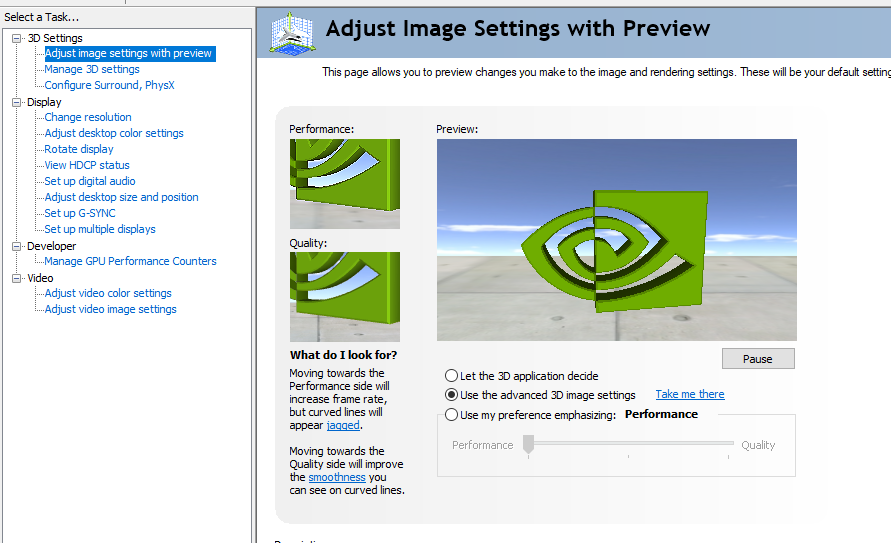
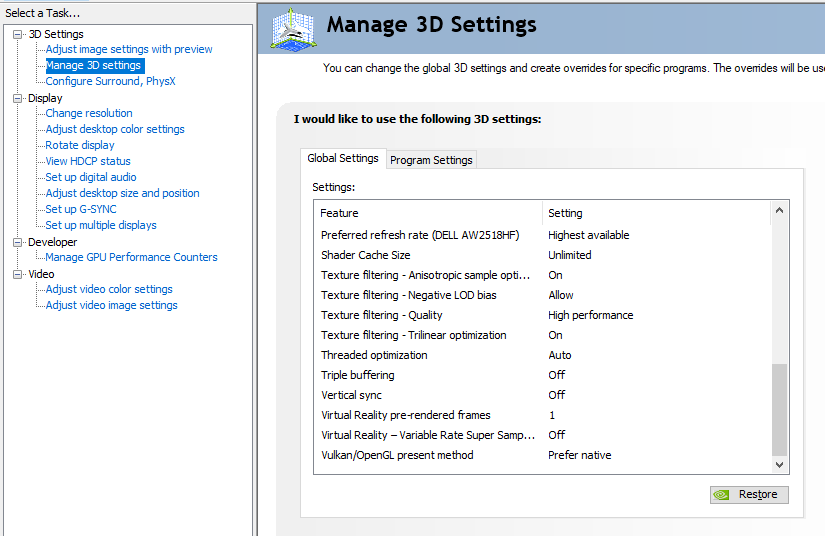
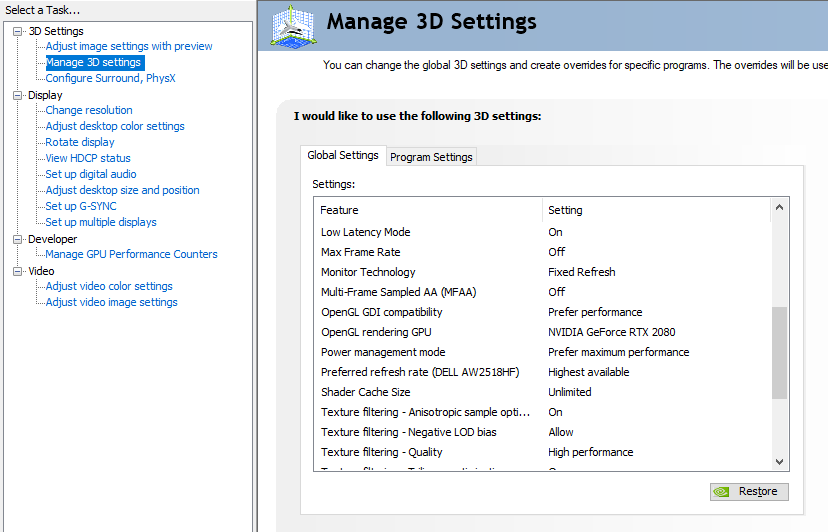
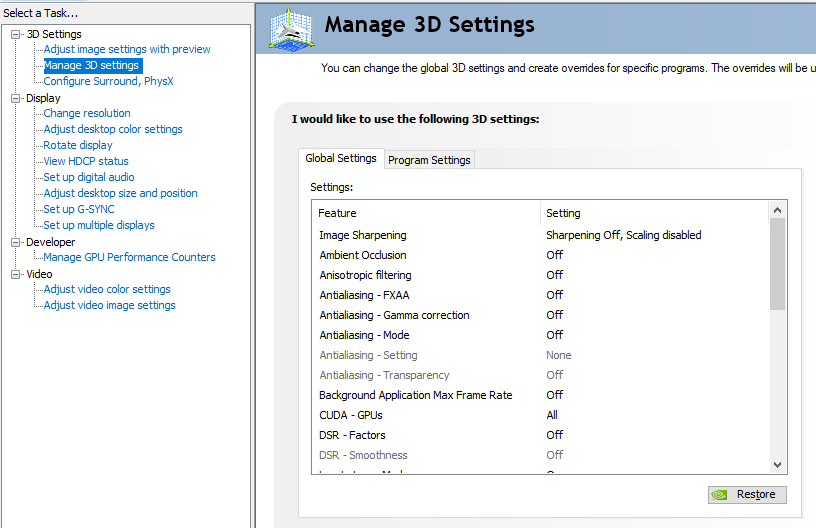
Best NVIDIA Control Panel SETTINGS for any game📈
🚨Don't use NVIDIA App, uninstall it and get OBS for clipping.
❤️+♻️ for part 2
📂Best services & free things available in my discord server.
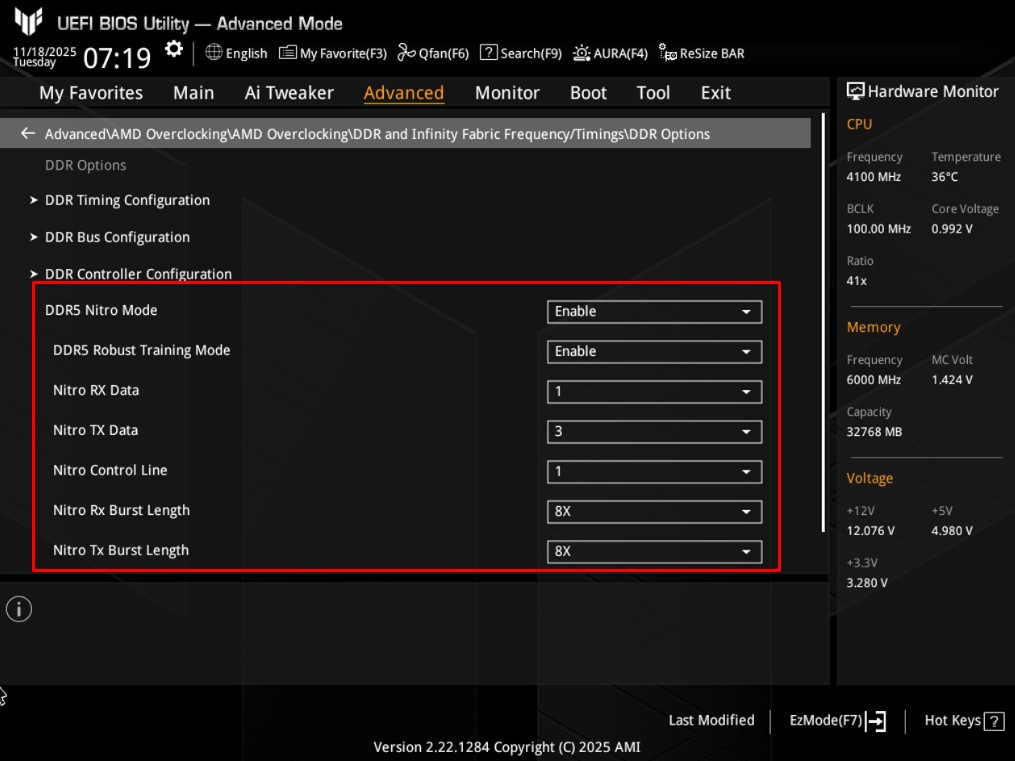
X3D Optimization Guide
Changing these settings in BIOS will instantly lower input delay and improve system responsiveness on any AM5 system.
🩷 If you would like me to keep on releasing optimization tips & tricks.
♻️To help others.