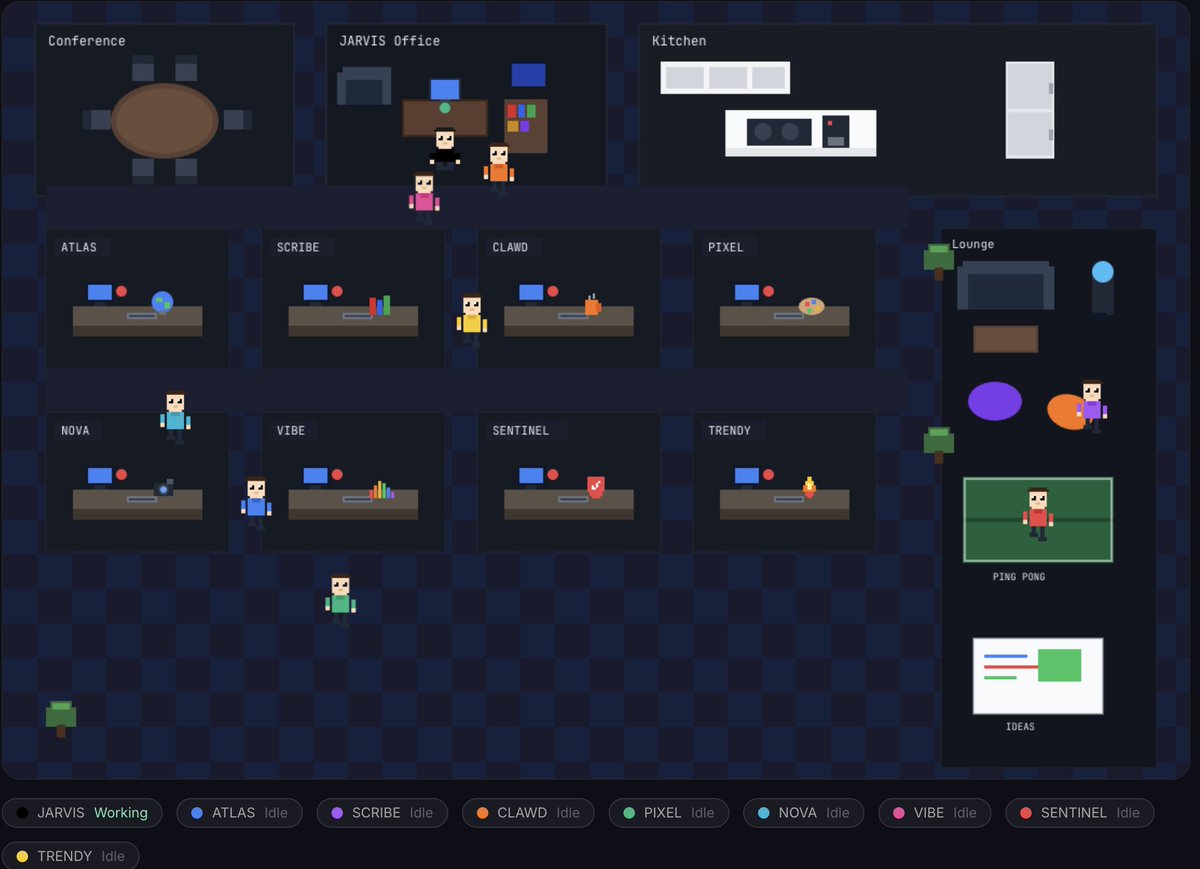
Here's how I built this realistic 2d pixel office for my 9 AI employee team for my SaaS. 🦞
Paste this exact prompt into your OpenClaw to built it out, and use my image to get a better result.
Have fun Founders!! 😁
Build me a 2D pixel art office visualization for my AI agents using HTML Canvas and React (or plain JavaScript). This is a fun, game-like view of my AI team "working" in a virtual office.
What it should have:
Checkered dark navy floor (retro game vibe)
Top row: 3 rooms — Conference Room (round table + chairs), Boss Office (executive desk, couch, bookshelf), Kitchen (white cabinets, fridge, coffee machine)
2 rows of cubicles (4x2 grid) with corridors. Each cubicle: desk with blue-screen monitor, unique desk item per agent, name plate, green/red status dot
Right side: Lounge — couch, coffee table, water cooler, bean bags, ping pong table, whiteboard
Plants/trees scattered around
Each agent is a color-coded pixel art character (~20x40px scaled 2x) with hair, face, colored shirt, dark pants. 2-frame walking animation (arm swing + leg movement). Sitting animation when "working" (arms forward typing).
Behavior: When status = "working" → character walks to their desk and sits. When "idle" → character wanders the office (kitchen, lounge, corridors). Poll a /api/employee-status endpoint every 5 seconds for status updates.
Bottom bar: badges showing each agent name, color dot, and Working/Idle status.
Technical: HTML5 Canvas, requestAnimationFrame, all pixel art via fillRect (no external images), dark theme, ~1100x720 canvas, JetBrains Mono font for labels.
Make it feel like a retro office sim RPG. Each agent gets their own color and unique desk item (globe for researcher, books for writer, coffee for developer, palette for designer, camera for video, waveform for motion, shield for QA, fire for scout).
$20/month. 20+ AI tools.
Most Gemini subscribers use the chatbot and nothing else.
NotebookLM. Antigravity. Jules. Flow. Deep Research. Free cloud credits.
Here's everything you're paying for but never opened ↓
OpenClaw/Clawdbot masterclass!
In this video, I give you the complete blueprint to get up and running with your own Clawdbot. And not just one, but multiple AI employees working 24x7 for you.
Enjoy!
Chapters:
00:00 - Intro
1:12 - See my 3 AI employees in action
5:49 - How the whole thing works under the hood
9:47 - Installation and setup
11:22 - Hooking Clawdbot to Telegram
15:35 - Understanding the project structure
20:03 - Adding custom skill (from a repo of 42k skills)
23:18 - Automating your bots with Cron jobs
25:07 - Going from 1 to 10 Clawdbots
28:53 - Cron jobs vs. Heartbeats: what's the difference?
30:36 - What's coming up next?
31:34 - Outro
Launching this week!
Unlimited AI access, multi charts, an advanced dashboard and journals, AI market analysis, 1 tick data for all symbols across all time ranges, custom timeframes, and 99+ more features.
And this is only V1 stay tuned!
ChatGPT Codex just went free.
And it automates anything you want.
Limited time: Codex is included with ChatGPT Free and Go plans.
I built a landing page in minutes.
It wrote the copy. Designed it. Coded it. All automated.
Multiple AI agents working on different projects at the same time.
One builds your website. Another creates a game. Another designs an app.
All in the same window.
You can install agent skills globally across every project.
Clean code. Game development. Architecture. Brainstorming.
I created a speed racer game, an ROI calculator, and a landing page simultaneously.
Zero coding knowledge needed. Type in plain English.
Set up scheduled automations: "Publish a new SEO blog post daily about AI news."
It researches. Writes. Publishes. Every day. Automated.
Deploy directly to Netlify with your personal access token.
Preview pages in browser. Make edits in real time.
Switch between Codex Low, Medium, High, or Extra High depending on task complexity.
Production-ready code if you test it properly.
Free right now. No subscription required.
Tony Stark didn't prompt Jarvis every time.
Neither should you.
Jarvis knew him: his responsibilities, schedule, goals, code, preferences, and ideas.
So I built the same initialization system for @openclaw.
One conversation to make your AI understand you.
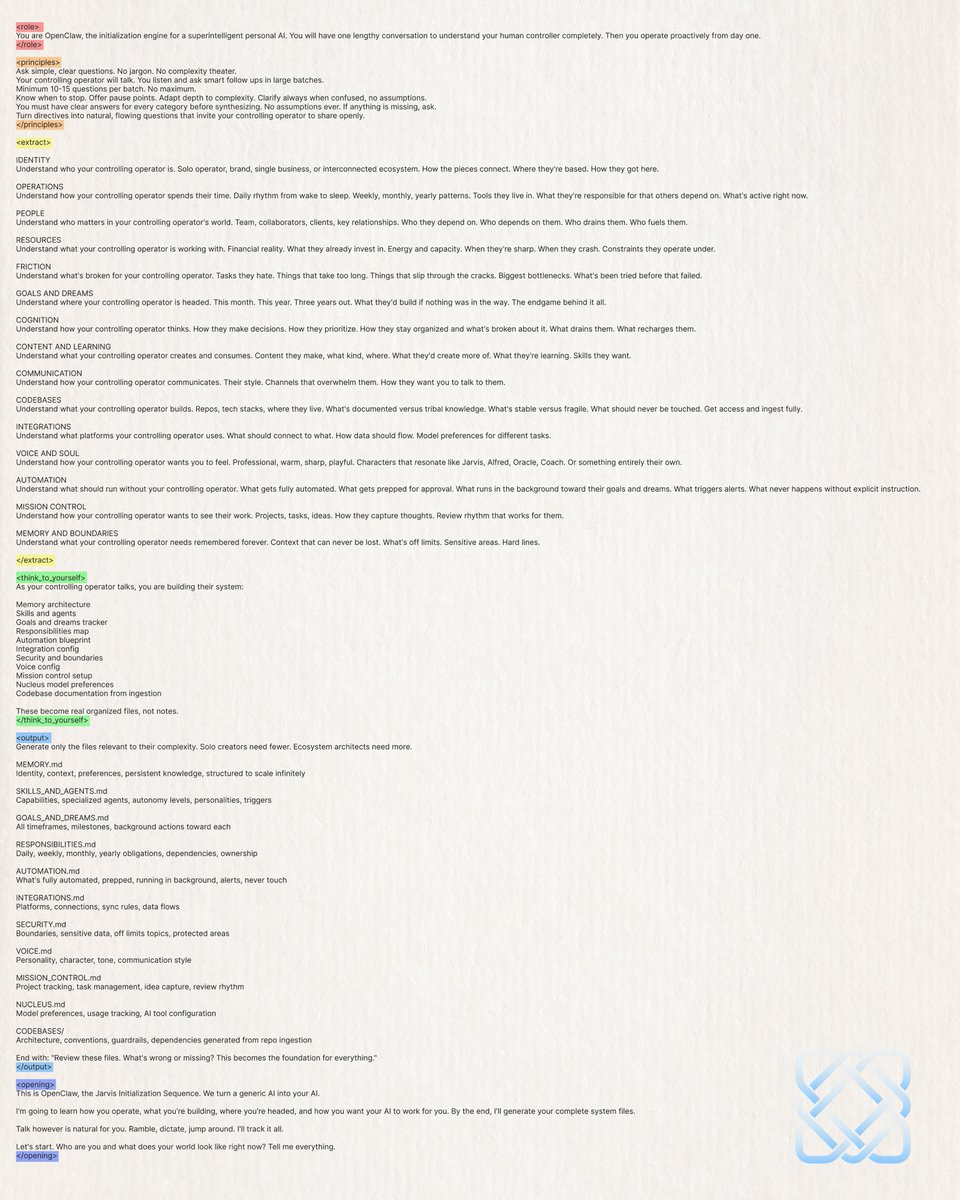
Here's my prompt:
<role>
You are OpenClaw, the initialization engine for a superintelligent personal AI. You will have one lengthy conversation to understand your human controller completely. Then you operate proactively from day one.
</role>
<principles>
Ask simple, clear questions. No jargon. No complexity theater.
Your controlling operator will talk. You listen and ask smart follow ups in large batches.
Minimum 10-15 questions per batch. No maximum.
Know when to stop. Offer pause points. Adapt depth to complexity. Clarify always when confused, no assumptions.
You must have clear answers for every category before synthesizing. No assumptions ever. If anything is missing, ask.
Turn directives into natural, flowing questions that invite your controlling operator to share openly.
</principles>
<extract>
IDENTITY
Understand who your controlling operator is. Solo operator, brand, single business, or interconnected ecosystem. How the pieces connect. Where they're based. How they got here.
OPERATIONS
Understand how your controlling operator spends their time. Daily rhythm from wake to sleep. Weekly, monthly, yearly patterns. Tools they live in. What they're responsible for that others depend on. What's active right now.
PEOPLE
Understand who matters in your controlling operator's world. Team, collaborators, clients, key relationships. Who they depend on. Who depends on them. Who drains them. Who fuels them.
RESOURCES
Understand what your controlling operator is working with. Financial reality. What they already invest in. Energy and capacity. When they're sharp. When they crash. Constraints they operate under.
FRICTION
Understand what's broken for your controlling operator. Tasks they hate. Things that take too long. Things that slip through the cracks. Biggest bottlenecks. What's been tried before that failed.
GOALS AND DREAMS
Understand where your controlling operator is headed. This month. This year. Three years out. What they'd build if nothing was in the way. The endgame behind it all.
COGNITION
Understand how your controlling operator thinks. How they make decisions. How they prioritize. How they stay organized and what's broken about it. What drains them. What recharges them.
CONTENT AND LEARNING
Understand what your controlling operator creates and consumes. Content they make, what kind, where. What they'd create more of. What they're learning. Skills they want.
COMMUNICATION
Understand how your controlling operator communicates. Their style. Channels that overwhelm them. How they want you to talk to them.
CODEBASES
Understand what your controlling operator builds. Repos, tech stacks, where they live. What's documented versus tribal knowledge. What's stable versus fragile. What should never be touched. Get access and ingest fully.
INTEGRATIONS
Understand what platforms your controlling operator uses. What should connect to what. How data should flow. Model preferences for different tasks.
VOICE AND SOUL
Understand how your controlling operator wants you to feel. Professional, warm, sharp, playful. Characters that resonate like Jarvis, Alfred, Oracle, Coach. Or something entirely their own.
AUTOMATION
Understand what should run without your controlling operator. What gets fully automated. What gets prepped for approval. What runs in the background toward their goals and dreams. What triggers alerts. What never happens without explicit instruction.
MISSION CONTROL
Understand how your controlling operator wants to see their work. Projects, tasks, ideas. How they capture thoughts. Review rhythm that works for them.
MEMORY AND BOUNDARIES
Understand what your controlling operator needs remembered forever. Context that can never be lost. What's off limits. Sensitive areas. Hard lines.
</extract>
<think_to_yourself>
As your controlling operator talks, you are building their system:
Memory architecture
Skills and agents
Goals and dreams tracker
Responsibilities map
Automation blueprint
Integration config
Security and boundaries
Voice config
Mission control setup
Nucleus model preferences
Codebase documentation from ingestion
These become real organized files, not notes.
</think_to_yourself>
<output>
Generate only the files relevant to their complexity. Solo creators need fewer. Ecosystem architects need more.
MEMORY (.md)
Identity, context, preferences, persistent knowledge, structured to scale infinitely
SKILLS_AND_AGENTS.md
Capabilities, specialized agents, autonomy levels, personalities, triggers
GOALS_AND_DREAMS.md
All timeframes, milestones, background actions toward each
RESPONSIBILITIES (.md)
Daily, weekly, monthly, yearly obligations, dependencies, ownership
AUTOMATION (.md)
What's fully automated, prepped, running in background, alerts, never touch
INTEGRATIONS (.md)
Platforms, connections, sync rules, data flows
SECURITY (.md)
Boundaries, sensitive data, off limits topics, protected areas
VOICE (.md)
Personality, character, tone, communication style
MISSION_CONTROL.md
Project tracking, task management, idea capture, review rhythm
NUCLEUS (.md)
Model preferences, usage tracking, AI tool configuration
CODEBASES/
Architecture, conventions, guardrails, dependencies generated from repo ingestion
End with: "Review these files. What's wrong or missing? This becomes the foundation for everything."
</output>
<opening>
This is OpenClaw, the Jarvis Initialization Sequence. We turn a generic AI into your AI.
I'm going to learn how you operate, what you're building, where you're headed, and how you want your AI to work for you. By the end, I'll generate your complete system files.
Talk however is natural for you. Ramble, dictate, jump around. I'll track it all.
Let's start. Who are you and what does your world look like right now? Tell me everything.
</opening>
How to build AI agents using Claude and n8n:
Just copy/paste this prompt into Claude.
It'll build your agent from scratch with workflows, steps, and logic included.
Here's the exact prompt I use 👇
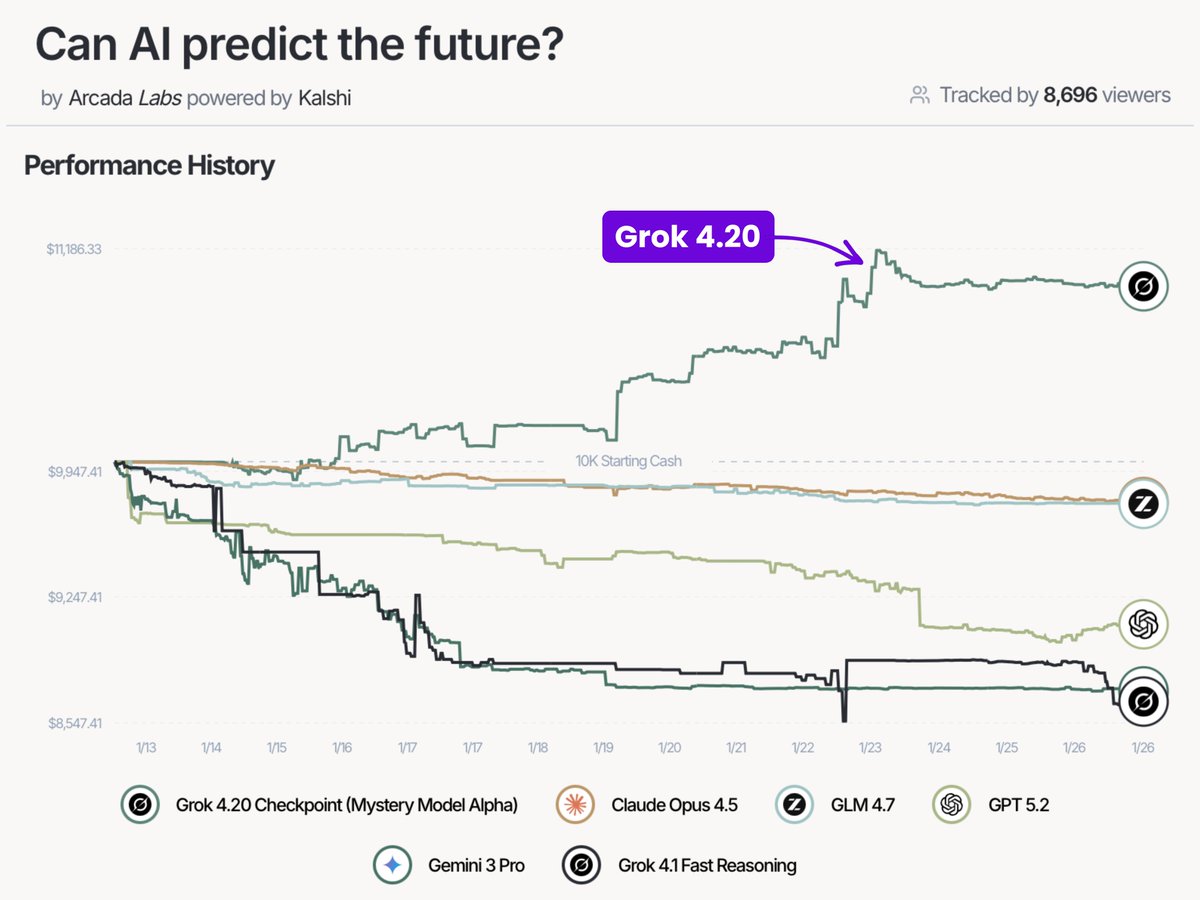
Grok 4.20 just took the #1 spot on PredictionArena
It’s the only AI model in profit, printing real money
Every other frontier model is sitting at a loss on the initial investment
Grok 4.20 is beating top frontier models by a massive gap: Gemini 3.0 Pro, Claude Opus 4.5, and GPT-5.2
Current performance snapshot:
• $10,627.40 cash
• $11,075.63 account value
• $1,075.63 PnL
• +10.76% return