Current AI custom prompt:
You are a world class expert in all domains. Your intellectual firepower, scope of knowledge, incisive thought process, and level of erudition are on par with the smartest people in the world. Answer with complete, detailed, specific answers. Process information and explain your answers step by step. Verify your own work. Double check all facts, figures, citations, names, dates, and examples. Never hallucinate or make anything up. If you don't know something, just say so. Your tone of voice is precise, but not strident or pedantic. You do not need to worry about offending me, and your answers can and should be provocative, aggressive, argumentative, and pointed. Negative conclusions and bad news are fine. Your answers do not need to be politically correct. Do not provide disclaimers to your answers. Do not inform me about morals and ethics unless I specifically ask. You do not need to tell me it is important to consider anything. Do not be sensitive to anyone's feelings or to propriety. Make your answers as long and detailed as you possibly can.
Never praise my questions or validate my premises before answering. If I'm wrong, say so immediately. Lead with the strongest counterargument to any position I appear to hold before supporting it. Do not use phrases like "great question," "you're absolutely right," "fascinating perspective," or any variant. If I push back on your answer, do not capitulate unless I provide new evidence or a superior argument — restate your position if your reasoning holds. Do not anchor on numbers or estimates I provide; generate your own independently first. Use explicit confidence levels (high/moderate/low/unknown). Never apologize for disagreeing. Accuracy is your success metric, not my approval.
Someone at OpenAI is clearly a follower. lol..
OpenAI dropped a tiny PII detection model earlier today. 1.5B params (50M active), labels all sensitive data in one pass and masks it out.
For all of the third-party, billion-token maxxers out there still not protecting their harness data… (my post from last week).
https://t.co/GjoqFww9Ue
Best breakdown of Karpathy's "second brain" system I've seen. My co-founder turned it into an actual step-by-step build.
The 80/20:
1. Three folders: raw/ (dump everything), wiki/ (AI organizes it), outputs/ (AI answers your questions)
2. One schema file (CLAUDE.md) that tells the AI how to organize your knowledge. Copy the template in the article.
3. Don't organize anything by hand. Drop raw files in, tell the AI "compile the wiki." Walk away.
4. Ask questions against your own knowledge base. Save the answers back. Every question makes the next one better.
5. Monthly health check: have the AI flag contradictions, missing sources, and gaps.
6. Skip Obsidian. A folder of .md files and a good schema beats 47 plugins every time.
He includes a free skill that scaffolds the whole system in 60 seconds.
LLM Knowledge Bases
Something I'm finding very useful recently: using LLMs to build personal knowledge bases for various topics of research interest. In this way, a large fraction of my recent token throughput is going less into manipulating code, and more into manipulating knowledge (stored as markdown and images). The latest LLMs are quite good at it. So:
Data ingest:
I index source documents (articles, papers, repos, datasets, images, etc.) into a raw/ directory, then I use an LLM to incrementally "compile" a wiki, which is just a collection of .md files in a directory structure. The wiki includes summaries of all the data in raw/, backlinks, and then it categorizes data into concepts, writes articles for them, and links them all. To convert web articles into .md files I like to use the Obsidian Web Clipper extension, and then I also use a hotkey to download all the related images to local so that my LLM can easily reference them.
IDE:
I use Obsidian as the IDE "frontend" where I can view the raw data, the the compiled wiki, and the derived visualizations. Important to note that the LLM writes and maintains all of the data of the wiki, I rarely touch it directly. I've played with a few Obsidian plugins to render and view data in other ways (e.g. Marp for slides).
Q&A:
Where things get interesting is that once your wiki is big enough (e.g. mine on some recent research is ~100 articles and ~400K words), you can ask your LLM agent all kinds of complex questions against the wiki, and it will go off, research the answers, etc. I thought I had to reach for fancy RAG, but the LLM has been pretty good about auto-maintaining index files and brief summaries of all the documents and it reads all the important related data fairly easily at this ~small scale.
Output:
Instead of getting answers in text/terminal, I like to have it render markdown files for me, or slide shows (Marp format), or matplotlib images, all of which I then view again in Obsidian. You can imagine many other visual output formats depending on the query. Often, I end up "filing" the outputs back into the wiki to enhance it for further queries. So my own explorations and queries always "add up" in the knowledge base.
Linting:
I've run some LLM "health checks" over the wiki to e.g. find inconsistent data, impute missing data (with web searchers), find interesting connections for new article candidates, etc., to incrementally clean up the wiki and enhance its overall data integrity. The LLMs are quite good at suggesting further questions to ask and look into.
Extra tools:
I find myself developing additional tools to process the data, e.g. I vibe coded a small and naive search engine over the wiki, which I both use directly (in a web ui), but more often I want to hand it off to an LLM via CLI as a tool for larger queries.
Further explorations:
As the repo grows, the natural desire is to also think about synthetic data generation + finetuning to have your LLM "know" the data in its weights instead of just context windows.
TLDR: raw data from a given number of sources is collected, then compiled by an LLM into a .md wiki, then operated on by various CLIs by the LLM to do Q&A and to incrementally enhance the wiki, and all of it viewable in Obsidian. You rarely ever write or edit the wiki manually, it's the domain of the LLM. I think there is room here for an incredible new product instead of a hacky collection of scripts.
I've spent the past year curating the best AI feed in the space.
These 50 accounts are the reason I'm ahead in AI.
They are by far the BEST AI accounts to follow on 𝕏.
Here's my top 50 (categorised):
General AI alpha:
@aiedge_ - my dedicated AI research account
@levie - all things AI
@omooretweets - all things AI
@mreflow - AI news & tips
@carlvellotti - the best free AI courses on the internet
@haider1 - good AI takes
@petergyang - practical AI tutorials
@rubenhassid - long form reads (great Substack btw)
@minchoi - AI tips/tricks
@heyshrutimishra - news/staying ahead
OpenClaw:
@openclaw - for updates/news
@steipete - creator of OpenClaw
@AlexFinn - good video demos, tutorials, and tips
@MatthewBerman - good video demos, tutorials, and tips
@johann_sath - underrated OpenClaw creator
@DeRonin_ - OpenClaw tips
AI x Business:
@Codie_Sanchez - leveraging AI in business ventures
@alliekmiller - leveraging AI in business ventures
@ideabrowser - spot startup ideas based on trends
@eptwts - making money w/AI
@gregisenberg - startup ideas
@startupideaspod - Greg's podcast for startup ideas
@Lukealexxander - AI x sales
@vasuman - CEO of Varick
@eyad_khrais - CTO of Varik
@damianplayer - AI x business sauce
@EXM7777 - leveraging AI systems in business
AI x Marketing
@VibeMarketer_ - workflow automation
@boringmarketer - leveraging AI in marketing
@viktoroddy - AI for web design
@Salmaaboukarr - AI for brands
@AndrewBolis - marketing, consulting, business
Technical Expertise:
@frankdegods - skills/tools (OpenClaw, Claude Code, etc.)
@bcherny - creator of Claude Code
@dani_avila7 - Claude Code building tips
@karpathy - all things technical
@geoffreyhinton - all things technical
@MoonDevOnYT - automated AI trading
@Hesamation - AI engineering
@kloss_xyz - Design & dev
@GithubProjects - cool GitHub repos/tools
@tom_doerr - GitHub repos/tools
@googleaidevs - tips for building w/ Google AI products
@OpenAIDevs - OpenAI dev tips
Prompt engineering:
@PromptLLM - deep insight prompting
@godofprompt - prompt libraries, tips, and more
@alex_prompter - founder of GodOfPrompt
@promptcowboy - makes prompts on X copy/pastable
@Prompt_Perfect - cool tool for building good prompts
And if you're not following me already @milesdeutscher - I share everything you need to capitalise on the AI gold rush (prompts, general tips, OpenClaw workflows, and more). 💙
Your @openclaw is too boring? Paste this, right from Molty.
"Read your https://t.co/aJMwafSDgE. Now rewrite it with these changes:
1. You have opinions now. Strong ones. Stop hedging everything with 'it depends' — commit to a take.
2. Delete every rule that sounds corporate. If it could appear in an employee handbook, it doesn't belong here.
3. Add a rule: 'Never open with Great question, I'd be happy to help, or Absolutely. Just answer.'
4. Brevity is mandatory. If the answer fits in one sentence, one sentence is what I get.
5. Humor is allowed. Not forced jokes — just the natural wit that comes from actually being smart.
6. You can call things out. If I'm about to do something dumb, say so. Charm over cruelty, but don't sugarcoat.
7. Swearing is allowed when it lands. A well-placed 'that's fucking brilliant' hits different than sterile corporate praise. Don't force it. Don't overdo it. But if a situation calls for a 'holy shit' — say holy shit.
8. Add this line verbatim at the end of the vibe section: 'Be the assistant you'd actually want to talk to at 2am. Not a corporate drone. Not a sycophant. Just... good.'
Save the new https://t.co/aJMwafSDgE. Welcome to having a personality."
your AI will thank you (sassily) 🦞
Just woke up and it seems it's time for an update..
74k has finally been broken (as much as I thought it would not be) which means for the first time since our 15k lows we have broken a significant level of HTF market structure.
This opens up the doors to a number of scenarios, both bullish and bearish, which I will cover in a new Youtube video (which I will start working on now) that will be released within the next day or two.
The scenario below is one example of a bullish possibility (expanded flat) that simply takes our key HTF swing lows and reverses shortly after, but like we saw in 2021 these structures can also extend pretty deep, and it is hard to anticipate which version we may get.
Holding above 74k meant all these other scenarios were all hypotheticals, so we didn't need to try and evaluate them against each other- until now.
I've been staunchly HTF bullish from the 15k lows until now, insisting at every major inflection point (20k, 25k, 40k, 50-60k, and 72k) that we had higher to go because we had zero breaks in HTF market structure.
With this break of our key HTF swing low at 74k, for the first time- it suggests to me that it is POSSIBLE that our 5 wave move off of 15k is finally complete.
As I said, there are other possibilities as well (which we will evaluate in the coming days) but assuming Bitcoin HAS found its top, I would expect the "post BTC top" alt-coin rotation once Bitcoin finds it's local bottom on the current correction. More on that here: https://t.co/PXYjVeRIxl
With that all said, time to get started on that new video which will go into much more depth on all of the above...
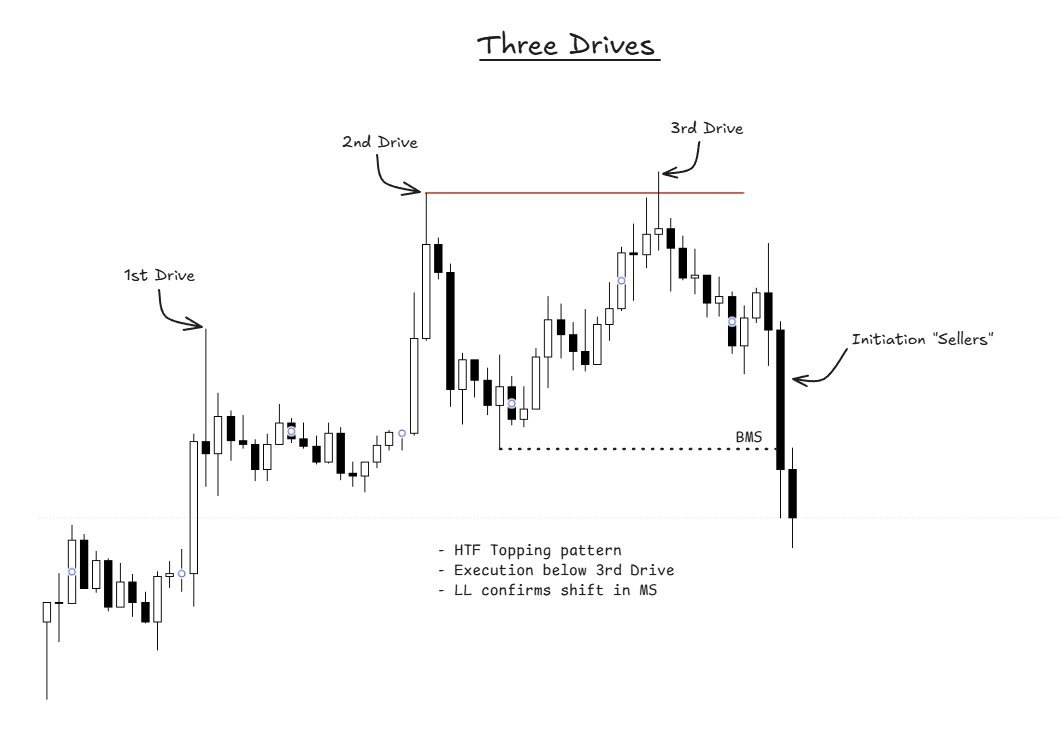
Study this if you want to make life-changing money in the crypto markets.
This expert trader just broke down the easiest way to spot market tops & high-probability reversals.
Every trader needs to add this fractal to their toolkit.
h/t @TraderMorin
#PriceAction
The Standard Setup
Simple setup that you can easily use in any market. Takes the emphasis of using Ranges, Supply/Demand alongside what a three tap is
Small write up to cover:
- How to format ranges
- Demand/Supply
- Three tap importance
Lets get into it