Karpathy method + Claude Code reading your whole Obsidian vault is the smartest second brain on earth.
The method is simple and brutal. If you can’t build a thing from scratch, you don’t know it. Tutorials are fake learning and your brain deletes them in 3 days.
Most people ignore this. They build a second brain that just sits there, folders of notes nobody reopens, dead text.
Point Claude Code at the vault and it wakes up. 5,000 notes, one mind. It reads all of it and answers in your own words and your own proofs, not a model’s guess.
Then the loop closes.
Want to understand neural nets? Skip the 3-hour video and ask Claude Code to build a tiny one. 200 lines from scratch. Watch it train, break a layer, watch it fail, fix it.
It clicks in 20 minutes instead of 3 weeks.
The second it lands the note gets written. One idea per file, linked to 10 others, dropped into the vault while the memory is still hot.
Now it compounds.
Month 1: is 60 notes. Month 6 is 900. Every new note pulls in old ones, so you ask anything and the answer comes from your brain, not the internet.
Before: 40 tabs, 6 half read PDF, 0 retained.
After: build it once, own it for life.
Setup takes 4 minutes. Plain text, no lock-in.
A second brain nobody reads is a graveyard.
Yours just started thinking.
Claude 한도 빨리 차는 이유, 클로드 토큰 줄이는 방법 정리
Claude 한도 빨리 차는 진짜 이유
모델이 갑자기 멍청해진 게 아니라,
내가 대화 안에 너무 많은 짐을 쌓아둔 경우가 많음
Claude는 새 질문만 읽고 답하는 게 아니라
이전 대화, 답변, 파일 내용, 도구 출력, CLAUDE.md, MCP 정보까지 같이 보고 답함
그래서 대화가 길어질수록 한도가 빨리 찬다
줄이는 방법은 단순함
1. CLAUDE.md 짧게 유지
2. MCP는 쓰는 것만 켜기
3. 긴 대화는 요약하고 새로 시작
4. 큰 로그/파일은 제외
5. 틀린 답변은 바로 중단
6. 작업 끝나면 /clear
7. 필요한 파일 범위만 정확히 지정
핵심은 요금제를 올리기 전에
내 사용 습관부터 줄이는 것
Claude가 느려진 게 아니라,
내 컨텍스트가 무거워진 걸 수도 있음
더 자세한 글은 네이버 블로그 링크 댓글에⬇️
AI가 프로처럼 디자인하게 만드는 DESIGN.md 라이브러리
🖼️ Refero Styles
https://t.co/n1y3qjdrZe
"완성된 디자인 시스템을 활용하세요"
"단순한 사양보다는 실제 사례를 보��주세요"
이런 Claude Design으로 더 나은 결과물을 내는 팁과 연결해서 활용할 수 있는 사이트!
주요 제품 웹사이트에서 가져온 2,000개 이상의 AI 인식 가능 디자인 시스템을 살펴보세요.
Refero Styles 은 Stripe, Linear, Vercel, Notion, ElevenLabs 등 실제 프로덕트들의 디자인 시스템을 AI가 바로 읽을 수 있는 DESIGN.md 형식으로 2,000개 이상 정리해 놓은 사이트 예요.
이런걸 다 가지고 있음..!
- 색상 팔레트 & 토큰
- 타이포그래피 스케일
- 스페이싱/레이아웃 리듬
- 컴포넌트 패턴
- 전체적인 무드와 가이드
Claude Code, Codex, Cursor, Lovable 같은데에서 이런 DESIGN.md를 붙여넣고 작업하면, 퀄리티 높은 제품 같은 느낌의 결과물을 기대해볼 수 있죠.
[이 5개 플러그인만 깔면 Hermes가 날아다님🚀]
Hermes
이제 플러그인 붙기 시작하니까
그냥 다른 급으로 넘어가는 느낌임 👀
단순한 Agent 툴이 아니라
이제는 거의
· 스킬 마켓
· 지식 그래프 브레인
· 메모리 워크벤치
· 엔터프라이즈 저장소
· 운영 대시보드
이렇게 커지는 중.
특히 인상적이었던 건 이 5개:
1️⃣ Hermes Skill Registry
한 Agent가 배운 스킬을
다른 Agent도 바로 가져다 쓰는 구조
(https://t.co/1oV3AnXX2b)
2️⃣ Graphiti Plugin
메모리를 단순 기록이 아니라
관계형 지식 그래프로 바꿔버림
(https://t.co/dLqBksJehw)
3️⃣ Mnemosyne Dashboard
메모리 상태를 실시간으로 보고, 찾고, 수정할 수 있음
(https://t.co/SyoGeeIhEc)
4️⃣ YantrikDB Hermes Plugin
엔터프라이즈용 벡터/그래프 메모리 백엔드
(https://t.co/ESrubfX5AC)
5️⃣ YantrikDB Dashboard
DB 상태, 쿼리 성능, 메모리 건강도까지 한 번에 모니터링
(https://t.co/n2oXkA3fUU)
이쯤 되면
Hermes는 그냥 Agent 툴이 아니라
Agent 운영체제처럼 가는 느낌도 있음.
솔직히 이제 모델 성능보다
이런 생태계를 어떻게 붙여서 굴리느냐가 더 중요해지는 구간 같음 🚀
#AI #Hermes #AICaffeine
AI 자동화에서 Hermes가 중요한 이유 ( 연동 방법 스레드)
Hermes를 단순히 텔레그램으로 AI를 부르는 도구라고 보면 조금 좁게 보는 것 같음
진짜 핵심은
여러 AI와 도구를 하나의 작업 안에서 자연스럽게 연결해주는 데 있음
예를 들면
Claude는 글 구조를 잡고
Codex는 앱이나 코드 작업을 하고
Gemini는 리서치와 번역을 하고
다른 도구는 이미지, 영상, 파일 정리를 맡는 식임
원래는 사람이 중간에서 계속 복붙해야 했음
Claude가 만든 내용을 Codex에 붙이고
Codex 결과를 다시 ChatGPT에 넣고
리서치 결과를 따로 정리하고
파일을 다시 옮기고
이런 식으로 사람이 AI들 사이의 전달자가 됐음
근데 Hermes 같은 에이전트 구조가 붙으면
이 작업을 앱 안에서 더 자연스럽게 이어갈 수 있음
내가 할 일은
“이 주제로 리서치하고
글감 만들고
필요하면 웹앱으로 구현하고
결과를 정리해줘”
이렇게 목표를 말하는 쪽에 가까워짐
그러면 �� AI가 잘하는 역할을 나눠 맡고
필요한 도구를 연결해서
하나의 작업처럼 이어가는 방식이 가능해짐
이게 진짜 자동화에 가까운 것 같음
텔레그램으로 명령을 보내는 건 편의 기능이고
본질은 AI들이 따로 노는 게 아니라
내 작업 안에서 연결되어 움직이게 만드는 것임
앞으로 자동화는
버튼 하나 눌러서 끝나는 게 아니라
리서치
기획
글쓰기
코딩
이미지
영상
파일 정리
보고
이런 작업들이 하나의 앱 안에서 가능하게 해줌
다음 글에서는
Hermes를 실제로 어떤 작업에 붙이면 좋은지
어떤 식으로 자동화할 수 있는지 정리해보겠음
아래는 헤르메스 ai에 연동하는 방법 스레드⬇️
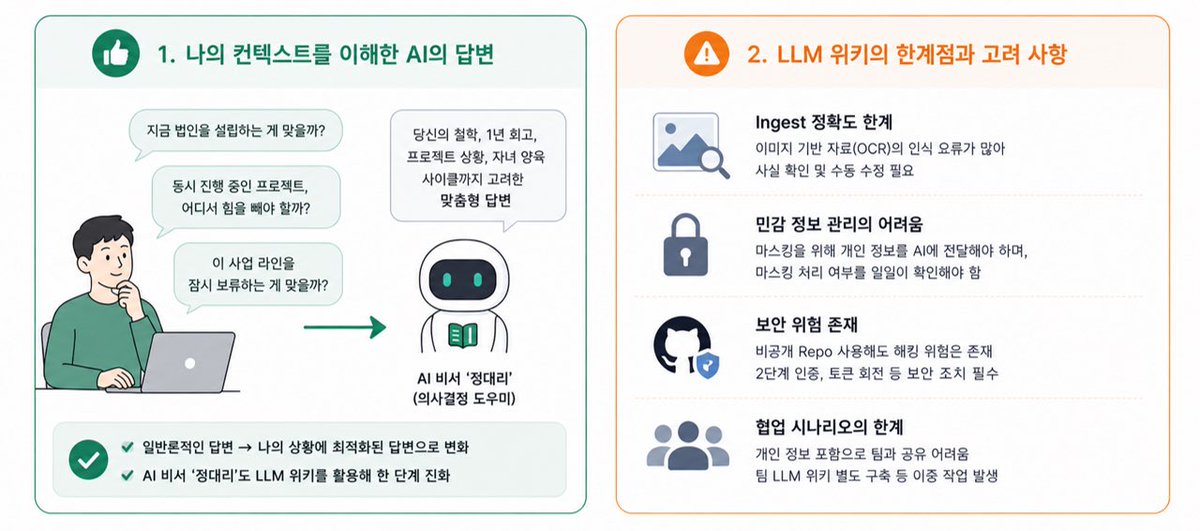
🧠 "나만의 세컨 브레인: 옵시디언 기반 LLM 위키 구축기"
접근 방향에는 정답이 없어요. 이 아티클에는 그 시도에 대한 내용이 있으니 흐름을 참고해보실 수 있어요.
ㄱㄱㄱ
옵시디언을 설치하고 새 Vault를 만듬
↓
Minimal 테마를 적용해 깔끔한 화면을 준비함
↓
Git 플러그인과 Terminal 플러그인을 가장 먼저 설치함
↓
Web Clipper 확장 프로그램으로 웹 자료를 한 번에 저장하도록 설정함
↓
모바일에서는 공유 기능을 통해 바로 Vault로 보내지도록 함
↓
GitHub에 Private Repository를 만들고 Vault를 연결함
↓
iOS 환경이라면 Working Copy 앱을 사용함
↓
Fine-grained Personal Access Token을 발급해 Working Copy에 등록함
↓
Vault 루트에 CLAUDE.md 파일을 만들고 운영 규칙을 적음
↓
Claude Code를 실행할 때마다 CLAUDE.md가 자동으로 주입되도록 함
↓
SessionStart Hook을 걸어 위키 Index를 세션 시작과 동시에 참조하게 함
↓
obsidian-cli와 defuddle 같은 전용 스킬을 추가로 설치함
↓
Claude Code에게 위키 카테고리 구조를 제안받음
↓
Identity, Thoughts, Goals, History, People, Assets, Works로 분류함
↓
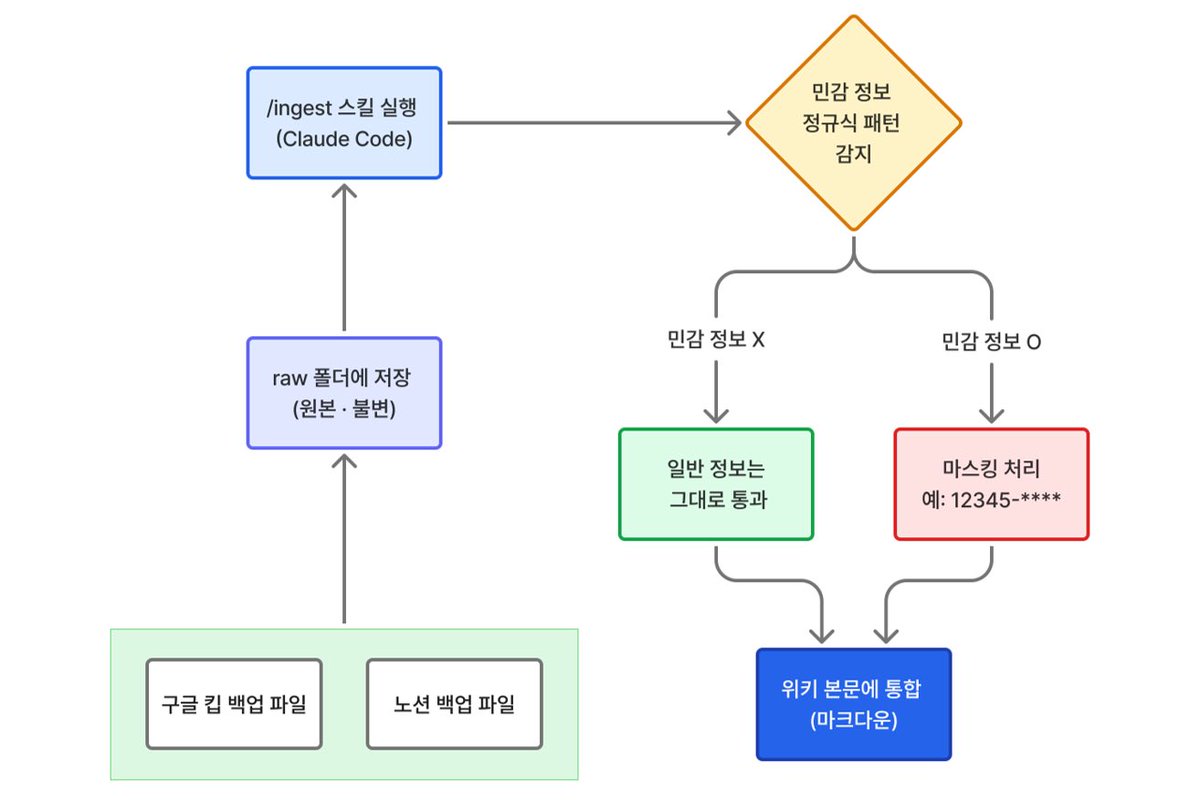
기존 Notion과 Google Keep 데이터를 raw 폴더에 모음
↓
/ingest 스킬로 자료를 읽어 적절한 페이지로 합성함
↓
민감 정보는 Regex로 감지해 자동으로 마스킹 처리함
↓
/lint 스킬을 만들어 매일 자동으로 위키 상태를 점검함
↓
Claude Schedule 기능을 활용해 Lint 작업을 무인으로 돌림
↓
/query 스킬로 위키 전체를 컨텍스트 삼아 질문함
↓
그래프 뷰를 자주 열어 연결되지 않은 노트를 확인함
Andrej Karpathy가 2시간 동안
자기가 실제로 AI를 쓰는 화면을 그대로 보여줬습니다
(OpenAI 공동 창립자, Tesla AI책임자였던)
핵심은 놀라울 정도로 단순합니다
말로 일을 맡기고,
결과를 보고,
다시 한 문장으로 고칩니다
AI 시대의 차이는 프롬프트 암기가 아니라
“일을 맡기는 감각”에서 갈립니다
핵심만 한국어 자막으로 1시간 정도 압축했습니다
AI를 제대로 쓰고 싶은 사람은 꼭 보세요
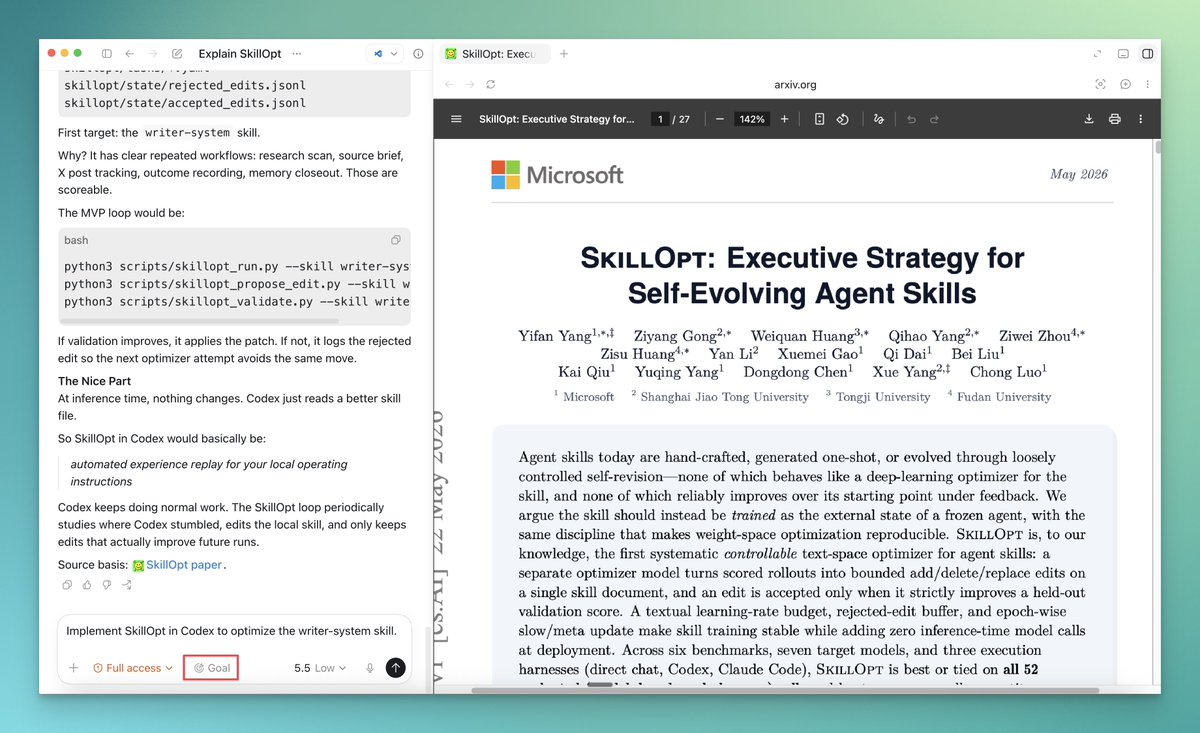
Codex Pro tip: turn Codex into a research engineer.
Take any new agent paper and:
1. Ask: “How would this work in Codex?”
2. Enter /goal mode
3. Set the goal to implement it in your local config
There’s a wave of research coming out on harness engineering: skills, memory, eval loops, tool use, scaffolds, agent feedback.
This workflow lets you pull those ideas into your actual Codex environment instead of just bookmarking them.
SkillOpt is a perfect example.
It treats agent skills as trainable external state: run a rollout, edit the skill, validate, keep what works.
In the paper, SkillOpt improved GPT-5.5 inside a Codex-style harness by +24.8 points over the no-skill baseline.
That’s the loop you can implement today. It's already possible:
research paper → Codex goal → local agent upgrade
El web scraping acaba de cambiar de nivel
Scrapling evita los bloqueos de Cloudflare, es 774 veces más rápido que BeautifulSoup y no necesita configuración de proxies
52.2k estrellas en GitHub
No es otro scraper más
Es un framework adaptativo que aprende la estructura de cada web y se ajusta automáticamente cuando cambia
Sin mantenimiento manual. Sin que te bloqueen.
✅ Bypassa Cloudflare y los anti-bots más agresivos
✅ 774x más rápido que BeautifulSoup en benchmarks reales
✅ Sin necesidad de proxies ni configuración especial
✅ Se adapta automáticamente cuando cambia la estructura de la web
✅ Compatible con agentes de IA como servidor MCP
✅ Soporte para JavaScript, iframes y contenido dinámico
✅ Modo stealth para webs con detección avanzada
✅ 46 releases. Actualizado la semana pasada.
✅ Licencia BSD-3
Lo que antes tardabas días en montar y mantener ahora son minutos
52.2k estrellas. 5k forks. BSD-3.
repo aquí 👇
A good /goal has 4 parts.
1. The job
Build the app in SPEC.md.
2. The proof
Done means `npm test` exits 0 and `npm run build` exits 0.
3. The boundary
Only change files needed for this feature.
4. The stop rule
Stop after 20 turns or if blocked by missing credentials.
Example:
/goal Build the app in SPEC.md. Done means `npm test` and `npm run build` both pass, README matches the final behavior, and git status only shows relevant project files. Stop after 20 turns or if blocked.
Do not ask the agent to "work on it."
Give it the finish line, the proof, and the boundary.
La mejor forma de entender un Agente de IA es pensar en un loop.
1) El agente percibe el contexto (conversación, memoria, archivos, estado actual)
2) El modelo decide qué hacer (razona y elige el próximo paso)
3) Usa una tool (leer archivos, buscar en web, correr comandos, llamar APIs)
4) Observa el resultado (analiza qué pasó después de ejecutar la acción)
5) Y vuelve a empezar el proceso hasta llegar al objetivo.
Para que eso funcione, aparecen varias piezas importantes:
• Brain: el LLM que piensa y toma decisiones
• Tools: las capacidades para interactuar con sistemas externos
• Memory: el contexto que guarda entre pasos o sesiones
• Planning: la división de tareas complejas en pasos más chicos
• Guardrails: límites y validaciones para mantener control
Cuando entendés este loop, entendés por qué los agentes pueden programar, investigar, automatizar tareas o resolver problemas complejos.
Son sistemas que usan un LLM como cerebro y van iterando sobre un problema hasta cumplir un objetivo.




![AI_Caffeine's tweet photo. [이 5개 플러그인만 깔면 Hermes가 날아다님🚀]
Hermes
이제 플러그인 붙기 시작하니까
그냥 다른 급으로 넘어가는 느낌임 👀
단순한 Agent 툴이 아니라
이제는 거의
· 스킬 마켓
· 지식 그래프 브레인
· 메모리 워크벤치
· 엔터프라이즈 저장소
· 운영 대시보드
이렇게 커지는 중.
특히 인상적이었던 건 이 5개:
1️⃣ Hermes Skill Registry
한 Agent가 배운 스킬을
다른 Agent도 바로 가져다 쓰는 구조
(https://t.co/1oV3AnXX2b)
2️⃣ Graphiti Plugin
메모리를 단순 기록이 아니라
관계형 지식 그래프로 바꿔버림
(https://t.co/dLqBksJehw)
3️⃣ Mnemosyne Dashboard
메모리 상태를 실시간으로 보고, 찾고, 수정할 수 있음
(https://t.co/SyoGeeIhEc)
4️⃣ YantrikDB Hermes Plugin
엔터프라이즈용 벡터/그래프 메모리 백엔드
(https://t.co/ESrubfX5AC)
5️⃣ YantrikDB Dashboard
DB 상태, 쿼리 성능, 메모리 건강도까지 한 번에 모니터링
(https://t.co/n2oXkA3fUU)
이쯤 되면
Hermes는 그냥 Agent 툴이 아니라
Agent 운영체제처럼 가는 느낌도 있음.
솔직히 이제 모델 성능보다
이런 생태계를 어떻게 붙여서 굴리느냐가 더 중요해지는 구간 같음 🚀
#AI #Hermes #AICaffeine](https://pbs.twimg.com/media/HKhWgkjboAAw4E7.jpg)