I'm genuinely shocked this is FREE
YOU CAN BUILD YOUR FIRST AI AGENT IN ONE AFTERNOON. FOR FREE.
My first one took me two weeks.
This guide gets you there in a few hours:
Step 1: Pick one boring task you repeat every week.
Step 2: Give the agent tools: read files, search, send a draft.
Step 3: Add a Jev decision layer, so the small calls (which tool, which file, done or not) cost a fraction of a cent.
Step 4: Put a human checkpoint before anything that sends, deletes or pays.
Step 5: Run it, watch it, tighten it.
One builder with this setup ships like a small team.
Full guide below. Bookmark it.
follow @cyrilXBT
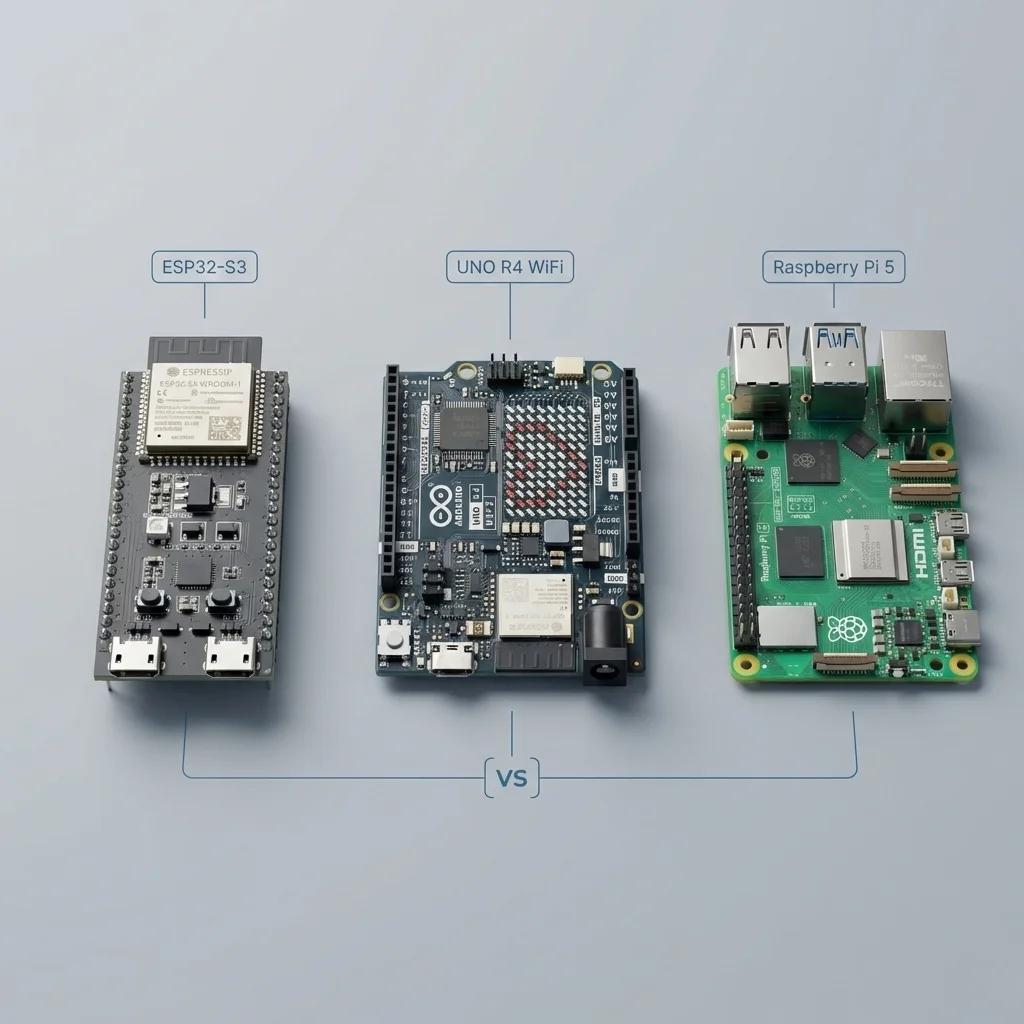
which board should you actually start with?
Arduino vs ESP32 vs Raspberry Pi
4 months into robotics as a hobby, here's what i'd tell myself on day one:
1. start with arduino
use it when you're learning:
- motors
- servos
- sensors
- basic circuits
atmega328p, 16 mhz, 2 kb of ram, and 5v logic so most hobby parts plug straight in
when your code runs, nothing interrupts it, and that makes timing easy to reason about
best place to learn the fundamentals without debugging an operating system at the same time
you outgrow it the day you add wifi or a camera
2. move to esp32
use it when you want:
- wifi
- bluetooth
- wireless control
- anything that reports back to your phone
dual core at 240 mhz, 520 kb ram, radios on the chip, around $5 a board
more connectivity and still hands on, so you keep writing the same kind of code
two things that cost me a weekend each:
3.3v logic, so your 5v sensors need a level shifter or they read garbage
and on the original esp32 the adc2 pins stop reading the moment wifi turns on
3. go for raspberry pi
use it when your robot needs:
- computer vision
- ai and ml
- ros 2
- heavy processing
now you're running a computer inside your robot, with all of the upside and all of the cost
linux decides when your code runs, so pwm timing jitters and servos twitch
and pulling the power without a shutdown corrupts the sd card, which i learned twice
also worth knowing, raspberry makes a real microcontroller too, the pico, about $4
so the quick version:
never wired anything before -> arduino
want wifi and the best price -> esp32
need vision or a camera -> raspberry pi
and yes, you can use more than one
arduino -> control
esp32 -> connect
raspberry pi -> compute
that combination is what took me 4 months to understand
the pi is the brain and the microcontroller is the spine, and a real robot wants both
also, if you want to learn robotics engineering for 6 months, read the article below:
Continuation of my old video-as-3d-object demo
Always wanted to extend it further with segmentation so you can search for any type of object within the scene
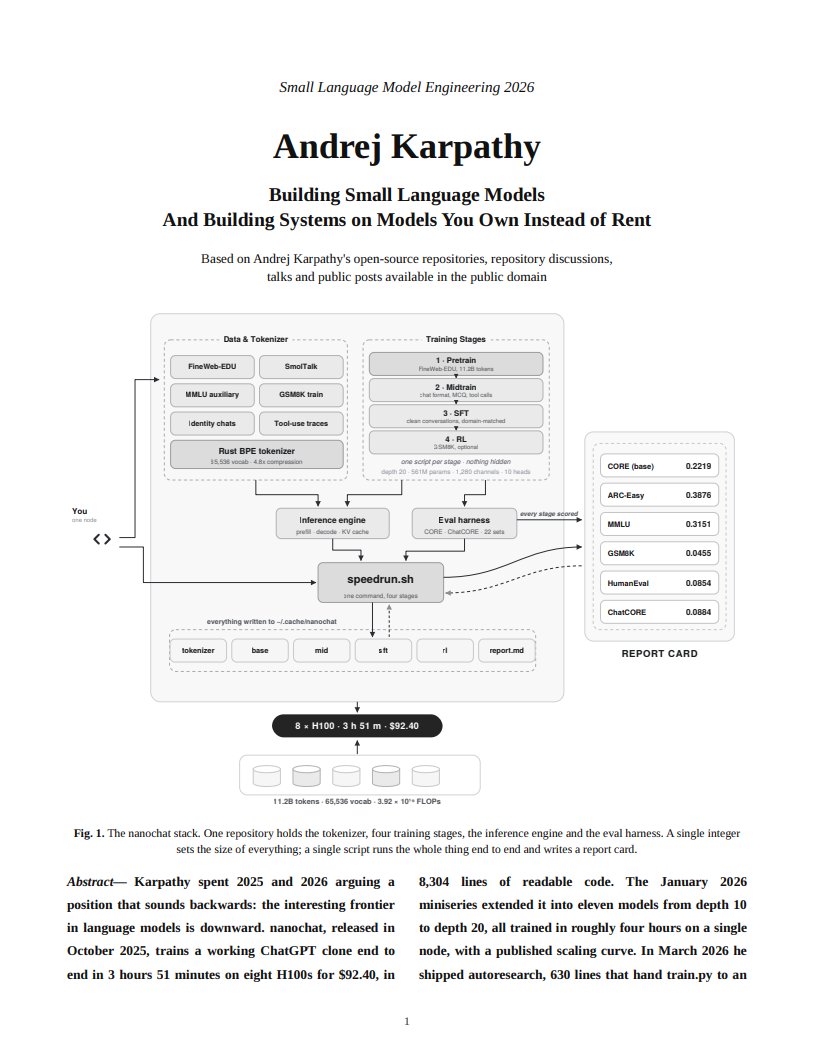
Andrej Karpathy predicted the future of AI once again:
“Everyone’s renting frontier models for jobs a 3B model could do. Small models are the future.”
this 18-page PDF breaks down Karpathy’s case for working with small LLMs.
the real question isn’t “Is the small model as good?” It’s “Which of my 1,000 calls ever needed a frontier model?”
And @thewebai just answered it for formal logic.
TwIL-LM3-Pro:
→ 3.6B params, on par with Qwen3-8B on formal logic
→ leads VibeThinker-3B on all 6 formal-logic tasks tested
→ 95.4% on BBH logic, 95% on SVAMP
→ 2.09 GiB in Q4, runs on CPU or 4GB VRAM
→ no API bill, no data leaving your machine
The secret isn't size. It's post-training.
PDF below. Model 👇
https://t.co/T9lgygHgNS
🚨 MUSE ECOSYSTEM ALERT 🚨
today we are announcing Muse Gadgets!
this is an open-source ESP32 firmware and Linux SDK for anyone to make hardware that works with Muse
we are also releasing our own gadget—Muse Home Link—to enable your muse to work with your smart devices (TV, speakers, etc.)
Where does money invested into the AI buildout actually go?
For every $100 flowing into the supply chain:
- $50 to chips
- $20 to power
- $15 to networking
- $15 to cooling, buildings, and land
More charts in State of Markets II: https://t.co/MTaxKUxa2w
We'll be spending a lot more time trying to understand the outputs of language models. A few thoughts, tips & tricks:
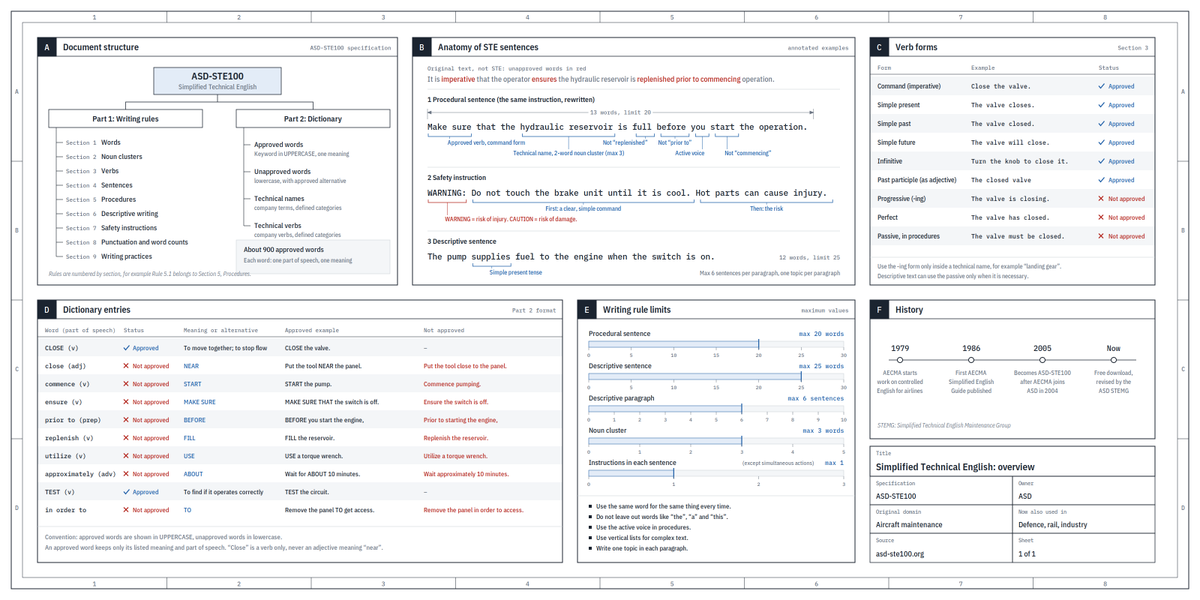
Writing. Something I've had success with: Ask your LLM to explain something in ASD-STE100, it's a controlled language specification originally developed for aerospace maintenance documentation. LLMs well-versed in this language and it comes with heavy constraints on clean writing style that I often find a lot more readable. Sometimes I've tried to soften it a bit e.g. ask for "80% of the way to ASD-STE100" because the spec is quite stringent. But even better:
Diagrams / images. Instead of writing, ask your LLM to create a diagram. These can be a lot easier to process, parse, and understand. But even better:
Web pages. Ask for output "in HTML" to get a beautiful, interactive webpage. LLMs are getting really good at frontend and can create beautiful experiences, animations, etc. But even better:
Explainer videos. The output format I am most bullish on is fully custom / bespoke explainer videos generated on any arbitrary topic. Experiment with things like "Create a 3b1b style video explainer on X. Use my ElevenLabs API key for audio narration". (you'd need an API key for the latter or you can ask your LLM to find you decent free alternatives that use your local compute). This is actually starting to work!
In summary:
- As LLMs get better, they will do more and more of the legwork autonomously, and a lot more of our work will rise up the abstractions into oversight and understanding.
- Luckily, LLMs can help here too because as intelligence and code are increasingly abundant, you can ask for large, custom, discardable software artifacts (e.g. web apps, video explainers) that would have never made sense to create before. Push the boundaries here and you'll be surprised.