MFA Is Not a Session Security Strategy
Your organisation has 98% MFA coverage. Conditional Access is deployed. Everything looks secure.
But what happens when an attacker steals an authenticated session?
MFA has already succeeded. The attacker may not need a password or another authentication challenge.
Authentication security and session security are different problems.
Microsoft Entra provides several controls, but each addresses a different risk.
1. Phishing-Resistant MFA
FIDO2 security keys, passkeys and Windows Hello for Business resist conventional AiTM phishing through origin-bound authentication.
Limitation: They cannot prevent all session theft, particularly when an endpoint or existing session is compromised.
2. Compliant Devices
Conditional Access can require Intune-compliant or Entra hybrid-joined devices, restricting access from unmanaged endpoints.
Limitation: Device compliance does not automatically prevent stolen browser-cookie replay.
3. Global Secure Access (GSA)
GSA enables compliant-network checks through Conditional Access, helping restrict token use outside trusted network paths.
Limitation: Protection depends on policy configuration, traffic routing and resource support.
4. Microsoft Entra Token Protection
Cryptographically binds supported sign-in session tokens to devices, reducing replay from other endpoints.
Limitation: Support varies by platform, client and resource. Browser-session protection remains limited.
5. Continuous Access Evaluation (CAE)
Enables supported resources to respond to critical events such as session revocation or account disablement without waiting for normal token expiry.
Limitation: CAE does not prevent initial token theft, and enforcement isn't always immediate.
What should your SOC validate?
• Is phishing-resistant MFA enforced for sensitive access?
• Are device and network requirements applied correctly?
• Which applications actually support Token Protection?
• Are CAE capabilities available for critical resources?
• Can you detect suspicious activity after authentication?
• Have you tested whether session revocation actually terminates access?
The takeaway:
MFA coverage measures authentication adoption. It doesn't measure protection against session theft.
A mature identity security strategy must prevent phishing, reduce token replay, detect suspicious session activity and verify containment.
Are you measuring MFA adoption, or validating session security?
#MicrosoftEntra #ConditionalAccess #IdentitySecurity #CyberSecurity #ZeroTrust
🎣 https://t.co/LElYRAAzfB researchers identified 𝗦𝗸𝘆𝘄𝟰𝗹𝗸𝗲𝗿, a 𝗱𝗲𝘃𝗶𝗰𝗲 𝗰𝗼𝗱𝗲 𝗽𝗵𝗶𝘀𝗵𝗶𝗻𝗴 campaign primarily 𝘁𝗮𝗿𝗴𝗲𝘁𝗶𝗻𝗴 𝗨.𝗦. 𝗼𝗿𝗴𝗮𝗻𝗶𝘇𝗮𝘁𝗶𝗼𝗻𝘀 across the manufacturing, technology, and healthcare sectors. The campaign uses password-protected contract or service-proposal decoys and sites[.]google[.]com lures to redirect victims to Microsoft authentication, seeking M365 token access without directly harvesting passwords.
#Skyw4lker #DeviceCodePhishing
There are plenty of LOLBin lists, but only one page indexes all of them.
https://t.co/EZnMRhknGL indexes the community's Living-Off-the-Land research in one searchable page:
- 31 projects, 21 tags, 8 platforms
- LOLBAS, GTFOBins, LOLDrivers, LoFP and more
- filter by platform or focus area
Built by @br0k3ns0und. Bookmark it for your next triage.
https://t.co/XgZM2IpgsG
Your AI agent might be doing things you never asked it to do.
I built AgentSec, an open-source tool to catch that before production.
Looking for developers to break it.
Try it. Find a bug. Tell me what sucks.
⭐ https://t.co/UxPCQblvxF
RT to help me find testers.
I had the domain for quite some time and the website was already up - but finally it's where I wanted it to be.
◽️Full XDR and Sentinel schema coverage
◽️Documentation of XDRInternal modules by @NathanMcNulty and me
◽️Table column relations (partly)
https://t.co/BfiLFcYDMg
MFA Passed. The Session Was Still Hijacked.
Conditional Access policies that require only traditional MFA do not reliably prevent Adversary-in-the-Middle (AiTM) phishing or session hijacking.
Microsoft Authenticator push notifications, SMS and OTP-based MFA remain vulnerable to real-time phishing proxies. These methods verify that an authentication challenge was completed, but they do not cryptographically bind the authentication to the legitimate website.
Attackers exploit this weakness using AiTM phishing frameworks such as Evilginx.
How the attack works
The victim visits a phishing site. The attacker-controlled reverse proxy relays authentication traffic between the victim and the legitimate Microsoft Entra ID sign-in service.
The victim authenticates; they enter their credentials and complete a genuine MFA challenge, such as an Authenticator push notification or OTP.
Entra ID authenticates the session. If the authentication satisfies applicable Conditional Access requirements, Entra ID establishes an authenticated session. The reverse proxy may intercept authentication cookies, including ESTSAUTH or ESTSAUTHPERSISTENT, and other relevant session artifacts.
The attacker attempts session replay. Depending on the captured artifacts, target application and applicable session protections, the attacker may reuse the authenticated session to access Microsoft 365 resources without completing MFA again.
The critical distinction: MFA was not necessarily defeated. The attacker exploited an authenticated session after MFA had succeeded.
What actually reduces the risk?
1. Phishing-resistant MFA
Require phishing-resistant authentication methods through Conditional Access authentication strengths.
FIDO2 security keys, appropriately configured passkeys and Windows Hello for Business use cryptographic mechanisms that bind authentication to the legitimate service.
This prevents the conventional reverse-proxy AiTM flow from successfully relaying phishing-resistant authentication.
However, phishing-resistant MFA alone does not prevent every form of session theft, particularly when an endpoint or existing authenticated session is compromised.
2. Device-based Conditional Access
Requiring Microsoft Entra hybrid-joined or Intune-compliant devices can substantially reduce access from unmanaged endpoints.
However, device compliance does not automatically bind every browser session cookie to the originating device.
An attacker may still attempt to replay stolen session artifacts where the application accepts them without a fresh device-compliance evaluation.
Device requirements are an important preventive layer, not a universal session-replay defence.
3. Microsoft Entra Token Protection
Token Protection uses cryptographic device binding to help prevent stolen sign-in session tokens from being replayed on another device.
Its effectiveness depends on supported platforms, applications, clients and resources.
Coverage for browser-based sessions remains more limited than for supported native applications. Token Protection should therefore not be treated as universal protection against browser-based AiTM attacks.
4. Continuous Access Evaluation (CAE)
CAE enables supported resources to respond to critical identity and access changes without waiting for normal token expiry.
Relevant events include account disablement, supported credential changes, session revocation and certain location-policy changes.
CAE can reduce the usable lifetime of compromised access, but it does not prevent initial session theft, and enforcement depends on resource and client capabilities.
5. Risk-based Conditional Access
Microsoft Entra ID Protection can identify suspicious authentication activity and session-related risks.
Conditional Access can use available user-risk and sign-in-risk signals to block access or require appropriate remediation.
These controls improve detection and response, but their effectiveness depends on the available signals, licensing and policy configuration.
Detection: Hunt the session, not just the sign-in
Successful session hijacking may not generate another interactive authentication event.
An attacker replaying an existing application session cookie may access resources without producing a new, easily correlated event in Entra ID SigninLogs.
Therefore, hunting exclusively for failed logins, repeated MFA challenges or unusual interactive sign-ins is insufficient.
Investigate across multiple telemetry sources:
Entra ID SigninLogs: Suspicious authentication context, unfamiliar IP addresses, device characteristics and sign-in patterns.
AADNonInteractiveUserSignInLogs: Unexpected token-related sign-in activity and changes in authentication context.
Entra ID Protection: Attacker in the Middle, Anomalous Token and other relevant risk detections.
Microsoft Defender for Cloud Apps: Suspicious cloud sessions, unusual access patterns and anomalous application activity.
Microsoft 365 audit logs: Unusual mailbox access, inbox-rule modifications, suspicious file downloads and other post-authentication activity.
Where telemetry supports it, correlate session identifiers, user identity, application, device context, IP address, ASN, geographic location and activity timestamps.
A sudden change in session context is an investigation lead, not automatic proof of compromise. Legitimate VPN use, mobile networks and device roaming can produce similar indicators.
The takeaway
Passing MFA does not guarantee that the resulting session remains under the legitimate user's control.
Effective defence against AiTM phishing and session hijacking requires layered protection:
Phishing-resistant authentication
Device-based access requirements
Device-bound token protection where supported
Risk-based Conditional Access
Continuous Access Evaluation
Cross-platform session and post-authentication monitoring
Authentication establishes identity at a point in time. Security teams must also protect and monitor what happens after authentication succeeds.
Is your Conditional Access strategy focused primarily on enforcing MFA, or does it also address session theft and token replay?
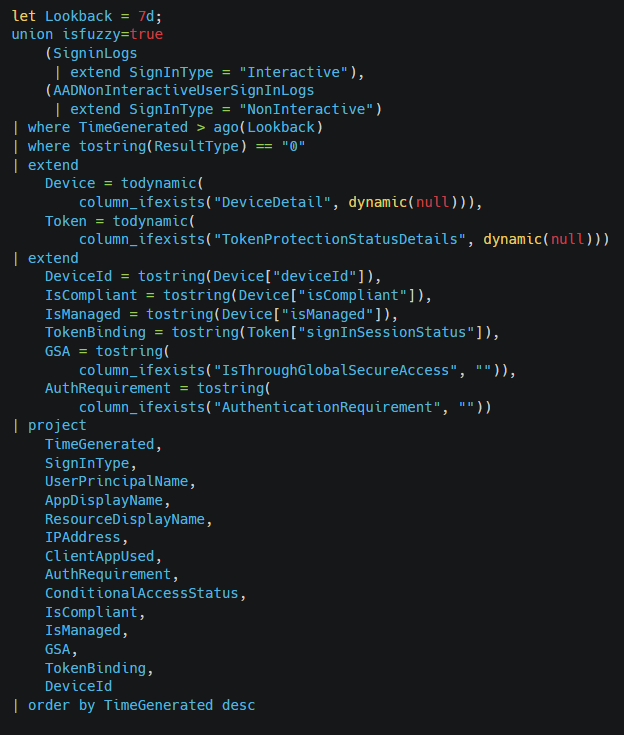
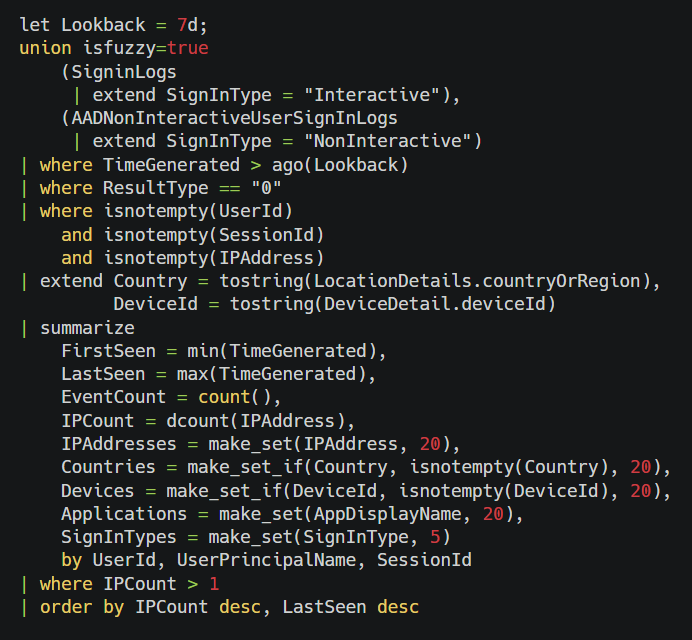
For investigations where SessionId is populated, the following query provides focused hunting for user-and-time correlation:
Check the comment section for the raw KQL
VirusTotal analiza IPv4 públicas para exponer servidores C2 e infraestructura de malware
VirusTotal ha implementado el escaneo diario del espacio IPv4 público para ayudar a los equipos de seguridad a localizar servidores de comando y control
https://t.co/bO5oVFN3y9
Seven national blue teams used THOR APT Scanner at Locked Shields 2026, the world’s largest live-fire cyber defence exercise.
We didn’t ask for flowers. We asked how it held up, and what would make their life easier.
Their strongest ask: easier integration with LLM-assisted analysis. Which is exactly where THOR v11 will shine (stay tuned!).
Read the full feedback here:
https://t.co/6hKQHgnCor
#LockedShields @NATO Cooperative Cyber Defence Centre of Excellence (CCDCOE)
Quick check via SSH for recently created template files on you #Citrix#Netscaler#ADC systems
ssh -tt [netscaler-ip] 'find /netscaler/portal/templates /var/tmp/netscaler/portal/templates -mtime -5 -type f'
based on report by @TrustedSec
https://t.co/TLpr9eGtTu
🚨 UPDATE: We added a SIGMA detection rule to our Alert on actively exploited Citrix NetScaler ADC and Gateway vulnerabilities to help organizations identify suspicious activity. Learn more 👉 https://t.co/pDudecAuzQ
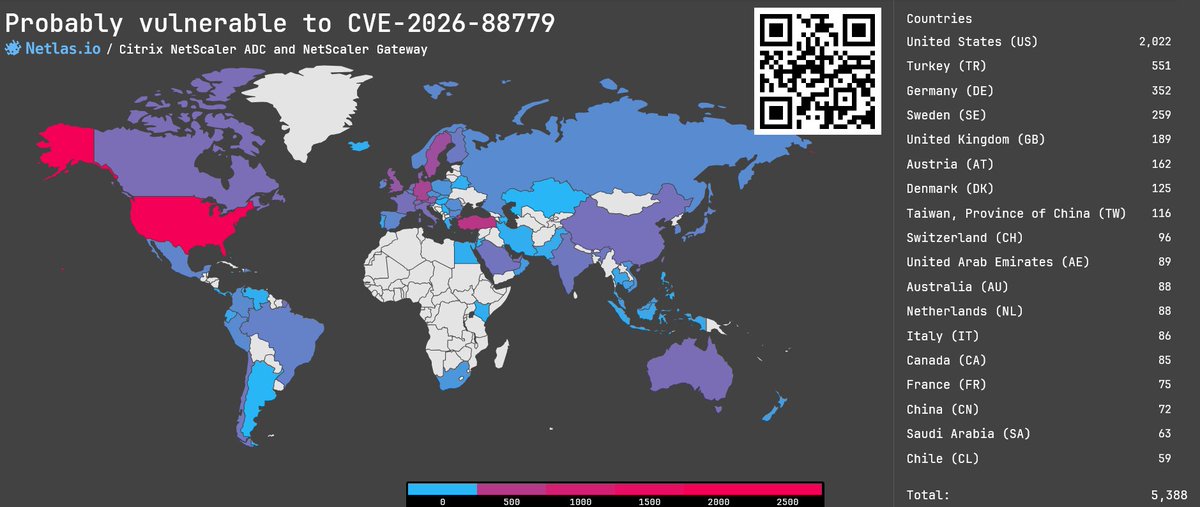
CVE-2026-88779: DoS vulnerability in Citrix NetScaler ADC & Gateway, 8.7 rating 🔥
A recently disclosed memory overflow vulnerability in NetScaler ADC and NetScaler Gateway can lead to Denial of Service when configured as a SAML SP or IdP. This vulnerability is being actively exploited in the wild!
👉 https://t.co/L4c90FI8Vk
Citrix Netscaler things again:
https://t.co/bMP8mHg3zr
CVE-2026-88772/CVE-2026-88771
This is labelled as a poc...don't get excited...read code first...or even the authors comments..more of a scanner, but interesting info nonetheless:
https://t.co/Q8drW8VOWZ
For the last two days, our Research Team has been looking into the recently disclosed Citrix NetScaler vulnerabilities CVE-2026-88771 and CVE-2026-88772 and building detection coverage to help identify compromised systems.
The new THOR Preview signature set currently includes:
- EXPL_CVE_2026_88772_POC_Sep26
Detects artifacts related to the public CVE-2026-88772 PoC
- LOG_SUSP_EXPL_CVE_2026_88771_Sep26
Detects potential CVE-2026-88771 exploitation traces in NetScaler logs
- WEBSHELL_CSS_PassThrough_Sep26
Detects the PHP webshell pattern observed in the post-exploitation activity reported by GreyNoise
We also released a new IOC set:
- NetScaler ADC suspicious file artifacts
It contains filesystem indicators derived from the Citrix IOC scanner script and covers suspicious PHP/XHTML files and other unusual artifacts in NetScaler web directories.
The Preview signatures are already available with:
./thor-util update --sigdev
We’ll keep adding signatures as new technical details become available from public research and from information shared with us by partners and customers.
Details:
https://t.co/3JZKTSWgXG
And if you’re wondering how to actually scan a NetScaler appliance with THOR: we documented a remote scanning approach using SSHFS a few years ago, which still applies here:
https://t.co/Q4NWOZxAWL
Underrated steps taken to disrupt ClickFix and harden against a lot of initial-access vectors is blocking command interpreters like wscript, cscript, mshta, hh.exe as well as remapping file extensions of interest (.js, .jse, .vbs, .vbe, .wsf, .hta, .chm) to open in Notepad by default instead of executed by interpreters.
This already exists for PowerShell with scripts opening in notepad by default instead of being executed.
Another proof of concept using a Microsoft-signed DLL (rdpbase.dll) to encrypt implants.
✅ No memory patching
✅ no build-specific offsets
https://t.co/HdQyXncoBQ


![cyb3rops's tweet photo. Quick check via SSH for recently created template files on you #Citrix #Netscaler #ADC systems
ssh -tt [netscaler-ip] 'find /netscaler/portal/templates /var/tmp/netscaler/portal/templates -mtime -5 -type f'
based on report by @TrustedSec
https://t.co/TLpr9eGtTu https://t.co/E2jYlsSXdX](https://pbs.twimg.com/media/EOEzn_KX4AEe6Gb.jpg)


![0x534c's tweet photo. 🎣 https://t.co/LElYRAAzfB researchers identified 𝗦𝗸𝘆𝘄𝟰𝗹𝗸𝗲𝗿, a 𝗱𝗲𝘃𝗶𝗰𝗲 𝗰𝗼𝗱𝗲 𝗽𝗵𝗶𝘀𝗵𝗶𝗻𝗴 campaign primarily 𝘁𝗮𝗿𝗴𝗲𝘁𝗶𝗻𝗴 𝗨.𝗦. 𝗼𝗿𝗴𝗮𝗻𝗶𝘇𝗮𝘁𝗶𝗼𝗻𝘀 across the manufacturing, technology, and healthcare sectors. The campaign uses password-protected contract or service-proposal decoys and sites[.]google[.]com lures to redirect victims to Microsoft authentication, seeking M365 token access without directly harvesting passwords.
#Skyw4lker #DeviceCodePhishing](https://pbs.twimg.com/media/HUmvk4hbAAAtHfb.jpg)


![cyb3rops's tweet photo. Quick check via SSH for recently created template files on you #Citrix #Netscaler #ADC systems
ssh -tt [netscaler-ip] 'find /netscaler/portal/templates /var/tmp/netscaler/portal/templates -mtime -5 -type f'
based on report by @TrustedSec
https://t.co/TLpr9eGtTu https://t.co/E2jYlsSXdX](https://pbs.twimg.com/media/EOEz_yNX4AAf4ew.png)

![SimoKohonen's tweet photo. IPs that hit our NetScaler sensors on September 17th with the deflate payloads against SAML surface (probe/1 UA):
194[.]77.94.40 2,804 → 63,488B 'G'
103[.]171.122.41 1,759 → 62,464B 'G'
157[.]85.104.79 2,862 → 62,534B 'G'
102[.]18.119.22 1,756 → 62,464B 'G'
46[.]247.43.50 117 → 98,304B 'P'
103[.]112.0.110 78 → 272 B valid-XML canary](https://pbs.twimg.com/media/HT37J_iWMAAIx_T.jpg)


