In the rush to ship AI, it's tempting to deprioritize performance and latency. Perf still matters! We just have new product surfaces to design for now. What follows is research across these new modalities ⏰
Traditional web performance is well-studied. We have Core Web Vitals (LCP, INP, CLS) and decades of classic HCI research: 0.1s feels instant, 1s keeps your train of thought intact, and 10s is about as long as you can hold someone's attention before they switch tabs. Those human limits haven't changed, but they're mapped indirectly onto three new AI surfaces:
1️⃣ LLM Web Chat
Conversational AI introduced a whole new set of wait times: Time to First Token (TTFT), output speed (tokens/second), reasoning time, and end-to-end turnaround.
- TTFT ≤ 1s: Users expect the first token within 500ms–1s. Past 2s, perceived responsiveness drops fast.
- Stream faster than reading speed: Output should stream at 30 to 80+ tokens per second (tok/s). Humans read at ~4-7 tok/s- this might sound like overkill, but fast streaming lets people skim and reassures them the app isn't frozen.
- Users will wait 3–15s+ for a thinking model if the UI shows progress. They will actually wait longer if they believe the task/ideation is more complex.
- The 10-second limit still applies: For non-streaming or multi-step tasks, users will start multitasking after 5–10s.
The budget is: start in under 1 second, stream above reading speed, and set expectations for anything longer. Users will tolerate multi-minute waits for visibly better answers if there’s UI activity.
2️⃣ Cobrowse (Agent-Driven Browsing)
This is the newest and least settled modality: an agent drives the browser while the human watches, approves actions, and steps in when needed.
The tricky part is that the user is watching two clocks at once (each individual step and the whole task) while subconsciously comparing the agent's speed to how fast they could just do it themselves.
- The budget is roughly 1s per step, ≤5s per sub-task, and no more than 1–2× the time it would take the human to do it themselves.
- You have to balance "permission fatigue", asking for approval enough to stay safe, without becoming annoying.
- If a single step stalls past 10 seconds with nothing happening, the user will leave to do something else.
However, cobrowse can go hand in hand with longer tasks. Once the user starts doing something else, real-time speed matters less. Which brings us to…
3️⃣ 24/7 or Headless Agents
Once the human walks away, raw latency stops being the main concern. The tradeoff shifts to accuracy and trust. People will gladly wait minutes for a background agent to run verification loops and double-check its own work, as long as they don't have to redo it themselves.
A few things actually govern this surface:
- Instant hand-off: That 0.1s to 1s rule still applies when you kick off the job. The task needs to be confirmed immediately so the user can feel trust they can leave.
- No silent latency: Long runs are fine if there are some live logs or state updates. If it goes dark, people lose trust and hit cancel.
- Fast failure: If the agent gets stuck, the user needs a notification. Trust is lost if there’s a 30-minute run, when there was a blocker at minute two.
Reliability compounds: Per-step reliability is the real bottleneck right now, which caps most useful autonomous runs at around 30 minutes.
Core Web Vitals aren't going anywhere, and neither is human tolerance. As we build these new interfaces, our latency budgets have to modify around these new experiences and user expectations.
I'm hiring for a cool role! I'm looking for a Senior Director of Product Management to lead our Developer and Ecosystem work on the Chrome team.
As agents change the way people get stuff done, we have a ton of work to do to make sure that people and agents work well together both in the browser and when visiting web sites more generally. This role will cover a broad area (more details below), but I want to highlight two:
1) How can we help people work with their favorite agents in Chrome? As users work with a variety of different agents (some general, some vertical-specific, some role-specific), they need to safely delegate tasks to all of them right in the browser.
2) How can we help sites and apps thrive in the agentic era? As agentic traffic increasingly surpasses human traffic, we need to design the capabilities and protocols for developers to make their experiences agent ready.
If you're interested, check out the details below.
Thanks @aripap and @ericfranchi for inviting me back on the pod and helping me get the word out about the new ad metrics in the Chrome User Experience Report (CrUX) and the even newer analysis @jouncemedia did using CrUX ad metrics.
I’m now 2 for 2 on getting heckled for acronyms on the @marketecturetv podcast. 🤣
Google’s @alextcone joins @aripap and @ericfranchi to unpack CrUX, ad clutter’s impact, and key industry deals. Catch insights on CTV, AI, and more in this episode.
https://t.co/vYvZeJM4Rn
One of my favorite UXs is when you get a new credit card. You add it to Apple Wallet, removing the old card. Later you get an email from Apple saying you have a billing issue with one of your Apple subscriptions (old card you recently replaced in Apple Wallet). You click the link to remedy and when you go to add a new card, Apple Wallet is nowhere to be found.
Today @ckane's @jouncemedia published data on Chrome's new ad metrics. All 4 metrics are correlated with Jounce's marketer conversion score metric. ⭐️ Average ad count and density in viewport are the most predictive. ⭐️
Jounce gives this advice to DSPs: "To drive maximum performance for buyers, DSPs should bid more often and at higher prices for low ad count domains. In the process, DSPs will also create healthier incentives for publishers." ❤️
Jounce Media subscribers can read the whole report and attend a webinar tomorrow at 1:30 ET. https://t.co/hARvwLoTwp
Thanks for sharing!
Starting with Chrome 159 (currently in Chrome Canary and due to be stable in early December) we will include main frame in ad CPU. Depending on traffic, sites should start to see the data reflected in CrUX (a 28 day aggregation) sometime in early January.
One thing I’m curious about in your report is why you didn’t spend much time on average ad count in viewport. From the Jounce report and data I’ve seen that’s not publicly shared, ad count has the strongest correlation with ad campaign outcomes and thus is most likely to be a signal the buy side uses.
If you’re curious about how @googlechrome is thinking about the present and the future, there’s no better place to turn than this interview with @jebank. I dare you to watch on 1.25x speed and keep up with how fast Jacob’s mind works.
Had a great time talking about the future of Chrome with @conorgrennan on the AI Applied podcast. A few of the topics we covered:
- Why AI isn't going to do everything for us
- How different users with different needs will use AI
- Why the browser presents cool opportunities for collaborating with AI
Check it out: https://t.co/rGcqh2E5Cg
Waaaaayy back in 2016, we shared a roadmap to mark HTTP as "Not Secure" and help nudge the web toward HTTPS by default: https://t.co/mNObCrcPzu
Here is a picture of our kick-off cake! 🔐🍰
A decade later, HTTPS is the standard—and today @googlechrome is enabling proactive warnings before insecure HTTP connections. 🧵
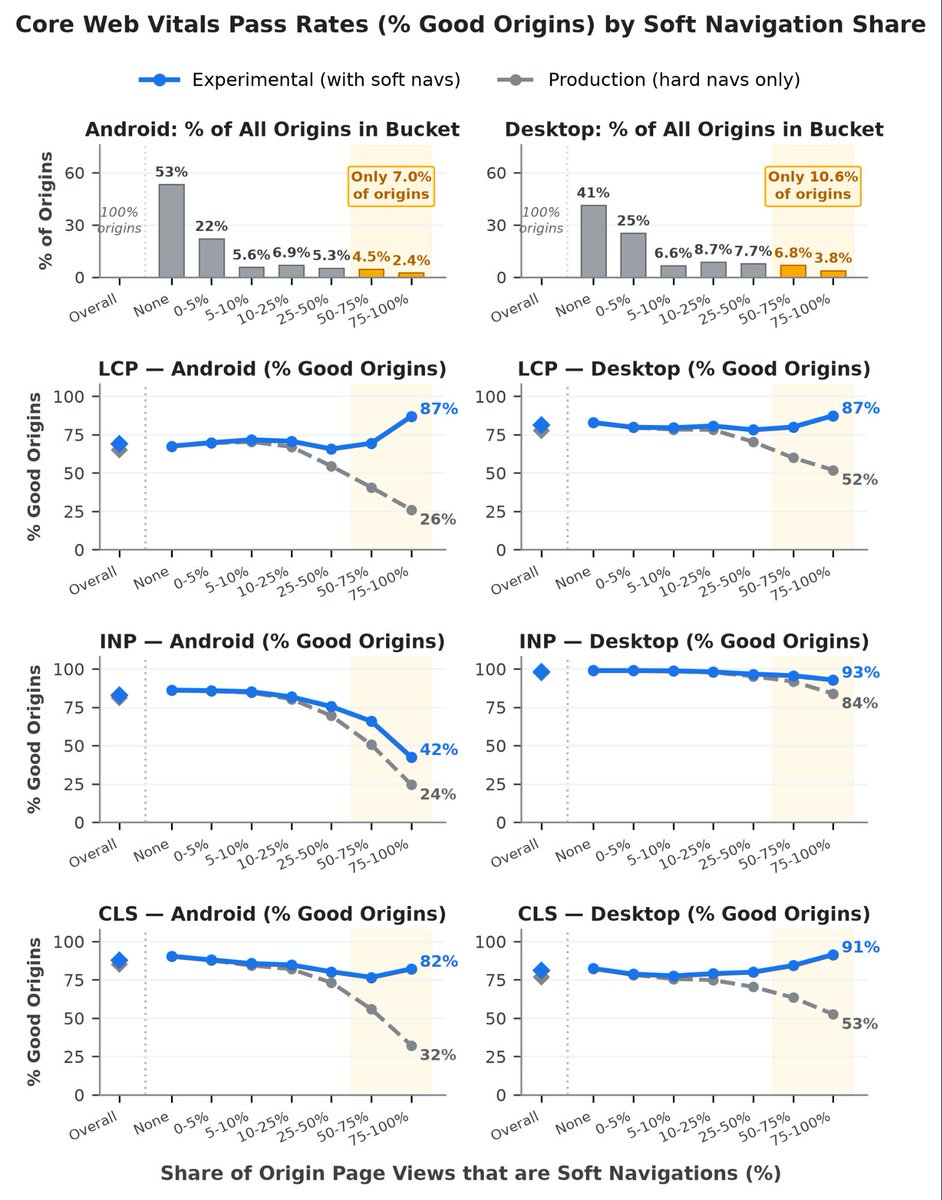
We've expanded Core Web Vitals to include special support for soft navigation (SPA)!
Since SPAs are handled differently in their implementation, they've required bespoke custom measurement, making it hard to compare directly across sites. Measuring performance is a little art, a little science. Over time, we've evolved CVW to best fit how the web is written, and we've found that giving SPAs their own unique metrics has had the best outcome.
More here, including access, and plans for SEO:
https://t.co/KFkscKZeRQ
Chrome is taking another big step toward providing a clearer picture of real user experiences on the web. Today, in the Chrome User Experience Report, we added experimental versions of Core Web Vitals with soft navigation measurements included. This comes on the heels of releasing two new APIs, DevTools and web-vitals.js upgrades that enable the ecosystem to measure soft navigations easily and comparably.
My colleague Annie wrote a helpful post to build understanding about what measuring soft navigations means. https://t.co/MPcMtyrC6m
This is a helpful overview of the ad experience metrics we launched a few weeks ago in the Chrome User Experience Report. If you're curious and you prefer video explanations to written docs, this one's for you.
Google has introduced a new set of performance metrics providing insight into how ads impact page speed.
This video explains what the metrics measure and how to view ad performance data in Chrome DevTools.
https://t.co/9gZMW6mmlm