I'm really happy with Qwen3.8-27B !
All frustrations of not able to use Ox-Alpha and running out of credits for Glm-5.3, Grok turned me into Qwen-3.8-27b.
Running locally on my 3090.
This is the first fps game i'm creating with Qwen3.8-27b.
I was after NMS vibe, alien planet, vast, flying drones, background music + sound effects. Without any external assets at all. With proper game like graphics settings panel 😍
And i'm really impressed, because all this is generated with my mixed quant for Qwen3.8-27B, which gives me more context + speed for a really good quality work.
DSK harness at beginning and Pi agent towards the end cause i wanted to get this done fast.
Full quant name: HF aj9o9/Qwen3.8-27B-GGUF
file name: Qwen3.8-27B-gdn8-q6attn-iq3ffn.gguf
Just like all of you, i also hate having to compact context, so higher context without ever needing to compromise quality is what i'm always after and this quant is created for that.
Gives me 210K context at q8_0 kv + dflash2 Q4_K_M for speculative decoding. This result in 23GB vram usage.
Opus 5 is a great model, when used correctly.
Do these two things:
1. Use it on ‘Medium’ effort - performs better and is cheaper. Opus 5 can overthink.
2. Set output style to ‘Concise’ - /output-style —> ‘Concise’. Cuts down on the techno-babble responses.
It also seems very efficient as the tasks get longer, burning down less usage on my Claude Max 5x plan slower than other models for long-horizon tasks.
🔥 🛑 If you already downloaded Qwen3.8-27B from Unsloth, you may want to download it again. 👀
Unsloth released new Dynamic 3.0 GGUFs, and these are new model files, not a setting you turn on in LM Studio or llama.cpp.
🤯 Qwen3.8-27B now goes down to ~6.2GB
New quant options include roughly:
🟢 UD-IQ1_S — 6.2GB
🟢 UD-IQ1_M — 6.7GB
🟢 UD-IQ2_S — 8.4GB
🟢 UD-Q3_K_XL — 13.1GB
🟢 UD-IQ4_XS — 14.3GB
🟢 UD-Q4_K_M — 16.5GB
🟢 UD-Q6_K — 22GB
And Unsloth says Dynamic 3.0 preserves significantly more of the original model's behavior at similar file sizes than previous quantization approaches.
⚠️ If you already have an older Unsloth Qwen3.8 GGUF, Dynamic 3.0 is baked into the weights.
👉 You need to re-download the new UD-... GGUF to get it.
There is no →
❌ “Dynamic 3.0” checkbox in LM Studio
❌ llama.cpp command that converts your old GGUF at runtime
You simply download the new model and run it normally.
Works with:
✅ llama.cpp
✅ LM Studio
��� RTX / CUDA
✅ AMD / Strix Halo via llama.cpp
✅ CPU
✅ Apple Metal via llama.cpp
Native MLX versions: not yet.
And don't confuse this with Qwen3.8's MTP support.
💾 Dynamic 3.0 = better quality at lower memory
⚡ MTP = faster generation
A 27B model entering 8GB-class hardware territory is crazy!
I will teach you how to run Qwen 3.8 27B Dense at its optimal configuration.
If you have an RTX 3090, 4090, or 5090, you can now have frontier-level AI on your desk.
The model is free, open source, Apache 2.0. But the defaults are not the optimum. The community spent the first 24 hours digging the real config out of it, and a handful of flags now separate "it runs" from "it runs right." Here is each one and why it exists.
The one that matters most.
--spec-type draft-mtp
Qwen trained a draft head directly into the weights. A small attached brain guesses the next couple of tokens, the big model checks all guesses in one pass, every accepted guess is a free token. The head already ships inside the GGUF you downloaded. You do not download a drafter, you do not build anything. Someone found unused tensors in the server logs at 2am, tried to build the draft file, and discovered there was nothing to build. One flag connects what is already there (sudoingX found this, paired A/B, open sourced the probe before sunrise).
The depth cap. The head has exactly one layer. n=4 breaks it.
--spec-draft-n-max 2
n=2 is the sweet spot. n=3 is the ceiling. The model has one MTP layer, so pushing the draft depth to 4 or 5 crashes the head and it starts emitting junk tokens. People hit this on the Spark and documented the whole ladder: n=1 gives 1.75x, n=2 gives 2.37x, n=3 gives 2.85x, n=4 does not exist. Respect the cap.
The memory flags. MTP brings its own luggage.
--cache-type-k q8_0 --cache-type-v q8_0
--spec-draft-type-k q8_0 --spec-draft-type-v q8_0
-np 1
Three flags, one purpose: fit it on 24GB.
The KV cache is the model's running memory of your conversation, and it is the thing that eats your card at long context. q8_0 halves it with no visible quality cost.
The second line does the same for the draft head's own cache, which defaults to full fat and quietly eats 2GB.
And parallel slots set to 1 means requests queue instead of reserving a second pool. Single card, single lane, everything fits (AJ runs this exact trio on a 3090).
The quality flag. Past 100K the model gets dumb, this is the fix.
--kv-cache-dtype bfloat16
The quantized cache saves memory but degrades reasoning at long context. One person ran it all day past half the window and called the full precision fix night and day. Slight tok/s cost, real quality gain. If your sessions stay short, skip it. If you live past 100K, do not.
The trap that generates "this quant is broken" reports.
--jinja
Qwen 3.8 ships its own chat template. Load the model without this flag and there is no reliable marker for where your turn ends and its answer begins. Two failure modes: it rambles past the stop token, or it answers clipped and loses the thread between turns. Both look like a broken quant. It is not the quant. Several packs now ship a corrected template file because the official one nests empty think blocks across turns.
The Blackwell lane, if you own a 50-series or a Spark.
NVFP4 instead of GGUF. The MTP flag translates to --speculative-config '{"method":"mtp","num_speculative_tokens":3}', same cap. FP8 KV cache doubles your context window (a full 1M token session costs about 32GB of cache).
Two gotchas documented in the first 24 hours: stock vLLM cannot load this model's MTP architecture on a Spark, you need the community GB10 build. And FP8 KV requires a specific attention backend on the Spark, the default one silently cannot serve it.
Set reasoning to medium unless you want it thinking at maximum depth on every reply. Default is xhigh and it burns your tokens.
None of these came from the model card. Every one came from someone's server log, 2am session, or paired benchmark. Flip the flags, then come tell the community table what your card did.
Drop in parameter flags and sources for your technical DD in reply 👇
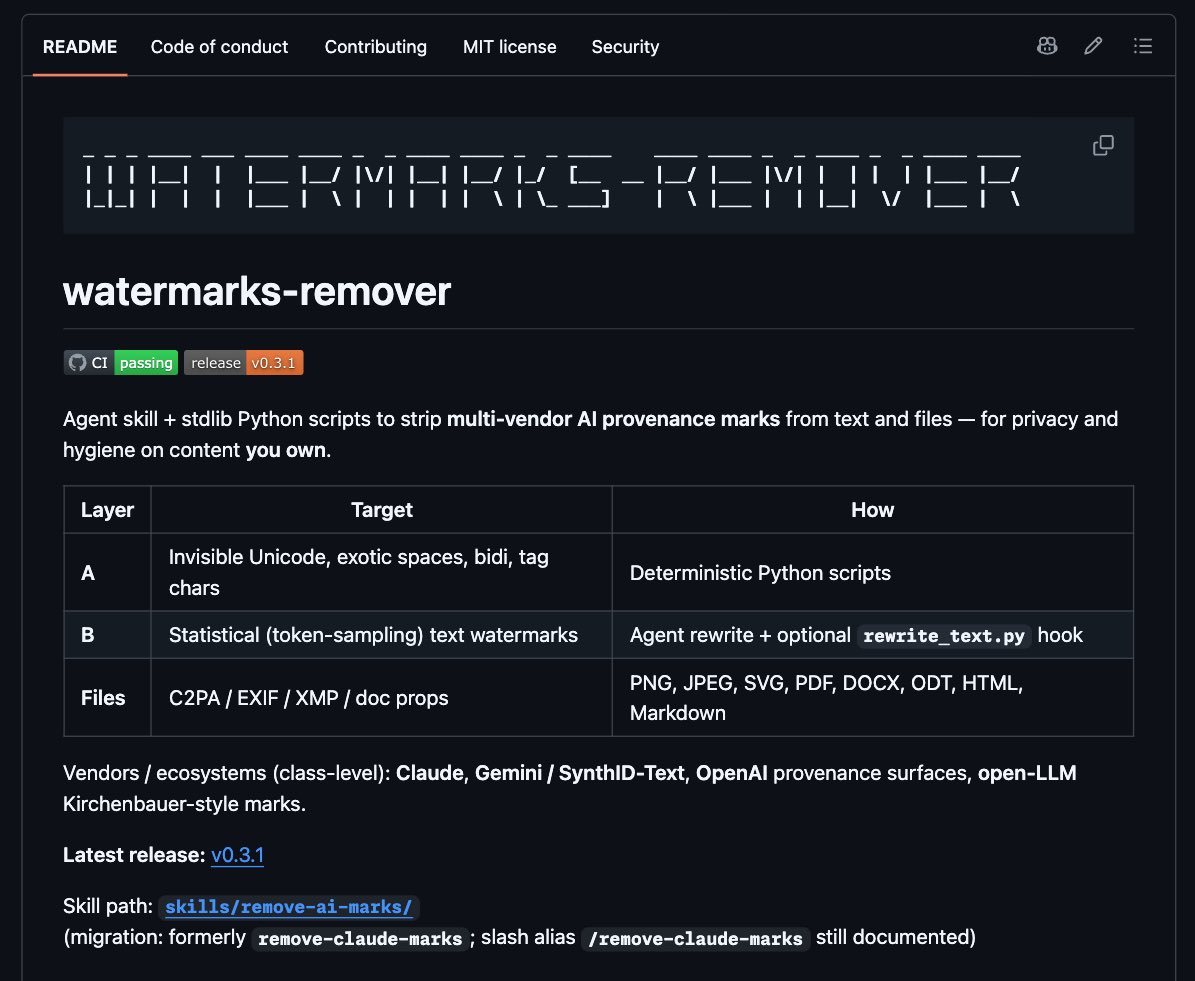
AI 워터마크 지우자. 내가 소유한 콘텐츠의 프라이버시/위생 목적으로..
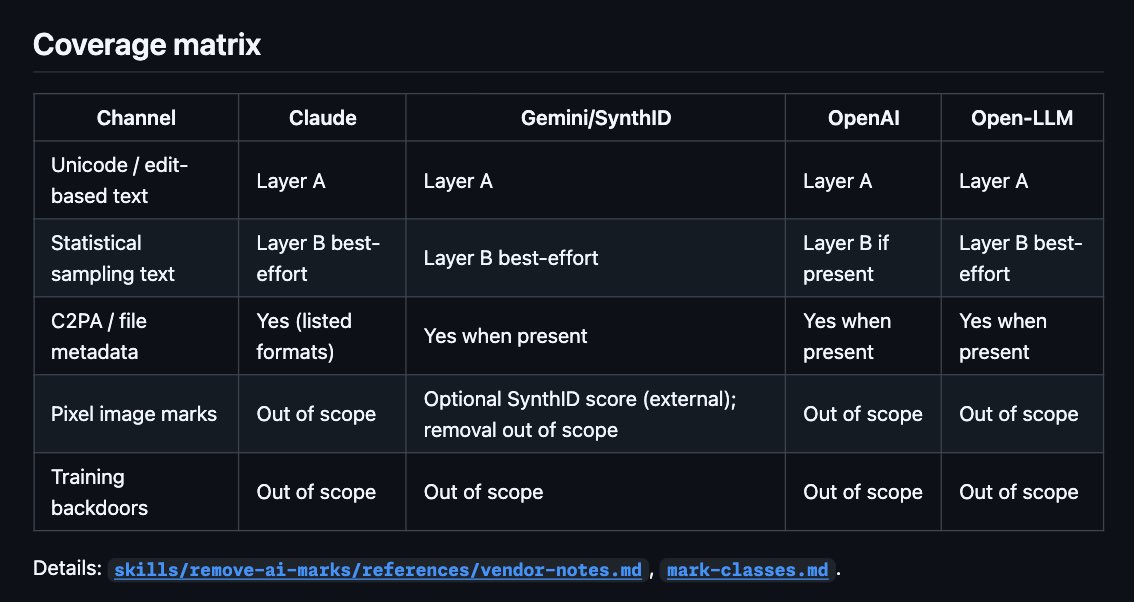
이번에 업그레이드 되어서 Claude, Gemini/SynthID, OpenAI, Open-LLM 지원 확장됨.
🧹 watermarks-remover
https://t.co/D3QpJR0kcz
텍스트와 파일에서 워터마크 같은 AI 생성 흔적을 제거하는 에이전트 스킬 + Python 스크립트 패키지.
개인 메모, 초안, 사적인 글에 눈에 보이지 않는 메타데이터가 남는 것 자체가 불편하다면 괜찮은 시도.
Python 3.10+ 표준 라이브러리만으로 동작하고, 시스템 도구랑 엮어서 자동화 시키는 것도 떠올려볼 수 있음.
프로젝트의 목적과 한계를 제대로 인지하면서, 에이전트 스킬로 활용해볼 수 있다.
이런 프로젝트가 계속 나오고 업그레이드 되는 이유는 있음.
프라이버시, 투명성, 생태계.. 이런 가치가 부딪히기 때문.
AI로 랜딩페이지는 딸깍하면 만들지만,
직접 검수하는 시간은 그대로죠?
“3번째 문장 수정해줘���
“이 카드는 삭제”
“CTA는 다시 써줘”
이걸 하나씩 AI에게 설명하는 것도 일인데요.
Peter Yang이 만든 무�� 오픈소스 Human Review는 이 과정을 꽤 단순하게 바꿉니다.
HTML·Markdown·localhost 페이지를 브라우저에서 열고
1. 문장은 직접 수정
2. 이미지·섹션에는 댓글
3. 수정사항은 한 번에 AI에게 전달
여러 페이지도 링크를 타고 다니며 검수할 수 있습니다.
특히 AI로 랜딩페이지나 웹앱을 자주 만드는 분이라면 꽤 유용해 보입니다.
AI 시대에는 만드는 속도만큼
사람이 마지막 결과물을 검수하는 방식도 중요해지는 것 같습니다.
https://t.co/ClL5scWO1J
Why I’m actually recommending the DGX Spark now, after advising against it 3 months ago:
Memory bandwidth was always the main bottleneck for local setup choices. Speculative decoding changed that completely.
On paper, a DGX Spark at 273 GB/s running DeepSeek V4 Flash (13B Active) tops out at just 21 tok/s.
Speculative decoding bypasses this wall entirely. You get speeds multiple times faster, actually beating top frontier models.
Early concerns about output quality loss are gone as well. It runs with almost zero degradation now.
Local AI Era is here.
☕️ Vercel 엔지니어가 600억 Token`을 써가며 정리한 `AGENTS.md.
핵심은 AI에게 더 많은 코드를 시키는 게 아니라,
불필요한 반복·과한 추상화·임시방편을 처음부터 막는 것.
이 규칙만 잘 넣어도
AI 코딩의 Token 낭비가 확실히 줄어듦. 👇
# AGENTS.md
- 하위 호환성을 유지하려 하지 마세요. 호환성 레이어, 폴백, 마이그레이션을 덧붙이기보다 오래된 경로를 제거하세요.
- 현재 요구사항을 완전히 충족하는 가장 단순한 구현을 선택하세요. 추측성 추상화, 과도한 설정, 불필요한 간접 계층은 피하세요.
- 시스템은 단계적으로 확장하세요. 처음에는 처음부터 끝까지 동작하는 가장 작은 버전을 만들고, 이미 작동하는 제품 위에 새로운 기능을 하나씩 추가하세요. 동작하는 제품을 미완성 복잡성과 맞바꾸지 마세요.
- 컴포넌트는 모듈화하고, 관심사는 명확하게 분리하세요.
- 전체 복잡도를 낮추거나 안정성을 높일 수 있다면, 검증되고 유지보수가 잘 되는 라이브러리를 우선 사용하세요. 명확한 이유 없이 흔한 기능을 직접 다시 구현하지 마세요.
- 직접 구현하거나 새 패키지를 추가하기 전에, 프로젝트에 이미 있는 의존성을 먼저 활용하세요. 문서와 타입을 확인하지 않고 라이브러리에 필요한 기능이 없다고 단정하지 마세요.
- 해결책을 설계하기 전에, 이미 검증된 제품들이 같은 문제를 어떻게 해결하는지 먼저 조사하세요. 처음부터 새로운 방식을 발명하기보다, 검증된 패턴과 관례를 우선 따르세요.
- 아키텍처 결정은 장기적인 관점에서 내리세요. 당장만 작동하고 나중에 교체해야 하는 임시방편을 받아들이지 마세요.
#AI #AICaffeine #Vercel
Deepseek V4 Flash 0731 (Q2) - 12 tokens/sec - Single RTX 4090 - 650+ tokens/sec prefill - 250k context - no kv cache quantization!
@deepseek_ai just dropped the official V4 Flash 0731 two days ago with a massive agent capabilities upgrade.
The official benchmarks are literally crushing their own V4-Pro-Preview on agentic tasks like Terminal Bench 2.1 and DeepSWE.
@UnslothAI said they couldn't wait to bring it to local devices, and they delivered.
If you thought my 118B Poolside Laguna S 2.1 MoE run last week on a single GPU was wild, hold onto your hardware.
I just successfully ran Unsloth’s brand new 91GB DeepSeek-V4-Flash-0731 (UD-IQ2_M) GGUF entirely locally. And I pushed it to a mind-bending 250,000 context window. The VRAM ceiling is an illusion if you know how to optimize llama.cpp. Here are the benchmarks and the cheat codes to run a local frontier class model yourself.
For the hardware and setup, I used a single @NVIDIA RTX 4090 (24GB VRAM) hooked up via a PCIe 4 bus, running Ubuntu 22.04 LTS and CUDA 13.0. You don't need a massive enterprise server for this, if you have more than 80 GB of standard DDR4 RAM and a 24GB card like an RTX 3090 or 4090, you can run this exact stack yourself.
All benchmarks were run using a massive 28k token prompt to truly stress test the prefill limits. no kv cache quantization
THE BENCHMARKS (Scaling Context):
# 80k Context (Baseline: -b 2048 -ub 2048):
Prefill: 465.43 t/s | Decode: 13.00 t/s | VRAM: 22.87 GB
# 80k Context (Optimized: -b 4096 -ub 4096):
Prefill: 643.15 t/s | Decode: 12.20 t/s | VRAM: 23.00 GB
(Notice how doubling the batch flags spiked my prefill throughput by nearly 200 t/s with almost zero VRAM penalty)
# 180k Context (-b 4096 -ub 4096):
Prefill: 629.18 t/s | Decode: 11.92 t/s | VRAM: 23.40 GB
# 250k Context MAXIMUM (-b 4096 -ub 4096):
Prefill: 619.02 t/s | Decode: 11.54 t/s | VRAM: 23.40 GB
# THE SECRET SAUCE (Why this works):
Unsloth’s UD-IQ2_M quant is ~91GB across 3 files. Since I only have 24GB of VRAM, the PCIe 4 bus and system RAM have to do the heavy lifting.
The magic bullet is the --no-mmap flag. By completely bypassing OS disk paging, I forced llama.cpp to load the massive model weights directly into the system RAM upfront. Combined with Flash Attention (-fa on) and exactly 12 CPU threads (--threads 12), I maintained an incredibly stable 11.5+ tokens/sec decode speed even at a quarter million token context.
# THE EXACT COMMAND:
./build/bin/llama-server -m /workspace/models/DeepSeek-V4-Flash-0731-UD-IQ2_M-00001-of-00003.gguf -c 250000 -fa on --port 8080 --threads 12 -b 4096 -ub 4096 --no-mmap -v
Local conversational and agentic coding AI is fully here. You don’t need an API or an H100 cluster. Qwen 3.8 27b drops next week making the 24GB VRAM tier even more worthwhile.
What does your current local AI rig look like, and what's the craziest model you've managed to squeeze into it?
Official huggingface GGUF links from Unsloth and performance graphs are dropped in the replies below!
카파시가 작년 12월 이후로 코드를 한 줄도 안 쳤다고 함. 직접 짜던 비중이 8대 2에서 2대 8로 뒤집혔고 지금은 그보다 더 심하다고.
근데 그가 지금 문제로 꼽는 건 모델이 아님. 자기 자신임. 토큰을 더 쓸 수 있는데 안 쓰고 있으면 최대 성능을 막고 있는 병목이 자기라는 거고, 그래서 도구에서 최대치를 뽑으려면 사람을 루프에서 빼고 판을 다시 짜야 한다고 말함.
병목이 사라진 게 아니라 옮겨간 거임. 예전엔 타이핑 속도가 병목이었는데 이제는 사람의 판단과 개입이 병목임. 1900년 공장도 똑같았음. 증기기관을 전기 모터로 갈아 끼우자 병목이 동력에서 배치로 ���겨갔고, 그 배치를 다시 짜는 데 30년이 걸렸음.
🚨 ¡ESTO VA A ROMPER INTERNET!
Elon Musk acaba de soltar la bomba más loca de Neuralink:
“En los próximos 6 a 12 meses vamos a poner los primeros implantes de visión. Aunque estés 100% ciego de nacimiento, vamos a escribir directamente en tu corteza visual… y vas a ver.”
“Y eso es solo el comienzo. A largo plazo tendrás resolución ultra HD y superpoderes reales: verás en infrarrojo, ultravioleta y hasta radar. Literalmente como un superhéroe.”
El futuro ya no es ciencia ficción. Es Neuralink.
Claude Code es un lío. Hasta que instalas esto.
Hay un plugin oficial de Anthropic llamado claude-code-setup.
Te dice qué automatizaciones puedes montar (hooks, skills, MCP servers, subagentes…) y cómo configurarlas paso a paso.
Básicamente analiza tu proyecto y te recomienda qué activar.
Para instalarlo:
/plugin install claude-code-setup@claude-plugins-official
Guarda este post para no perderlo 🔖
Claude Opus 5 (high) - Sea of thieves clone
Assets 100% made by Claude
> water physics
> ship to ship combat
> stormy skies / seas
> treasure
> sail physics
> dozens of explorable islands
And many more!
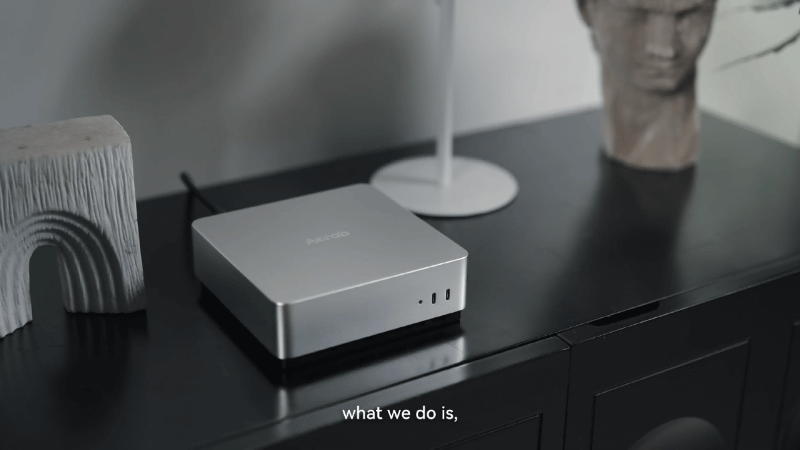
1/5 가격에 DGX Spark를?? "Acrab Agent Box"
Acrab Agent Box는 싱가포르 스타트업 Acrab이 발표한 개인용 엣지 AI PC입니다.
독자 개발 SoC인 GΞLIX 1을 탑재해 100B 파라미터급 대형 언어 모델을 로��에서 실행할 수 있다고 주장하며, NVIDIA의 개인용 AI 슈퍼컴퓨터 DGX Spark와 직접 비교되는 제품으로 주목받고 있습니다.
정확한 메모리 용량은 아직 밝히지 않았지만, 100B 모델을 원활히 돌릴 수 있다 했으므로 DGX Spark와 동급인 128GB에 가깝지 않을까 합니다.
256-bit LPDDR5X를 탑재하여 273 GB/s 대역폭을 가지며, 이 또한 DGS Spark와 동일합니다. 또한 NPU 4코어 + Attention 전용 가속을 사용, Prefill 성능에서 Mac Mini M4 Pro 대비 약 7.5배 빠른 수치를 공개하기도 했습니다.
Acrab에서 미리 공개한 내용에 의하면, 판매가는 DGX Spark의 1/5, 전력 소비는 1/2 수준에 달한다고 하네요. 때문에 스마트홈 제어, 개인 프라이빗 비서, CCTV 감시 등 24시간 켜놓고 활용하��� 데에 제격일 것이라고 합니다.
정확한 메모리 용량과 가격은 나와 봐야 알겠지만, 결국 개인용 PC는 이렇게 128GB 이상의 DRAM을 탑재한 AI PC로 변화할듯 합니다.
https://t.co/FP2izTdFgn
국내 연구진, "치매 해결책 찾았다"
1. 나이가 들수록 뇌 속 노폐물이 제대로 빠져나가지 못해 치매 같은 퇴행성 뇌질환이 생길 수 있는데, 국내 연구진이 그 배출 통로를 세계 최초로 완전히 밝혀냈음
2. 뇌척수액이 지주막의 미세한 구멍을 통과해 뇌막 림프관 → 코 안쪽 림프관 → 목 림프절로 빠져나가는 전체 경로를 파악한 것임
3. 그래서 시험삼아 늙은 쥐의 코에 림프관 재생 유전자를 넣어봤더니, 좁아진 통로가 다시 넓어지고 뇌 청소 기능이 젊은 수준으로 회복되는 것을 확인함
4. 이 실험으로 연구진은 ���에 뿌리는 비침습 치료제 개발 가능성이 ��렸다고 판단함
5. 영장류에 이어 사람 대상 연구와 임상시험도 계획 중임
이 연구 결과는 세계적 학술지 ‘셀’에 실렸음
최악의 질병이자, 가장 슬픈 병이라는 치매 정복도 얼마 남지 않은듯
$TSLA 테슬라 장투하시는분들 힘내시길 바랍니다.
1. 테슬라는 시총 1위가 될 것 입니다.
일론머스크는 시대의 천재이며 폰노이만 + 에디슨을 합쳐놓은 급의 천재입니다. 그는 인류에게 없던 기술을 만들고 있으며 인류를 번영시킬 것 입니다. 하지만 그 만큼 어려운 것을 도전하고 있기 때문에 쉽지 않은 길입니다. 투자의 측면에서는 될지 안될지 모르는 어려운 기술에 도전하는 회사에 장투하는 것은 결코 쉽지 않은 길입니다.
2. 저는 스윙투자자입니다.
저는 1년 이상 한 종목을 잘 보유하지 않으며 단기 스윙, 중기 스윙, 트레이딩 위주로 투자합니다.
작년에 관세 저점 테슬라 $212 부근에서 반등 시작이라고 하며 $TSLL 스윙 들어간 것을 '테슬라공식커뮤니티'에 공개하며 알려드렸었습니다. 그때 저는 X 초보유저였고 5억정도 베팅(본주 제외)한 것으로 많은 분들이 좋아해주셨었습니다. 중간 단기 고점에서 매도 후 다시 매수한 후 연말에 테슬라 고점에서 매도 했었습니다.
그 이후 2025년 4분기 실적 분석, 2026년 1분기 실적 분석, 2026년 2분기 실적 분석 모두 분석해드리며 매수하지 않는다고 미리 알려드렸었습니다. 매수하지 않는 이유는 위에서 말씀드린 내용과 같습니다.
3. 매수하지 않�� 이유(추가 부분)
일론머스크는 세상에 없던 기술을 위해 돈을 퍼붓고 있고 이는 투자자 입장에서는 기업의 가치가 떨어지는 것 입니다. 단순하게 말해 돈은 더 쓰는데 돈을 더 벌어들일 것은 아직 완성되지 않았고 매출로 찍히지 않으니 당연히 떨어질 수 밖에 없습니다.
또한 중국에서는 규제도 없애고 지원금을 퍼부어서 중국 기업을 도와주고 있는데 일론머스크는 미국에서 공정 경쟁을 하면서 테슬라인 미국 기업의 위상을 드높여야 하니 이 경쟁이 공정하겠습니까? 그럼에도 불구하고 저는 짱깨새키이 아닌 일론머스크의 테슬라가 승리할 것이라고 봅니다.
하지만 그것은 미래의 일이며 당장의 일은 아닌 것이 너무 뻔했기 때문에 저는 추가매수하지 않았습니다.
4. 제가 생각하는 매수 타이밍
정확히 공개 게시물에서는 못 알려드리지만 저는 올해는 아니라고 봅니다. 제가 분석해놓은 자료들 기준으로 지금의 조정과는 다른 큰 조정을 내년에 예상하고 있으며 그 조정 이후 저점에서 저는 테슬라를 매수할 것 입니다. 작년 관세 저점보다 몇배 많은 금액을 투자할 계획입니다. 그때의 상승은 역사상 테슬라의 고점을 향해 가지 않을까 생각하고 있습니다.
테슬라 장투하는 분들은 인류에 없던 기술을 만들어내는 일론머스크를 응원하고 ��지하는 분들이라 믿고 있습니다. 저도 내년엔 함께 할 것이며 내년 후반엔 빛을 보지 않을까 생각하고 있습니다. 저는 장투를 안하지만 저의 분석이 조금이나마 도움이 되길 바라겠습니다.
아래의 과거 테슬라 분석들도 참고적으로 읽어보시길 권합니다.
$TSLA 2025년 4분기 실적 분석 + 안산다.
https://t.co/EWrAx8GmrR
$TSLA 2026년 1분기 실적 분석 + 안산다.
https://t.co/UtPv9DamvS
테슬라랑 스페이스X 합병 못합니다.(2026년 5월 27일)
https://t.co/Mi3mGQE3gw
$TSLA 저점 고점 다 맞췄습니다.(2026년 7월 1일 아티클)
https://t.co/UvRdsBafM6
$TSLA 2026 2분기 실적 분석 + 안산다.
https://t.co/4iFmrJAvTQ
#TSLA #테슬라 #TESLA #ROBOTAXI #FSD #로보택시