AutoMapper, MediatR, and MassTransit, three defaults in every .NET Clean Architecture template, all went commercial last year.
On .NET 10, you need fewer of them anyway. JSON, OpenAPI, resilience, rate limiting, health checks: all in the box.
The best library is the one you don't install.
Here is the collection of 60 open-source animated CSS tooltips.
Both the CSS version and the prompt for AI tools are available.
https://t.co/1MrGrz9TLu
Here's how I implement CQRS in my applications.
The CQRS pattern is actually simple.
I organize my application around use cases.
Use cases represent a feature (functionality) in your application:
- Get the current user's details
- Add an item to the shopping cart
- Refund the payment for an order
So you can think of a use case as a business capability.
I structure my code around a single use case (feature).
There are two types of use cases:
- Commands → business logic, database write, trigger side effects
- Queries → return the required data representation for the UI
If you think it should be more complex than this, you're overengineering it.
What do you think about applying CQRS?
P.S. No - you don't need event sourcing or a separate database.
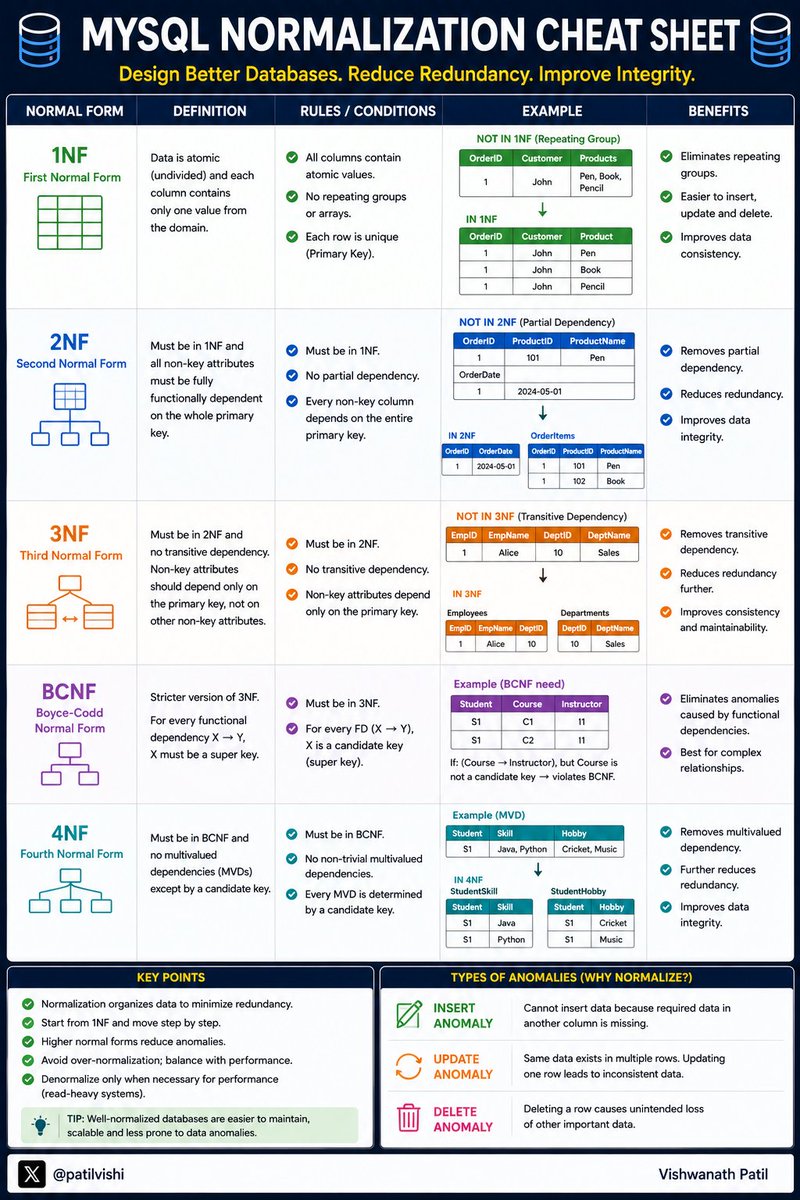
Database Normalization is one of those topics every developer learns...
But many forget the difference between
✅ 1NF
✅ 2NF
✅ 3NF
✅ BCNF
✅ 4NF
A well-normalized database:
• Reduces redundancy
• Improves data integrity
• Prevents update anomalies
• Makes systems easier to maintain
Here's a quick MySQL Normalization Cheat Sheet 👇
Save it for your next system design or database interview...
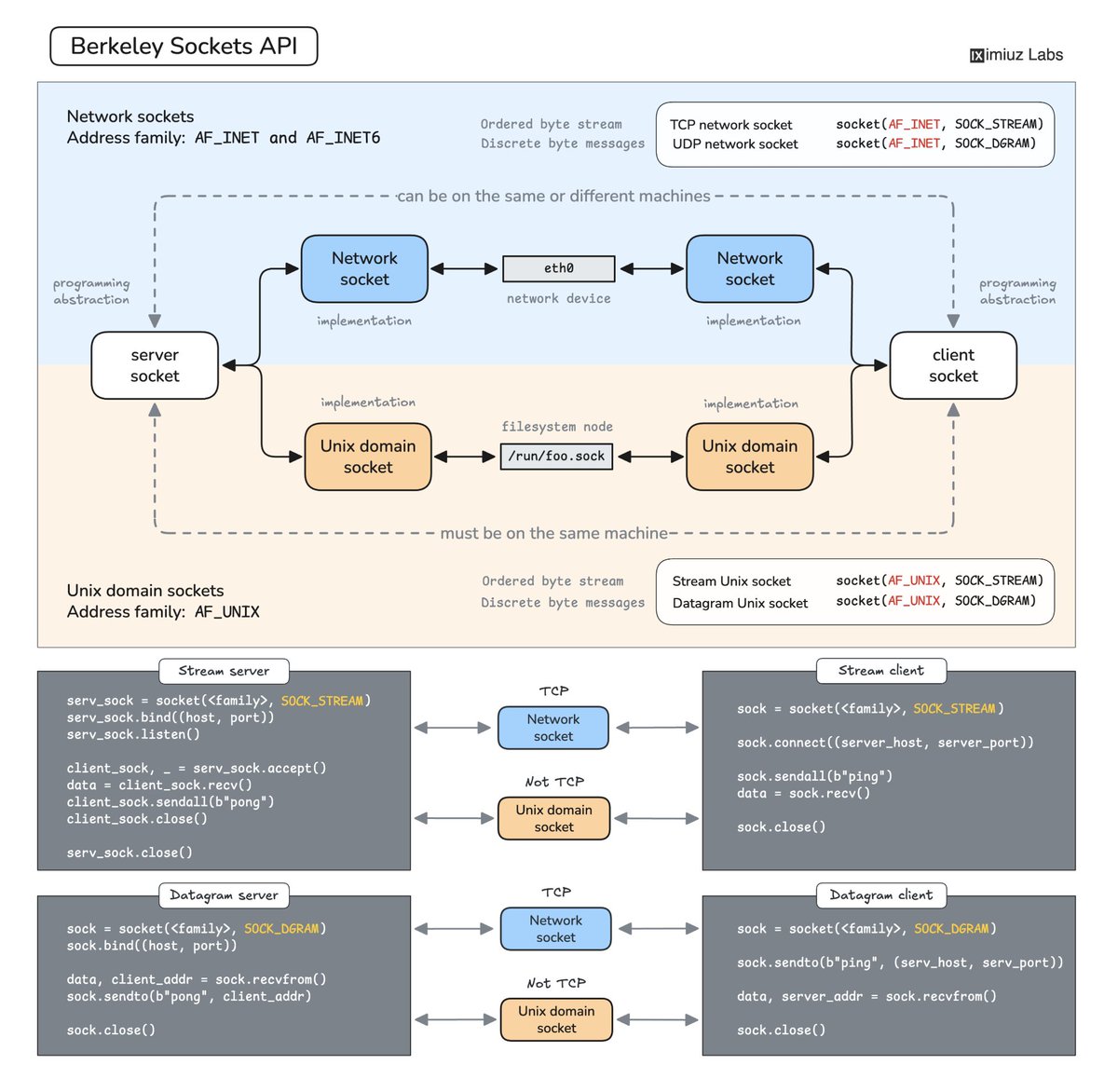
The best way to understand how servers actually work is to write a couple of them from scratch. I prepared a series of exercises that help you get started with socket programming in C, Python, and Go:
- Write a TCP client for a telemetry server https://t.co/OH9JHuE81i
- Write a TCP client for a chat server https://t.co/ukwPsC9bCb
- Write a TCP echo server from scratch https://t.co/yZTvQoId63
- Make one echo server work with both TCP and Unix sockets https://t.co/D2ot5e7tJn
Happy hacking!
The Right AI Model for Every Type of User
__________
I used to ask one question:
Which AI model is the best?
Now I ask a better one:
Which AI model is best for this job?
Because the "best" model changes based on what you need.
For example:
Perplexity works well for research.
Claude is strong for long documents and coding.
Gemini is useful if your work lives inside Google.
Llama is better when control and privacy matter.
ChatGPT is still the easiest daily all-rounder.
The mistake most people make is simple:
They use one model for every task.
That is like using one app for writing, design, research, meetings, and code.
Possible, but not always smart.
You do not need every AI tool.
You need the right one for the right moment.
That is how AI becomes a real advantage, not another tab open on your browser.
What AI model do you use the most right now?
P.S. Save this cheat sheet before your next AI task.
These Python LIST METHODS are used in almost every project
👉 append() – add item
👉 extend() – add multiple
👉 insert() – add at position
👉 remove() – delete item
👉 pop() – remove last
👉 sort() – arrange
👉 reverse() – flip list
👉 count() – count items
👉 index() – find position
🔥 Master these = Strong Python basics
AddDbContext is the default. AddDbContextPool is the optimization. AddDbContextFactory is the escape hatch. Most .NET teams don't know when to pick which.
EF Core gives you three ways to register a DbContext. They look similar in Program.cs. They behave very differently in production.
1. AddDbContext<T>
The default. Registers DbContext as Scoped - a new instance per HTTP request. The framework creates one when the request starts, disposes it when the response is sent.
Use this when context configuration changes per request - different connection strings for multi-tenant apps, dynamic logging filters, anything that has to be decided at request time.
The cost: allocation and disposal on every request. On a low-throughput API, you never notice. On 5,000 requests per second, the GC pressure starts showing up in your traces.
2. AddDbContextPool<T>
EF Core keeps a pool of DbContext instances and hands one out per request, then puts it back when you're done. No allocation, no construction cost.
Use this when config is stable and throughput matters. Cuts allocation pressure significantly on hot endpoints.
The caution: pooled instances are reused, not recreated. If a request mutates context-level state - ChangeTracker settings, savepoints, custom interceptor state - and your reset logic misses it, the next request inherits it. The bug looks random. It is not random. It is your pool reset.
Don't use pooling if you depend on per-request configuration. The pool defeats it.
3. AddDbContextFactory<T>
You own the lifecycle. Inject IDbContextFactory<T>, call CreateDbContext(), use it inside a using block, dispose it.
Use this in background services, worker tasks, hosted services, anywhere code runs outside an HTTP request scope. Scoped DI does not work there - there is no request scope to be scoped to. The factory gives you a context anyway.
The cost: you own disposal. Forget the using block and the connection leaks.
The decision in one line:
If config is dynamic per request, use AddDbContext.
If you need raw throughput with stable config, use AddDbContextPool - and own your reset path.
If you are outside the HTTP scope (background services, workers), use AddDbContextFactory.
Most teams default to AddDbContext and never revisit. Worth a 10-minute audit if you have any hot endpoints or any background work touching the database.
MICROSOFT'S FREE AI AGENTS COURSE
The best resource to go from zero to building production ai agents.
→ 15+ lessons with code + videos
→ agentic RAG, multi-agent, tool use
→ memory, planning, browser-use agents
→ MCP & A2A protocols included
all free.... all open source
https://t.co/M4s5joeXrr
Github & Microsoft öyle bir kurs başlattı ki bu kursu alanlar bu yıl sonunda SERVET KAZANCAK.
Bu sadece bir sertifika programının çok ötesinde. AI ajanları oluşturmak ve yönetmek ilk kez resmi mühendislik rolü artık tanındı.
Developing in Agentic AI Systems Part 1 of 2
Kurs içeriği: ajan mimarisi, MCP, tools, bellek, çoklu ajan sistemleri ve guardrails.
Şu an kimsenin konuşmadığı ama 2027'de en çok aranacak yetkinlik bu olacak gibi duruyor.
Kurs: https://t.co/p6zunwfe8z
Sertifika: https://t.co/8b0aocHwih
𝗦𝘁𝗼𝗽 𝘂𝘀𝗶𝗻𝗴 𝗗𝗮𝘁𝗲𝗧𝗶𝗺𝗲.𝗡𝗼𝘄 𝗶𝗻 𝘆𝗼𝘂𝗿 𝗰𝗼𝗱𝗲.
Here is why 👇
Almost every .NET project I review has the same hidden bug.
DateTime[.]Now is scattered everywhere: services, validators, business rules, even domain entities.
It looks innocent. But it quietly breaks your tests and your code's reliability.
📌 The real problem with DateTime[.]Now:
→ You can't test time-dependent logic
→ You can't simulate "tomorrow" or "1 year ago"
→ Your tests become flaky and timezone-dependent
→ Your business rules silently depend on the server clock
→ Switching environments breaks behavior in subtle ways
Want to test what happens when a subscription expires?
Or when a free trial ends?
Or when a discount window closes at midnight?
You can't! Unless you control time in your tests.
✅ The fix is simple: inject time as a dependency.
You have two clean options in modern .NET:
1. Custom IDateTimeProvider interface (works in any .NET version)
2. Built-in TimeProvider (available since .NET 8)
I prefer TimeProvider for new projects.
It's part of the framework, ships with FakeTimeProvider for testing, and supports timers and time zones out of the box.
Register it once in DI:
𝚋𝚞𝚒𝚕𝚍𝚎𝚛.𝚂𝚎𝚛𝚟𝚒𝚌𝚎𝚜.𝙰𝚍𝚍𝚂𝚒𝚗𝚐𝚕𝚎𝚝𝚘𝚗(𝚃𝚒𝚖𝚎𝙿𝚛𝚘𝚟𝚒𝚍𝚎𝚛.𝚂𝚢𝚜𝚝𝚎𝚖);
Then inject it like any other service and call GetUtcNow() instead of DateTime[.]UtcNow.
This one change makes your code testable, predictable, and ready for production.
Where do you still use DateTime[.]Now in your code? Leave a comment down below 👇
——
♻️ Repost to help others write testable, time-aware code
➕ Follow me ( @AntonMartyniuk ) to improve your .NET and Architecture Skills
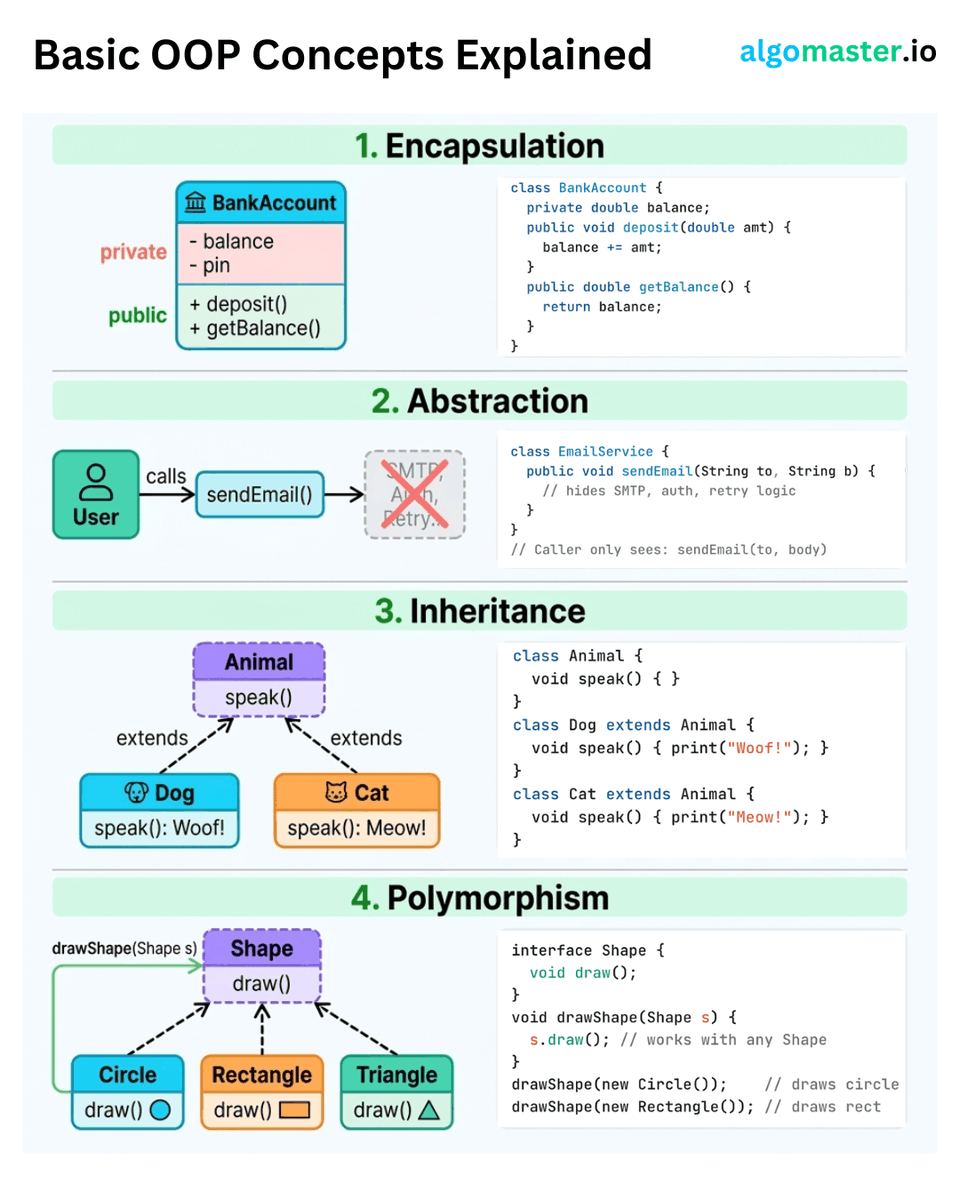
Basic OOP Concepts Explained with Clear Examples:
1. 𝐄𝐧𝐜𝐚𝐩𝐬𝐮𝐥𝐚𝐭𝐢𝐨𝐧
Hide internal data behind public methods.
- Example: A BankAccount class keeps balance and pin private. The only way to interact with it is through deposit() and getBalance().
2. 𝐀𝐛𝐬𝐭𝐫𝐚𝐜𝐭𝐢𝐨𝐧
Expose a simple interface, hide the complexity behind it.
- Example: An EmailService class gives you sendEmail(to, body). Internally, it handles SMTP connections, authentication, and retry logic. The caller doesn't need to know any of that. They just call one method and it works.
3. 𝐈𝐧𝐡𝐞𝐫𝐢𝐭𝐚𝐧𝐜𝐞
Let child classes reuse and override behavior from a parent class.
- Example: An Animal class defines speak(). Dog extends it and returns "Woof!", Cat extends it and returns "Meow!". Shared logic lives in one place, and each subclass customizes what it needs.
4. 𝐏𝐨𝐥𝐲𝐦𝐨𝐫𝐩𝐡𝐢𝐬𝐦
Write code that works with multiple types through a common interface.
- Example: Define a Shape interface with a draw() method. Now Circle, Rectangle, and Triangle each implement draw() their own way. A single drawShape(Shape s) method works with all of them.
♻️ Repost to help others learn this
After 12 years in software development, I stopped learning from Big Tech case studies.
They were impressive — but they didn't change how I think.
People did.
Some think that following creators won't make you skilled.
And you need to write code and build apps instead.
But how you think while writing that code is what separates juniors from seniors and seniors from architects.
Skills come from building systems.
But judgment is learned by watching how others reason about trade-offs.
That's what actually compounds over time.
Here are the 10 best Newsletters to read:
1. Reach Top 1% of .NET devs and Architects by @AntonMartyniuk
https://t.co/DYz9YuBQJQ
2. Elevate Your .NET Skills To The Next Level by @mjovanovictech
https://t.co/ynNdaSEY66
3. Tech World with Milan (best tech deep dives and personal growth) by @milan_milanovic
https://t.co/z7uFKDqQf7
4. How to build .NET apps without over-engineering by @kristijan_kralj
https://t.co/DLp4TBolxL
5. .NET Newsletter and Courses by @TheCodeMan__
https://t.co/W7G9ijLXka
6. Get better in .NET & AWS by @iammukeshm
https://t.co/lMu4Se8kyj
7. .NET, Azure, Backend by @julioc
https://t.co/xBcpUEOOPY
8. System Design Classroom by @RaulJuncoV
https://t.co/zSUhTJDCUv
9. Level Up Coding System Design Newsletter by @NikkiSiapno
https://t.co/RR1PUsV3UA
10. System Design One by @systemdesignone
https://t.co/gNaI0W7H12
------
♻️ Repost to help others follow the best software development content creators
➕ Follow me ( AntonMartyniuk ) to improve your .NET and Architecture Skills





![AntonMartyniuk's tweet photo. 𝗦𝘁𝗼𝗽 𝘂𝘀𝗶𝗻𝗴 𝗗𝗮𝘁𝗲𝗧𝗶𝗺𝗲.𝗡𝗼𝘄 𝗶𝗻 𝘆𝗼𝘂𝗿 𝗰𝗼𝗱𝗲.
Here is why 👇
Almost every .NET project I review has the same hidden bug.
DateTime[.]Now is scattered everywhere: services, validators, business rules, even domain entities.
It looks innocent. But it quietly breaks your tests and your code's reliability.
📌 The real problem with DateTime[.]Now:
→ You can't test time-dependent logic
→ You can't simulate "tomorrow" or "1 year ago"
→ Your tests become flaky and timezone-dependent
→ Your business rules silently depend on the server clock
→ Switching environments breaks behavior in subtle ways
Want to test what happens when a subscription expires?
Or when a free trial ends?
Or when a discount window closes at midnight?
You can't! Unless you control time in your tests.
✅ The fix is simple: inject time as a dependency.
You have two clean options in modern .NET:
1. Custom IDateTimeProvider interface (works in any .NET version)
2. Built-in TimeProvider (available since .NET 8)
I prefer TimeProvider for new projects.
It's part of the framework, ships with FakeTimeProvider for testing, and supports timers and time zones out of the box.
Register it once in DI:
𝚋𝚞𝚒𝚕𝚍𝚎𝚛.𝚂𝚎𝚛𝚟𝚒𝚌𝚎𝚜.𝙰𝚍𝚍𝚂𝚒𝚗𝚐𝚕𝚎𝚝𝚘𝚗(𝚃𝚒𝚖𝚎𝙿𝚛𝚘𝚟𝚒𝚍𝚎𝚛.𝚂𝚢𝚜𝚝𝚎𝚖);
Then inject it like any other service and call GetUtcNow() instead of DateTime[.]UtcNow.
This one change makes your code testable, predictable, and ready for production.
Where do you still use DateTime[.]Now in your code? Leave a comment down below 👇
——
♻️ Repost to help others write testable, time-aware code
➕ Follow me ( @AntonMartyniuk ) to improve your .NET and Architecture Skills](https://pbs.twimg.com/media/HIa7GfeW4AAYFKW.jpg)