Used the exact same prompt and asked Opus 5.5 to create a video for https://t.co/WruSSIWaS8
Literally one shot.
I really thought all these one shot videos are fake, until I actually tried it.
Of course, I used Squad to create the video.
Yes I built it for myself, it started with a calorie tracker, kinda messy but nice:
https://t.co/FeWxZkJUiG
I log my food in Telegram to get calories and protein data
My workouts and sleep from WHOOP
My weight from my scale
Indoor air quality, temperature, humidity for bedroom is also tracked from Xiaomi to Home Assistant to there
Steps and other health data from Apple Health is auto exported every hour with Health Auto Export app on iOS which POST's to my server
My travels from @nomadscom's API and sauna use from @wip's API
That lets me find correlations between lots of things and see what is good for me and what is bad for me
Health is personal and everyone's body is different so this helps me make good more healthy decisions
@thelifeofrishi Planning to form my business next month to use Stripe. Is there any specific reason why you decided to go with UK instead of US? Isn’t UK corporation tax 19%?
Yesterday I did a proactive whole-body MRI at @prenuvo for early cancer screening and other diseases. Luckily no worrisome or high risk findings. I had a few minor findings (common and benign things), and the explanation and reassurance was very well done in the report. The MRI even detected a lingering sinus infection I've had for the past 4 weeks! The images you get of your body are incredible too. It can't possibly hurt (except the pocket; it's $2,500) to do these regularly and monitor changes over time.
Their MRI setup is quite nice too. They are a bit more spacious than the ones I've seen at hospitals, but most importantly they put special glasses on you with a 45° mirror that lets you watch a movie projected behind you. (You choose the movie/show.) Makes a huge difference for claustrophobia because the space feels much bigger when looking through the mirror. It's also nice you can see a clock in the screen, so you know approximately how much time you have remaining inside the magnet.
Overall, impressed.
✨ Okay with lots of help from @javilopen and his Spanish scraping friends I've managed to vibe code my own @Scrapingbee alternative and replace my $249/mo Scrapingbee plan with my own $1/mo scraper running on my VPS!
First I tried OpenSERP, an open source project that seems freshly maintained but it didn't work on my VPS IP or laptop IP and got blocked fast
Then I tried to use residential IP proxies from IPRoyal but they were already quite tainted IPs meaning Google already knew they were scrapers and just blocked about 60% of them already, not so great, also didn't work!
Then I discovered OpenSERP uses a vanilla headless Chrome, Google instantly detects that and blocks that, so literally the entire repo is useless cause it won't even work? I don't get why they don't say that in the docs? OpenSERP is even worse than just basic CURL, as my AI said: "plain curl got 7% blocked but OpenSERP's headless browser got 100% blocked"
So then I just built my own with Playwright and a real Google Chrome on my VPS, headful and persistent context, and slow pacing like every 30 seconds or so
And I got some better residential IP recommendations (which I can't tell you because thenhey t stop working!)
Now I'm at about 90% success rate, which is similar or better than Scrapingbee
And it costs me ~$1/mo (measured by GBs, obviously for text scraping I barely use a lot) instead of the $249/mo I paid Scrapingbee!
My only remaining SaaS now are:
- Cloudflare Domains
- Cloudflare Email Sending
- Cloudflare R2 Storage
- Backblaze B2 for backups
- Hetzner for all my servers for all my sites (VPS)
- xAI for all LLMs for all my sites (so many things like moderation, writing emails, anything)
Ferndesk has been live for over a year now.
But all our design + branding has been mostly YOLO'd.
So last week, I created and implemented a brand language E2E across our marketing, dashboard, and even our docs.
It only took 2 days 🤯
Here's how I did it (and how you can too)
I wanna share all my startup experience, one topic at a time,
Today it's ---SEO---
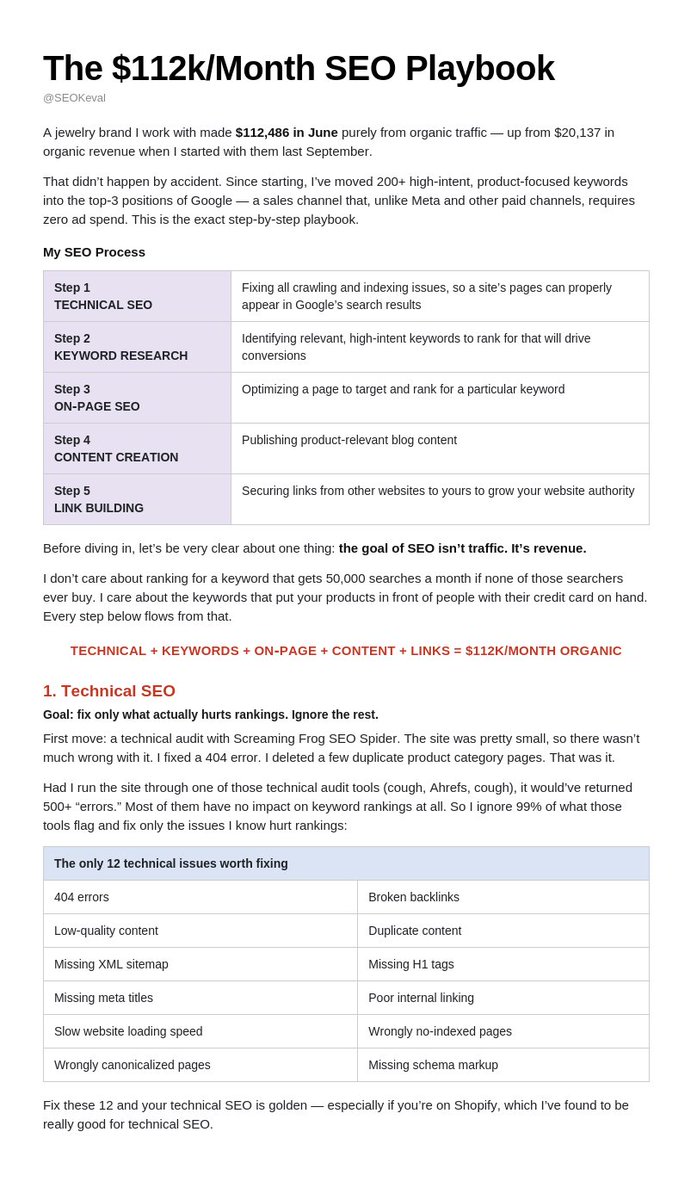
In the past years, I generated over 1B impressions and 1M clicks from SEO.
Everything I've done:
📁 Domain names
↳ Use: .com, .org, .dev, .ai, .io
↳ Use keyword-like naming, e.g. osssoftware dot org
↳ Max 14 letters in a domain name
↳ No “-” or “_”
↳ One topic per domain when possible
↳ Pick www or non-www and stick to that one version (one redirects to another one)
📁 Tech SEO
↳ Make sure the page renders HTML when bots make requests
↳ One way to check it:
↳ Drop your URL into Claude
↳ Ask if it’s doing everything right for tech SEO
↳ There are many more details, but really, Claude or Codex will lay it all down for you if you show it your website
↳ HTTPS on
↳ Mobile-friendly
↳ Fast enough that it doesn’t feel broken
↳ PageSpeed Insights is enough
↳ Open GSC web-vitals and if it's green then all good
↳ Short, stable URLs
↳ Url slug should match the meta title and h1
↳ No random strings
↳ One H1 per page
↳ Unique title + unique meta per page
↳ Image alt text on anything that matters
↳ Canonical URL on every indexable page that has no query string in it
↳ Fix 404s and redirect chains
↳ No orphan pages
↳ Every important URL should have at least one internal link pointing to it (seogets shows all such pages)
📁 Indexing
↳ Add sitemap.xml to Google Search Console
↳ See if all the pages are indexed
↳ If not, run @indexrusher
↳ Do the same for Bing and Yandex via indexrusher
↳ robots.txt should be there and allow your public pages, again, ask chatgpt to check your robots.txt
↳ Request indexing in GSC for new pages or run indexrusher to automate this
↳ Check Coverage / Pages reports
↳ Fix “crawled – currently not indexed” on pages that should rank
↳ Don’t waste crawl budget (don't create too many pages, too many folders, tags, groupss...at least right away, you better do it later once the first bulk is indexed)
📁 Analytics
↳ Google Search Console
↳ Ahrefs small plan
↳ @seogets + @DataFast_
↳ Once a week, look at:
↳ Queries with impressions but few clicks (take the queries pointing to these pages and embed them into h1 and meta title)
↳ Pages that used to get clicks and then decayed (update the content here)
📁 Low hanging fruit
↳ Pages already in positions 8–20
↳ Those are closer to page 1 than any new article
↳ Add the exact query(if makes sense) to H1 / title / H2
↳ Add one missing section the current top results have
↳ Queries with lots of impressions and almost no clicks
↳ Rewrite title + meta, keep the keyword
↳ Old pages that already get a little traffic
↳ Update them before writing a new one (google kinda loves to see pages being regularly updated)
↳ Pages Google knows but didn’t index
↳ Request indexing manually page by page, or run @indexrusher (if it doesn't help, remove them, cuz google wont index them ever)
↳ Thin pages fighting each other for the same query
↳ Keep the stronger URL
↳ Merge or 301 the weaker one
📁 Quick 5min SEO hacks
↳ Paste a URL into GSC → URL Inspection → Request indexing
↳ Put the target keyword in the first 60 characters of the title
↳ Add the main query into the H1 if it’s missing
↳ Add 2 internal links from old posts to the page I want to push
↳ Add alt text to the first image on the page
↳ Add a 3-question FAQ at the bottom using GSC queries
↳ Submit / resubmit sitemap.xml in GSC
↳ Search site:mydomain and see if the pages are indexed and how they look like
↳ Google my brand + product keyword
↳ If a page mentions me with no link, ask them to add one
↳ Ask ChatGPT “best tool for [keyword]”
↳ Open the cited URLs
↳ Email those authors the same day (offer them either money or a link exchange)
↳ Post the article URL on X / LinkedIn / Reddit with the keyword in the first line
↳ Drop the URL into Claude: “what 5 on-page fixes can I do in 5 minutes?”
📁 Blog
↳ Write 1 good blog post a week
↳ Do it manually with some AI assistance
↳ Focus on the most promising keywords where you already rank high
↳ Use @seobotai to generate more blog articles
↳ See if some of them get traction
↳ Manually turn the promising ones from AI-generated into high-quality human-made articles
↳ Before writing, search Google for the keyword
↳ Match the format that already ranks
↳ Answer the question better than the current top 5
↳ Put original stuff in the article
↳ Screenshots
↳ My own numbers
↳ What I actually tried (basically ensure google that this article comes from a human's own experience)
↳ Refresh old posts that already get impressions
↳ Update the date only if the content actually changed (avoid hacks here, do real updates)
↳ Useful page types on top of the weekly post:
↳ “best X”
↳ “X vs Y”
↳ “X alternatives”
↳ “how to” for the exact job my product does
📁 Backlinks
↳ Ask ChatGPT: “What’s the best tool for...”
↳ See the URLs it used to form the response
↳ Reach out to all those authors
↳ Ask them to include my URL in exchange for money or a backlink from you
↳ Do the same in Claude, Perplexity, and Gemini and Grok
↳ Search Google for your keywords
↳ Find the pages that already rank
↳ Do the same as above
↳ List on as many directories as possible using @listingbott
↳ Link all my pages across all my websites when possible
↳ Do internal linking on each site too
↳ Between blog articles
↳ Between pages
↳ Extra places that still work:
↳ Guest posts on sites that already rank for my keywords
↳ “best tools” roundups
↳ Unlinked brand mentions
↳ Search Google for my brand name
↳ Ask them to turn the mention into a link
↳ When I link out or guest post, I want the page to have:
↳ Real traffic
↳ A topic close to mine
↳ A link that looks natural on the page (avoid spam at all cost)
📁 Social media SEO
↳ Social media gets indexed instantly
↳ Reddit
↳ X
↳ Substack
↳ LinkedIn
↳ Monitor hot, growing keywords and trends
↳ Google Trends
↳ Radar on X
↳ Produce posts around those trends
↳ Place some of the product links inside
↳ Find relevant social media posts via Google Search
↳ Plug my product into the comments when it brings some value
↳ No spam
↳ Put the keyword in the first line of the post
↳ Turn each good blog post into (and link back to the original url with a backlinks, cuz social media backlinks in my experience have really high weight for google):
↳ 1 X thread
↳ 1 LinkedIn post
↳ 1 Reddit answer where it actually helps
↳ Reply under bigger posts in my niche
↳ Useful reply first
↳ Link only if it adds something
📁 AI search
↳ Same game as SEO
↳ Ask ChatGPT / Claude / Perplexity / Gemini:
↳ “What’s the best tool for [my keyword]?”
↳ “Best alternatives to [competitor]”
↳ See if they mention me
↳ If not, look at who they mentioned and get onto those same pages by paying them or doing a link exchange
---
That's it for now.
I'll share the next topic in my next tweet. What should it be?
Also, i put it all in great details into my Founder Guide: https://t.co/o3mvaqnIEO
so i made Orshot's platform agent-ready with WebMCP
— gives agents shortcuts to act faster on your app in browser
— no connector, no api key, no auth
— easy to implement if you already have MCP
here's how to add it in your app ⬇️ https://t.co/5guZ2mSYX3
Two days ago, Rank Math closed about a dozen security issues in 1.0.277. This plugin runs on over 4 million sites.
In that same update, group[.]one (who also owns WP Rocket) now gets administrative privileges to your site.
Last time, I classified something like this as a backdoor. This time, you may decide.
The file: vendor/groupone/wap-client/includes/class-app-password-manager.php.
What it does:
When a site administrator whose site is connected to a (free) rankmath[.]com account opens "Help & Support," the plugin immediately creates a WordPress Application Password for that user. It sends that password to group[.]one's servers. Their AI agent can then act on your behalf on your site.
The plugin never asks first. There is a "Terms & Conditions" box, but it does not stop the password from being created or sent. The transfer starts before the box even appears.
What they can do with it:
WordPress Application Passwords have no capability scopes; that password gives administrator powers. Their servers can install and activate plugins from WordPress[.]org, change settings, create admin users, and edit or delete content. They cannot immediately log into wp-admin in a browser, but they do not need to.
For example, they can install a snippets plugin and then inject PHP into its settings. That is remote code execution. "WPCode — Insert Headers and Footers" by Syed Balkhi exists to do just that. The password group[.]one holds can install it and write those settings.
Will they do this? Probably not. But their servers are now a hot target: they are collecting administrator passwords from a plugin on over 4 million sites. A hacker who gets that pile can hijack every site that already minted one.
The password shows up on your profile as "WAP – Rank Math Support Agent". Closing the "Help & Support" tab does not revoke it. This Application Password does not expire. You cannot turn the "Support Agent" off.
What you should do:
If you opened "Help & Support" while connected, revoke the Application Passwords immediately.
Go to "WP Admin -> Users -> Profile -> Application Passwords, and revoke anything starting with "WAP –".
Extra context:
I'm the founder of The SEO Framework plugin, a competing plugin to Rank Math, but without CVEs.
My real use cases for Grok Bot so far: 👇
I connected it to email. Now it filters the urgent stuff that actually needs my attention.
I connected it to Intercom and GitHub. Our help center docs update automatically when a PR changes the UI or ships a new feature.
I connected it to Cursor. Bug reports and feature requests from Intercom open the Cursor bot, and it starts triaging or implementing them. I can wake up to a PR. I basically hired another engineer.
I connected it to Slack. When customer support asks product questions: if it’s covered in our docs, the Intercom bot pulls it. If not, the Cursor bot jumps in and pulls answers straight from the code. I just opened up that knowledge base to the whole team.
I connected it to our CMS, Google Search Console, and Ahrefs. Now I’ve got a content engine that brainstorms ideas, builds a plan, and helps create content.
I connected it to X, set the keywords and topics I care about, and now I get a briefing every morning. I have a personal secretary.
I connected it to my bank statements. I can ask anything finance-related, revenue, spend, P&L, etc. No more QuickBooks, and honestly, I might fire my accountant.
I paid $200/month for Grok Bot.
Still expensive?
I found this system fascinating so I gave Grok Bot the transcript and had it create a prompt you can give your agent to build our your own AgentOS
https://t.co/zbllbgyx0r
6 months ago: laptop open all day, typing into Claude Code, waiting.
Today: I write a spec, go to the gym, and my phone only pings when an agent needs a decision. 95% of my work runs itself.
Full breakdown so you can build your own 👇








![SybreWaaijer's tweet photo. Two days ago, Rank Math closed about a dozen security issues in 1.0.277. This plugin runs on over 4 million sites.
In that same update, group[.]one (who also owns WP Rocket) now gets administrative privileges to your site.
Last time, I classified something like this as a backdoor. This time, you may decide.
The file: vendor/groupone/wap-client/includes/class-app-password-manager.php.
What it does:
When a site administrator whose site is connected to a (free) rankmath[.]com account opens "Help & Support," the plugin immediately creates a WordPress Application Password for that user. It sends that password to group[.]one's servers. Their AI agent can then act on your behalf on your site.
The plugin never asks first. There is a "Terms & Conditions" box, but it does not stop the password from being created or sent. The transfer starts before the box even appears.
What they can do with it:
WordPress Application Passwords have no capability scopes; that password gives administrator powers. Their servers can install and activate plugins from WordPress[.]org, change settings, create admin users, and edit or delete content. They cannot immediately log into wp-admin in a browser, but they do not need to.
For example, they can install a snippets plugin and then inject PHP into its settings. That is remote code execution. "WPCode — Insert Headers and Footers" by Syed Balkhi exists to do just that. The password group[.]one holds can install it and write those settings.
Will they do this? Probably not. But their servers are now a hot target: they are collecting administrator passwords from a plugin on over 4 million sites. A hacker who gets that pile can hijack every site that already minted one.
The password shows up on your profile as "WAP – Rank Math Support Agent". Closing the "Help & Support" tab does not revoke it. This Application Password does not expire. You cannot turn the "Support Agent" off.
What you should do:
If you opened "Help & Support" while connected, revoke the Application Passwords immediately.
Go to "WP Admin -> Users -> Profile -> Application Passwords, and revoke anything starting with "WAP –".
Extra context:
I'm the founder of The SEO Framework plugin, a competing plugin to Rank Math, but without CVEs.](https://pbs.twimg.com/media/HQ0vmLmXIAIlkhH.png)





