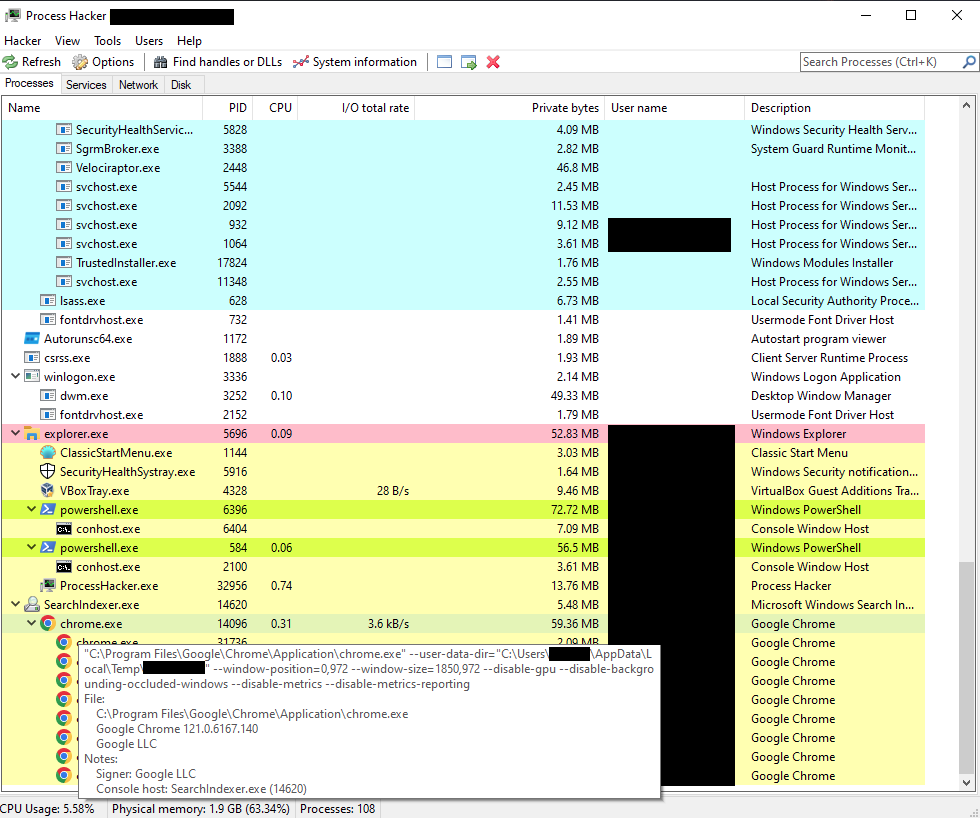
From 2020-2024, I tracked the SolarMarker malware, and in 2024, monitored a self-infection for months to learn their actions-on-objectives: on-device fraud.
I didn't publish the details of my months long investigation until now. Check the link the the attached comment.
CertCentral is now TheCertGraveyard[.]org & CertGraveyard[.]org.
The CertCentral API returns an error directing to use the new domains.
Please give me a like or a share to get the word out.
Also use the site to report and investigate certificates used to sign malware. :)
@IAMERICAbooted One vector that I'm still worried about is OAuth phishing with first-party Microsoft app (e.g. https://t.co/oUc3b7epZ3).
As almost all the CA checks are performed on the victim's side, I've found this technique hard to mitigate.
Do you have recommendations?
@ItsReallyNick Any chance Microsoft might officially document UserAuthenticationMethod at some point? I realize it's not your remit, but if this ever comes up in conversation with the right folks internally, there's definitely interest in the community!
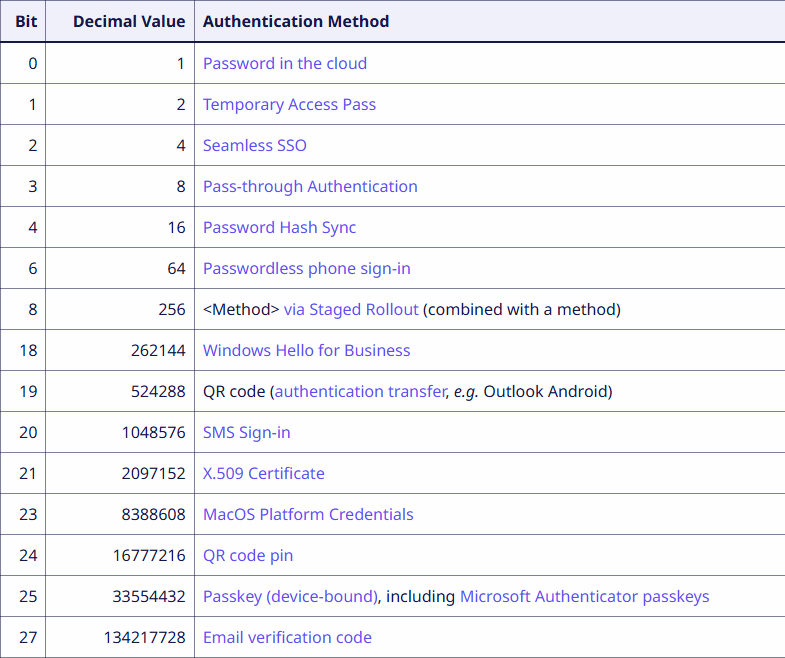
The #UserAuthenticationMethod field of the Microsoft 365 sign-in logs contains numeric values (16, 272, 33554432...) that were not documented anywhere.
I figured out that it's a bitfield, and recovered the meaning of most of the bits!
@ItsReallyNick Thanks, Nick! Your tweets and GitHub comments were the only information I could find coming from a Microsoft employee (or anyone, really) about this field!
That definitely gave me some confidence that this bitfield interpretation was credible.
Our latest technical deep-dive unravels the mystery behind the opaque numeric codes (16, 272, 33554432, etc.) you see in #Microsoft365 audit logs.
https://t.co/cejqzvjsPQ
@sekoia_io UserAuthenticationMethod 16457, of SolarWinds fame (and that doesn't seem to exist anymore) remains a bit of a mystery to me.
I'm not sure if it could be decoded in the same way (bits 0, 3, 6, 14?)
https://t.co/iWcY8mBevf
The results and methodology are detailed on the @sekoia_io blog:
https://t.co/gA45hqh0TQ
Several bits remain unmapped (bits 5, 7, 9-17, 22, 26). If you observe these values, please share your findings!
@ZackKorman I have a pet theory that the reason why Kusto got so versatile and powerful is because the Entra/Azure/M365 logs are so convoluted and impractical.
Instead of fixing the logs, they built a crazy query language.
New RE Blog Post: RustyPages-Pt1
https://t.co/I2QdHgtRuy
We RE a Rust dropper, that sets persistence and runs the downloaded next stage, queries @patrickwardle's tools, and quiets notifications. We included relevant IOCs as we continue our analysis of the loader for Part 2. :)
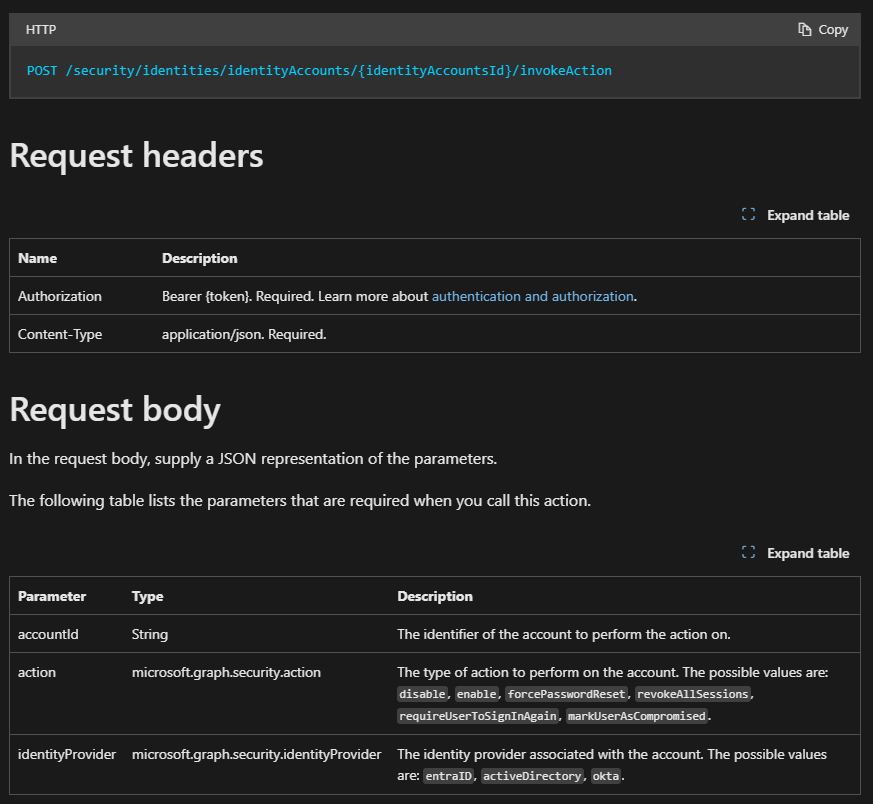
New Microsoft Graph based API for response actions in #MDI
Disable, Enable, ForcePasswordReset and RevokeAllSessions finally available for your automations.
https://t.co/6W5ps9Xdq2
A few weeks ago, we published our global analysis of Adversary-in-the-Middle #phishing threats, providing actionable intelligence on multiple #AitM phishing kits.
This report includes 11 sheets covering the most widespread #AitM phishing kits as of Q1 2025.
Aaand we (or mostly Fabian) made this cool website where you can explore all these first party apps and their scopes at https://t.co/v1qrDbKUOd https://t.co/PyjNQLYDk0
Coming up on my 1 year anniversary with @HuntressLabs !
Taking this opportunity to go over some things myself and the team have seen in intrusions and drop some tips on basic things you can do to make your network more immune to compromise.
Let's start with initial access
- We see so much VPN compromise, it's by far our number 1 initial access vector - yes 0days for VPN appliance are there, but most of the time the compromise is a result of good ol' fashion credential stuffing or brute force.
- Some VPN appliances have decent log retention, others do not and it really sucks when only ~1 hour worth of logs are available - if you're standing up a SIEM or any kind of log collection effort in your org, make sure that devices which are externally exposed are sending their telemetry to the SIEM. If your VPN appliance has different logging settings, check them out and enable as needed - this telemetry is gold during intrusions.
- In addition to VPN appliances, we see a lot of RDP / RDS machines get compromised - same story here, no fancy 0days, just weak credentials in use. In some cases, MFA is in use, but has either been bypassed for the compromised user or has "failed open" - if you use RDP for your org, make sure that MFA is enabled somehow on it, if it is enabled, test to see what happens when the process that handles MFA crashes or is turned off. Also, make sure you have good procedures in place for turning MFA bypasses back off when they're applied.
- Remember to keep an eye on your web applications, deserialization attacks aren't super common, but happen fairly often. Turn on IIS logging and enable POST request logging if possible. Remember that a standard penetration test often does not deep dive into custom web applications, invest in a good Appsec focused test if you have a custom application exposed externally.
Turning to lateral movement
- Once inside networks, threat actors move very quickly and unfortunately do not run into a lot of resistance. We typically see multiple accounts compromised in rapid succession, suggesting weak or shared passwords in use. You have no idea how happy it makes me to see "LOGON_TYPE_NOT_GRANTED" in the logs - Yes I know segmenting your network is probably a pain, but its a very effective security control.
- In most cases we see, RDP is used for lateral movement and unfortunately, there is often no controls to prevent users from RDP'ing into servers they have no business need to RDP into. Check your Active Directory permissions and see what users can RDP into your file servers and domain controllers, you might be very surprised by what you find!
- Impacket & impacket-related tooling is very popular for lateral movement, if you are in charge of defending a network and have telemetry and a lab environment, try to use WMIExec etc for yourself and compare the telemetry you see versus normal activity, this is a great way to build high-fidelity alerts. Aside from that, remove local admin where possible. Local admin rights enable credential access and lateral movement avenues that would be shut right down were a non-admin account in use.
Looking at Execution / Impact
- Do threat actors use fancy 0days ? Yes of course, but in the cases we work, we rarely see it. Most of the time, "just enough tradecraft" is employed, all a TA needs is FileZilla and 7Zip to ruin your day.
- Tunneling tools like ngrok and plink are very popular, most often, these tools are being used to make RDP externally available to the TA - everyone loves a GUI I guess.
How do adversaries get credentials ?
- Registry credential dumping is extremely popular, same with LSASS credential dumping. Threat actors will also search local file systems and network shares for credentials and - guaranteed - will find them. By segmenting your network, limiting local admin access and hardening authentication silos within your AD environment ( things like a three-tiered admin model, or as close to it as you can get ) will limit the impact of credential theft drastically.
- Brute forcing is old and boring I get it, but unfortunately it works, especially for less-monitored environments, some cases we've seen hundreds of thousands brute force attempts for hours before an account is successfully compromised. Don't sleep on brute forcing, ensure you have account lock out policies in place and some kind of monitoring for brute force attacks.
Miscellaneous tidbits
- Please, please, please - change your default Windows log sizes via GPO. By default, these log channels do not hold a lot of data, if a threat actor undertakes a brute force in the environment, security-relevant telemetry will be clobbered hampering any investigation efforts.
- Have a standard naming convention for your organizations' workstations and servers, this makes it so much easier to orientate everything during an investigation and very often bubbles up malicious activity for workstations that don't fit the standard naming convention.
- Have a plan in place in case of an incident, it's bound to happen and it's better to be prepared. What happens if certain hosts need to be offline, who do you call to get a potential insurance claim started? What is the threshold for a formal IR engagement - deciding all these things under pressure from an incident is not ideal.
I think this post is long enough 😅 so I'll wrap it up 💙