We are live! If you're just starting out in #DataAnalytics and want to understand how to leverage the power of #AWS to analyze data, this guide will help!
https://t.co/9bPbLcek9h
https://t.co/cOkgJ7Qnep
David Foster Wallace on what it actually means to be a great artist:
It's spring 1986, and Wallace is a hyper-educated grad student learning to write, coming out of an avant-garde tradition.
The problem: his teachers are all realists with no interest in postmodern work.
He explains the delusion he was living under at the time. They didn't like his stuff, and he had a comforting explanation for why:
"They don't like my stuff. I believe that it's not because my stuff isn't good, but because they just don't happen to like this kind of aesthetic."
Then comes the honest admission:
"In fact, known to them but unknown to me, the stuff was bad, was indeed bad."
So there he is, hating his teachers for exactly the wrong reason. And then he goes to see "Blue Velvet".
Wallace describes the film as an entirely new and original kind of surrealism.
Maybe a debt to Hitchcock somewhere, but it "no more comes out of a previous tradition" than anything.
As he puts it: "It is completely David Lynch."
He points to one scene that crystallised it. A character called the yellow man is shot in an apartment, and the main character runs in to find the guy dead but still standing there, no explanation, he's just standing. Wallace calls it almost classically, francophilistically surreal. And yet, he says, "it seems absolutely true and absolutely appropriate."
That's when it hit him:
"The point of being postmodern or being avant-garde or whatever wasn't to follow in a certain kind of tradition, that all that stuff is BS imposed by critics and camp followers afterwards."
Then the core of it:
"What the really great artists do is they're entirely themselves. They've got their own vision, their own way of fracturing reality. And that if it's authentic and true, you will feel it in your nerve endings."
He's careful not to overclaim. He's not suggesting the film would do this for any other viewer. But for him, Lynch "very much helped snap me out of a kind of adolescent delusion that I was in about what sort of avant-garde art could be."
The proof was in what happened next.
He'd gone with two poets and one other fiction writer. Afterwards they all went to a coffee shop and just sat there slapping themselves in the forehead.
"It was this truly epiphanic experience."
People often ask what my biggest tip is for getting the most out of Claude Code.
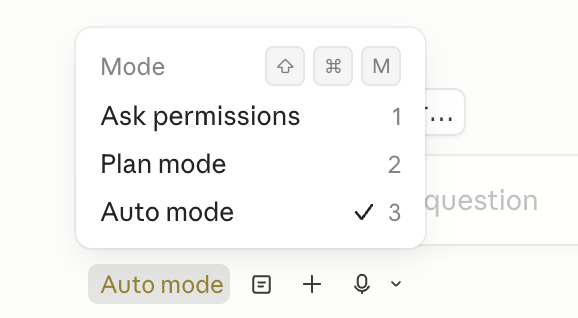
These days my #1 tip is: use auto mode
Auto mode means no more permission prompts. It is the key building block for multi-clauding: start a session, then while it runs, work on another session in parallel.
The first thing you have to do before anything else: you have to know yourself. Figure out who the hell you are.
The second thing: you’ve got to know what you actually want to do.
If you know who you are and what you want to do, then just wake up and get after that goal every single day.
From one of the guys leading $CSU.TO AI
"Hubspot - replaced with AI built CRM + raia Agents
Jira - replaced with AI built system + raia Agents
MailChimp - replaced with raia Control
Zendesk - replaced with raia CX + chat + copilot
Webflow CMS - built website using AI
EventBrite - built using AI + raia Agent
The only SaaS companies that will grow with AI are ones that have strong systems of record, deep workflow integrations into their vertical and service complex businesses. a.k.a Vertical Market Software. Everyone else. Good Luck. We built your products in days and custom to our needs"
We just announced a large raft of improvements at @Stripe Sessions. My meta reflections:
• It feels that the entire economy is replatforming right now.
• Many charts at Stripe are inflecting in quite dramatic ways. What GitHub recently reported for commits we are seeing in economic activity (such as new company formations).
• It is increasingly clear that agents will be responsible for most transactions in the not overly distant future.
• Stripe was always developer-centric, but AI is making developer-centricity strategic in a new way: agents are even hungrier for good DX than developers themselves are.
• Things that we’re launching are increasingly network products at heart. (Instant transfers between Stripe businesses, new kinds of fraud prevention with Stripe Radar, stablecoin payouts to anyone with Link.) "How can we turn Stripe's economies of scale into user benefits?" is increasingly the relevant question.
• Between Privy, Bridge, Tempo, and Stripe’s core capabilities, we’re now doing a lot in stablecoins/crypto, and companies like DoorDash, Ramp, Meta, and Klarna are using our crypto stack to deploy meaningful new functionality in production. “But where’s the production use?” is rapidly becoming stale when applied to crypto.
• After more than a decade of building, we seem to have hit some kind of critical mass of core platform capabilities such that building new things now feels easier and faster than before. (AI also helps.) We announced Stripe Treasury last year (originally called Financial Accounts); since then, we’ve added multi-currency support, global payouts, card issuance and rewards, and a bunch of other sophisticated functionality. By the end of this year, Treasury will support 15 more currencies and be available to businesses in 160 countries.
On the launches themselves, a small selection that I thought were cool, though this is really just a subset:
• The @Link AI wallet. Point your agent to https://t.co/vYdvNtJgpE and ask it to make purchases on your behalf with secure single-use tokens. (To test it, I asked Claude Code to buy a small gift for me yesterday. It purchased HTTPZine on Gumroad.)
• New payment methods for Link, including Pix (largest payment method in Brazil) and UPI (largest payment method in India). We’re also adding stablecoin support to Link (which I think will be huge if we execute well).
• We’re adding a lot of new Machine Payments Protocol functionality, including micropayment and recurring payment support.
• We announced Checkout studio: a sophisticated dashboard for managing your checkout flow, including things like transaction replays and A/B tests. Today this tends to require a lot of fussy edits to production code.
• Adaptive Pricing (which automatically localizes the price and currency that customers see) now supports subscriptions. We’ve seen pretty huge (4–5%) conversion rate improvements after enabling it — customers really like paying in their home currency.
• New Stripe Terminal reader (the T600) with a customer-facing screen that can run native apps, plus support for 15 new international markets for Stripe Terminal.
• General availability for Stripe Managed Payments, our merchant of record solution. (Natively handles tax, disputes, fraud.) Maybe sounds a bit arcane, but it’s one of those iykyk products. It saves a lot of schlep.
• Fraud is a *much* bigger priority for customers than it was 2 years ago (AI makes fraud easier + unlike software, tokens can be resold), so we’ve been extending Stripe Radar to support things beyond payments fraud: free trial abuse, multi-account abuse, pay-as-you-go abuse. Early results are extremely positive. We also announced Stripe Signals — new scoring APIs for customers, businesses, and other objects, not just payments on and off Stripe.
• Usage-based billing is also becoming the de facto business model of the AI era, and we launched a bunch of new pricing models in @getMetronome and features like low-balance alerts, automatic credit top-ups, and multidimensional pricing structures.
• We showed streaming payments built on @Tempo and Metronome — track usage and get paid the instant value is delivered. Hard to predict, but I think this could be big. (Why wouldn’t you want to get paid as costs are incurred?)
• We added automatic US tax filing in Stripe Tax.
• We announced Stripe Database -- a hosted PostgreSQL database with all of your Stripe data, updated in real time. Read-only to start but we’ll make it read-write.
• Stripe Workflows are now GA.
• We showed Stripe Console, a full agentic execution environment built directly into the Stripe Dashboard. It’ll happily write code and use tools to answer your questions.
• We previewed custom objects: model your business data directly in Stripe, with custom objects, typed fields, and relationships.
• As mentioned above, Stripe Treasury accounts will support storage in 15 currencies by the end of the year. And instant/free(!) transfers between US Stripe businesses.
• You can use a Stripe card with your Treasury balance and get 2% cash back on purchases.
• We’re massively expanding our Global Payouts coverage -- soon 100 countries with fiat rails and 160 with stablecoins.
• Atlas companies can now raise money directly within Stripe.
• We launched the platform growth studio, which uses Stripe’s network data to generate specific recommendations for optimization/growth.
• We announced the Stripe Managed Risk API — platforms can outsource risk handling to Stripe while maintaining full UI/UX control.
• Connected accounts now benefit from networked onboarding, which hugely increases conversion rates.
• We’re launching Treasury for Platforms. Connected accounts can get spend cards with just a few lines of code. (Plus cash rewards, cash acceptance, check acceptance, real-time payments…)
• We announced Issuing for agents: easily create cards for agents.
But that’s really just a subset of a subset. (See https://t.co/Ej0S8aRVi0 for more.) The Stripe team is cooking! And if you’re interested in building the economic infrastructure for this new world, we’re hiring.
1/ Auto mode = no more permission prompts
Opus 4.7 loves doing complex, long-running tasks like deep research, refactoring code, building complex features, iterating until it hits a performance benchmark.
In the past, you either had to babysit the model while it did these sorts of long tasks, our use --dangerously-skip-permissions.
We recently rolled out auto mode as a safer alternative. In this mode, permission prompts are routed to a model-based classifier to decide whether the command is safe to run. If it's safe, it's auto-approved.
This means no more babysitting while the model runs. More than that, it means you can run more Claudes in parallel. Once a Claude is cooking, you can switch focus to the next Claude.
Auto mode is now available for Opus 4.7 for Max, Teams, and Enterprise users. Shift-tab to enter auto mode in the CLI, or choose it in the dropdown in Desktop or VSCode.
Some early thoughts after building real apps by myself for the first time…
We built an internal tool called Conveyor
It’s an app builder, and internal App Store
It is connected to all of our data, context, and external data APIs
I’m completely and utterly useless as an engineer, but I’m good at knowing what I want a tool to do.
I’d previously struggled to make useful programs with pure CLIs. Our wrapper made it easy for me.
In the first 3 days of having this tool, I’ve built several fairly complicated applications, two of which I’ve used a ton for real work.
I’ve only used a couple hundred million tokens so far.
Some early feelings:
1) It’s obvious to my that my companies Positive Sum and Colossus will have fully bespoke operating systems, built in house. They will manage as much of our work as possible. This is already exploding for things like research and reporting. Every business will want this for themselves. Sure we won’t built our own slack, but we will built everything that pertains specifically to our shape as a firm, which is a lot.
2) x402 protocol (which enables AI agents and users to pay for API access and digital services instantly, without accounts or subscriptions) is immediately interesting to me. Many times I’ve wished I could just stream payments for individual data points.
3) right now each loop of prompt to output takes 5 to 15 minutes. As models and ASICs (@Etched !) make this faster, it’s going to be so much more fun. Even 5 minutes makes it hard to get in the flow. Can’t wait for seconds instead of minutes.
4) it’s so much easier to design things by starting with a shitty first draft of an app and seeing what’s wrong and iterating than nailing a full design ahead of time. When I had directed the design of software before this was always maddening and slow.
5) this has made me realize that my imagination had atrophied. Use it or lose it is real. Very quickly I’m finding it easier to have good ideas by building more stuff. I encourage everyone to do the same. So fun and rewarding.
6) We need more compute
LLM Knowledge Bases
Something I'm finding very useful recently: using LLMs to build personal knowledge bases for various topics of research interest. In this way, a large fraction of my recent token throughput is going less into manipulating code, and more into manipulating knowledge (stored as markdown and images). The latest LLMs are quite good at it. So:
Data ingest:
I index source documents (articles, papers, repos, datasets, images, etc.) into a raw/ directory, then I use an LLM to incrementally "compile" a wiki, which is just a collection of .md files in a directory structure. The wiki includes summaries of all the data in raw/, backlinks, and then it categorizes data into concepts, writes articles for them, and links them all. To convert web articles into .md files I like to use the Obsidian Web Clipper extension, and then I also use a hotkey to download all the related images to local so that my LLM can easily reference them.
IDE:
I use Obsidian as the IDE "frontend" where I can view the raw data, the the compiled wiki, and the derived visualizations. Important to note that the LLM writes and maintains all of the data of the wiki, I rarely touch it directly. I've played with a few Obsidian plugins to render and view data in other ways (e.g. Marp for slides).
Q&A:
Where things get interesting is that once your wiki is big enough (e.g. mine on some recent research is ~100 articles and ~400K words), you can ask your LLM agent all kinds of complex questions against the wiki, and it will go off, research the answers, etc. I thought I had to reach for fancy RAG, but the LLM has been pretty good about auto-maintaining index files and brief summaries of all the documents and it reads all the important related data fairly easily at this ~small scale.
Output:
Instead of getting answers in text/terminal, I like to have it render markdown files for me, or slide shows (Marp format), or matplotlib images, all of which I then view again in Obsidian. You can imagine many other visual output formats depending on the query. Often, I end up "filing" the outputs back into the wiki to enhance it for further queries. So my own explorations and queries always "add up" in the knowledge base.
Linting:
I've run some LLM "health checks" over the wiki to e.g. find inconsistent data, impute missing data (with web searchers), find interesting connections for new article candidates, etc., to incrementally clean up the wiki and enhance its overall data integrity. The LLMs are quite good at suggesting further questions to ask and look into.
Extra tools:
I find myself developing additional tools to process the data, e.g. I vibe coded a small and naive search engine over the wiki, which I both use directly (in a web ui), but more often I want to hand it off to an LLM via CLI as a tool for larger queries.
Further explorations:
As the repo grows, the natural desire is to also think about synthetic data generation + finetuning to have your LLM "know" the data in its weights instead of just context windows.
TLDR: raw data from a given number of sources is collected, then compiled by an LLM into a .md wiki, then operated on by various CLIs by the LLM to do Q&A and to incrementally enhance the wiki, and all of it viewable in Obsidian. You rarely ever write or edit the wiki manually, it's the domain of the LLM. I think there is room here for an incredible new product instead of a hacky collection of scripts.
For the @samhinkie fans out there don't miss the exclusive chapter on him in @bgurley's terrific new book Runnin' Down a Dream! Not sure how Bill got that info on the notoriously reclusive Sam but he did...
Grab a copy here: https://t.co/fSGA07PsVq
Great timing for this conversation given today's SaaS sell-off. It’s a great talk. Gokul argues that "Systems of Record"—those holding critical long-term data—might remain insulated from AI disruption. He notes that replacing core systems like ERPs is a "career-limiting" move for CIOs, giving incumbents ample runway to layer their own AI agents atop existing data moats.
$NOW $CRM $QQQ $TEAM $IGV
Call me out in a few years when all my software investments go to zero:
AI (incl. “vibe coding”) commoditizes code, not systems of record. CSU owns mission‑critical systems of record in niche markets. Those moats are data, workflows, integrations & switching costs – not the difficulty of writing code.
Think about what CSU actually buys: 20‑year‑old billing, practice management, municipal, utility, hospital, etc. systems that are completely entangled with how that vertical runs. Replacing them is a multi‑year capex + career‑risking project. AI doesn’t change that risk calculus.
Vibe coding makes it cheap to stand up “an app”. It does not:
• migrate 15 years of messy production data
• recreate hundreds of integrations (banks, tax authorities, devices)
• rebuild reports auditors & regulators already trust
• retrain an entire workforce on new workflows
Most CSU businesses sit at a control point in the value chain. They are the authoritative ledger for money, people, or regulated data. That’s qualitatively different from a point solution that sends emails or draws dashboards on top of someone else’s data.
AI is great at “systems of action”: generating content, orchestrating tasks, moving data between APIs. Those are the tools that get nuked – thin SaaS wrappers around Gmail, Stripe, HubSpot, QuickBooks, etc. They have shallow data gravity and low switching costs.
But systems of record (ERP/CRM/core VMS) encode:
• strict data models & referential integrity
• audit trails, permissions, compliance
• deterministic workflows that boards, auditors, and regulators understand.
You don’t vibe‑code your general ledger or your clinical records.
We’ve seen a similar wave already: low‑code/no‑code. For a decade you could drag‑and‑drop your own business app. Did enterprises kill SAP, Oracle, or niche ERPs? No – they use low‑code at the edges while keeping standardized core systems. AI just turns that dial further.
The “every company will build their own ERP with AI agents” story underestimates non‑coding costs: product mgmt, domain expertise, change mgmt, security, incident response, integration maintenance. Most CSU end‑markets don’t even have the teams to run that experiment.
On margins: AI is more likely to be margin‑accretive for CSU‑type vendors. It:
• boosts dev productivity (faster features/integrations with same R&D)
• automates support, onboarding, documentation
• improves internal ops (billing, collections, forecasting)
Can buyers use AI to squeeze prices? Some, at the margin. But in most CSU verticals, software is 1–2% of revenue and mission‑critical. The binding constraint is risk, not license cost. As long as the app works and is maintained, there isn’t much appetite to rock the boat.
Meanwhile vendors can repackage AI as upsell: copilots, agents, forecasting, process mining. Core ERP/CRM pricing stays per‑seat/per‑site; AI is a new line item or higher tier. That’s ARPU expansion, not commoditization. The code got cheaper – the outcome got more valuable.
Where AI really hurts is exactly what you flagged: point solutions. Single‑feature SaaS that:
• sits at the UI layer
• talks to a few APIs
• has no proprietary data model or workflow depth.
Those become prompts: “Hey model, do what this $30/month SaaS was doing.”
Net effect:
• Point solutions & generic horizontal tools: heavy pressure.
• Core vertical systems of record: AI is an add‑on + cost reducer, not a replacement.
• CSU’s skill set (buying sticky, boring, regulated, low‑IT‑budget software) is aligned with where AI is least disruptive.
Could AI still reshuffle winners within verticals? Sure. Incumbents that ignore AI may lose to incumbents that embrace it. Some CSU properties will under‑invest and stagnate. But that’s competition at the margin, not “vibe coding obsoletes the whole business model.”
So why doesn’t AI commoditize CSU? Because their moat isn’t lines of code. It’s being the entrenched, audited, regulator‑blessed system that runs payroll, billing, tax, and operations for thousands of tiny niches. AI will sit on top of that stack long before it replaces it.
Oh and I haven't even started talking about the complexity of running a software company and building a team.
$CSU.TO $ACP.WA $SGN.WA $TOI.V $LMN.V
Keith Rabois shares the decision-making framework he learned from Reid Hoffman
“Reid has a very specific view of how to make decisions… Most people create pros and cons lists. But Reid was adamant that that was the worst possible way to make a decision. He trained me to never do that… So since this conversation in 2002, I have never done that. You will never find a notebook where I write down the pros and cons of any decision.”
Instead, Reid advocates for strictly ranking your priorities — this could be priorities in your life, priorities for your company, etc.
Then you try to make the decision based solely on the first priority. Only if there’s a tie do you go to your second or third priority. As Keith explains:
“The reason Reid’s model is so brilliant is because when you create a pros and cons list, you’re creating effectively — and visually — a false equivalence.”
When your brain sees two pros and three cons it looks at each item as though it’s equivalent. But usually the reasons for doing something will follow a power law. The first one might be really, really important, while the second factor is only slightly important.
But when you see them all listed equally in a pros and cons list, you’re brain will often make the wrong decision.
Video source: @khoslaventures (2023)
If I look at the last 15 years of knowing people in startups, and then seeing who became successful and who didn't, I'm starting to see some general patterns
The people I know who became successful (and very rich) regularly asked for help and feedback, and then applied that feedback very quickly (think minutes) and shipped fast while maintaining their own vision
The people who didn't become successful are the ones who worked on stuff for months/years without asking for help or feedback, or when they did took weeks/months to apply it
So I think the feedback -> implement loop and speed of it is possibly very important
This is spot on. Ben Affleck’s characterization of AI very much matches my experience as an average quant coding person who uses AI day in day out. I don’t think “have something close to AGI” as impressive as Claude is. Fundamentally, “it’s just a tool”.