@YuriOQueiroz@attributesol Ai can do everything bro
Feed ai with
Playwright ( ai will click every thing ) and create a account
Mitmproxy ( capture request and response like burp suit )
And find a good idor
Myself and @OriginalSicksec , bagged over 6OK-ish $ bounties from this technique in bug bounties, and based on the current supply chain attacks I wanted to share some thoughts
Note: english not my mother tongue so article is enhaced by AI, but content is not an AI slop I promise
https://t.co/C1b80E5FHt
I found a critical unauthenticated account takeover that let me log in as any customer on the platform. No password, no account of my own. It earned a $5,000 bounty.
Quick context: the platform runs unattended devices, and those devices sign in with no human present. So instead of a password, each account has an "auto login key." A device presents the key and gets a session. The key is the credential.
That design is fine right up until a key leaks.
The chain came down to 3 things:
- Keys are the credential: by design, holding an account's auto login key gets you a session for that account, no password.
- Wildcard injection: the lookup endpoints ran input through a SQL `LIKE` query, so a single `%` let me pull any account's key out of the database.
- No rate limiting: I could iterate the whole customer table and lift every key.
Here's how I chained them:
1. Leak accounts with a wildcard
The lookup took a `key` and found it in the database with a `LIKE` query. So I sent:
`GET /autologin/lookup?key=%`
Instead of one record, it returned matching accounts: user IDs, tenant IDs, emails. A single `%` dumped account rows.
2. Pull a victim's real key
A second endpoint resolved a key to an account. Same flaw. I sent a wildcard plus an ID I'd just leaked:
`POST /autologin/resolve?key=%`
`{"user_id": {victim-id}, "tenant_id": {tenant-id}}`
It handed back that victim's actual auto login key.
3. Trade the leaked key for a session
The device endpoint does exactly what it's built to do: present a valid auto login key for an account, get a session token for that account. The catch is the key was the victim's, leaked in the steps above, and should never have been in my hands.
`POST /autologin/devices`
`{"user_id": {victim-id}, "key": "{victim-key}", ...}`
It registered my device under the victim's account and returned a fresh session token for them.
4. Full takeover
`GET /me` with that token returned the victim's full profile. PII, billing identifiers, all of it. No authentication, no account of my own, and no notification to the victim that a new device had appeared.
The wildcard enumerated the entire customer table, there was no rate limiting, so this worked against every account on the platform at scale.
#BugBounty tip:
Any endpoint that takes a secret and looks it up is a candidate for wildcard injection. If `%` returns more than it should, it's a `LIKE` query and you can enumerate the table.
I stumbled across a simple IDOR yesterday after ordering something online. Here's how I found it:
After placing my order, I noticed the receipt URL contained two parameters:
`/order/receipt?orderId=12345&codeId={uuid}`
Opening this URL returned the full order details, including the shipping address and payment method.
Removing the `codeId` parameter returned an "invalid code" error.
Since the `codeId` was a UUID, it wasn't something I could simply increment.
But I wondered what would happen if I kept my valid UUID and changed the order ID.
My order:
`/order/receipt?orderId=12345&codeId={my-uuid}`
Another order:
`/order/receipt?orderId=12346&codeId={my-uuid}`
No luck. The request was rejected. Then I had another thought.
What if the backend wasn't validating the UUID properly? What if it accepted the order ID itself as the `codeId`?
So I tried:
`/order/receipt?orderId=12345&codeId=12345`
It worked. My full order details were returned, even though I hadn't supplied the UUID.
Now for the interesting part. I incremented both parameters:
`/order/receipt?orderId=12346&codeId=12346`
And there it was. Another customer's order details, shipping address, and payment method information. Because order IDs were sequential, this exposed thousands of customer records.
#BugBounty Tip:
Don't assume an endpoint is secure just because it uses UUIDs. When multiple parameters are involved, test how they're validated together, not just individually. A UUID is not an authorization check.
If you're doing bug bounty, you should be storing your recon data in an actual database instead of scattered local txt/md files.
Free services like Supabase make this incredibly easy now, especially with their MCP integration.
Get in the habit of constantly storing everything you discover about your targets:
Endpoints
Parameters
Headers
Request/response structures
Related services
Anything that might be useful later.
The real benefit comes when you give your AI agents access to this data through MCP. You can start asking things like:
"Check our endpoint store for related endpoints and build a custom wordlist for fuzzing."
"What other services have we discovered on this target?"
"What other parameters have we seen on this endpoint?"
"What does a valid request to this endpoint look like?"
Having all your recon in a structured, queryable database makes it so much easier to validate findings, discover related attack surfaces, and find ways to escalate vulnerabilities.
The more recon you collect, the more useful this becomes. And instead of manually digging through old files, your agents can actually use everything you've discovered in previous sessions.
#BugBounty
If you start reading just 5 CTF write-ups a day, by the end of this year, you'll be 10x more skilled than you are today. Just start, rn!
That's 150 write-ups in a month. Assuming you learn 30–40 unique techniques from them, no course can match that. You'll be unstoppable.
Discipline is boring.
Hard work is boring.
Studying is boring.
Doing the same thing every day is boring.
As a man who wants to go far in life, learn to be bored, silent, and alone.
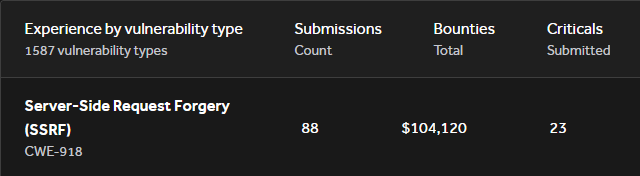
I've made over 100k on SSRF vulnerabilities.
They aren't always as simple as pointing it at localhost or AWS Metadata service.
Here are some tricks I've picked up over the past 5 years of web app testing:
I talk about this on the pod all the time, but CSRF is dead simple. You just need to know the conditions.
I'm not gonna recite them again here, but today a new condition came up:
No Content-Type header -> no CSRF restrictions
Same-site: None
POST
= CSRF
The research:
In this article, I break down how I built OSA, the architecture behind it, the tools I use, and the lessons I’ve learned along the way. https://t.co/00s1qu5Z1J