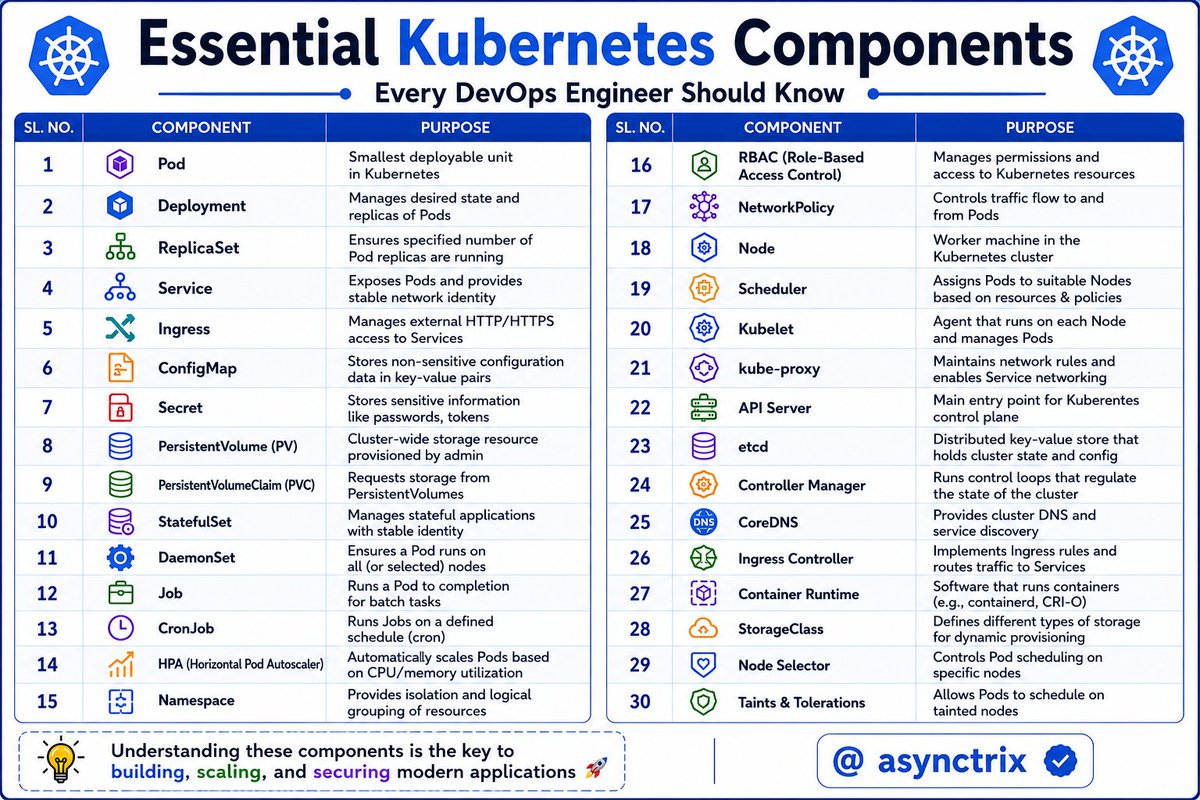
☸️ Kubernetes Looks Complex🔥
Until you understand
what each component actually does 👨💻
From Pods → API Server → CoreDNS,
these components work together
to run modern cloud applications at scale 🚀
If you're learning Kubernetes,
master these components first.
Everything else becomes easier after that 🔥
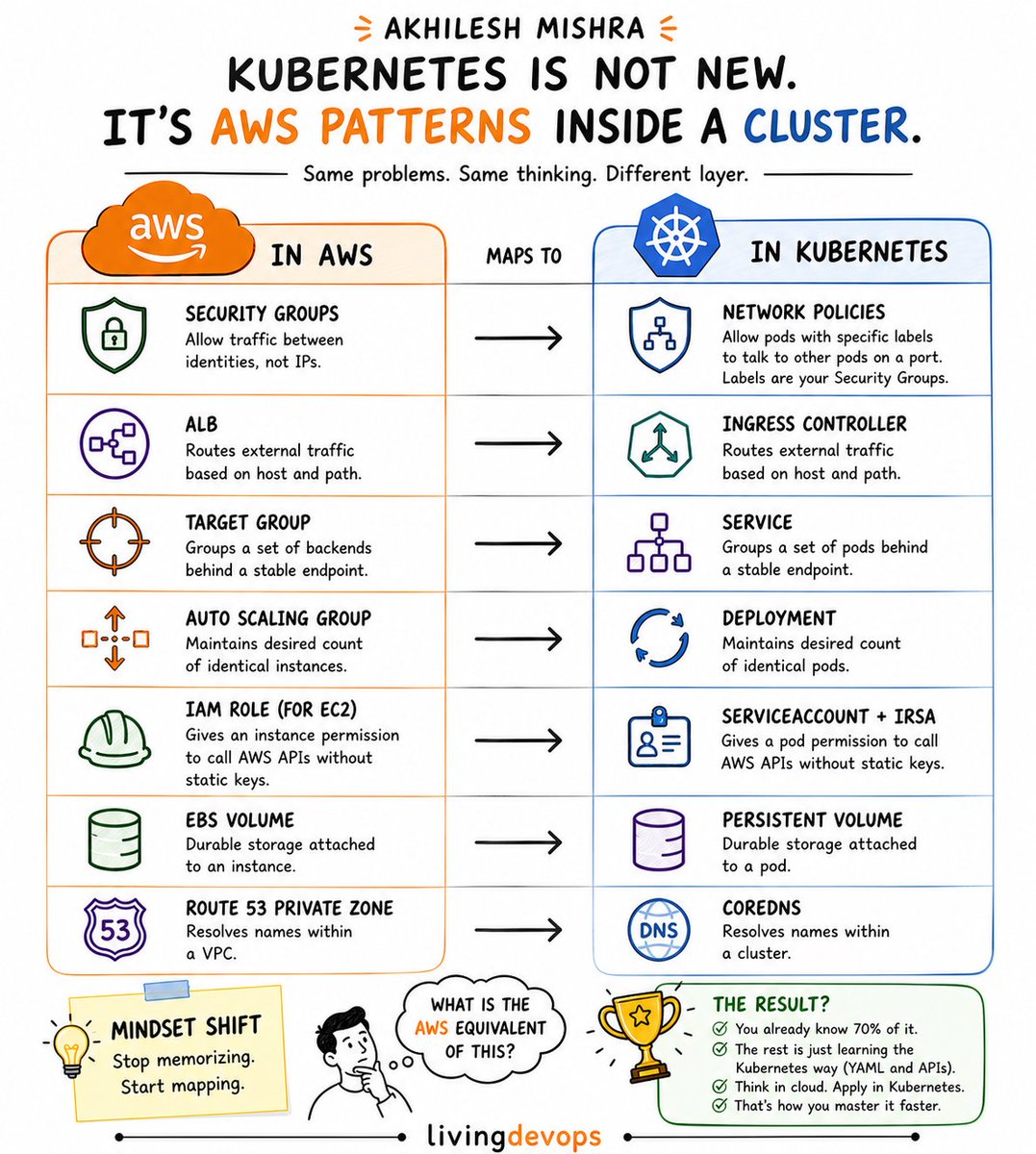
Kubernetes becomes much easier once you realize it is mostly the same AWS patterns you already know. Just running inside a cluster.
Take Network Policies, for example
In AWS, you create a Security Group rule like this:
> > Allow port 5432 from the app Security Group to the RDS Security Group
You are not opening random IPs.
You are allowing one identity to talk to another.
Kubernetes does the exact same thing:
> > Only pods with label `app=api` can talk to pods with label `app=db` on port 5432
That is basically a Security Group for pods.
And once this clicks, Kubernetes stops feeling alien.
More useful mappings:
> > ALB --> Ingress Controller
> > Target Group --> Service
> > Auto Scaling Group --> Deployment
> > IAM Role --> ServiceAccount + IRSA
> > EBS Volume --> PersistentVolume
> > Route 53 Private Zone --> CoreDNS
The engineers who struggle with Kubernetes try to memorize YAML.
If you already understand cloud architecture, you are already much closer to Kubernetes than you think.
You are not starting from zero.
You are translating concepts you already know.
System Design Series - Day 21/30
Alerting That Doesn't Destroy Your Sleep
Bad alerting is worse than no alerting.
If every little thing wakes you up at 3 AM, you’ll eventually ignore all alerts.
Then the real emergency comes… and you miss it.
Here’s how to build smart alerting that actually works (and lets you sleep peacefully).
Thread 👇
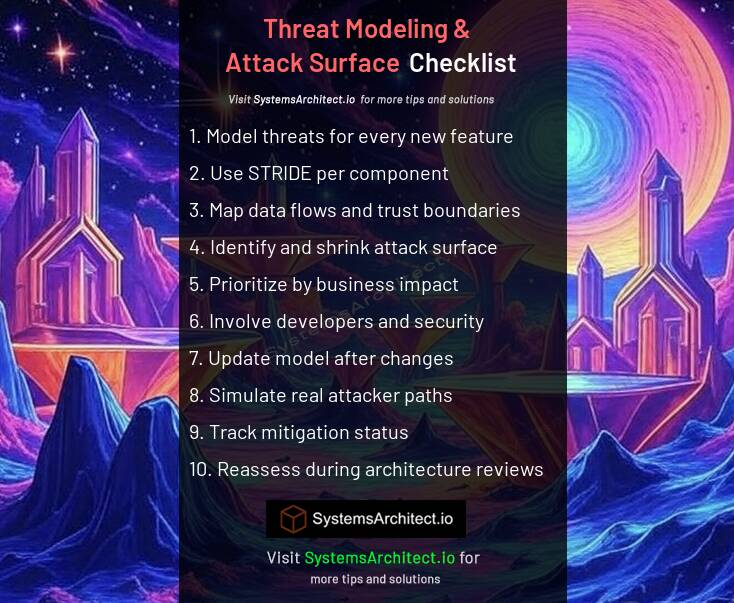
✅ Cloud Threat Modeling & Attack Surface Checklist (SEC13)
https://t.co/BGvMdsWNfU
Threat modeling is the structured practice of identifying what can go wrong, how likely it is, and what to do about it before an attacker finds the answer for you.
1. Model threats for every new feature
2. Use STRIDE per component
3. Map data flows and trust boundaries
4. Identify and shrink attack surface
5. Prioritize by business impact
6. Involve developers and security
7. Update model after changes
8. Simulate real attacker paths
9. Track mitigation status
10. Reassess during architecture reviews
I loved reading the first edition of "Designing Data-Intensive Applications". It is the most comprehensive book on the types of systems I work on. I recently started reading the second edition. It was a pleasant surprise—and rather humbling—to read the references in Chapter 1.
AI AGENT LAYERS
INPUT AND PERCEPTION LAYER
→ Collects and interprets user input from text, voice, images, or sensors
→ Processes natural language and external data sources
→ Converts raw input into structured information for decision-making
→ Technologies: NLP, Speech Recognition, Computer Vision
MEMORY LAYER
→ Stores short-term and long-term contextual information
→ Maintains conversation history and user preferences
→ Enables personalization and contextual reasoning
→ Technologies: Vector Databases, Embeddings, Knowledge Bases
REASONING LAYER
→ Analyzes information and makes intelligent decisions
→ Applies logic, inference, and contextual understanding
→ Helps the AI agent determine the best action to take
→ Technologies: LLMs, Rule Engines, Knowledge Graphs
PLANNING LAYER
→ Breaks complex goals into smaller actionable tasks
→ Creates workflows and execution sequences
→ Optimizes task completion strategies
→ Technologies: Task Planners, Workflow Engines, Agent Frameworks
TOOL USAGE LAYER
→ Connects the AI agent with external tools and APIs
→ Enables actions like web search, database queries, and automation
→ Expands the capabilities of the AI system beyond text generation
→ Examples: APIs, Browsers, Calculators, Code Interpreters
EXECUTION LAYER
→ Performs tasks and executes planned actions
→ Handles automation and task orchestration
→ Interacts with external systems and environments
→ Technologies: Python Scripts, Cloud Functions, Automation Pipelines
LEARNING AND FEEDBACK LAYER
→ Improves agent performance using feedback and interactions
→ Learns from previous outcomes and user corrections
→ Enhances decision-making accuracy over time
→ Technologies: Reinforcement Learning, Fine-Tuning, Feedback Loops
SECURITY AND GOVERNANCE LAYER
→ Ensures safe, secure, and ethical AI operations
→ Implements permissions, authentication, and policy enforcement
→ Prevents harmful or unauthorized actions
→ Technologies: Access Control, Encryption, Monitoring Systems
COMMUNICATION LAYER
→ Delivers responses and updates to users clearly
→ Supports multi-channel communication platforms
→ Ensures smooth human-AI interaction
→ Examples: Chat Interfaces, Voice Assistants, Messaging Platforms
OBSERVABILITY AND MONITORING LAYER
→ Tracks agent behavior, performance, and reliability
→ Logs activities, errors, and execution metrics
→ Helps improve system stability and debugging
→ Technologies: Logging Systems, Monitoring Dashboards, Alerts
FLOW OVERVIEW
USER
→ INPUT AND PERCEPTION LAYER
→ MEMORY LAYER
→ REASONING LAYER
→ PLANNING LAYER
→ TOOL USAGE LAYER
→ EXECUTION LAYER
→ COMMUNICATION LAYER
→ USER
This layered AI Agent architecture ensures intelligent automation, contextual reasoning, scalability, and reliable task execution.
Grab the AI Agent ebook: https://t.co/sv0fSvM3JV
Kubernetes Deployment Strategies need not be that complex to understand.
Here, I’ve made this to simplify the understanding.
48K+ read my DevOps and Cloud newsletter: https://t.co/wwkI6UOSo4
What do we cover:
DevOps, Cloud, Kubernetes, IaC, GitOps, MLOps
🔁 Consider a Repost if this is helpful
Most developers use Kafka.
Far fewer understand how Kafka actually works internally.
Here’s a simple Kafka Internals cheat sheet 👇
- Partitions
- Consumer Groups
- Replication
- Offsets
Follow @patilvishi for more system design content
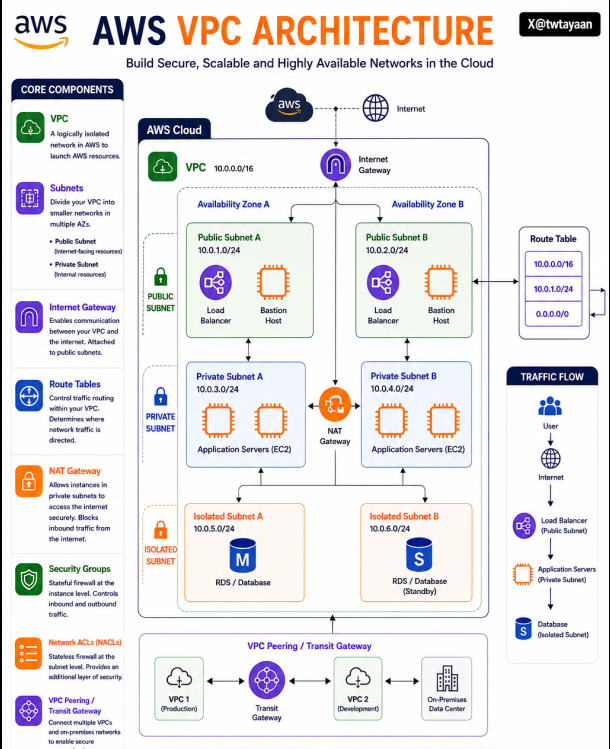
AWS VPC Architecture 🏗️
Amazon VPC helps you build isolated, secure, and scalable networks inside AWS for running cloud applications reliably.
→ Public subnets expose internet-facing resources like Load Balancers
→ Private subnets securely host internal application servers
→ Isolated subnets protect sensitive databases from direct internet access
→ Internet Gateway enables communication between VPC and the internet
→ NAT Gateway allows private instances to access the internet securely
→ Route Tables control how network traffic flows inside the VPC
→ Security Groups act as stateful firewalls for EC2 instances
→ NACLs provide subnet-level traffic filtering and security
→ Multi-AZ deployment improves availability and fault tolerance
→ VPC Peering and Transit Gateway connect multiple networks securely
🧵 Day 26/30 — #SystemDesign
Retries seem harmless.
An API fails → retry the request.
Still fails → retry again.
Simple… until thousands of servers start retrying together and accidentally take the entire system down.
That’s why production systems use Retry Strategies with Exponential Backoff instead of blind retries.
A retry mechanism helps recover from temporary failures like:
→ Network instability → Timeout issues → Short server overloads → Rate limiting
But retrying instantly creates traffic spikes during failures.
Exponential backoff solves this by increasing delay after every failed attempt.
Example:
→ Retry 1 → wait 1s → Retry 2 → wait 2s → Retry 3 → wait 4s → Retry 4 → wait 8s
This gives systems time to recover instead of getting overwhelmed.
Modern systems also add Jitter (randomness in delay) so millions of clients don’t retry at the exact same moment.
Without jitter:
→ Retry storm → Traffic spikes → Cascading failures
With jitter:
→ Requests spread naturally → Better recovery behavior → More stable systems
That’s why companies like AWS, Google, Stripe, and Netflix heavily recommend exponential backoff patterns in distributed systems.
Retries improve resilience. Uncontrolled retries destroy resilience.
#30DaysOfSystemDesign #DistributedSystems #BackendEngineering
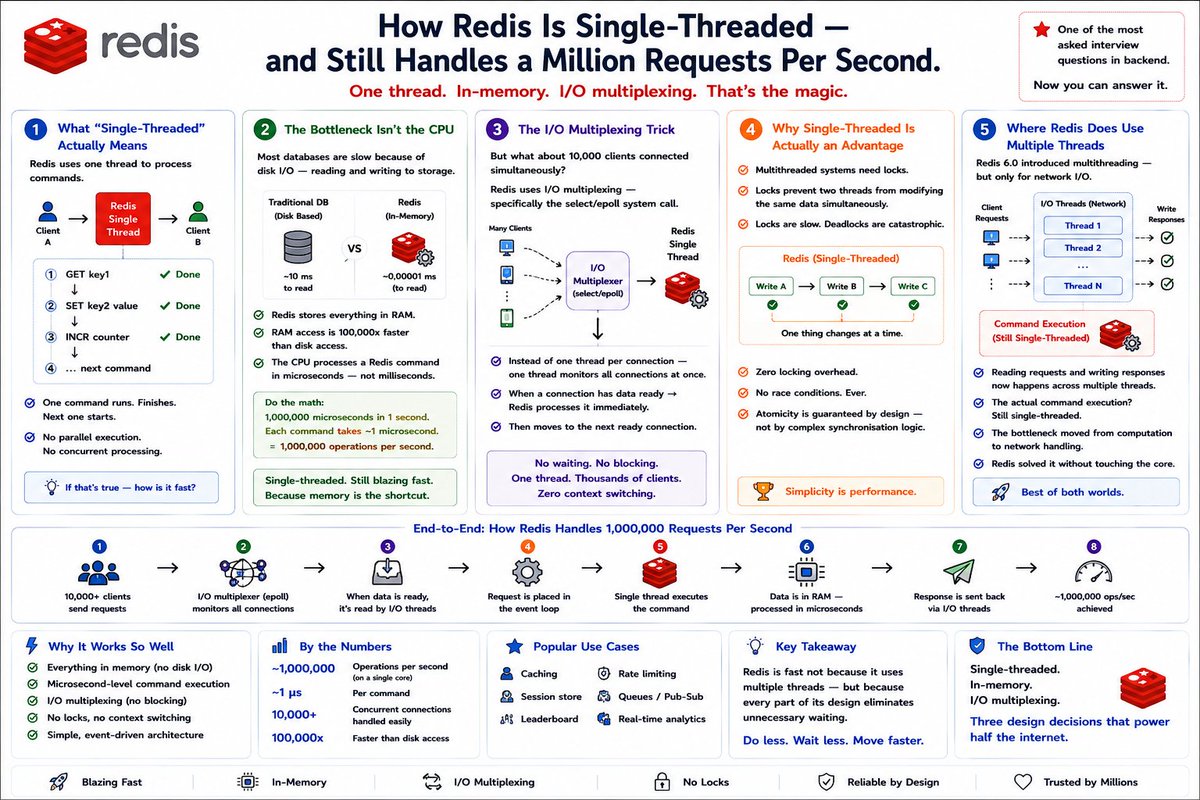
How Redis is single-threaded -
and still handles a million requests per second.
This is one of the most asked interview questions in backend.
Most people know Redis is fast.
Very few can explain why.
System Design Series - Day 16/30
DDoS Protection Patterns
Getting DDoS’d is terrifying.
One minute your API is working fine.
Next minute you’re getting 100,000 requests per second from 50 different countries.
Your servers melt.
Database crashes.
You go offline and start losing real money.
Here’s exactly how to survive a DDoS attack using layered protection.
Layer 1: Cloudflare (First Line of Defense)
Put Cloudflare in front of everything.
It absorbs attacks at the edge with 180+ global data centers and massive capacity.
Free tier already blocks:
- Volumetric attacks (SYN floods, UDP)
- Basic HTTP floods
- Most common bot patterns
Real example: A 500 Gbps attack hit our domain.
Cloudflare absorbed everything.
Our servers saw zero attack traffic.
Layer 2: AWS Shield / Cloud Armor
If you’re on AWS or GCP, enable their built-in protection.
AWS Shield Standard is free and provides automatic mitigation for ELB, CloudFront, and Route 53.
Layer 3: Rate Limiting at API Gateway
Block abusive patterns before they reach your backend:
- Same IP hitting too fast → throttle or block
- Suspicious User-Agent or missing headers → restrict
- Accessing only admin endpoints → auto-block
Layer 4: Challenge-Response (Human Verification)
Use Cloudflare Turnstile (invisible CAPTCHA alternative).
Only trigger challenges during sudden spikes or suspicious traffic.
Layer 5: Geo-Blocking
90% of DDoS traffic often comes from specific regions.
Temporarily block high-risk countries during active attacks while keeping your real users unaffected.
Real 3 AM Incident Response:
- 00:03:00 → Traffic suddenly 50x normal
- 00:03:30 → Cloudflare shows 95% traffic from Russia/China
- 00:04:00 → Enable “I’m Under Attack” mode
- 00:05:00 → Temporary geo-block non-core regions
- 00:06:30 → Attack neutralized
- Total downtime for real users: under 3 minutes
Our Current Stack (Total Cost ~$250/month):
- Cloudflare (free tier) → edge protection
- Kong Gateway → rate limiting
- AWS Shield Standard → automatic mitigation
- Datadog → monitoring & alerts
DDoS protection is no longer optional.
Set it up before you need it not at 3 AM while your CEO is calling you.
Tomorrow: How to design fault-tolerant APIs that survive anything.
Have you ever faced a DDoS attack?
What protection are you currently using?
Drop your experience below 👇
How AI Infrastructure Powers Production AI Agents (2026 Interview View)
Most candidates talk about LLMs + prompts
Top 1% engineers explain the full stack,
how AI infra makes agents reliable, scalable,
and cost-effective at production scale.
Why This Topic Dominates 2026 Interviews:
- Every company is moving from chatbots → autonomous AI agents
- Interviewers test: Can you design infra that supports reasoning, memory, tools, and multi-agent
collaboration without exploding costs or latency?
- Real challenge: Agents are bursty, stateful,
and tool-heavy traditional infra fails here.
Core Components: How AI Agents Actually Work:
1. Reasoning Engine (The Brain)
- LLM (Claude 3.5/4o, GPT-4o, or open-source) for planning & decision-making
- Multi-step reasoning (ReAct, Chain-of-Thought, Tree-of-Thoughts)
2. Memory Layer (Short + Long-Term)
- Short-term: Conversation history + working memory (in-context)
- Long-term: Vector DB (Pinecone, Chroma, Redis, Weaviate) + RAG for knowledge retrieval
- Graph DBs or SQLite for structured task history
3. Tool Use & Execution
- Agents call external tools (APIs, web search, code interpreter, databases, email)
- Standardized via MCP (Multi-Tool Control Protocol) or LangChain tools
4. Orchestration & Planning
- Frameworks: LangGraph (stateful graphs), CrewAI (role-based teams), AutoGen (conversational multi-agent)
- Agent decides: next action → tool call → reflection → loop until goal achieved
5. AI Infrastructure Layer (The Real System Design Part)
- Compute: GPUs/TPUs for inference (H100/B200 dominant; bursty workloads need spot + auto-scaling)
- Serving: Low-latency inference servers (vLLM, TensorRT-LLM, TGI) with batching + speculative decoding
- Observability: Causal tracing, token-level logging, cost attribution (80% of AI spend is inference)
- Scaling: Feature store + cache for embeddings, KV cache offloading to SSD for cost savings
Key Trade-offs Top Engineers Discuss:
- Latency vs Accuracy: Faster models (smaller) → cheaper but less intelligent agents
- Cost vs Autonomy: More tool calls & reasoning
steps = higher token cost (4x vs simple workflows)
- Statefulness vs Scalability: Long-running agents need persistent memory → harder to scale horizontally
- Single Agent vs Multi-Agent: Simpler but limited vs collaborative but complex debugging
- Inference Optimization: Quantization + batching can cut costs 40-70% but risks quality
Quick Infra Design Framework for Interviews:
1. Clarify agent type (single, multi-agent, long-running?)
2. Estimate load (QPS, tokens/sec, memory growth)
3. Sketch layers: LLM → Orchestrator → Memory (Vector DB) → Tools → Infra (GPU serving + observability)
4. Highlight bottlenecks: inference cost, memory retrieval latency, tool failure handling
5. End with optimizations: speculative decoding,
KV cache offload, hybrid workflow+agent patterns
One-Liner You Can Drop in Any Interview:
“I’d design the system with a LangGraph orchestration layer on top of a scalable inference infra (vLLM + GPU auto-scaling), persistent vector memory for RAG, and explicit cost/observability controls because agents only succeed when the infra makes them reliable and economical at scale.”
Master this and you’ll sound like you’ve actually shipped agentic systems.
Most candidates describe prompts.
Top performers describe the entire infra stack + trade-offs that make agents production-ready.
Follow for more sharp system design interview tips 👍
Hi all, @csjcode (founder) here, Feature Update on our SaaS MVP Tutorial series for Builders/Devs.
https://t.co/eINDM2bQbV
🛠️ This article = summary of ALL FEATURES included in EACH tutorial! (sections)
🔥 We have 40+ tutorials planned (10 done so far).
🔥 Some of each Tutorial (dev walkthrough, APIs, data model, scaling) is FREE, though FULL code/infra + AI integrations is for PRO members of the site.
🛠️ BUT, you can still get a ton out of each, even without logging in or PRO, eg. full PRODUCT development workflow, data models, API endpoints, and project.
🛠️ Tutorials vary: from EASY "features" for a larger app, to ADVANCED full self-standing apps.
🔥 We're calling it "SaaS MVP" because the focus is not only tech stack/code (although that's a big part!) but it also contains a full customer/business Saas WORKFLOW, product/marketing ideas.
🛠️ Also, it's a "STARTER" because it's highly customizable to your needs, gets you mostly there, but you may want to fine-tune aspects.
Most people look at this and think: “That’s a lot of AI.”
Wrong takeaway.
The Anthropic ecosystem behind Claude isn’t complexity, it’s leverage.
The gap today isn’t access to AI.
It’s knowing how to use it as a system.
Most people stay at the surface:
* Write emails
* Summarize docs
* Ask random questions
That’s not power usage.
Power users go deeper:
* Design workflows, not prompts
* Chain reasoning + tools + outputs
* Use AI for thinking, not just content
How to level up:
1. Build workflows (not one-off prompts)
2. Understand the layers (reasoning → tools → apps)
3. Use AI for decisions, not just writing
4. Automate with agents
5. Be precise, context is everything
AI won’t replace you.
But someone who uses systems like Claude properly will.
SLO vs SLI vs SLA
An 𝗦���𝗜 (Service Level Indicator) measures what’s actually happening in your system; like request latency, error rate, or uptime. It’s the raw signal that tells you how your service is performing.
An 𝗦𝗟𝗢 (Service Level Objective) defines the acceptable range for an SLI; like “99.9% of requests succeed within 200ms.” It’s what your team aims to achieve to maintain reliability.
An 𝗦𝗟𝗔 (Service Level Agreement) is a formal contract with users or customers, often tied to penalties if targets aren’t met. It defines the consequences, not just the goal.
And when failures occur, that’s where postmortems should close the loop.
But here’s the gap:
Most postmortems are written after the fact. Digging through Slack. Rebuilding timelines. Guessing what actually happened. Which means they’re slow, and painful. So they get deprioritised, half-finished, or never written at all.
That’s not just a process problem. It’s an experience and tooling problem.
incident[.]io’s new postmortem workflow flips this:
→ It builds the draft for you from real incident data
→ So you start with context, not a blank page
→ It turns postmortems into a collaborative, structured workflow that’s actually easy to write and complete
Worth a read → https://t.co/bZ3jEokLnf
SLIs tell you what happened.
SLOs define what should happen.
SLAs define what happens if you fail.
Postmortems are where you make sure it doesn’t happen again.
What else would you add?
——
♻️ Repost to help others learn and grow.
🙏 Thanks to @incident_io for sponsoring this post.
➕ Follow me ( Nikki Siapno ) to improve at system design.











![NikkiSiapno's tweet photo. SLO vs SLI vs SLA
An 𝗦���𝗜 (Service Level Indicator) measures what’s actually happening in your system; like request latency, error rate, or uptime. It’s the raw signal that tells you how your service is performing.
An 𝗦𝗟𝗢 (Service Level Objective) defines the acceptable range for an SLI; like “99.9% of requests succeed within 200ms.” It’s what your team aims to achieve to maintain reliability.
An 𝗦𝗟𝗔 (Service Level Agreement) is a formal contract with users or customers, often tied to penalties if targets aren’t met. It defines the consequences, not just the goal.
And when failures occur, that’s where postmortems should close the loop.
But here’s the gap:
Most postmortems are written after the fact. Digging through Slack. Rebuilding timelines. Guessing what actually happened. Which means they’re slow, and painful. So they get deprioritised, half-finished, or never written at all.
That’s not just a process problem. It’s an experience and tooling problem.
incident[.]io’s new postmortem workflow flips this:
→ It builds the draft for you from real incident data
→ So you start with context, not a blank page
→ It turns postmortems into a collaborative, structured workflow that’s actually easy to write and complete
Worth a read → https://t.co/bZ3jEokLnf
SLIs tell you what happened.
SLOs define what should happen.
SLAs define what happens if you fail.
Postmortems are where you make sure it doesn’t happen again.
What else would you add?
——
♻️ Repost to help others learn and grow.
🙏 Thanks to @incident_io for sponsoring this post.
➕ Follow me ( Nikki Siapno ) to improve at system design.](https://pbs.twimg.com/media/HHEznH1a4AEsfE8.jpg)