If you want to learn AI infrastructure in 2026,
This is for you 👇
When it comes to running AI/ML workloads on Kubernetes, Kubeflow is the foundation platform.
When the project started, it was primarily built as an MLOps platform for Kubernetes to build and manage traditional ML pipelines.
Fast forward to 2026 and the platform has changed a lot.
It is no longer just an MLOps platform.
It has become a cloud-native AI platform for building and operating GenAI, LLMOps, Agentic AI, distributed AI training, and fine-tuning foundation models.
In our newsletter, we covered the following.
- Understand the Kubeflow stack
- Learn how Kubeflow Pipelines work
- Explore the KFP architecture and execution flow
- Creating a KFP pipeline from scratch on Kubernetes
- A look into Cloudflare’s in-house MLOps platform
and more..
𝗥𝗲𝗮𝗱 𝗶𝘁 𝗛𝗲𝗿𝗲: https://t.co/HICjMzsnWJ
♻️ If you find it useful, share it with fellow DevOps and Cloud Engineers.
#devops #MLOps #kubernetes
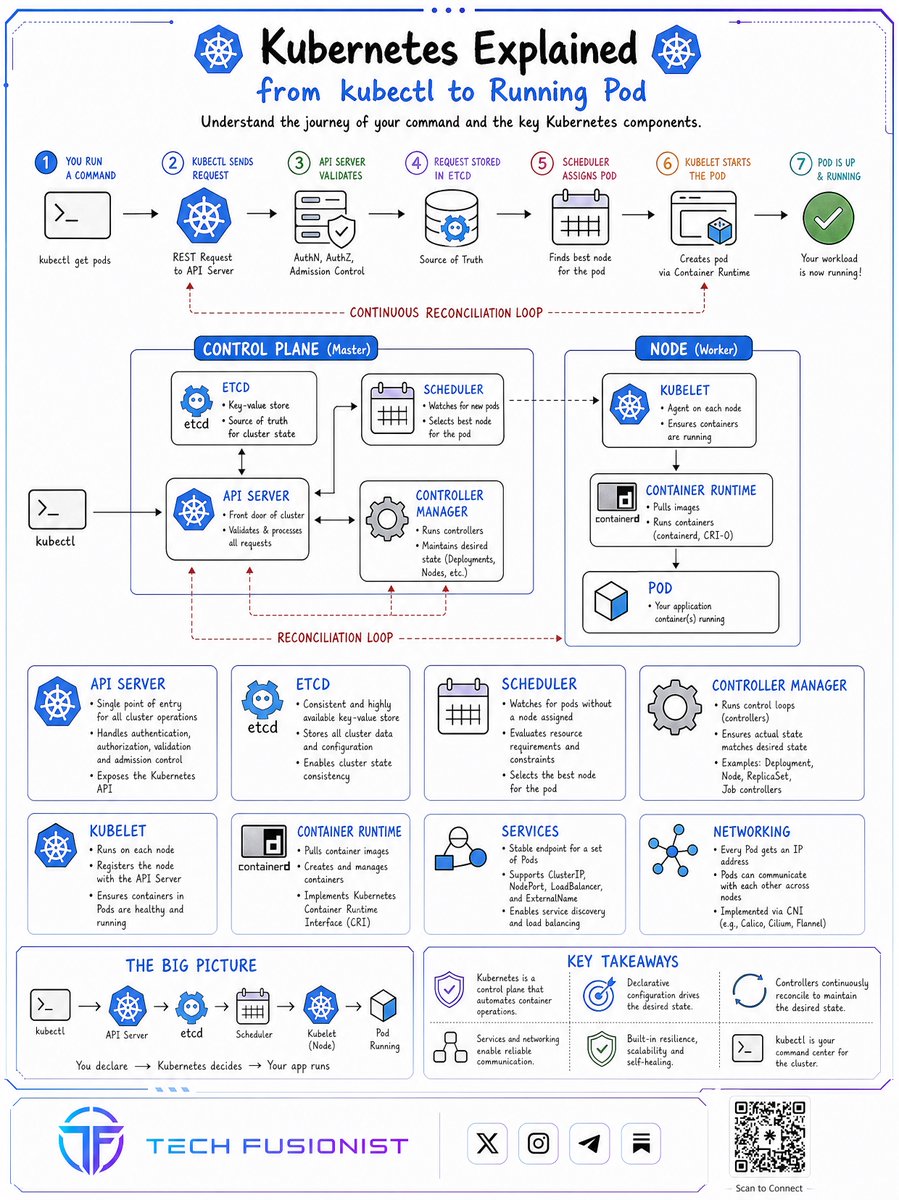
𝗞𝗨𝗕𝗘𝗥𝗡𝗘𝗧𝗘𝗦 𝗪𝗢𝗥𝗞𝗘𝗥 𝗡𝗢𝗗𝗘𝗦 𝗘𝗫𝗣𝗟𝗔𝗜𝗡𝗘𝗗.
Think of a Kubernetes Worker Node like a fully equipped kitchen in a large restaurant.
The Control Plane manages the restaurant, but the kitchen is where the actual work happens. Similarly, Worker Nodes are the machines responsible for running your applications inside a Kubernetes cluster.
Here's how each component works.
𝗪𝗼𝗿𝗸𝗲𝗿 𝗡𝗼𝗱𝗲 = “The kitchen”
A Worker Node is a physical or virtual machine that runs application workloads. It provides CPU, memory, networking, and storage resources required to run Pods.
𝗞𝘂𝗯𝗲𝗹𝗲𝘁 = “The kitchen supervisor”
Kubelet runs on every Worker Node. It communicates with the API Server and ensures that the Pods assigned to its node are running as expected.
𝗖𝗼𝗻𝘁𝗮𝗶𝗻𝗲𝗿 𝗥𝘂𝗻𝘁𝗶𝗺𝗲 = “The cooking equipment”
The container runtime is responsible for running containers inside Pods. Examples include containerd and CRI-O.
𝗞𝘂𝗯𝗲-𝗽𝗿𝗼𝘅𝘆 = “The traffic coordinator”
Kube-proxy maintains network rules that enable communication between Services and their backend Pods. It helps route traffic to the appropriate application instances.
𝗣𝗼𝗱𝘀 = “The individual kitchen stations”
Pods are the smallest deployable units in Kubernetes. Each Pod contains one or more containers that share networking and can share storage resources.
𝗖𝗼𝗻𝘁𝗮𝗶𝗻𝗲𝗿𝘀 = “The actual cooking activities”
Containers package applications with their dependencies and run inside Pods. They execute the workloads that your users interact with.
𝗩𝗼𝗹𝘂𝗺𝗲𝘀 = “The storage shelves”
Volumes provide storage to containers inside Pods. They allow applications to access shared or persistent data, depending on the volume type.
𝗡𝗼𝗱𝗲 𝗥𝗲𝘀𝗼𝘂𝗿𝗰𝗲𝘀 = “The kitchen's available capacity”
Every Worker Node has limited CPU, memory, and storage. Kubernetes uses resource requests and limits to help allocate resources and manage workloads.
The simple mental model:
→ Worker Node: Provides the machine that runs applications.
→ Kubelet: Ensures assigned Pods are running.
→ Container Runtime: Runs containers.
→ Kube-proxy: Helps manage Service networking.
→ Pods: Host application containers.
→ Volumes: Provide storage.
→ Node Resources: Supply CPU and memory.
𝗛𝗼𝘄 𝗱𝗼𝗲 𝗶𝘁 𝗮𝗹𝗹 𝘄𝗼𝗿𝗸 𝘁𝗼𝗴𝗲𝘁𝗵𝗲𝗿?
The Control Plane schedules a Pod onto a suitable Worker Node.
Kubelet receives the assignment.
Kubelet instructs the container runtime to create and run the containers.
Containers start executing your application.
Networking components enable communication with other workloads and Services.
Kubelet continuously monitors the Pods and reports their status to the Control Plane.
The key idea: The Control Plane makes decisions, while Worker Nodes execute workloads.
Without Worker Nodes, Kubernetes would have nowhere to run your applications.
𝗚𝗿𝗮𝗯 𝘁𝗵𝗲 𝗞𝘂𝗯𝗲𝗿𝗻𝗲𝘁𝗲𝘀 𝗲𝗯𝗼𝗼𝗸 → https://t.co/1JQaCCc17i
What else would you add?
——
Repost to help others learn Kubernetes.
Follow me ( @e_opore ) to improve at AI and system design.
Jensen drove supply chain brilliantly at Nvidia, but many of those deals were a handshake with Jensen, not a written contract.
Without Jensen, at least some of those critical deals will be lost.
New instructor-led course: Building GPU Platforms on Kubernetes
From Kubernetes fundamentals to GPU allocation, sharing, isolation, and efficiency, including NVIDIA Kubernetes Engine (NVKE)
https://t.co/AaTff62XTa
Kubernetes Operators can help you wrangle complex applications.
They let you manage external systems like everything else in the cluster.
In this handbook, @karan_6864 goes over how to create operators to automate tasks in Kubernetes apps.
https://t.co/exYNDFln4a
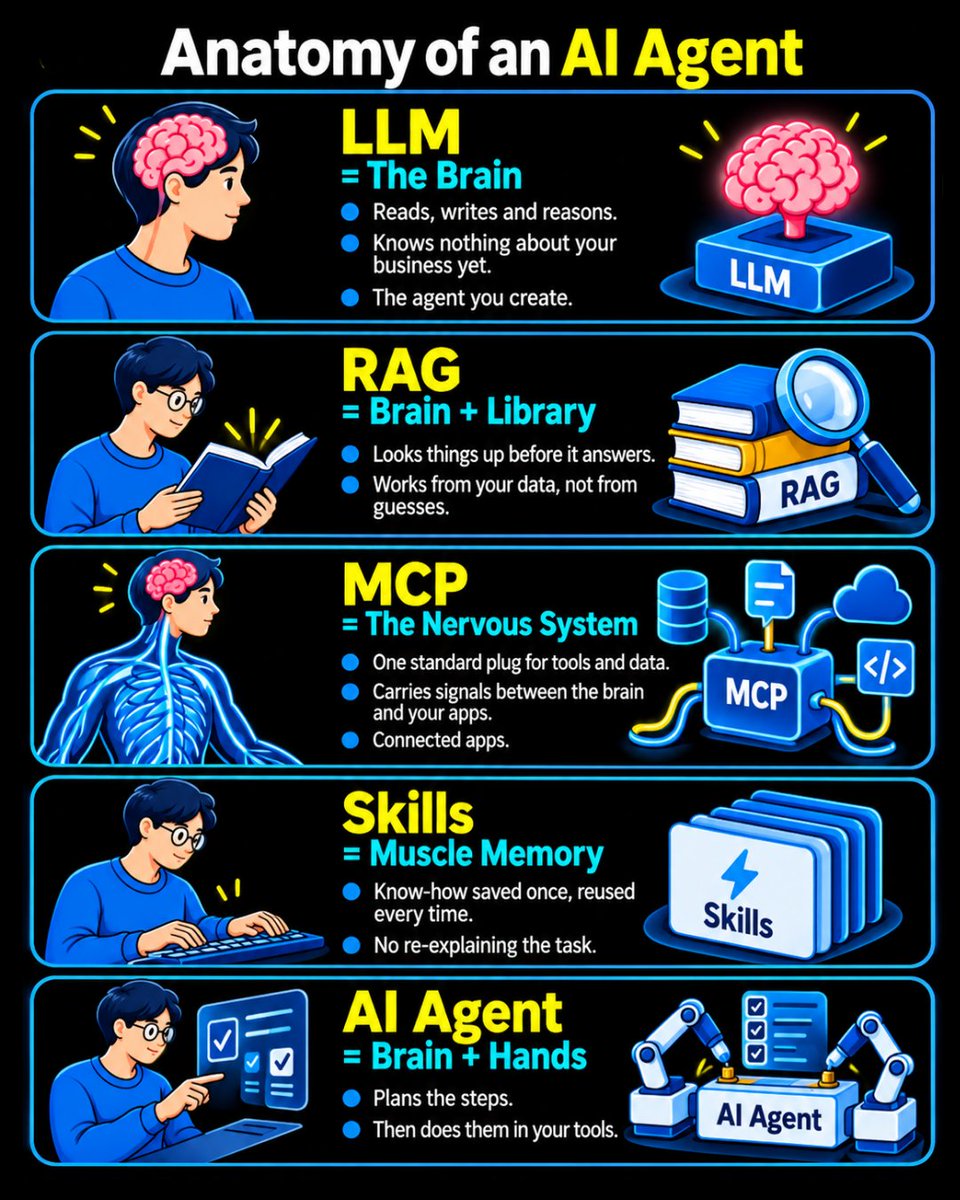
Anatomy of an AI Agent: Understanding the 5 Key Components
An AI Agent is more than just an LLM. It's a combination of intelligence, knowledge, tools, and execution.
Here's how the main components work together:
1️⃣ LLM = The Brain
Reads, writes, reasons, and makes decisions.
2️⃣ RAG = Brain + Library
Retrieves relevant information from external knowledge sources before generating answers.
3️⃣ MCP = The Nervous System
Connects AI models with external tools, applications, and data through a standardized protocol.
4️⃣ Skills = Muscle Memory
Reusable instructions and workflows that help an agent perform tasks consistently.
5️⃣ AI Agent = Brain + Hands
Combines reasoning, planning, and tools to execute tasks autonomously.
The Big Picture:
LLM provides intelligence.
RAG provides knowledge.
MCP provides connectivity.
Skills provide reusable capabilities.
AI Agents bring everything together to get work done.
Want to Learn More? Explore These AI Courses from CLCODING:
1. IBM RAG and Agentic AI Professional Certificate
Learn RAG, LangChain, LangGraph, CrewAI, MCP, vector databases, and multi-agent systems.
https://t.co/YNzp0HsD5J
2. Agentic AI Foundations: Build RAG & MCP Chatbots
Learn AI agents, embeddings, RAG pipelines, MCP, tool calling, and chatbot development.
https://t.co/8Y7yoVy02G
Explore more AI, Python, and Data Science learning resources:
Kubernetes User Namespaces ⚡
It is a security feature that maps user and group IDs inside a container to a different set of IDs on the host (Rootless Isolation)
Here is the key idea.
A process running as root (UID 0) inside the container runs as an unprivileged user (eg, UID 100000) on the host.
Without user namespaces, when a container runs as root, it uses the same root identity as the host.
So if an attacker breaks out of the container, they get full host privileges.
We have published a hands-on guide covering the following.
- What are User Namespaces
- How the kernel does the root-to-non-root user mapping
- What changes when you set hostUsers: false
- Limiting host UID ranges using /etc/subuid file
- Hands-on deployment to understand User Namespace
- User Namespace limitations
𝗥𝗲𝗮𝗱 𝗶𝘁 𝗛𝗲𝗿𝗲: https://t.co/F6HmkliHvS
Have you tried this feature yet?
♻️ PS: Repost and share this with the community!
#devops #kubernetes
𝗖𝗼𝗻𝘁𝗮𝗶𝗻𝗲𝗿𝘀 𝘃𝘀 𝗩𝗶𝗿𝘁𝘂𝗮𝗹 𝗠𝗮𝗰𝗵𝗶𝗻𝗲𝘀 𝘃𝘀 𝗦𝗮𝗻𝗱𝗯𝗼𝘅𝗲𝘀.
Do you know the differences?
A 𝗰𝗼𝗻𝘁𝗮𝗶𝗻𝗲𝗿 isolates processes on a shared kernel. Namespaces control what each process can see, and cgroups control what resources it can use. They start fast and pack densely on one host.
For stronger isolation, 𝘃𝗶𝗿𝘁𝘂𝗮𝗹 𝗺𝗮𝗰𝗵𝗶𝗻𝗲𝘀 run their own operating systems. A hypervisor gives each VM virtual hardware and a separate guest kernel, creating a stronger boundary between workloads.
When the code itself can’t be trusted, that’s where 𝘀𝗮𝗻𝗱𝗯𝗼𝘅𝗶𝗻𝗴 comes in. Sandboxes restrict what code can access, such as system calls, network connections, and files. Often built on containers or lightweight VMs, they can use technologies like gVisor, Firecracker, or seccomp filters.
Containers isolate processes. VMs isolate operating systems. Sandboxes restrict what untrusted code can access.
But when the code comes from an AI agent, containing the run is only half of it.
The agent's output still has to land somewhere: the company's codebase, its live product. A sandbox limits what code can touch while it runs, not what ships afterwards.
So the boundary has two parts: an isolated place for the agent to work, and a review step before changes reach production. Replit runs agents in isolated cloud environments, away from employee laptops. For work on an existing company codebase, agents turn their work into proposed changes for engineering to review.
The agent proposes the change. Engineering decides what ships.
𝗦𝗲𝗲 𝗵𝗼𝘄 𝗥𝗲𝗽𝗹𝗶𝘁 𝗿𝘂𝗻𝘀 𝗮𝗴𝗲𝗻𝘁𝘀 𝗳𝗼𝗿 𝗰𝗼𝗺𝗽𝗮𝗻𝗶𝗲𝘀 → https://t.co/Q3hwKAwPRy
What else would you add?
——
♻️ Repost to help others learn and grow.
🙏 Thanks to @Replit for sponsoring this post.
➕ Follow me ( Nikki Siapno ) to improve at system design and AI.
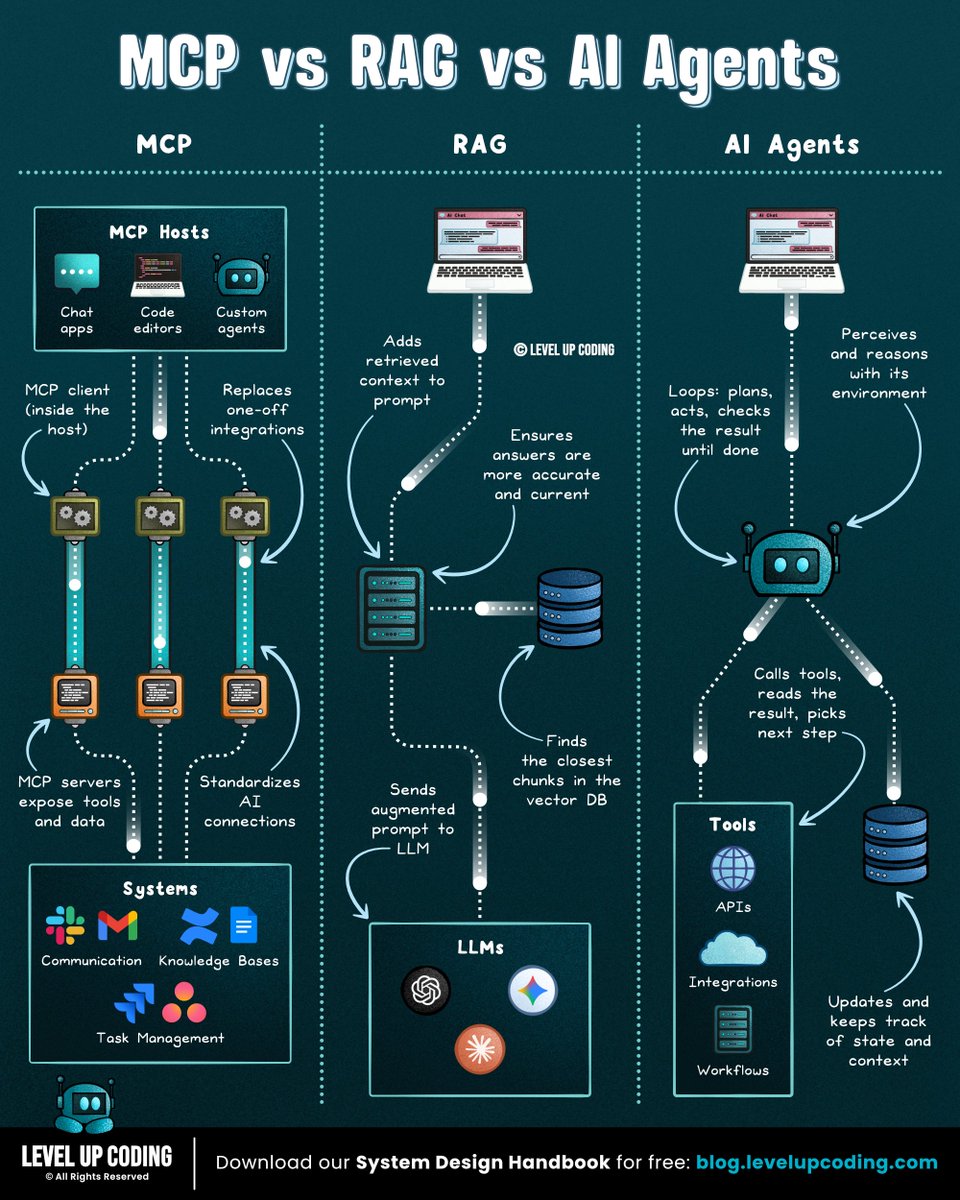
𝗠𝗖𝗣 𝘃𝘀 𝗥𝗔𝗚 𝘃𝘀 𝗔𝗜 𝗔𝗴𝗲𝗻𝘁𝘀.
𝗠𝗖𝗣 𝗶𝘀 𝘁𝗵𝗲 𝗰𝗼𝗻𝗻𝗲𝗰𝘁𝗶𝗼𝗻 𝗹𝗮𝘆𝗲𝗿. It gives AI systems a standard way to connect to external systems and capabilities. MCP servers expose tools for querying databases, calling APIs, or taking actions, without requiring custom integrations for every client. But it handles connectivity, not retrieval.
That's where 𝗥𝗔𝗚 comes in. It searches your docs at query time, pulling relevant chunks into the prompt so answers can draw from your data. Keeping it current means updating an index, not retraining the model. In a basic RAG pipeline, the flow is straightforward: retrieve, then answer.
Now with 𝗔𝗜 𝗔𝗴𝗲𝗻𝘁𝘀, the model runs in a loop: plan a step, call a tool, read the result, repeat until the goal is met. That handles multi-step tasks, at the cost of more latency, tokens, and failure points.
So the choice comes down to the gap you're closing: access to systems, knowledge from your data, or action over many steps.
But executing a task successfully doesn't necessarily mean it's still the right task.
Priorities shift, budgets change, and teams move between projects. Both humans and AI agents can keep executing work that no longer aligns with the bigger plan.
The problem is that strategy, capacity, spend, and execution data often live in different systems. By the time a quarterly review reveals the gap between plan and reality, time and budget have already been spent.
Catching that drift early means continuously connecting what was planned with the work actually happening, across both human teams and AI agents.
Tempo Loop brings together time, capacity, spend, and execution data in one unified view across human and AI-agent work.
It answers a simple question without chasing status updates: Are we still working on the right things?
When something drifts, Loop identifies the gap, recommends corrective actions with tradeoff context, and orchestrates approved changes back into the systems teams already use, like Jira.
𝗔𝗴𝗲𝗻𝘁𝘀 𝗹𝗼𝗼𝗽 𝗼𝗻 𝘁𝗮𝘀𝗸𝘀. 𝗧𝗵𝗶𝘀 𝗼𝗻𝗲 𝗹𝗼𝗼𝗽𝘀 𝗼𝗻 𝗽𝗿𝗶𝗼𝗿𝗶𝘁𝗶𝗲𝘀.
𝗦𝗲𝗲 𝗵𝗼𝘄 𝗧𝗲𝗺𝗽𝗼 𝗟𝗼𝗼𝗽 𝘄𝗼𝗿𝗸𝘀 → https://t.co/gG53bFKIYa
What else would you add?
——
♻️ Repost to help others learn AI.
🙏 Thanks to @TempoHQ for sponsoring this post.
➕ Follow me ( Nikki Siapno ) to improve at AI and system design.
GPU scheduling in Kubernetes is becoming an important skill now.
Here is why 👇
Most organizations are either experimenting or running ML workloads in Kubernetes.
As Devops engineers you should know how to set up and manage GPU resources.
We have created a simple guide on setting up GPU node using NVIDIA GPU Operator
By the end of this blog, you will have a clear understanding of:
- Need for GPU operator on Kubernetes
- Setting up NVIDIA GPU Operator on a Kubernetes cluster
- Verify if Kubernetes detects GPUs
- How to deploy a real GPU-based workload to validate the full stack.
To be honest, it is not as complicated as it sounds once you understand the basics.
Even if you dont have access to GPU's, just go through the content to have an understanding on how it works.
𝗥𝗲𝗮𝗱 𝗶𝘁 𝗵𝗲𝗿𝗲: https://t.co/nTPpIb0rtW
#devops #mlops
Introducing Claude Fable 5.2 and Claude Mythos 5.2, designed to tackle the most daunting technical challenges.
They’re capable collaborators on ambitious projects in many fields, and show improvements in areas like coding, reasoning, and vision.
Deploying Pods is one skill. Understanding Kubernetes networking in production takes these 15. 👇
𝐊𝐮𝐛𝐞𝐫𝐧𝐞𝐭𝐞𝐬 𝐍𝐞𝐭𝐰𝐨𝐫𝐤𝐢𝐧𝐠: 𝟏𝟓 𝐏𝐫𝐨𝐝𝐮𝐜𝐭𝐢𝐨𝐧 𝐒𝐤𝐢𝐥𝐥𝐬 𝐁𝐞𝐲𝐨𝐧𝐝 𝐁𝐚𝐬𝐢𝐜 𝐂𝐍𝐈
1. 𝐂𝐍𝐈 & 𝐈𝐏𝐀𝐌
Understand how Pods receive interfaces, IP addresses, and routes. Diagnose IP exhaustion and failed network setup.
2. 𝐏𝐨𝐝-𝐭𝐨-𝐏𝐨𝐝 𝐑𝐨𝐮𝐭𝐢𝐧𝐠
Trace same-node and cross-node traffic. Know whether your cluster uses an overlay or directly routed Pod IPs.
3. 𝐎𝐕𝐍
Understand logical switches, routers, ACLs, and load balancers in clusters using OVN.
4. 𝐎𝐩𝐞𝐧 𝐯𝐒𝐰𝐢𝐭𝐜𝐡 (𝐎𝐕𝐒)
Inspect bridges, ports, tunnels, and flows. Connect OVN’s logical configuration to actual packet forwarding.
5. 𝐕𝐏𝐂 𝐑𝐨𝐮𝐭𝐢𝐧𝐠
Map Pod CIDRs, node subnets, route tables, and cloud firewalls. Always verify the return path.
6. 𝐒𝐞𝐫𝐯𝐢𝐜𝐞 𝐕𝐈𝐏𝐬
Understand how a ClusterIP reaches backend Pods. Identify which component implements Service forwarding in your cluster.
7. 𝐒𝐞𝐫𝐯𝐢𝐜𝐞 𝐋𝐨𝐚𝐝 𝐁𝐚𝐥𝐚𝐧𝐜𝐢𝐧𝐠
Learn your actual dataplane: kube-proxy or a CNI-provided implementation. Troubleshoot backend selection and connection persistence.
8. 𝐄𝐧𝐝𝐩𝐨𝐢𝐧𝐭𝐒𝐥𝐢𝐜𝐞𝐬
Check backend IPs, ports, and readiness conditions. A Service can exist while having no eligible backends.
9. 𝐒𝐍𝐀𝐓
Understand when source addresses change. Track the IP external systems actually see.
10. 𝐃𝐍𝐀𝐓
Trace destination translation from a Service address to a backend. Verify 𝚙𝚘𝚛𝚝, 𝚝𝚊𝚛𝚐𝚎𝚝𝙿𝚘𝚛𝚝, and application listeners.
11. 𝐄𝐠𝐫𝐞𝐬𝐬 𝐆𝐚𝐭𝐞𝐰𝐚𝐲𝐬
Use implementation-specific egress controls for predictable outbound IPs. Test failover, routing, and external allowlists.
12. 𝐍𝐞𝐭𝐰𝐨𝐫𝐤 𝐏𝐨𝐥𝐢𝐜𝐢𝐞𝐬
Start with default deny, then allow required traffic. Check both source egress and destination ingress, including DNS.
13. 𝐄𝐱𝐭𝐞𝐫𝐧𝐚𝐥 𝐓𝐫𝐚𝐟𝐟𝐢𝐜 & 𝐒𝐨𝐮𝐫𝐜𝐞 𝐈𝐏
Understand LoadBalancer, NodePort, and 𝚎𝚡𝚝𝚎𝚛𝚗𝚊𝚕𝚃𝚛𝚊𝚏𝚏𝚒𝚌𝙿𝚘𝚕𝚒𝚌𝚢. Test source-IP preservation and nodes without local backends.
14. 𝐃𝐍𝐒 & 𝐌𝐓𝐔
Debug name resolution separately from connectivity. Check tunnel overhead when small requests work but larger transfers stall.
15. 𝐏𝐚𝐜𝐤𝐞𝐭-𝐋𝐞𝐯𝐞𝐥 𝐓𝐫𝐨𝐮𝐛𝐥𝐞𝐬𝐡𝐨𝐨𝐭𝐢𝐧𝐠
Combine 𝚝𝚌𝚙𝚍𝚞𝚖𝚙, route inspection, conntrack, and dataplane tools. Find exactly where packets disappear.
Practice tracing two paths:
Pod → Service → backend Pod
Pod → egress path → external API → return path
Bookmark this for your next networking incident or platform engineering interview. 🔖
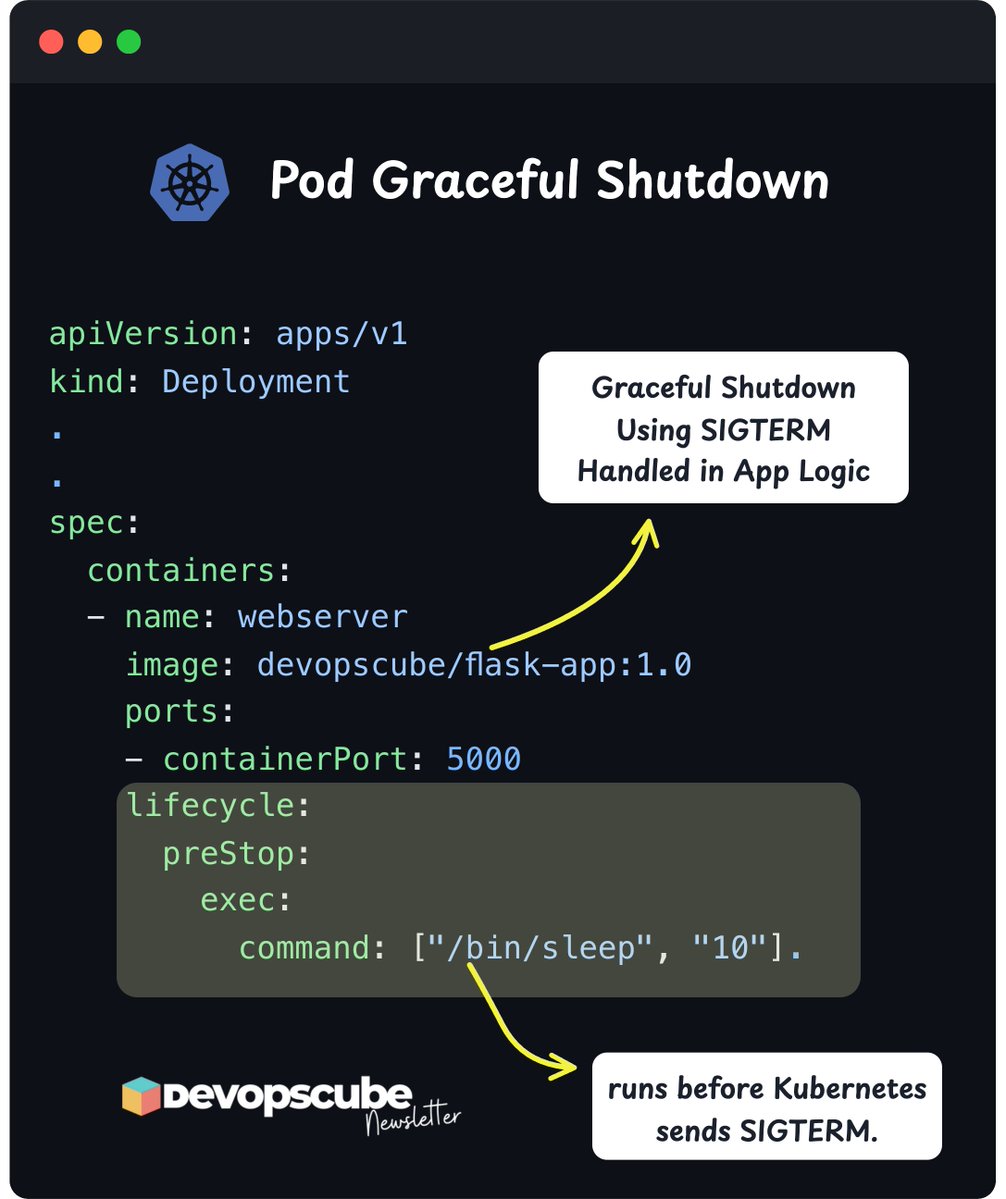
Deleting a pod ≠ stopping it instantly
Here is the hidden shutdown flow Kubernetes follows👇
- The API server sends a deletion event.
- Kubernetes executes the PreStop hook if any exists.
- kubelet sends a SIGTERM signal to the container's main process (PID 1).
- Applications have 30 seconds by default to handle the signal and shut down gracefully.
- If the application process does not exit within the grace period, Kubernetes sends a SIGKILL signal to terminate the pod.
𝗡𝗼𝘁𝗲: Kubernetes does not give extra time for the PreStop hook. If your pod has a 30-second grace period, the PreStop hook and your app’s shutdown process must both finish within those same 30 seconds.
We covered the following in detail in our newsletter edition.
- What are SIGTERM and SIGKILL
- How Kubernetes handles SIGTERM and SIGKILL
- How applications can handle SIGTERM for graceful shutdown
- The role of PreStop hooks and why it matters
- The link between SIGTERM and container PID 1
→ 𝗥𝗲𝗮𝗱 𝗶𝘁 𝗛𝗲𝗿𝗲: https://t.co/jGjVUm0aSa
Over to you…
Have you written any custom logic to handle SIGTERM?
#devops #kubernetes