This is it.
Everything learned spending millions on longevity.
From: Your Immortal Unc and Auntie.
To: Our Immortal nieces and nephews.
0. Sleep is the world's most powerful drug.
1. Be in your bed for 8 hours
2. Same bedtime every night, any time before midnight
3. Don’t eat right before bed
4. Calm foods for dinner
5. No screens 1 hour before bed
6. Avoid added sugar (be aware it’s in everything)
7. Avoid all things in an American convenience store
8. Avoid fried foods
9. Shoes off at the door
10. Eat whole foods, particularly veggies fruits nuts legumes berries
11. Walk a little after meals or air squats
12. Get your heart rate high routinely
13. Lift heavy things
14. Stretch daily
15. Water pik, floss, brush, tongue scrape, morning and night
16. Make an effort to drink water
17. Get sunlight when you wake up (UV is low)
18. Protect skin in midday sun
19. Stand up straight
20. See at least one friend once a week
21. Avoid plastic where you can (in all things)
22. Circulate air in rooms
23. When stressed, breathe, learn to calm your body
24. Go to the dentist
25. Avoid sitting for long times
26. Protect your hearing, the world is too loud
27. Alcohol is bad for you
28. Finish coffee before noon
29. Avoid bright lights after sunset
30. If obese, look into a GLP
31. Sleep in a cold room
32. Texting while driving is dangerous
33. Turn off all notifications
34. Limit social media use
35. Don’t smoke anything
36. If you struggle to sleep, read a physical book before bed
37. 1 hour before bed have a calm wind down routine: bath, read, light walk, listen to music
38. The body is a clock and loves routine. Have a daily morning and evening schedule.
39. Avoid long distance travel where you can
40. Baby steps first: incorporate new things slowly
41. Do less… most things don’t work.
Bonus points if you get your blood checked.
Start here, it will change your life.
Agency > Intelligence
I had this intuitively wrong for decades, I think due to a pervasive cultural veneration of intelligence, various entertainment/media, obsession with IQ etc. Agency is significantly more powerful and significantly more scarce. Are you hiring for agency? Are we educating for agency? Are you acting as if you had 10X agency?
Grok explanation is ~close:
“Agency, as a personality trait, refers to an individual's capacity to take initiative, make decisions, and exert control over their actions and environment. It’s about being proactive rather than reactive—someone with high agency doesn’t just let life happen to them; they shape it. Think of it as a blend of self-efficacy, determination, and a sense of ownership over one’s path.
People with strong agency tend to set goals and pursue them with confidence, even in the face of obstacles. They’re the type to say, “I’ll figure it out,” and then actually do it. On the flip side, someone low in agency might feel more like a passenger in their own life, waiting for external forces—like luck, other people, or circumstances—to dictate what happens next.
It’s not quite the same as assertiveness or ambition, though it can overlap. Agency is quieter, more internal—it’s the belief that you *can* act, paired with the will to follow through. Psychologists often tie it to concepts like locus of control: high-agency folks lean toward an internal locus, feeling they steer their fate, while low-agency folks might lean external, seeing life as something that happens *to* them.”
I'm observing a mini Moravec's paradox within robotics: gymnastics that are difficult for humans are much easier for robots than "unsexy" tasks like cooking, cleaning, and assembling. It leads to a cognitive dissonance for people outside the field, "so, robots can parkour & breakdance, but why can't they take care of my dog?" Trust me, I got asked by my parents about this more than you think ...
The "Robot Moravec's paradox" also creates the illusion that physical AI capabilities are way more advanced than they truly are. I'm not singling out Unitree, as it applies widely to all recent acrobatic demos in the industry. Here's a simple test: if you set up a wall in front of the side-flipping robot, it will slam into it at full force and make a spectacle. Because it's just overfitting that single reference motion, without any awareness of the surroundings.
Here's why the paradox exists: it's much easier to train a "blind gymnast" than a robot that sees and manipulates. The former can be solved entirely in simulation and transferred zero-shot to the real world, while the latter demands extremely realistic rendering, contact physics, and messy real-world object dynamics - none of which can be simulated well.
Imagine you can train LLMs not from the internet, but from a purely hand-crafted text console game. Roboticists got lucky. We happen to live in a world where accelerated physics engines are so good that we can get away with impressive acrobatics using literally zero real data. But we haven't yet discovered the same cheat code for general dexterity.
Till then, we'll still get questioned by our confused parents.
Glass had 5 – 50× higher plastic than plastic or cans
The French tested water, soda, beer, iced tea, lemonade, and wine sold nationwide and found that glass-bottled beverages carried far more plastic shrapnel than plastic bottles or cans.
🧵
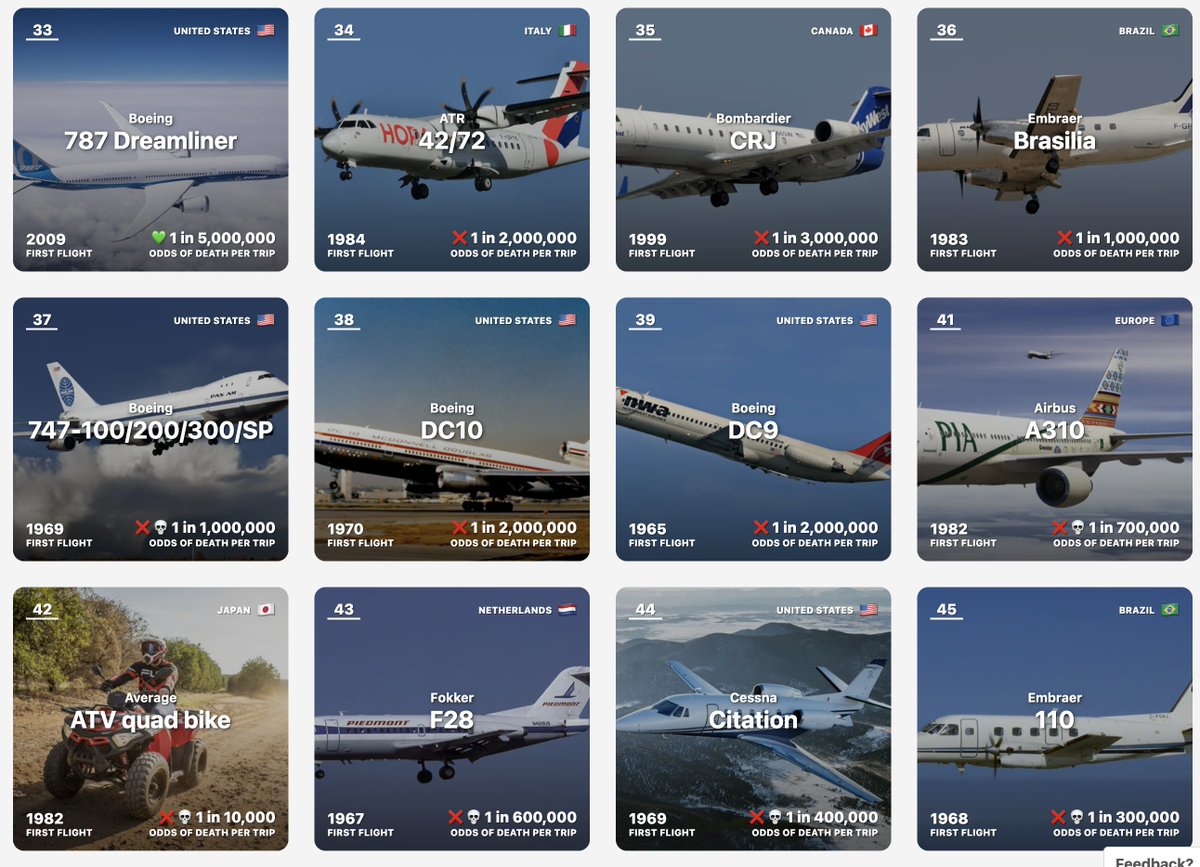
A horrible @airindia crash today being the first 787 Dreamliner ever to have a fatal incident
Both the 787 and the 737 Max are part of the new "problem generation" of Boeing aircraft starting around the mid-2000s
Like the 737 Max, the Dreamliner had lots of manufacturing/safety issues but at least until today it never crashed
We have to wait for the investigation to make any conclusions why though
This crash puts the 787 Dreamliner near the bottom of airplane models in fatality odds though, positioning it next to the ATR 42/72, the plane that fell from the sky in Brazil last year
I personally solely fly Airbus planes:
- Airbus A318/A319/A320/A321 Classic or Neo
- Airbus A350
- Airbus A340
- Airbus A380
Or Boeing models but ONLY from before the mid-2000s:
- Boeing 737NG
- Boeing 747-400
- Boeing 777
- Boeing 717
All of these have great safety records
The 737 Max and 787 Dreamliner do not
I track all of these on my sites ✈️ Airline List dot com
P.S. I am NOT suicidal
More efficient. More affordable. Long Range Cybertruck brings all-wheel stability and traction control plus a rear locking differential with up to 362 miles of estimated range. Put it to work with 7500lb tow rating, 2000lb payload wrapped in a tough stainless exterior
I wrote a quick new post on "Digital Hygiene".
Basically there are some no-brainer decisions you can make in your life to dramatically improve the privacy and security of your computing and this post goes over some of them. Blog post link in the reply, but copy pasting below too.
Every now and then I get reminded about the vast fraud apparatus of the internet, re-invigorating my pursuit of basic digital hygiene around privacy/security of day to day computing. The sketchiness starts with major tech companies who are incentivized to build comprehensive profiles of you, to monetize it directly for advertising, or sell it off to professional data broker companies who further enrich, de-anonymize, cross-reference and resell it further. Inevitable and regular data breaches eventually runoff and collect your information into dark web archives, feeding into a whole underground spammer / scammer industry of hacks, phishing, ransomware, credit card fraud, identity theft, etc. This guide is a collection of the most basic digital hygiene tips, starting with the most basic to a bit more niche.
Password manager. Your passwords are your "first factor", i.e. "something you know". Do not be a noob and mint new, unique, hard passwords for every website or service that you sign up with. Combine this with a browser extension to create and Autofill them super fast. For example, I use and like 1Password. This prevents your passwords from 1) being easy to guess or crack, and 2) leaking one single time, and opening doors to many other services. In return, we now have a central location for all your 1st factors (passwords), so we must make sure to secure it thoroughly, which brings us to...
Hardware security key. The most critical services in your life (e.g. Google, or 1Password) must be additionally secured with a "2nd factor", i.e. "something you have". An attacker would have to be in possession of both factors to gain access to these services. The most common 2nd factor implemented by many services is a phone number, the idea being that you get a text message with a pin code to enter in addition to your password. Clearly, this is much better than having no 2nd factor at all, but the use of a phone number is known to be extremely insecure due to the SIM swap attack. Basically, it turns out to be surprisingly easy for an attacker to call your phone company, pretend they are you, and get them to switch your phone number over to a new phone that they control. I know this sounds totally crazy but it is true, and I have many friends who are victims of this attack. Therefore, purchase and set up hardware security keys - the industrial strength protection standard. In particular, I like and use YubiKey. These devices generate and store a private key on the device secure element itself, so the private key is never materialized on a suspiciously general purpose computing device like your laptop. Once you set these up, an attacker will not only need to know your password, but have physical possession of your security key to log in to a service. Your risk of getting pwned has just decreased by about 1000X. Purchase and set up 2-3 keys and store them in different physical locations to prevent lockout should you physically lose one of the keys. The security keys support a few authentication methods. Look for "U2F" in the 2nd factor settings of your service as the strongest protection. E.g. Google and 1Password support it. Fallback on "TOTP" if you have to, and note that your YubiKeys can store TOTP private keys, so you can use the YubiKey Authenticator app to access them easily through NFC by touching your key to the phone to get your pin when logging in. This is significantly better than storing TOTP private keys on other (software) authenticator apps, because again you should not trust general purpose computing devices. It is beyond the scope of this post to go into full detail, but basically I strongly recommend the use of 2-3 YubiKeys to dramatically strengthen your digital security.
Biometrics. Biometrics are the third common authentication factor ("something you are"). E.g. if you're on iOS I recommend setting up FaceID basically everywhere, e.g. to access the 1Password app and such.
Security questions. Dinosaur businesses are obsessed with the idea of security questions like "what is your mother's maidan name?", and force you to set them up from time to time. Clearly, these are in the category of "something you know" so they are basically passwords, but conveniently for scammers, they are easy to research out on the open internet and you should refuse any prompts to participate in this ridiculous "security" exercise. Instead, treat security questions like passwords, generate random answers to random questions, and store them in your 1Password along with your passwords.
Disk encryption. Always ensure that your computers use disk encryption. For example, on Macs this total no-brainer feature is called "File Vault". This feature ensures that if your computer gets stolen, an attacker won't be able to get the hard disk and go to town on all your data.
Internet of Things. More like @internetofshit. Whenever possible, avoid "smart" devices, which are essentially incredibly insecure, internet-connected computers that gather tons of data, get hacked all the time, and that people willingly place into their homes. These things have microphones, and they routinely send data back to the mothership for analytics and to "improve customer experience" lol ok. As an example, in my younger and naive years I once purchased a CO2 monitor from China that demanded to know everything about me and my precise physical location before it would tell me the amount of CO2 in my room. These devices are a huge and very common attack surface on your privacy and security and should be avoided.
Messaging. I recommend Signal instead of text messages because it end-to-end encrypts all your communications. In addition, it does not store metadata like many other apps do (e.g. iMessage, WhatsApp). Turn on disappearing messages (e.g. 90 days default is good). In my experience they are an information vulnerability with no significant upside.
Browser. I recommend Brave browser, which is a privacy-first browser based on Chromium. That means that basically all Chrome extensions work out of the box and the browser feels like Chrome, but without Google having front row seats to your entire digital life.
Search engine. I recommend Brave search, which you can set up as your default in the browser settings. Brave Search is a privacy-first search engine with its own index, unlike e.g. Duck Duck Go which basically a nice skin for Bing, and is forced into weird partnerships with Microsoft that compromise user privacy. As with all services on this list, I pay $3/mo for Brave Premium because I prefer to be the customer, not the product in my digital life. I find that empirically, about 95% of my search engine queries are super simple website lookups, with the search engine basically acting as a tiny DNS. And if you're not finding what you're looking for, fallback to Google by just prepending "!g" to your search query, which will redirect it to Google.
Credit cards. Mint new, unique credit cards per merchant. There is no need to use one credit card on many services. This allows them to "link up" your purchasing across different services, and additionally it opens you up to credit card fraud because the services might leak your credit card number. I like and use privacy dot com to mint new credit cards for every single transaction or merchant. You get a nice interface for all your spending and notifications for each swipe. You can also set limits on each credit card (e.g. $50/month etc.), which dramatically decreases the risk of being charged more than you expect. Additionally, with a privacy dot com card you get to enter totally random information for your name and address when filling out billing information. This is huge, because there is simply no need and totally crazy that random internet merchants should be given your physical address. Which brings me to...
Address. There is no need to give out your physical address to the majority of random services and merchants on the internet. Use a virtual mail service. I currently use Earth Class Mail but tbh I'm a bit embarrassed by that and I'm looking to switch to Virtual Post Mail due to its much strong commitments to privacy, security, and its ownership structure and reputation. In any case, you get an address you can give out, they receive your mail, they scan it and digitize it, they have an app for you to quickly see it, and you can decide what to do with it (e.g. shred, forward, etc.). Not only do you gain security and privacy but also quite a bit of convenience.
Email. I still use gmail just due to sheer convenience, but I've started to partially use Proton Mail as well. And while we're on email, a few more thoughts. Never click on any link inside any email you receive. Email addresses are extremely easy to spoof and you can never be guaranteed that the email you got is a phishing email from a scammer. Instead, I manually navigate to any service of interest and log in from there. In addition, disable image loading by default in your email's settings. If you get an email that requires you to see images, you can click on "show images" to see them and it's not a big deal at all. This is important because many services use embedded images to track you - they hide information inside the image URL you get, so when your email client loads the image, they can see that you opened the email. There's just no need for that. Additionally, confusing images are one way scammers hide information to avoid being filtered by email servers as scam / spam.
VPN. If you wish to hide your IP/location to services, you can do so via VPN indirection. I recommend Mullvad VPN. I keep VPN off by default, but enable it selectively when I'm dealing with services I trust less and want more protection from.
DNS-based blocker. You can block ads by blocking entire domains at the DNS level. I like and use NextDNS, which blocks all kinds of ads and trackers. For more advanced users who like to tinker, pi-hole is the physical alternative.
Network monitor. I like and use The Little Snitch, which I have installed and running on my MacBook. This lets you see which apps are communicating, how much data and when, so you can keep track of what apps on your computer "call home" and how often. Any app that communicates too much is sus, and should potentially be uninstalled if you don't expect the traffic.
I just want to live a secure digital life and establish harmonious relationships with products and services that leak only the necessary information. And I wish to pay for the software I use so that incentives are aligned and so that I am the customer. This is not trivial, but it is possible to approach with some determination and discipline.
Finally, what's not on the list. I mostly still use Gmail + Gsuite because it's just too convenient and pervasive. I also use 𝕏 instead of something exotic (e.g. Mastodon), trading off sovereignty for convenience. I don't use a VoIP burner phone service (e.g. MySudo) but I am interested in it. I don't really mint new/unique email addresses but I want to. The journey continues. Let me know if there are other digital hygiene tips and tricks that should be on this list.
Link to blog post version in the reply, on my brand new Bear ʕ•ᴥ•ʔ blog cute 👇
One of the best use cases of AI I’ve seen so far. And everything is free. VLC is absolute chad.
Take notes Apple, this should come from you and not your stupid AI emojis no one asked for.